1. Sissejuhatus
Thank you for choosing the Baseus Orange Dot Wireless Presenter. This device is designed to enhance your presentations with its RF2.4GHz wireless technology, integrated laser pointer, and versatile USB/Type-C receiver. This manual provides detailed instructions for setup, operation, maintenance, and troubleshooting to ensure optimal performance.
2. Pakendi sisu
Enne jätkamist veenduge, et pakendis on kõik esemed olemas:
- Baseus Orange Dot Wireless Presenter
- USB/Type-C Dual Receiver
- AAA Battery (for battery version)
- Kasutusjuhend (see dokument)

Pilt: Contents of the package include the wireless presenter, a USB/Type-C receiver, and an AAA battery.
3. Seadistusjuhised
3.1 Aku paigaldamine
If your presenter is the battery-powered version, follow these steps:
- Open the battery compartment cover located at the rear of the presenter.
- Sisestage üks AAA-patarei, veendudes, et positiivsed (+) ja negatiivsed (-) klemmid joonduvad õigesti patareipesa sees olevate märgistustega.
- Sulgege akupesa kaas kindlalt.
Pilt: Insert one AAA battery into the designated compartment. Ensure correct polarity.
3.2 Vastuvõtja ühendus
The presenter features a dual USB/Type-C receiver for broad compatibility.
- Locate the receiver stored magnetically within the presenter's body. Gently pull it out.
- Plug the receiver into an available USB-A or Type-C port on your computer or laptop. The system will automatically detect and install the necessary drivers. No additional software installation is required.

Pilt: The dual USB/Type-C receiver connects to your computer for wireless operation.

Pilt: The receiver can be stored magnetically within the presenter body when not in use.
4. Kasutusjuhised
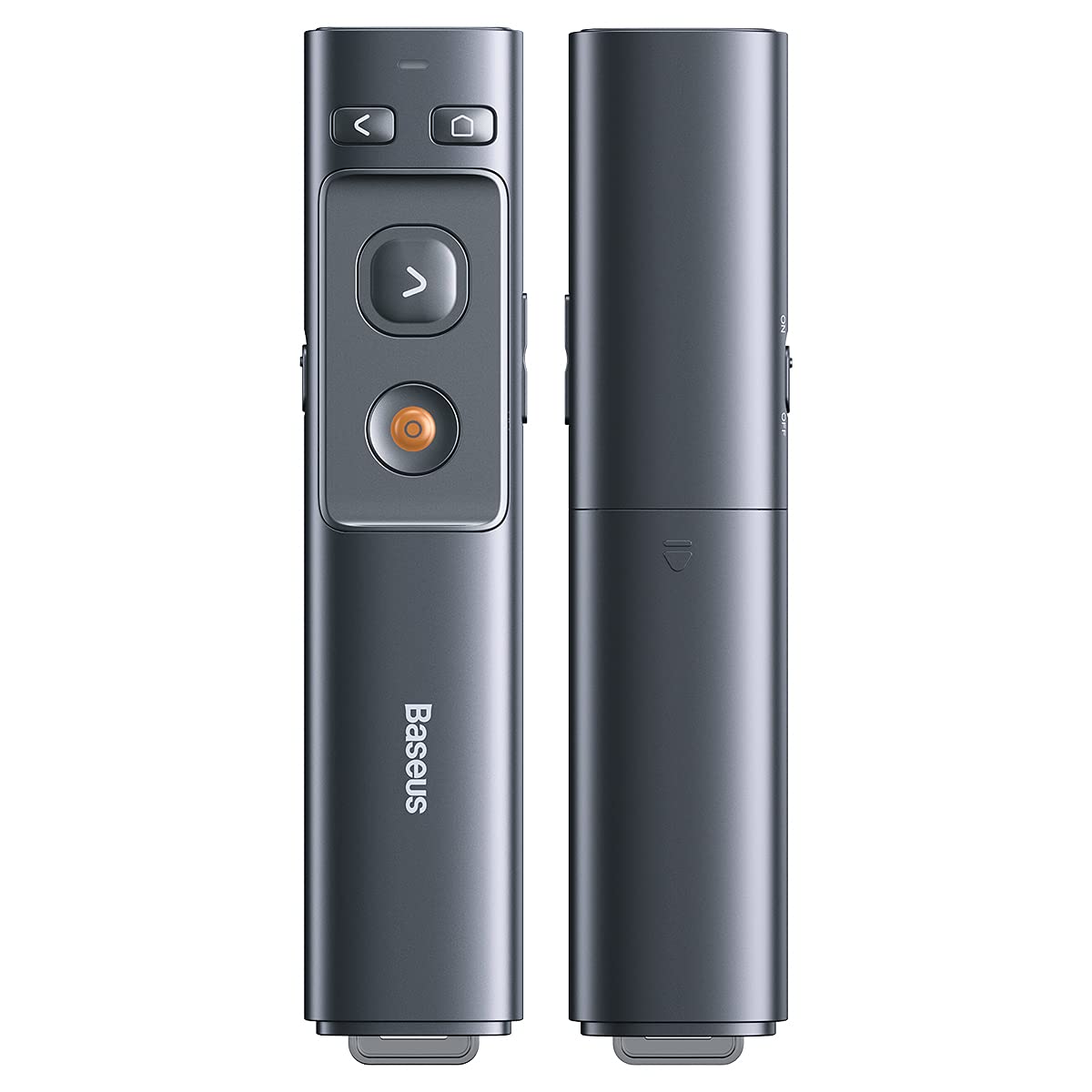
Familiarize yourself with the presenter's buttons for effective control during your presentation.

Pilt: Control buttons for page navigation, laser activation, and volume adjustment.
4.1 Toide sisse/välja
The presenter typically powers on automatically when the receiver is connected and a button is pressed. To conserve battery, ensure the receiver is disconnected when not in use.
4.2 Presentation Control
- Page Up Button (<): Press to move to the previous slide or page.
- Page Down Button (>): Press to move to the next slide or page.
- Full Screen/Black Screen Button: Press to toggle between full-screen mode and black screen mode in presentation software.
4.3 Laser Pointer Function
Press and hold the dedicated laser button (usually a red dot icon) to activate the red laser pointer. Release the button to turn off the laser.

Pilt: The laser pointer function highlights content on a display.
4.4 Helitugevuse reguleerimine
Use the designated volume buttons (if present) to adjust the audio output of your computer during a presentation.
5. Hooldus
Proper care ensures the longevity of your Baseus Orange Dot Wireless Presenter.
- Puhastamine: Use a soft, dry cloth to clean the surface of the presenter. Avoid using harsh chemicals or abrasive materials.
- Hoiustamine: When not in use, store the presenter and its receiver in a dry, cool place. Always store the receiver inside the presenter's magnetic compartment to prevent loss.
- Aku hooldus: For battery-powered versions, remove the AAA battery if the presenter will not be used for an extended period to prevent leakage.
6. Veaotsing
If you encounter issues with your presenter, refer to the following common problems and solutions:
- Presenter is unresponsive:
- Ensure the receiver is securely plugged into a USB-A or Type-C port on your computer.
- For battery versions, check if the AAA battery is inserted correctly and has sufficient charge. Replace if necessary.
- Proovige vastuvõtja ühendada arvuti teise USB-porti.
- Taaskäivitage arvuti.
- Laser pointer is not working:
- Ensure the presenter has power (battery charged/inserted).
- Confirm you are pressing and holding the correct laser activation button.
- Slides are not advancing/going back:
- Verify that your presentation software (e.g., PowerPoint, Keynote) is active and in presentation mode.
- Ensure the receiver is properly connected and recognized by your computer.
7. Tehnilised andmed
| Funktsioon | Detail |
|---|---|
| Kaubamärk | Baseus |
| Mudeli nimi | Orange Dot juhtmevaba esitlus |
| Mudeli number | LFZ_OrangeDotPresenter |
| Ühenduvus | RF 2.4 GHz juhtmeta |
| Vastuvõtja tüüp | USB-A / Type-C Dual Interface |
| Laseri tüüp | Punane laser |
| Laseri kaugus | Kuni 100 meetrit |
| Kaugjuhtimispuldi kaugus | Kuni 100 meetrit |
| Toiteallikas | 1 x AAA Battery (for battery version) |
| Kauba kaal | 60 g |
| Pakendi mõõtmed | 19.5 x 7 x 1.9 cm |
| Päritoluriik | Hiina |
8. Garantii ja tugi
Baseus products are designed for reliability and performance. For warranty information, please refer to the warranty card included with your purchase or visit the official Baseus website. For technical support or further assistance, please contact Baseus customer service through their official channels.


