1. Sissejuhatus
Thank you for choosing the iPega PG-P4008 Wireless Game Controller. This manual provides detailed instructions on how to set up, operate, and maintain your controller. The PG-P4008 offers broad compatibility with PS4, PS3, Android (10.0+), iOS (13.0+), and Windows PC, connecting wirelessly via Bluetooth for an enhanced gaming experience.
2. Toote lõppview
The iPega PG-P4008 is designed for versatile gaming across multiple platforms. It features a comfortable ergonomic design, responsive controls, and several advanced functionalities to immerse you in your games.
Peamised omadused:
- Wireless Bluetooth connectivity (BT2.1+EDR) with up to 8 meters range.
- No driver installation required for connection.
- Integrated colored LED light indicator for operational status.
- Dual motors for realistic vibration feedback during gameplay.
- Built-in three-dimensional acceleration sensor and gyroscope sensor with six-axis induction.
- Integrated speaker and 3.5mm earphone jack for game audio.
- Dual-point capacitive touchpad for enhanced control.
- Compatible with PS4, PS3, Android (10.0+), iOS (13.0+), and Windows PC.
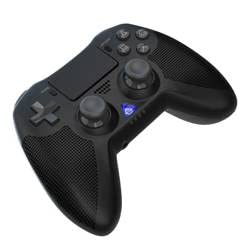
1. pilt: Esiosa view of the iPega PG-P4008 Wireless Game Controller. This image displays the controller's ergonomic design, dual analog sticks, D-pad, action buttons, touchpad, and the central LED indicator.
3. Seadistamine ja ühendus
The PG-P4008 controller connects wirelessly via Bluetooth. Follow these steps to pair your controller with your device:
- Toide sisse: Ensure the controller is charged. Press and hold the PS nupp (or equivalent power button) to turn on the controller.
- Sidumisrežiim:
- For PS4/PS3: Connect the controller to the console using a USB cable. Once recognized, you can disconnect the cable for wireless play. The connection method is similar to the official P4 controller.
- For Android/iOS: Activate Bluetooth on your mobile device. On the controller, press and hold the SHARE button + PS button simultaneously until the LED indicator flashes rapidly, indicating pairing mode. Select "PG-P4008" (or similar) from your device's Bluetooth list to connect.
- For Windows PC: Ensure your PC has Bluetooth capability. On the controller, press and hold the PS button + OPTIONS button simultaneously until the LED indicator flashes rapidly. On your PC, go to Bluetooth settings, add a new device, and select "PG-P4008" (or similar) to pair.
- Edukas ühendus: Once connected, the LED indicator on the controller will change to a solid color, indicating a successful pairing.
Märkus. No additional driver software is required for operation. The controller supports a stable connection up to 8 meters.
4. Kasutusjuhised
LED indikaator:
The built-in colored LED light indicates the controller's operational status and player assignment, similar to the official PS4 controller. Different colors will signify different stages or player numbers.
Vibratsiooni tagasiside:
The controller features dual motors embedded in the handles, providing tactile vibration feedback to enhance your gaming immersion. This feedback will vary based on in-game events.
Puuteplaat:
The dual-point capacitive touchpad allows for intuitive control in games that support touch input, offering an additional layer of interaction.
Heli funktsionaalsus:
Connect your 3.5mm earphones to the integrated jack on the controller to experience game audio directly, providing a private and immersive sound experience.
5. Hooldus
- Keep the controller dry and away from moisture to prevent damage to internal components.
- Puhastage kontrollerit regulaarselt pehme ja kuiva lapiga. Vältige tugevate kemikaalide või abrasiivsete materjalide kasutamist.
- Hoidke kontrollerit jahedas ja kuivas kohas, kui seda ei kasutata.
- Vältige kontrolleri jätmist äärmuslike temperatuuride või otsese päikesevalguse kätte.
- Do not attempt to disassemble or modify the controller, as this will void any potential warranty and may cause damage.
6. Veaotsing
- Kontroller ei ühendu:
- Veenduge, et kontroller oleks täielikult laetud.
- Veenduge, et Bluetooth oleks teie seadmes lubatud.
- Make sure the controller is in the correct pairing mode for your device (refer to Section 3).
- Proovige nii kontrollerit kui ka seadet taaskäivitada.
- Eemaldage seadme Bluetoothi loendist eelmised sidumised ja proovige uuesti siduda.
- Sisendviivitus või ühenduse katkemine:
- Veenduge, et olete 8-meetrise tööraadiuse piires.
- Minimeerige teiste traadita seadmete tekitatud häireid.
- Check for any physical obstructions between the controller and the device.
- Vibratsioon ei tööta:
- Veendu, et mäng, mida mängid, toetab vibratsioonitagasisidet.
- Kontrolli mängu seadeid, et vibratsioon oleks lubatud.
- Audio not working via 3.5mm jack:
- Ensure your earphones are properly plugged in.
- Check the volume settings on your device and in-game.
- Test with another pair of earphones to rule out earphone issues.
7. Tehnilised andmed
| Mudeli number | PG-P4008 |
| Kaubamärk | iPega |
| Ühenduvus | Bluetooth (BT2.1+EDR) |
| Wireless Range | Kuni 8 meetrit |
| Ühilduvad seadmed | PS4, PS3, Android (10.0+), iOS (13.0+), Windows PC |
| Eriomadused | Wireless, Touchpad, Vibration, 6-axis Gyroscope, Built-in Speaker, 3.5mm Audio Jack |
| Nuppude kogus | 17 |
| Toiteallikas | Akutoitel |
8. Garantii ja tugi
Teavet toote garantii ja klienditoe kohta selles kasutusjuhendis ei ole. Lisateavet leiate toote pakendilt või jaemüüja käest. webGarantiitingimuste ja klienditoega abi saamiseks ühenduse võtmise kohta leiate lisateavet veebisaidilt.


