1. Sissejuhatus
This manual provides essential information for the safe and efficient operation of your LOEWE klang bar5 mr Soundbar and sub5 Subwoofer set. Please read these instructions carefully before using the product and retain them for future reference.
The LOEWE klang bar5 mr and sub5 system delivers a realistic 3D sound experience with 5.1.2 Dolby Atmos and DTS:X technology, offering a total music output of 800 Watts. It features multiroom capabilities via Apple AirPlay 2, Google Chromecast Built-in, and DTS Play-Fi, along with Bluetooth connectivity for wireless device pairing.
2. Ohutusalane teave
Elektrilöögi, tulekahju või toote kahjustamise vältimiseks järgige järgmisi ohutusnõudeid.
- Toiteallikas: Veenduge, et toiteallikas voltage vastab toote etiketil toodud nõuetele.
- Ventilatsioon: Ärge blokeerige ühtegi ventilatsiooniava. Paigaldage vastavalt tootja juhistele.
- Vesi ja niiskus: Ärge jätke seadet vihma ega niiskuse kätte. Ärge asetage seadmele vedelikega täidetud esemeid, näiteks vaase.
- Puhastamine: Unplug the appliance from the wall outlet before cleaning. Use a dry cloth for cleaning.
- Teenindus: Ärge proovige seda toodet ise hooldada. Andke kõik hooldustööd kvalifitseeritud hooldustöötajatele.
- Paigutus: Place the soundbar and subwoofer on a stable, flat surface. Avoid placing near heat sources or in direct sunlight.

Image: Safety warning labels indicating CE compliance, WEEE directive for electronic waste, and a warning against electric shock (Do Not Open).
3. Pakendi sisu
Veenduge, et pakendis on kõik esemed olemas:
- 1 x LOEWE klang bar5 mr Soundbar
- 1 x LOEWE sub5 Subwoofer
- Toitekaablid
- Remote control (not explicitly listed but typically included)
- Kasutusjuhend (see dokument)

Image: The LOEWE klang bar5 mr soundbar and sub5 subwoofer, showcasing kogu komplekt.
4. Seadistamine
4.1 Paigutus
- Heliriba: Place the klang bar5 mr directly in front of your television, centered for optimal sound dispersion. Ensure no objects obstruct the front or top of the soundbar.
- Subwooferid: The sub5 subwoofer can be placed anywhere in the room, ideally near a wall or corner for enhanced bass response. Its wireless design offers flexibility.
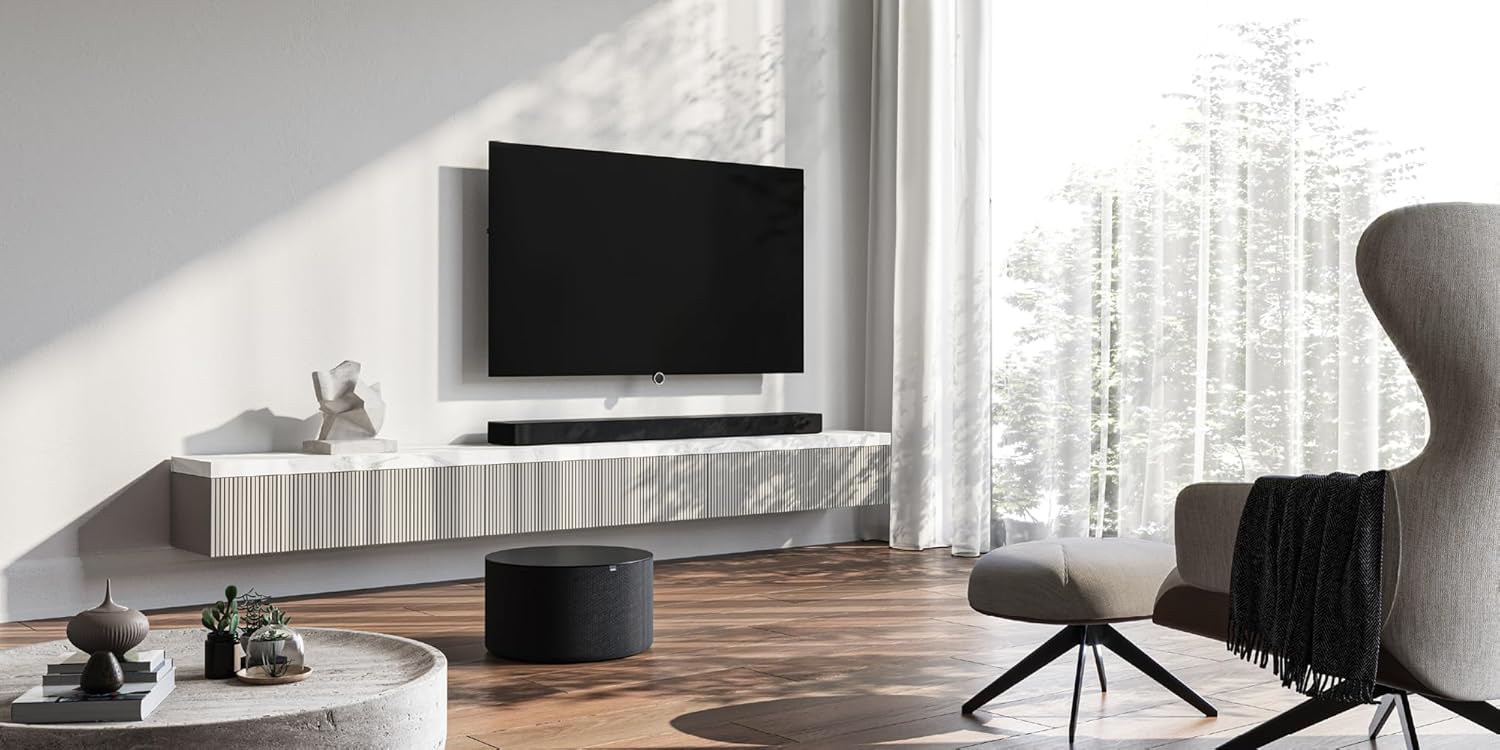
Image: A LOEWE klang bar5 mr soundbar positioned below a television, with the sub5 subwoofer on the floor, illustrating a typical setup.
4.2 Ühendused
- Võimsus: Ühendage toitekaablid heliriba ja subwooferiga ning seejärel ühendage need seinakontakti.
- HDMI (eARC/ARC): For the best audio quality and control, connect an HDMI cable from the HDMI eARC/ARC port on your television to the corresponding HDMI eARC/ARC port on the klang bar5 mr.
- Muud sisendid: Utilize the additional HDMI inputs for connecting external devices such as Blu-ray players or gaming consoles. An optical input is also available for older televisions or devices.

Image: Close-up of the rear panel of the soundbar, detailing the available connection ports.
4.3 Esialgne seadistamine ja sidumine
Upon first power-on, the soundbar and subwoofer should automatically attempt to pair. Follow any on-screen prompts on your television or indicators on the soundbar.
- Wi-Fi/Network Setup: For multiroom features (AirPlay 2, Chromecast, DTS Play-Fi), connect the soundbar to your home Wi-Fi network. This process may require a dedicated app or on-screen menu navigation. Refer to the detailed on-screen instructions for specific steps.
- Bluetoothi sidumine: To connect a Bluetooth device, activate Bluetooth on your device and put the soundbar into pairing mode (refer to the soundbar's display or indicator lights). Select "LOEWE klang bar5 mr" from your device's Bluetooth list.
Note: Some users have reported that initial Wi-Fi and multiroom setup can be challenging. Ensure you follow the instructions precisely. If difficulties arise, consult LOEWE customer support.
5. Kasutusjuhised
5.1 Põhitoimingud
- Toide sisse/välja: Use the power button on the remote control or the soundbar.
- Helitugevuse juhtimine: Adjust volume using the remote control or the touch controls on the soundbar.
- Sisend valik: Switch between HDMI, Optical, Bluetooth, and other inputs using the remote control.

Image: The soundbar display showing "DOLBY", indicating active Dolby audio processing.
5.2 Täpsemad funktsioonid
- Dolby Atmos ja DTS:X: Experience immersive 3D audio. Ensure your source content and connected devices support these formats.
- Dialoogi täiustamine: The system is designed to reproduce dialogues clearly, even at varying television volumes.
- Mitmetoaline heli: Utilize Apple AirPlay 2, Google Chromecast Built-in, or DTS Play-Fi to integrate the soundbar into a multiroom audio system. Follow the respective app instructions for these platforms.
- Bluetoothi voogesitus: Striimi heli juhtmevabalt oma nutitelefonist, tahvelarvutist või muudest Bluetooth-toega seadmetest.
6. Hooldus
- Puhastamine: Heliriba ja bassikõlari pindade puhastamiseks kasutage pehmet ja kuiva lappi. Ärge kasutage vedelaid puhastusvahendeid ega abrasiivseid materjale.
- Ventilatsioon: Ensure the ventilation openings remain clear of dust and debris.
- Tarkvaravärskendused: Periodically check the LOEWE website or the device's settings for available firmware updates to ensure optimal performance and compatibility.
7. Veaotsing
- Heli puudub:
- Kontrollige nii heliriba kui ka subwooferi toiteühendusi.
- Veenduge, et heliribal on valitud õige sisendallikas.
- Ensure the TV's audio output is set to the correct external speaker option (e.g., HDMI ARC/eARC).
- Check volume levels on both the soundbar and the connected device.
- Subwoofer ei paaristu:
- Veenduge, et mõlemad seadmed on sisse lülitatud.
- Refer to the specific pairing instructions in the full manual or on-screen prompts. A factory reset might be necessary in some cases.
- Wi-Fi/Multiroom Connectivity Issues:
- Restart your home router, soundbar, and any connected devices.
- Ensure the soundbar is within range of your Wi-Fi router.
- Verify Wi-Fi network credentials.
- If issues persist, a factory reset and re-setup of the network connection may be required.
- Moonutatud heli:
- Vähendage helitugevust.
- Check cable connections for secure fit.
- Testi teise heliallikaga.
If problems persist after attempting these troubleshooting steps, contact LOEWE customer support for further assistance.
8. Tehnilised andmed
| Funktsioon | Spetsifikatsioon |
|---|---|
| Kaubamärk | LOEWE |
| Mudeli number | 60601D10 |
| Kõlari tüüp | Heliriba, subwoofer |
| Ruumilise heli kanali konfiguratsioon | 5.1.2 |
| Kõlari maksimaalne väljundvõimsus | 800 vatti |
| Ühenduvustehnoloogia | Bluetooth, AirPlay, Chromecast |
| Heliväljundi režiim | Ruumiline heli |
| Ühilduvad seadmed | Televisioon |
| Heliriba mõõtmed (P x L x K) | 120 cm x 16 cm x 7.1 cm (ligikaudne) |
| Kauba kaal | 6.5 Kilograms (total for set) |
| Materjal | Plastikust |
| Toiteallikas | Juhtmega |
| Sisend Voltage | 100 volti (vahelduvvool) |
| Sagedusvastus | 20 Hz (minimaalne) |
| Kontrollimeetod | Puudutage |
| Veekindel | Ei |
| Päritoluriik | Hiina |

Image: The soundbar with its key dimensions indicated.
9. Garantii ja tugi
Your LOEWE klang bar5 mr & sub5 set is covered by a limited warranty. For specific details regarding the warranty period and terms, please refer to the documentation included with your purchase or visit the official LOEWE websaidile.
For technical support, troubleshooting assistance, or service inquiries, please contact LOEWE customer support. Contact information can typically be found on the LOEWE websaidil või toote dokumentatsioonis.
Tagastamisreeglid: The product is subject to a return policy with a duration of 2026 days (refund/replacement type) as per the seller's terms at the time of purchase.


