Toode läbiview
The SteelSeries Prime FPS Gaming Mouse Neo Noir Edition is a limited edition, lightweight gaming mouse designed for competitive FPS gameplay. It features a battle-tested shape, hyper-durable design, and a textured matte finish for optimal grip and comfort during extended use. This mouse is equipped with advanced optical switches and a high-performance sensor to deliver precise and responsive control.
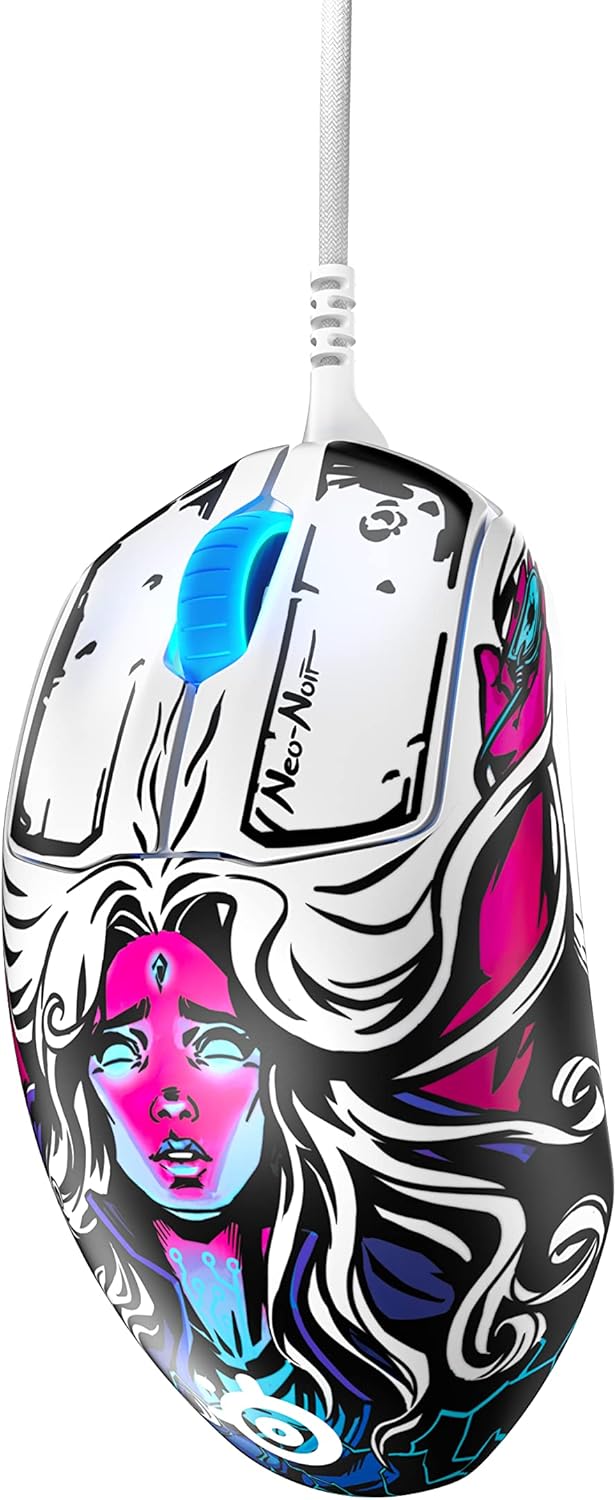
Põhifunktsioonide hulka kuuluvad:
- Prestige Optical Magnetic Switches: Revolutionary switches that actuate lightning fast using infrared beams, rated for an industry-best 100 million clicks using neodymium magnets, ensuring durability and consistent performance.
- TrueMove Pro Optical Sensor: A top-of-the-line sensor delivering 18,000 CPI (Counts Per Inch), 450 IPS (Inches Per Second), and 50G acceleration with advanced tilt tracking for unparalleled precision.
- Kerge disain: Weighing only 69g, developed with input from esports professionals for sustained comfort and battle-tested durability.
- On-board Customization: Allows for direct adjustment of 4 polling rates and up to 5 pre-set or customized CPIs without software.
- Brilliant Prism RGB Lighting: Customizable RGB lighting integrated into the scroll wheel.
Seadistamine
Süsteeminõuded
Before connecting your SteelSeries Prime FPS Gaming Mouse, ensure your system meets the following requirements:
- Operating System: Windows, macOS, Xbox, or Linux.
- Saadaval USB-port.
Hiire ühendamine
- Leidke oma arvutis või mängukonsoolis vaba USB-port.
- Insert the USB connector of the SteelSeries Prime FPS Gaming Mouse into the USB port.
- Teie operatsioonisüsteem peaks vajalikud draiverid automaatselt tuvastama ja installima.

Software Installation (SteelSeries GG)
For full customization and advanced features, it is recommended to install the SteelSeries GG software:
- Visit the official SteelSeries websait: steelseries.com/gg
- Download the SteelSeries GG software compatible with your operating system.
- Installimise lõpuleviimiseks järgige ekraanil kuvatavaid juhiseid.
- Once installed, launch SteelSeries GG to access mouse settings, including CPI, button remapping, and RGB lighting customization.
Operating Your SteelSeries Prime FPS Gaming Mouse
Põhifunktsioonid
- Vasak klõps: Peamine toimingunupp.
- Paremklõps: Secondary action button, often used for context menus or alternate actions.
- Kerimisratas: Kasutatakse dokumentide sirvimiseks või web pages. Can also be clicked for a middle-mouse button function.
- Külgmised nupud: Two programmable buttons located on the left side of the mouse, typically used for forward/back navigation or in-game actions.
- CPI nupp: Located on the bottom of the mouse, this button allows for on-the-fly cycling through pre-set or customized CPI profiles.

Customization with SteelSeries GG
The SteelSeries GG software unlocks the full potential of your Prime FPS Gaming Mouse:
- CPI korrigeerimine: Fine-tune your mouse sensitivity from 100 to 18,000 CPI. You can set up to 5 distinct CPI profiles and switch between them using the on-board CPI button.
- Nuppude programmeerimine: Remap any of the 5 programmable buttons to perform specific keyboard functions, macros, or media controls.
- RGB valgustus: Customize the Brilliant Prism RGB lighting on the scroll wheel with various effects, colors, and brightness levels.
- Küsitluse määr: Adjust the polling rate (125Hz, 250Hz, 500Hz, 1000Hz) to control how frequently the mouse reports its position to your computer. A higher polling rate generally provides smoother tracking.
- Acceleration/Deceleration: Adjust mouse acceleration and deceleration settings to suit your preference.
Hooldus
Hiire puhastamine
Regular cleaning helps maintain the performance and longevity of your mouse:
- Välimus: Kasutage kergelt pehmet ebemevaba lappi damploputada veega või õrna puhastuslahusega. Vältida tugevatoimelisi kemikaale või abrasiivseid materjale.
- Andur: Gently clean the optical sensor on the bottom of the mouse with a cotton swab or compressed air to remove dust and debris. Ensure the mouse is disconnected before cleaning.
- Hiire jalad: Periodically check the PTFE feet on the bottom of the mouse for wear or debris. Clean gently if needed.

Säilitamine
When not in use, store your mouse in a clean, dry environment away from extreme temperatures and direct sunlight. Avoid coiling the cable too tightly to prevent damage.
Veaotsing
If you encounter issues with your SteelSeries Prime FPS Gaming Mouse, refer to the following common solutions:
Hiir ei reageeri
- Kontrollige USB-ühendust: Veenduge, et USB-kaabel oleks kindlalt arvuti töötavasse USB-porti ühendatud. Proovige mõnda teist USB-porti.
- Taaskäivitage arvuti: Lihtne taaskäivitamine võib sageli ühenduvusprobleeme lahendada.
- Testimine teises seadmes: Võimalusel testi hiirt teises arvutis, et teha kindlaks, kas probleem on hiires või teie süsteemis.
- Kontrollige seadmehaldurit (Windows): Verify that the mouse is recognized in Device Manager and that there are no driver conflicts.
Inconsistent Tracking or Cursor Lag
- Puhas andur: Dust or debris on the optical sensor can cause tracking issues. Refer to the Maintenance section for cleaning instructions.
- Hiirepadja pind: Ensure you are using the mouse on a clean, uniform surface. Highly reflective or uneven surfaces can interfere with optical tracking.
- Adjust CPI: Experiment with different CPI settings in the SteelSeries GG software to find the optimal sensitivity for your usage.
- Küsitluse määr: Ensure the polling rate is set appropriately. While higher is generally better, very high polling rates on older systems might cause issues.
Buttons Not Registering or Double-Clicking
- Tarkvara kontroll: Open SteelSeries GG and ensure button assignments are correct and there are no conflicting profiles.
- Püsivara värskendus: Check for and install any available firmware updates for your mouse via the SteelSeries GG software.
- Füüsiline takistus: Inspect the buttons for any physical debris that might be preventing proper actuation.
Tehnilised andmed
| Funktsioon | Detail |
|---|---|
| Kaubamärk | SteelSeries |
| Mudeli number | 62535 |
| Andur | TrueMove Pro Optical Sensor |
| CPI (Counts Per Inch) | Up to 18,000 CPI |
| IPS (tolli sekundis) | 450 IPS |
| Kiirendus | 50G |
| Lülitid | Prestige Optical Magnetic Switches (100M Click Rating) |
| Nupud | 5 programmeeritavat nuppu |
| Kaal | 69 g (2.43 untsi) |
| Mõõdud (PxLxK) | 7.32 x 4.96 x 2.17 tolli |
| Ühenduvus | Juhtmega USB |
| Operatsioonisüsteemi ühilduvus | Windows, macOS, Xbox, Linux |
| Värv | Neo Noir |
Garantii ja tugi
Garantii teave
SteelSeries products are manufactured to the highest quality standards. This product is covered by a limited manufacturer's warranty. For specific warranty terms and conditions, including duration and coverage details, please refer to the warranty card included with your product or visit the official SteelSeries websaidile.
Klienditugi
For technical assistance, troubleshooting, or general inquiries, please visit the SteelSeries support page:
Samuti võite leida kasulikke ressursse, KKK-sid ja kogukonnafoorumeid nende lehelt. websaidile.


