Sissejuhatus
The MEE audio Connect Air is a versatile Bluetooth audio transmitter designed to provide wireless audio from any device with a 3.5mm audio jack. Enjoy your favorite movies, music, or podcasts wirelessly with your Bluetooth headphones or speakers, whether you're on an airplane, at the gym, or using a TV or gaming console.
Mis on karbis
- 1 x MEE audio Connect Air Bluetooth Audio Transmitter
- 1x laadimiskaabel
Toode läbiview ja funktsioonid
The MEE audio Connect Air offers a compact and user-friendly solution for wireless audio. Key features include:
- Juhtmeta heli voogesitus: Easily stream stereo audio from 3.5mm audio sources to up to two Bluetooth headphones or speakers simultaneously.
- Lai ühilduvus: Works with in-flight entertainment systems, gym equipment, TVs, gaming consoles (Nintendo Switch, Xbox/PlayStation controllers), and any device with a 3.5mm audio jack.
- Madala latentsusega heli: Features aptX Low Latency technology for clear, distortion-free digital sound and minimal audio delay with compatible devices.
- Pikendatud aku tööiga: Provides up to 20 hours of playtime with one headphone connected or 15 hours with two. Can be used while charging.
- Kompaktne ja kaasaskantav disain: Small and lightweight, making it ideal for travel.
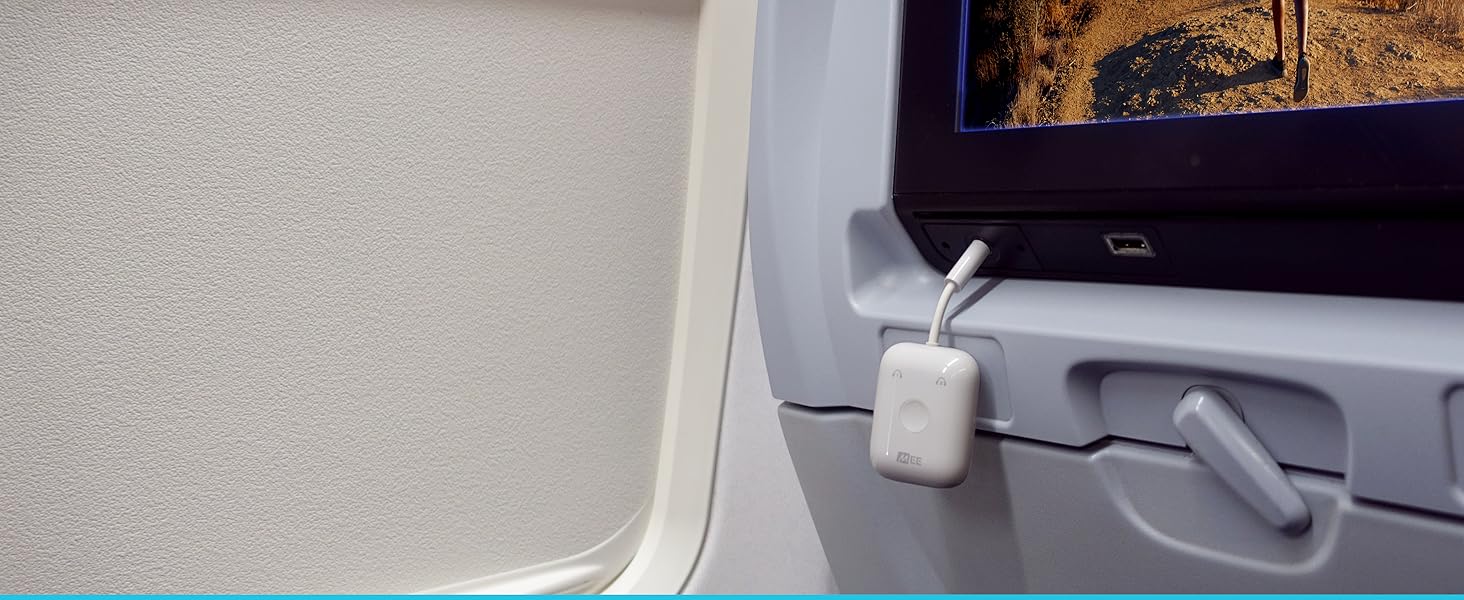
Image: The MEE audio Connect Air connected to an in-flight entertainment system, enabling wireless audio.

Image: The Connect Air plugged into an airplane audio jack.

Image: The Connect Air providing wireless audio for a Nintendo Switch.

Image: The Connect Air connected to gym equipment for wireless audio.

Image: The Connect Air connected to a television for wireless audio.
Seadistusjuhend
1. Charging the Connect Air
Before first use, fully charge your Connect Air. Connect the included charging cable to the USB-C port on the Connect Air and plug the other end into a USB power source. The battery indicator lights will show charging progress.

Image: The MEE audio Connect Air with its battery indicator lights and USB-C charging port.
2. Pairing Headphones or Speakers
The Connect Air can pair with up to two Bluetooth headphones or speakers simultaneously.
Pairing AirPods (All Models)
- Place your AirPods in their charging case and open the lid.
- For AirPods 4, double tap the front of the case to enter pairing mode (flashing white light). For AirPods Pro (2nd Gen) or AirPods Max, press and hold the button on the back of the charging case (or noise control button for Max) until the light flashes white.
- Turn on the Connect Air by pressing and holding the multifunction button for 2 seconds.
- Double-click the multifunction button on the Connect Air to enter pairing mode (alternating red and blue lights).
- Allow pairing to complete. Once connected, the headphone light on the Connect Air will turn solid blue.
Video: Instructions on how to pair AirPods 4 with the MEE audio Connect Air.
Video: Instructions on how to pair AirPods Pro 3 with the MEE audio Connect Air.
Video: Instructions on how to pair AirPods Max with the MEE audio Connect Air.
Video: Instructions on how to pair AirPods Pro (2nd Gen) with the MEE audio Connect Air.
Pairing Other Bluetooth Headphones or Speakers
- Put your headphones or speaker into Bluetooth pairing mode. (Refer to your device's user manual if unsure).
- Turn on the Connect Air by pressing and holding the multifunction button for 2 seconds.
- Double-click the multifunction button on the Connect Air to enter pairing mode (alternating red and blue lights).
- Allow pairing to complete. Once connected, the headphone light on the Connect Air will turn solid blue.
Pairing a Second Headphone (Optional)
To connect a second headphone or speaker, repeat the pairing steps above. Both headphone lights on the Connect Air will be solid blue once a second device is connected.
3. Heliallikaga ühendamine
- Plug the Connect Air's 3.5mm audio jack into your desired audio source (e.g., in-flight entertainment system, gym equipment, TV, gaming console).
- Increase the volume on the audio source if necessary.
- Then, use the volume controls on your connected headphones (if available) to adjust the listening volume.
Kasutusjuhised
Hilisem kasutamine
The Connect Air will automatically reconnect to previously paired headphones or speakers when powered on. To reconnect, power on your headphones or speakers first, then power on the Connect Air. A solid blue headphone light on the Connect Air indicates reconnection.
Aku oleku kontrollimine
Click the multifunction button once while the Connect Air is powered on to check the battery status. The LED indicators will light up to show the remaining charge.
Toide sisse/välja
Press and hold the multifunction button for 2 seconds to power the Connect Air on or off.
Veaotsing
Riistvara lähtestamine
If the device is unresponsive, perform a hardware reset:
- Insert a pin or paperclip into the reset pinhole on the side of the device.
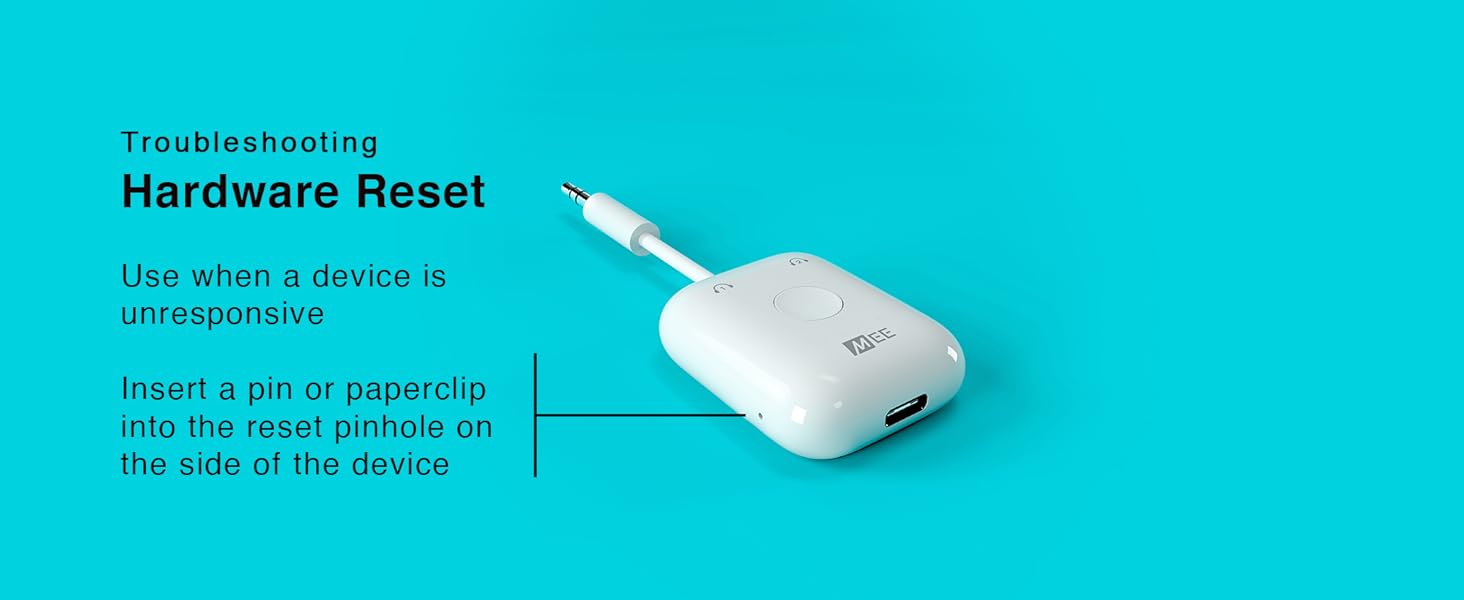
Image: Instructions for performing a hardware reset on the Connect Air.
Tarkvara lähtestamine
To delete all Bluetooth pairings from memory:
- Turn on the Connect Air.
- Press the multifunction button 6 times until both blue lights flash.
- All paired devices will be cleared from memory, and a new pairing can be created.
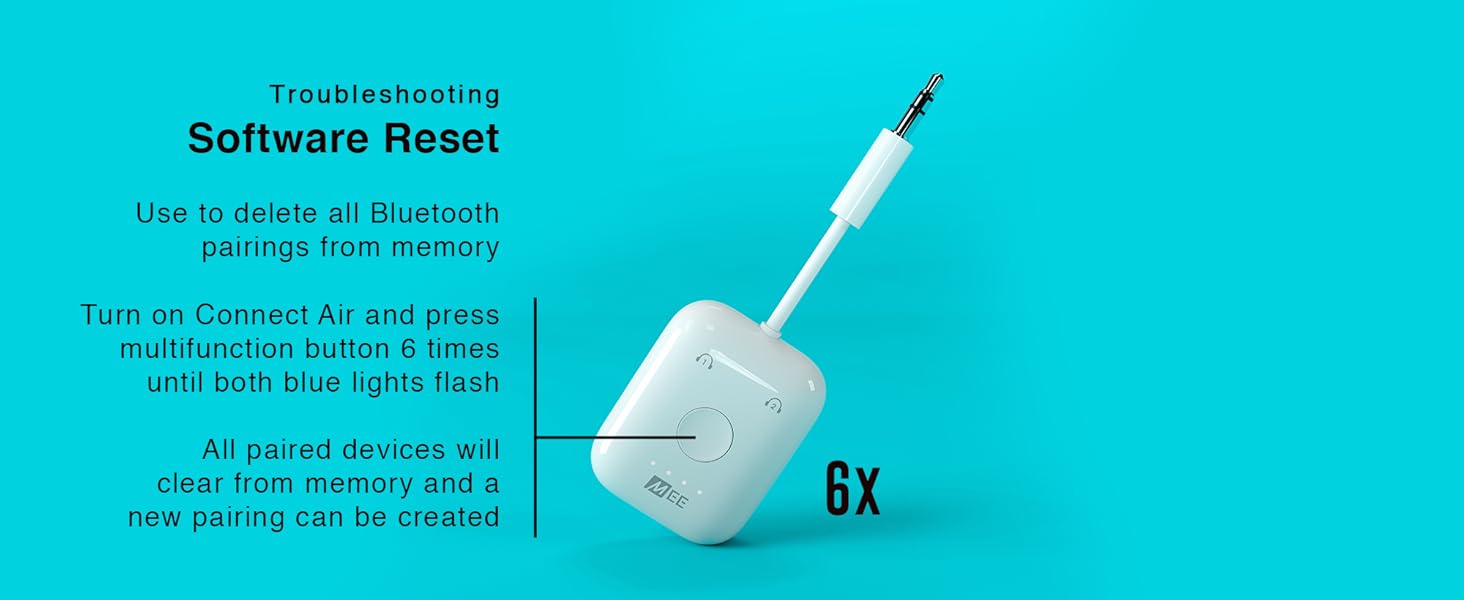
Image: Instructions for performing a software reset on the Connect Air.
Tehnilised andmed
| Funktsioon | Detail |
|---|---|
| Kaubamärk | MEE heli |
| Mudeli nimi | Ühendage õhk |
| Ühenduvustehnoloogia | Bluetooth |
| Erifunktsioon | Madal latentsusaeg |
| Toiteallikas | Akutoitel |
| Toote mõõtmed | 1.5" P x 0.6" L x 1.8" K |
| Kauba kaal | 0.6 untsi |
| Aku tüüp | Liitium-ioon |
| Aku laadimisaeg | 2 tundi |
| Helisisend | 3.5 mm |
| Heliväljundi režiim | Stereo |
| Toetatud standardid | Bluetooth, SBC, Qualcomm aptX, Qualcomm aptX Low Latency |
Ohutusteave
Handle the battery with care. Do not expose to extreme temperatures. Avoid interference with other wireless devices.
Garantii ja tugi
The MEE audio Connect Air comes with a 1-year manufacturer's warranty. For support or warranty claims, please visit the MEE audio websaidil või võtke ühendust nende klienditeenindusega.


