1. Ohutusjuhised
Palun lugege enne toote kasutamist hoolikalt läbi need ohutusjuhised. Hoidke see juhend alles edaspidiseks kasutamiseks.
- See toode on mõeldud ainult siseruumides kasutamiseks. Ärge jätke niiskuse ega äärmuslike temperatuuride kätte.
- Ärge proovige seadet avada ega muuta. See võib tühistada garantii ja kujutada endast ohutusriski.
- Hoidke seadet lastele kättesaamatus kohas.
- Use only the provided micro-USB cable for charging.
- Ärge vaadake otse LED-valgusallikasse.
2. Pakendi sisu
Veenduge, et pakendis on kõik esemed olemas:
- ANSMANN Under-Cabinet Light M
- Micro-USB laadimiskaabel
- Kasutusjuhend
3. Toote lõppview
The ANSMANN Under-Cabinet Light M is a versatile, rechargeable LED lamp designed for various indoor applications. It features a motion sensor, adjustable color temperatures, and a slim design for discreet placement.

Image 1: The ANSMANN Under-Cabinet Light M, showcasing its sleek, white design and integrated motion sensor.
Peamised omadused:
- PIR liikumisandur: Automatically activates the light when motion is detected in low-light conditions.
- Twilight Sensor: Ensures the light only activates in dark environments, conserving battery life.
- Reguleeritav värvitemperatuur: Choose between 3 color temperatures (cool white, neutral white, warm white) or activate all LEDs for maximum brightness.
- Astmeteta hämardamine: Adjust brightness by holding down the control button.
- Laetav aku: Integrated battery for cordless operation, charged via micro-USB.
- Magnetiline kinnitus: Easy installation and removal with a magnetic strip.

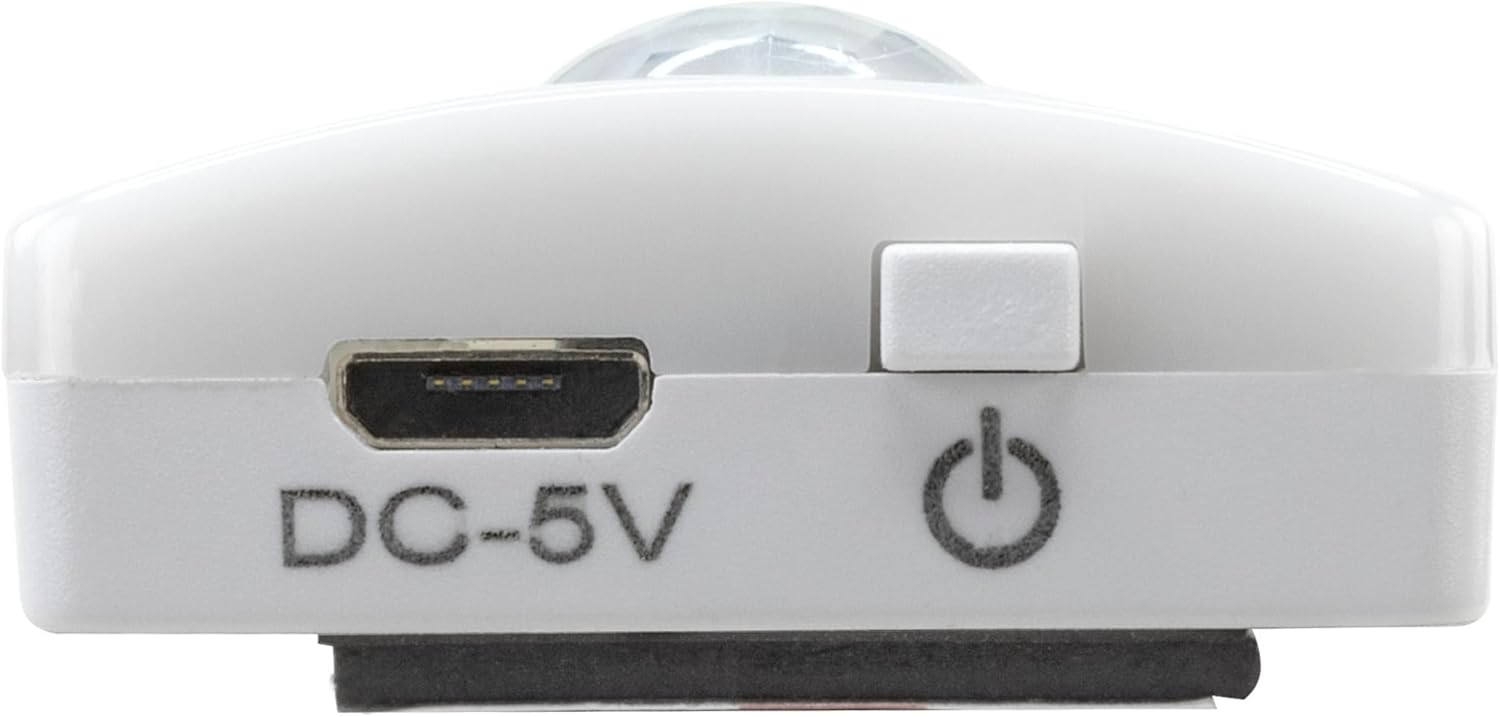
Image 2: Diagram illustrating the Micro-USB Port, On/Off button, and PIR motion sensor on the device.
4. Seadistamine ja installimine
The Under-Cabinet Light M offers flexible installation options using its integrated magnetic strip.
Magnetiline kinnitus:
- Identify a suitable, clean, and dry surface for installation (e.g., inside a cabinet, under a shelf).
- The light comes with a fixed magnetic strip on its back. For non-metallic surfaces, use the included adhesive strip.
- Peel off the protective film from the adhesive strip and firmly press it onto the desired surface.
- Attach the Under-Cabinet Light M to the adhesive strip. The magnetic connection will hold it in place.
Pilt 3: Lähivõte view of the magnetic strip and the removable adhesive strip, demonstrating the mounting mechanism.

Pilt 4: Näideample of the under-cabinet light installed in a modern kitchen setting, providing illumination over a countertop.
5. Operatsioon
The Under-Cabinet Light M offers intuitive control for its lighting functions.
Toide sisse/välja:
- Locate the On/Off button (refer to Image 2).
- Press the button once to turn the light on or off.
Värvitemperatuuri reguleerimine:
- With the light on, short press the control button repeatedly to cycle through the 3 available color temperatures: cool white, neutral white, and warm white.
- A fourth press will activate all LEDs for maximum brightness.
Hämardamise funktsioon:
- To adjust the brightness, press and hold the control button. The light will gradually dim or brighten. Release the button when the desired brightness level is reached.
Motion and Twilight Sensor:
- When the light is in motion sensor mode, it will automatically turn on when movement is detected within its range.
- The integrated twilight sensor ensures that the motion sensor only activates the light in dark environments, preventing unnecessary illumination during daylight hours.
6. Laadimine
The Under-Cabinet Light M is equipped with a rechargeable battery for convenient cordless use.
- When the battery is low, the light output may decrease or the light may not turn on.
- Gently detach the light from its magnetic mounting surface.
- Connect the provided micro-USB cable to the micro-USB port on the light (refer to Image 2).
- Connect the other end of the micro-USB cable to a suitable USB power source (e.g., USB wall adapter, computer USB port).
- Laadimise olekut näitab märgutuli (nt punane laadimise ajal, roheline täielikult laetud olekus).
- Once fully charged, disconnect the cable and reattach the light to its mounting surface.

Pilt 5: Detailne view of the Micro-USB charging port and the On/Off button, essential for charging and operation.
7. Hooldus
To ensure the longevity and optimal performance of your Under-Cabinet Light M, follow these simple maintenance guidelines:
- Clean the light regularly with a soft, dry cloth. Do not use abrasive cleaners or solvents.
- Ensure the motion sensor lens is kept clean and free from obstructions for proper function.
- Store the light in a cool, dry place if not in use for extended periods.
8. Veaotsing
If you encounter issues with your Under-Cabinet Light M, refer to the following common problems and solutions:
| Probleem | Võimalik põhjus | Lahendus |
|---|---|---|
| Valgus ei lülitu sisse. | Aku on tühjaks saanud. | Charge the light using the micro-USB cable. |
| Liikumisandur ei tuvasta liikumist. | Ensure the sensor is clean and unobstructed. Check if the environment is dark enough for the twilight sensor to activate. | |
| Valgus ei lae. | Vigane kaabel või toiteallikas. | Try a different micro-USB cable or USB power adapter. |
| Laadimisport on määrdunud. | Gently clean the micro-USB port with a dry, soft brush. | |
| Valgus väreleb või on hämar. | Aku tühi. | Laadige seade uuesti. |
Kui probleem püsib ka pärast nende lahenduste proovimist, võtke ühendust klienditoega.
9. Tehnilised andmed
| Funktsioon | Detail |
|---|---|
| Mudeli number | 1600-0438 |
| Toote mõõtmed | 25 P x 3.5 L x 1.3 K cm (9.84 P x 1.38 L x 0.51 K tolli) |
| Kauba kaal | 112 grammi (0.25 naela) |
| Toiteallikas | Akutoitel |
| Laadimisport | Micro-USB (DC-5V) |
| Materjal | Plastikust |
| Värv | Valge |
| Installi tüüp | Seinakinnitus (magnetiline) |
| Ruumi tüüp | Dining Room, Kitchen, Wardrobe, Hallway, etc. |
10. Garantii ja tugi
ANSMANN products are manufactured with high-quality standards. For information regarding warranty terms and conditions, please refer to the documentation provided with your purchase or visit the official ANSMANN websaidile.
For technical support or inquiries, please contact ANSMANN customer service through their official channels.


