1. Sissejuhatus
This user manual provides detailed instructions for the operation and maintenance of your Sunbuck AS-60BU Home Audio Amplifier Stereo Receiver. This 2-channel amplifier is designed to enhance your home audio experience, offering versatile input options including Bluetooth 5.0, USB, SD card, AUX, CD, Line-in, and microphone inputs. Please read this manual thoroughly before using the product to ensure proper function and safety.

Figure 1: Sunbuck AS-60BU Amplifier and Remote Control
2. Ohutusjuhised
- Ärge jätke seda seadet vihma või niiskuse kätte.
- Ärge eemaldage katet. Sees ei ole kasutaja poolt hooldatavaid osi. Pöörduge hoolduse poole kvalifitseeritud personali poole.
- Tagage seadme ümber piisav ventilatsioon. Ärge blokeerige ventilatsiooniavasid.
- Connect only to a grounded AC power outlet.
- Ärge koormake üle pistikupesasid ega pikendusjuhtmeid.
- Vältige seadme asetamist soojusallikate lähedusse või otsese päikesevalguse kätte.
- Lülitage seade äikesetormide ajal või kui seda pikka aega ei kasutata.
- Hoida lastele kättesaamatus kohas.
3. Pakendi sisu
Veenduge, et kõik esemed on teie pakendis olemas:
- Sunbuck AS-60BU Ampelujõulisem vastuvõtja
- Vahelduvvoolu toitejuhe
- Kasutusjuhend (see dokument)
- Kaugjuhtimispult

Joonis 2: Mis on karbis
4. Toote lõppview
4.1 Esipaneel

Joonis 3: Esi- ja tagapaneeli paigutus
| Funktsioon | Kirjeldus |
|---|---|
| TOIDE (SEES/VÄLJAS) | Seadme peatoitelüliti. |
| AUX sisend | 3.5 mm pesa väliste heliseadmete ühendamiseks. |
| Sisendi valija | Rotary knob to select audio input source: LINE, CD, AUX, MEDIA PLAYER. |
| BASSi juhtimine | Reguleerib madalsagedusliku heli väljundit. |
| TREBLE juhtimine | Reguleerib kõrgsagedusliku heli väljundit. |
| ECHO kontroll | Reguleerib mikrofoni sisendite kajaefekti. |
| M.TONE Control | Adjusts the microphone tone. |
| MIC-helitugevuse juhtimine | Adjusts the volume of the microphone inputs. |
| MASTERI MAHUS | Main volume control for all audio output. |
| USB/SD/MMC Port | Input for USB flash drives and SD/MMC cards for media playback. |
| MEDIA PLAYER Display & Buttons | Digital display and controls (MODE, Play/Pause, Previous, Next) for USB/SD/Bluetooth playback. |
| MIC 1 / MIC 2 | 6.35 mm mikrofoni sisendpesad. |
4.2 Tagapaneel
| Funktsioon | Kirjeldus |
|---|---|
| CD L/R IN | RCA stereo input for CD players. |
| LINE L/R IN | RCA stereo input for general line-level audio sources. |
| FM antenn | Connection point for the FM radio antenna. |
| Alalisvoolu sisend | Toite sisendvõimsus ampelujõulisem. |
| Speaker Output (L/R) | Passiivkõlarite (4-16 oomi) ühendamiseks mõeldud ühenduspostid. |
5. Seadistamine
Follow these steps to set up your Sunbuck AS-60BU ampelujõulisem:
- Kõlari ühendus: Connect your passive speakers to the "Speaker Output (L/R)" binding posts on the rear panel. Ensure correct polarity (+ to + and - to -) for optimal sound. This amplifier supports speakers with an impedance range of 4 to 16 ohms.
- Heliallika ühendus:
- For CD players, connect RCA cables from the CD player's output to the "CD L/R IN" on the ampelujõulisem.
- For other line-level devices (e.g., tape drive, tuner), connect RCA cables to the "LINE L/R IN".
- For devices with a 3.5mm output (e.g., smartphones, tablets), use a 3.5mm audio cable to connect to the "AUX INPUT" on the front panel.
- For PC connection, use appropriate cables to connect your PC's audio output to either the LINE IN or AUX IN.

Joonis 4: Ühendusskeem
- FM-antenni ühendus: If you plan to use the FM radio function, connect an FM antenna to the "FM Antenna" terminal on the rear panel.
- Toiteühendus: Tagada amplifier's POWER switch is in the OFF position. Connect the supplied AC power cord to the "DC Power Input" on the rear panel and then to a suitable wall outlet.
6. Kasutusjuhised
6.1 Toide sisse/välja
Sisselülitamiseks amplifier, press the VÕIMSUS switch to the ON position. The LED display will illuminate. To turn off, press the VÕIMSUS lülitage asendisse OFF.
6.2 Sisendite valik
Pöörake Sisendi valija knob on the front panel to choose your desired audio source (LINE, CD, AUX, MEDIA PLAYER). When selecting MEDIA PLAYER, you can then use the MODE button on the front panel or remote to switch between USB, SD, and Bluetooth modes.
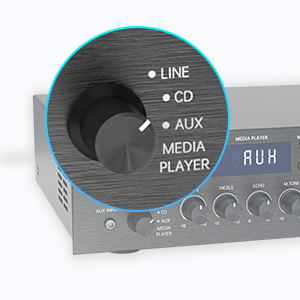
Figure 5: Input Selector
6.3 Bluetooth-ühenduvus
Ühenduse loomiseks Bluetoothi kaudu:
- Määrake Sisendi valija to MEDIA PLAYER.
- Vajutage nuppu REŽIIM button until "BLUETOOTH" or "BT" appears on the display.
- Luba oma mobiilseadmes (nutitelefon, tahvelarvuti, sülearvuti) Bluetooth ja otsi saadaolevaid seadmeid.
- Select "SUNBUCK" or "AS-60BU" from the list to pair.
- Pärast sidumist saate oma seadmest heli juhtmevabalt voogedastada. ampelujõulisem.
The Bluetooth range is approximately 40+ feet, but can be affected by obstacles and interference.

Joonis 6: Bluetooth-ühenduvus
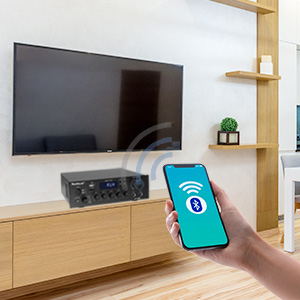
Figure 7: Bluetooth Connection Indicator
6.4 USB/SD-kaardi taasesitus
To play media from a USB drive or SD/MMC card:
- Insert your USB flash drive or SD/MMC card into the corresponding port on the front panel.
- Määrake Sisendi valija to MEDIA PLAYER.
- The amplifier will automatically detect and begin playing supported audio files (MP3, WAV, WMA, APE, FLAC).
- Use the Play/Pause, Previous, and Next buttons on the front panel or remote to control playback.
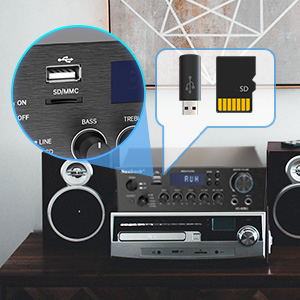
Figure 8: USB/SD Card Slots
6.5 Mikrofoni kasutamine
Connect up to two microphones to the MIC 1 and MIC 2 jacks on the front panel. Adjust the MIC MAHU, ECHO, ja M.TONE controls to achieve your desired sound for karaoke or public address.

Figure 9: Ideal for Karaoke and Home Entertainment
6.6 FM -raadio
FM-raadio kasutamiseks:
- Ensure an FM antenna is connected to the rear panel.
- Määrake Sisendi valija to MEDIA PLAYER.
- Vajutage nuppu REŽIIM nuppu, kuni ekraanile ilmub "FM".
- Use the Previous/Next buttons to scan for stations. Note that this model cannot fix and save FM stations.

Figure 10: FM Mode Display
6.7 Heli reguleerimine
Kasutage BASS, TREBLE, ja MASTERI MAHUS knobs on the front panel to fine-tune your audio output. The MASTERI MAHUS controls the overall sound level.
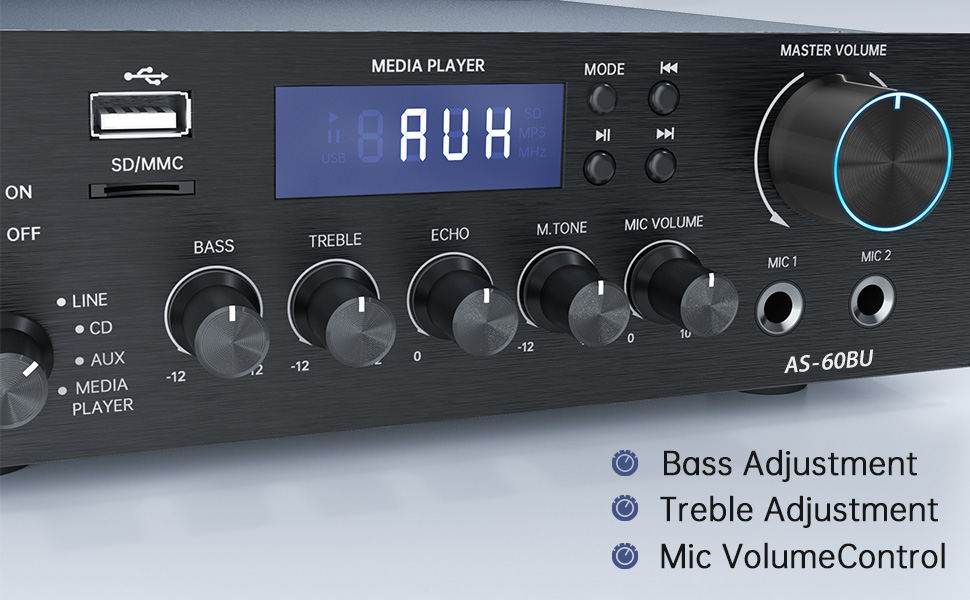
Figure 11: Audio Adjustment Controls
Video 1: Demonstration of Sunbuck AS-60BU amplifier features and sound quality.
7. Hooldus
- Puhastamine: Kasutage seadme välispinna puhastamiseks pehmet kuiva lappi ampÄrge kasutage vedelaid puhastusvahendeid ega aerosoole.
- Hoiustamine: Kui seadet pikemat aega ei kasutata, pange see hoiule ampHoida jahedas ja kuivas kohas, eemal otsesest päikesevalgusest ja äärmuslikest temperatuuridest.
- Ventilatsioon: Veenduge, et ventilatsiooniavad oleksid tolmust ja prahist puhtad, et vältida ülekuumenemist.
8. Veaotsing
| Probleem | Võimalik põhjus | Lahendus |
|---|---|---|
| Heliväljund puudub. | Incorrect input selected, loose speaker connections, low volume. | Verify input selection, check speaker wiring polarity and tightness, increase MASTER VOLUME. |
| Bluetooth connection unstable or short range. | Obstacles between device and amplifier, interference, device too far. | Reduce distance between devices, remove obstacles, avoid other wireless devices. |
| Kaugjuhtimispult ei tööta. | Dead batteries, line of sight blocked. | Replace batteries, ensure clear path to amplifieri infrapunavastuvõtja. |
| Settings not saved after power off. | This is normal behavior for some settings (e.g., input mode). | Re-select desired input mode after powering on. |
| Moonutatud heli. | Input signal too high, speaker impedance mismatch, faulty cables. | Reduce source volume, ensure speakers are within 4-16 ohm range, check/replace cables. |
9. Tehnilised andmed
- Mudel: AS-60BU
- Väljundvõimsus: MAX 400W x 2 (RMS 70W x 2)
- Kanalid: 2-kanal
- Kõlari takistus: 4-16 oomi
- Väljundtakistus: 0.1 oomi
- Sisendid: 2 x RCA Audio (CD, Line), 2 x Microphone (6.35mm), USB 2.0, SD Card, Bluetooth 5.0, AUX In (3.5mm), FM Radio
- Supported Audio Formats (USB/SD): MP3, WAV, WMA, APE, FLAC
- Toote mõõtmed: 8.27 x 7.68 x 2.44 tolli
- Kaal: 3.24 naela
- Tootja: JS Electronics Limited
- Esimene saadaval: 9. september 2021
10. Garantii ja tugi
Sunbuck products are designed for reliability and performance. For warranty information or technical support, please refer to the contact details provided with your purchase documentation or visit the official Sunbuck webveebisait. Hoidke ostutšekk ostutõendina garantiinõuete korral.
For further assistance, you may contact the manufacturer, JS Electronics Limited.


