StarTech.com 2 Port Dual Monitor HDMI KVM Switch
Model: SV231DHU34K6
1. Sissejuhatus
This instruction manual provides detailed information on the installation, operation, and maintenance of your StarTech.com 2 Port Dual Monitor HDMI KVM Switch. This device allows you to control two computers from a single set of peripherals, including two HDMI monitors, a keyboard, a mouse, and other USB devices, supporting resolutions up to 4K at 60Hz.
2. Ohutusalane teave
Palun lugege enne toote kasutamist kõik juhised läbi ja mõistke neid. Nende juhiste eiramine võib põhjustada elektrilöögi, tulekahju või tõsiseid vigastusi.
- Elektrilised ohud: Do not use damaged or frayed cables. Exposed wires can lead to electric shocks. Ensure all cables are properly connected and secured to prevent accidental disconnection.
- Soojuse kogunemine: Overloaded or tightly bundled cables can overheat and pose a fire hazard. Ensure adequate ventilation and avoid bundling power cables.
- Kahju: Always unplug adapters by holding the plug, not the cable. Pulling by the cable can expose live wires, which could lead to electrical shocks or burns.
3. Toote lõppview
The StarTech.com SV231DHU34K6 KVM switch is designed to streamline your workspace by enabling control of two computers with dual 4K HDMI displays and shared USB peripherals. Its robust steel housing ensures durability.
3.1. Põhiomadused
- Supports dual 4K (3840 x 2160) resolution at 60Hz per monitor.
- HDMI 2.0, HDCP 2.2, and HDR10 support.
- Integrated 2-port USB 3.0 Hub (5Gbps) for sharing peripherals.
- Four USB 2.0 HID ports for keyboard and mouse.
- Hotkey and front-panel push-button switching.
- EDID and HDCP signal emulation for fast, seamless switching.
- Supports stereo analog and 7.1 digital audio.
- OS Independent compatibility (Windows, Mac, Linux).
3.2. Esipaneel

Joonis 1: Esipaneeli paigutus
- HID USB Port: For connecting a keyboard or mouse.
- 5G USB Port: Kiirete USB 3.0 seadmete ühendamiseks.
- Computer Selection Buttons (1, 2): Press to switch to the corresponding computer.
- NUPP VALI: Used for various functions, including auto-scan activation.
3.3. Tagapaneel
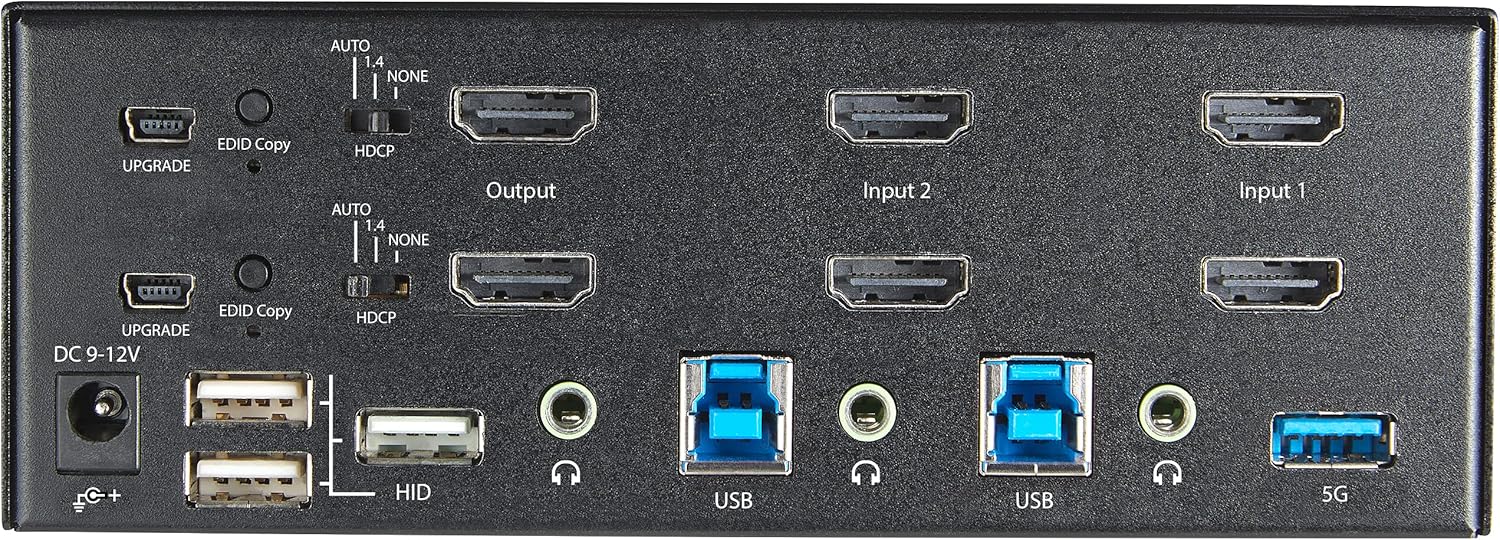
Joonis 2: tagapaneeli paigutus
- Alalisvoolu 9–12 V toitepinge: Ühendage kaasasolev toiteadapter.
- UPGRADE Port: Püsivara värskenduste jaoks.
- EDID Copy Button/Switch: Manages Extended Display Identification Data.
- HDCP lüliti: Manages High-bandwidth Digital Content Protection.
- Output (HDMI): Connect to your monitors.
- Input 1/Input 2 (HDMI): Connect to the HDMI outputs of your computers.
- USB (tüüp B): Connect to the USB 3.0 ports of your computers.
- HID USB Ports (Type-A): For additional keyboard/mouse connections or other low-power USB devices.
- Audio Jacks (3.5mm): For connecting speakers/headphones and microphones.
- 5G USB Port (Type-A): Kiirete USB 3.0 seadmete ühendamiseks.
4. Seadistamine
4.1. Mis on karbis
- 1 x KVM Switch (SV231DHU34K6)
- 1 x universaalne toiteadapter (NA / JP, EU, UK, ANZ)
- 4 x kummist jalga
- 1 x Kiirjuhend
Note: HDMI cables, USB 3.0 Type-A to Type-B cables, and audio cables are not included and must be purchased separately.
4.2. Ühendusjuhised
KVM-lüliti ühendamiseks järgige neid samme:
- Ühendage monitorid: Connect your two HDMI monitors to the 'Output' HDMI ports on the rear panel of the KVM switch.
- Arvutite ühendamine (HDMI): Connect the HDMI outputs from Computer 1 to the 'Input 1' HDMI ports on the KVM switch. Repeat for Computer 2 and 'Input 2'. Ensure both HDMI outputs from each computer are connected for dual monitor support.
- Arvutite ühendamine (USB): Connect the USB 3.0 Type-B ports on the KVM switch to the USB 3.0 Type-A ports on Computer 1 and Computer 2 using appropriate USB 3.0 cables. These connections enable keyboard, mouse, and USB hub functionality.
- Ühendage välisseadmed:
- Connect your keyboard and mouse to the 'HID' USB ports on the front or rear panel.
- Connect other USB devices (e.g., printer, scanner, webcam) to the '5G' USB 3.0 ports on the front or rear panel.
- Ühendage heli (valikuline): If desired, connect your speakers/headphones and microphone to the 3.5mm audio jacks on the rear panel.
- Ühendage toide: Connect the included universal power adapter to the 'DC 9-12V' power input on the rear panel, then plug it into a power outlet. The KVM switch will power on automatically.

Figure 3: KVM Switch with Ports for Connection
5. KVM-lüliti kasutamine
5.1. Arvutite vahel vahetamine
You can switch between connected computers using either the front-panel push buttons or hotkey commands.
- Front-Panel Buttons: Press the '1' or '2' button on the front panel to directly switch to Computer 1 or Computer 2, respectively.
- Kiirklahvide vahetamine: Use keyboard hotkey combinations to switch computers. The default hotkey sequence is typically Scroll Lock, Scroll Lock, [1 or 2]. Refer to the Quick-Start Guide for a complete list of hotkey commands and customization options. A buzzer sound confirms the switch.
5.2. EDID and HDCP Emulation
The KVM switch includes EDID (Extended Display Identification Data) and HDCP (High-bandwidth Digital Content Protection) signal emulation. This feature ensures that your monitors remain synced and desktop settings are maintained when switching between computers, preventing display resolution changes or window rearrangement.
5.3. USB-jaoturi funktsionaalsus
The integrated USB 3.0 hub allows you to share two USB 3.0 peripherals (connected to the 5G ports) and four USB 2.0 HID peripherals (connected to the HID ports) between the connected computers. Devices connected to these ports will function as if directly connected to the currently selected host computer.
5.4. Audio tugi
The KVM switch supports both digital audio (via HDMI, 7.1 Channel Audio) and separate 3.5mm stereo analog audio (2 Channel Audio). Ensure your displays and sources support the desired audio format for full compatibility.
6. Hooldus
KVM-lüliti pikaealisuse ja optimaalse jõudluse tagamiseks järgige neid hooldusjuhiseid:
- Puhastamine: Seadme välispinna puhastamiseks kasutage pehmet ja kuiva lappi. Ärge kasutage vedelaid ega aerosoolpuhastusvahendeid.
- Ventilatsioon: Ensure the KVM switch is placed in a well-ventilated area. Do not block any ventilation openings.
- Kaabli haldamine: Keep cables organized and untangled to prevent damage and ensure proper airflow. Avoid excessive bending or crimping of cables.
- Hoiustamine: Kui seadet pikemat aega ei kasutata, hoidke seda jahedas ja kuivas kohas, eemal otsesest päikesevalgusest ja äärmuslikest temperatuuridest.
7. Veaotsing
Kui teil tekib KVM-lülitiga probleeme, vaadake järgmisi levinud probleeme ja lahendusi.
- No Display or Incorrect Resolution:
- Ensure all HDMI cables are securely connected to both the KVM switch and your computers/monitors.
- Verify that your HDMI cables are rated for 4K 60Hz if you are using 4K displays. Longer cables (e.g., over 3m/10ft) may require higher quality or active cables.
- Check the display settings on your computers to ensure they are configured for the correct resolution and refresh rate.
- Try power cycling the KVM switch and monitors.
- Klaviatuur/hiir ei reageeri:
- Ensure the USB Type-B cables are securely connected from the KVM switch to your computers.
- Verify that your keyboard and mouse are connected to the designated HID USB ports.
- Proovige klaviatuuri/hiire otse arvutiga ühendada, et veenduda nende töökorras olemises.
- Some specialized keyboards/mice with advanced features may require direct connection or specific drivers.
- USB-seadmeid ei tuvastatud:
- Ensure the USB Type-B cables are connected from the KVM switch to your computers.
- Verify that the USB device is connected to the appropriate 5G USB 3.0 port.
- Some high-power USB devices may require an external power source or a powered USB hub connected to the KVM's 5G port.
- Heliprobleemid:
- Check all 3.5mm audio cable connections.
- Verify audio output settings on your computers.
- Ensure your monitors or audio devices support the HDMI audio format being sent.
- Slow Switching Time:
- The KVM switch is designed for fast switching. If experiencing delays, ensure EDID and HDCP emulation are functioning correctly.
- Ensure all cables are of good quality and properly seated.
If the problem persists after attempting these solutions, please contact StarTech.com technical support.
8. Tehnilised andmed
| Kategooria | Spetsifikatsioon |
|---|---|
| Mudeli number | SV231DHU34K6 |
| KVM-pordid | 2 |
| Monitors Supported | 2 |
| Video tüüp | HDMI 2.0 |
| Toetatud resolutsioonid | Kuni 3840 x 2160 @ 60 Hz |
| HDCP tugi | HDCP 2.2 |
| HDR tugi | HDR10 |
| USB-jaotur | 2-pordiline USB 3.0 (5 Gbps) |
| USB HID-pordid | 4x USB 2.0 |
| Audio tugi | HDMI (7.1 Channel), Analog Stereo (3.5mm) |
| Pordi valik | Push Button, Hotkeys |
| Materjal | Teras |
| Värv | Must |
| Toote mõõtmed (P x L x K) | 6.3 x 3.9 x 2.3 tolli (16.0 x 10.0 x 5.8 cm) |
| Toote kaal | 1.8 naela (0.8 kg) |
| Toiteallikas | Vahelduvvooluadapter (kaasas) |
| Sisend Voltage | 100 - 240 AC |
| Energiatarve | 36W |
| Töötemperatuur | 0 ℃ kuni 40 ℃ (32 ℉ kuni 104 ℉) |
| Säilitustemperatuur | -10 ℃ kuni 60 ℃ (14 ℉ kuni 140 ℉) |
| Niiskus | 0% kuni 80% suhteline õhuniiskus (mittekondenseeruv) |
9. Garantii ja tugi
This StarTech.com KVM Switch (Model: SV231DHU34K6) is backed by a 2-aastane garantii. StarTech.com also provides tasuta eluaegne tehniline tugi. For technical assistance or warranty claims, please visit the official StarTech.com websaidil või võtke ühendust nende klienditoe meeskonnaga.
Lisateabe saamiseks külastage: www.startech.com


