1. Sissejuhatus
The ION Audio Boombox Deluxe Stereo is a versatile audio system designed to provide a range of listening experiences. It combines classic audio playback options with modern connectivity, featuring an AM/FM radio, a cassette player, Bluetooth streaming, and USB/Micro SD card playback. This manual provides detailed instructions for setting up, operating, and maintaining your device.

Joonis 1: Esiosa view of the ION Audio Boombox Deluxe Stereo, showcasing its dual speakers, cassette deck, and radio tuner display.
2. Mis on karbis
- Boombox Deluxe Unit
- Toitekaabel
- Kiiralustusjuhend
3. Seadistamine
3.1 Seadme toiteallikaga varustamine
The Boombox Deluxe can be powered using the included AC power cable or by batteries for portable use. Insert the AC power cable into the AC IN port on the back of the unit and plug it into a standard wall outlet. For battery operation, open the battery compartment (typically on the bottom or back) and insert the required D-cell batteries (not included), ensuring correct polarity.
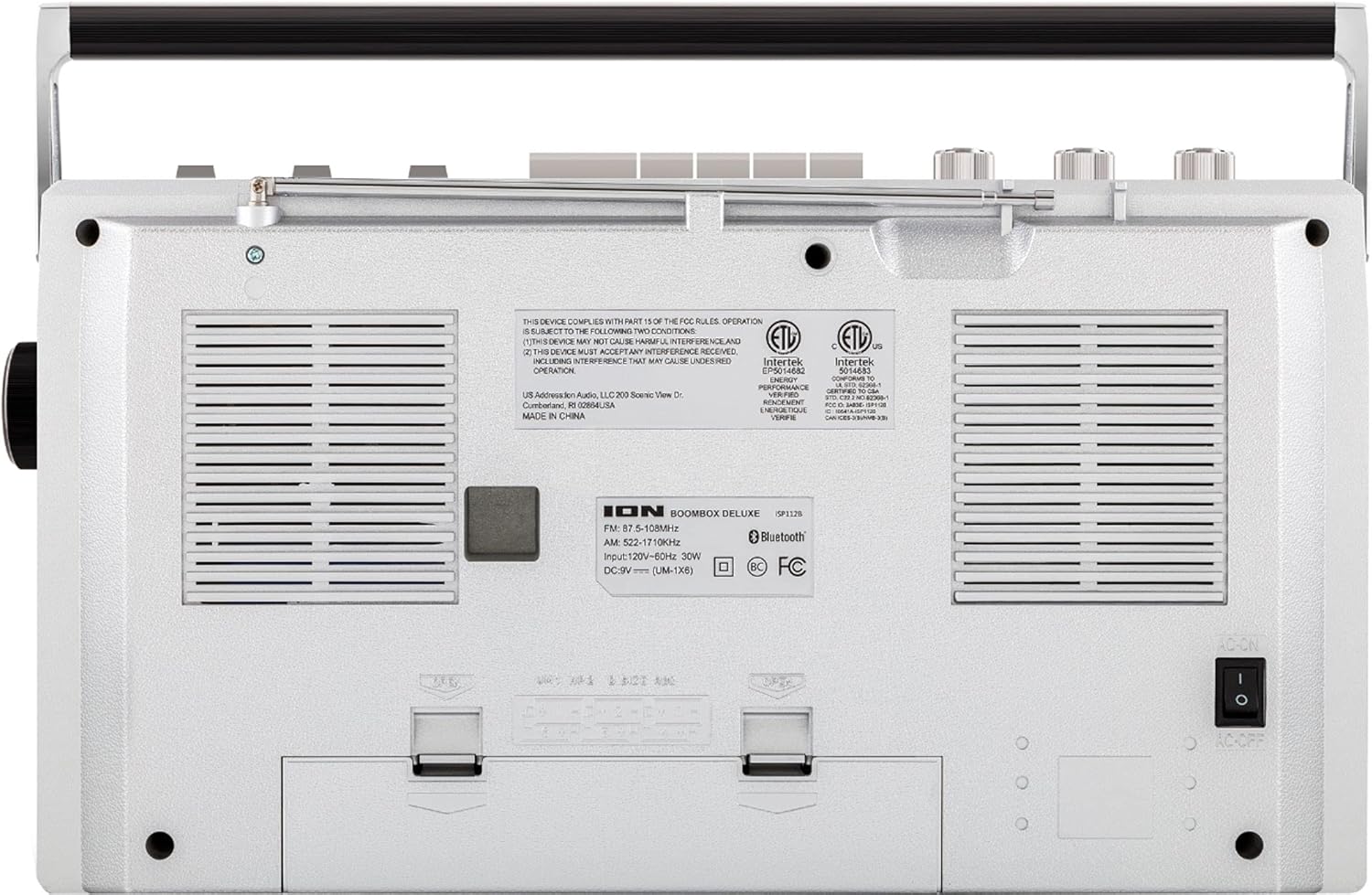
Figure 2: Rear panel of the Boombox Deluxe, highlighting the AC power input and battery compartment location.
3.2 Antenni reguleerimine
For optimal AM/FM radio reception, extend the telescopic antenna located on the top of the unit. Adjust its position for the clearest signal.
4. Kasutusjuhised
4.1 Üldised juhtnupud
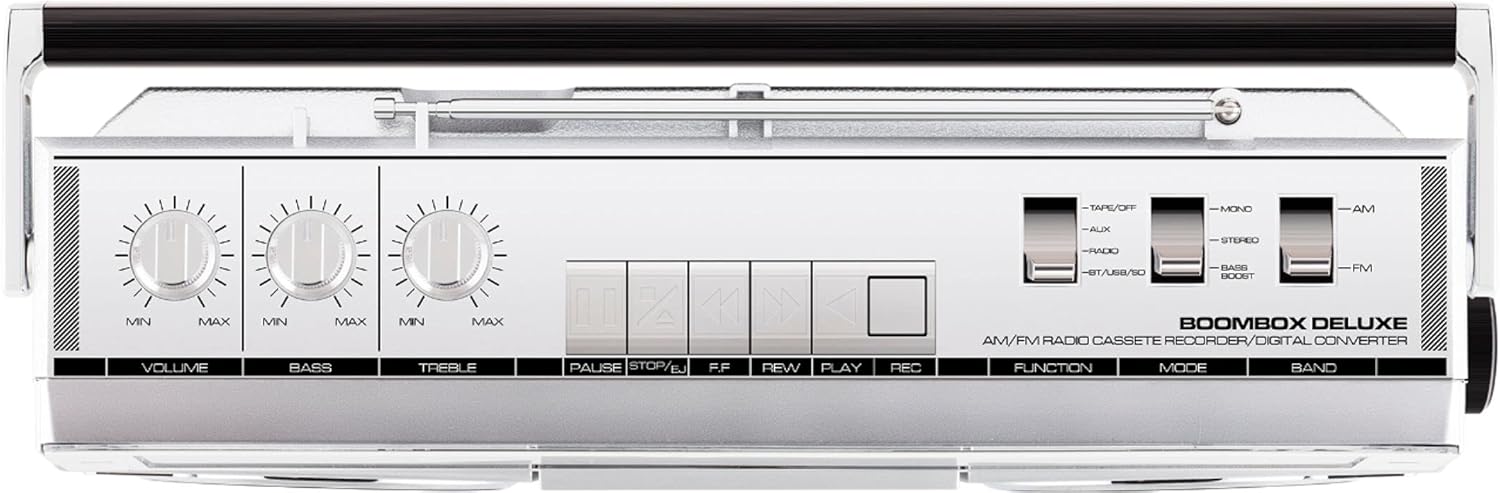
Figure 3: Top panel controls, including Volume, Bass, Treble knobs, and cassette playback buttons.
- Helitugevuse nupp: Reguleerib üldist heli väljundtaset.
- Bassi nupp: Reguleerib madalsagedusliku heli väljundit.
- Kõrgete nuppude nupp: Reguleerib kõrgsagedusliku heli väljundit.
- Funktsiooni lüliti: Selects between Tape/Off, Aux, Radio, and BT/USB/SD modes.
- Režiimi lüliti: Selects between Mono, Stereo, and Bass Boost audio modes.
- Sagedusriba vahetus: Valib AM- ja FM-raadio sagedusalade vahel.
4.2 Raadio kasutamine
- Määrake Funktsioon Switch to 'Radio'.
- Määrake Band Switch to 'AM' or 'FM'.
- Kasutage Häälestusnupp to select your desired radio station. The frequency will be displayed on the tuner scale.
4.3 Kassettmängija kasutamine
- Määrake Funktsioon Switch to 'Tape/Off'.
- Vajutage nuppu Stop/Eject nuppu kassetipesa avamiseks.
- Sisestage kassett avatud servaga ülespoole. Sulgege pesa.
- Vajutage nuppu Mängi nuppu taasesituse alustamiseks.
- Kasutage Tagasikerimine (REW) ja Kiirelt edasi (FF) nupud lindi navigeerimiseks.
- Vajutage Paus Esituse ajutiseks peatamiseks vajutage uuesti. Jätkamiseks vajutage uuesti.
- Vajutage Stop/Eject taasesituse peatamiseks ja lindi väljutamiseks.
- To record, ensure the Funktsioon Switch is set to 'Tape/Off' and press the Salvestus (REC) button simultaneously with the Mängi nuppu.
4.4 Bluetooth-ühenduvus

Figure 4: Side panel with USB and Micro SD card slots, and playback controls for digital media.
- Määrake Funktsioon Switch to 'BT/USB/SD'. The unit will enter Bluetooth pairing mode, indicated by a flashing LED.
- On your Bluetooth-enabled device (e.g., smartphone, tablet), search for 'ION Boombox Deluxe' in the Bluetooth settings.
- Select 'ION Boombox Deluxe' to pair. Once connected, a confirmation tone will sound, and the LED will stop flashing.
- You can now stream audio from your device to the Boombox Deluxe. Use your device's controls or the boombox's playback buttons (Play/Pause, Next/Previous Track) for media control.
4.5 USB/Micro SD taasesitus
- Määrake Funktsioon Switch to 'BT/USB/SD'.
- Insert a USB flash drive or Micro SD card (with compatible audio files) into the respective slot on the side of the unit.
- Seade tuvastab automaatselt heli ja hakkab seda esitama. files.
- Use the playback control buttons (Play/Pause, Next/Previous Track, Delete) on the side panel to manage your music.
4.6 Lisasisend

Figure 5: Side panel with headphone output and auxiliary input jacks.
- Määrake Funktsioon Switch to 'Aux'.
- Ühendage väline heliseade (nt MP3-mängija, CD-mängija) teleriga. AUX IN pesa abil 3.5 mm audiokaabli abil (ei kuulu komplekti).
- Audio from the connected device will play through the boombox speakers. Control playback from your external device.
5. Omadused
- Integrated Stereo System with Dual Speakers
- Bluetoothi juhtmeta voogesitus
- AM/FM-raadio tuuner
- Cassette Player/Recorder
- USB ja Micro SD kaardi taasesitus
- Auxiliary Input for External Devices
- Adjustable Bass and Treble Controls
- Portable Design with Carry Handle
6. Tehnilised andmed
| Spetsifikatsioon | Detail |
|---|---|
| Kaubamärk | ION Audio |
| Mudel | Boombox Deluxe |
| Ühenduvustehnoloogia | Bluetooth, USB |
| Kõlari tüüp | Stereo |
| Toiteallikas | Battery Powered (D-cell), AC Power |
| Värv | Must, hõbedane |
| Kauba kaal | 8.93 naela |
| Pakendi mõõtmed | 18.1 x 11.1 x 7.6 tolli |
7. Veaotsing
- Toide puudub:
Ensure the AC power cable is securely connected to both the unit and a working power outlet. If using batteries, check that they are inserted correctly and are not depleted. - Halb raadiovastuvõtt:
Fully extend the telescopic antenna and adjust its position. Try relocating the unit to an area with better signal reception, away from potential interference sources like other electronic devices. - Cassette Tape Not Playing/Recording:
Ensure the tape is inserted correctly and the cassette compartment is fully closed. Check that the tape is not tangled or damaged. For recording, ensure both Play and Record buttons are pressed simultaneously. - Bluetooth ei ühendu:
Make sure the Boombox Deluxe is in 'BT/USB/SD' mode and in pairing mode (flashing LED). Ensure Bluetooth is enabled on your external device and it is within range (typically 30 feet). Try unpairing and re-pairing the device. - No Sound from USB/Micro SD:
Verify that the USB drive or Micro SD card is inserted correctly and contains compatible audio files (e.g., MP3). Ensure the volume is turned up on the boombox.
8. Hooldus
- Puhastamine: Seadme välispinna puhastamiseks kasutage pehmet ja kuiva lappi. Ärge kasutage vedelaid puhastusvahendeid ega lahusteid.
- Kassettmängija hooldus: Puhastage lindipead ja pressimisrullikuid regulaarselt vatitupsuga kergelt dampened with isopropyl alcohol to ensure optimal playback and recording quality.
- Aku salvestusruum: Kui seadet pikemat aega ei kasutata, eemaldage patareid, et vältida leket ja kahjustusi.
9. Garantii ja tugi
This product is offered as an Amazon Renewed item. Amazon Renewed products are professionally inspected and tested to work and look like new. If you are not satisfied with your purchase, renewed products are eligible for replacement or refund under the Amazon Renewed Guarantee. For specific details regarding the Amazon Renewed Guarantee, please refer to the Amazon Renewed program terms and conditions on the Amazon websaidile.
For further assistance or technical support, please contact ION Audio customer service or refer to their official webtugiressursside sait.


