1. Toote lõppview
The Cisco Catalyst 9300 C9300-24S-E is a 24-port Gigabit Ethernet SFP modular uplink network switch designed for enterprise-level network deployments. It provides high-performance switching capabilities, advanced security features, and network automation for modern business environments. This manual provides essential information for the safe and efficient installation, operation, and maintenance of your switch.
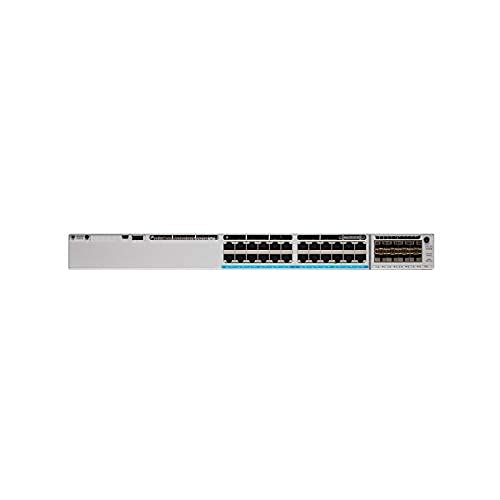
Joonis 1: Esiosa view of the Cisco Catalyst 9300 C9300-24S-E Switch. This image displays the 24 SFP ports and modular uplink slots.
2. Ohutusalane teave
Read all safety warnings and instructions before installing, operating, or servicing this equipment. Failure to follow these instructions can result in serious injury or equipment damage.
- Elektriohutus: Veenduge, et toiteallikas vastab lüliti helitugevusele.tage requirements. Always connect the power cord to a grounded outlet. Do not operate the switch with damaged power cords or plugs.
- Ventilatsioon: Ülekuumenemise vältimiseks tagage lüliti ümber piisav õhuvool. Ärge blokeerige ventilatsiooniavasid.
- Käitlemine: This device is heavy. Use proper lifting techniques or assistance when moving or installing.
- Keskkond: Operate the switch within the specified temperature and humidity ranges. Avoid exposure to moisture or extreme temperatures.
- Teenindus: Refer all servicing to qualified service personnel. Do not attempt to open or repair the switch yourself.
3. Pakendi sisu
Verify that your package contains the following items. If any item is missing or damaged, contact your vendor immediately.
- Cisco Catalyst 9300 C9300-24S-E Switch
- Vahelduvvoolu toitejuhe
- Rack-mount Kit (brackets, screws)
- Konsoolikaabel (RJ-45 kuni DB-9)
- Dokumentatsioon (kiirjuhend, ohutusteave)
4. Füüsiline kirjeldus ja komponendid
The C9300-24S-E switch features a robust design with various ports and indicators for network connectivity and status monitoring.
4.1 Esipaneel
Joonis 2: üksikasjalik view of the switch's front panel, highlighting SFP ports and status LEDs.
- 24 x SFP Ports: For Gigabit Ethernet fiber or copper connectivity using SFP transceivers.
- Modular Uplink Slots: Located on the right side, these slots accommodate optional uplink modules for higher bandwidth connections (e.g., 10G, 25G, 40G, 100G).
- Oleku LEDid: Indicate system status (SYS), redundant power supply (RPS), port status (STAT), and stack status (STACK).
- USB-tüüpi A port: For external storage or software upgrades.
- USB Type-C Console Port: Konsoolile juurdepääsuks ja esialgseks konfigureerimiseks.
- RJ-45 Console Port: For traditional console access.
4.2 Tagapaneel
Joonis 3: Tagumine view of the switch, showing power supply bays and fan modules.
- Power Supply Bays: Two bays for redundant power supplies.
- Ventilaatori moodulid: Field-replaceable fan modules for cooling.
- StackWise-1T Ports: (If applicable to the specific model variant) For stacking multiple switches.
5. Seadistamine ja installimine
Follow these steps to properly install your Cisco Catalyst 9300 switch.
5.1 Riiuli paigaldamine
- Kinnitage kaasasolevad riiulikinnitusklambrid lüliti külgedele, kasutades kaasasolevaid kruvisid.
- Align the switch with the desired rack unit (RU) space in your equipment rack.
- Secure the switch to the rack using the rack screws.
Figure 4: Illustration of the switch being mounted into a standard equipment rack.
5.2 Toiteühendus
- Insert the AC power cord into the power supply module on the rear of the switch.
- Ühendage toitejuhtme teine ots maandatud vahelduvvoolu pistikupessa.
- If using redundant power supplies, repeat for the second power supply.
5.3 Võrguühendused
- Insert appropriate SFP transceivers into the 24 SFP ports as needed.
- Connect fiber optic or copper cables from your network devices (servers, workstations, other switches) to the SFP transceivers.
- Install any optional uplink modules into the modular uplink slots and connect them to your core network infrastructure.
6. Kasutusjuhised
6.1 Sisselülitamine
Once power is connected, the switch will automatically power on. Observe the system status LEDs on the front panel. The SYS LED should turn green after the boot sequence completes.
6.2 Esialgne konfiguratsioon
For initial configuration, connect a console cable from your computer to the switch's console port (either USB-C or RJ-45). Use a terminal emulation program (e.g., PuTTY, Tera Term) with the following settings:
- Baudi kiirus: 9600
- Andmebitid: 8
- Pariteet: Mitte ühtegi
- Stop-bitid: 1
- Voolu juhtimine: Mitte ühtegi
Follow the on-screen prompts to complete the initial setup wizard. For advanced configurations, refer to the Cisco IOS XE documentation for Catalyst 9300 Series switches.
6.3 LED indikaatorit
| LED | Värv/olek | Kirjeldus |
|---|---|---|
| SYS (Süsteem) | Roheline (tahke) | Süsteem töötab normaalselt. |
| Merevaik (tahke) | System fault or error. | |
| STAT (Port Status) | Roheline (tahke) | Link loodud. |
| Roheline (vilkuv) | Activity on port. | |
| Väljas | Ükski link ega port pole keelatud. |
7. Hooldus
Regulaarne hooldus tagab teie lüliti optimaalse jõudluse ja pikaealisuse.
- Puhastamine: Periodically clean the exterior of the switch with a soft, dry cloth. Ensure ventilation openings are free from dust and debris. Do not use liquid cleaners directly on the switch.
- Püsivara värskendused: Kontrollige regulaarselt Cisco tuge website for the latest firmware updates. Applying updates can improve performance, add features, and address security vulnerabilities. Follow Cisco's recommended procedures for firmware upgrades.
- Keskkonnaseire: Ensure the operating environment remains within specified temperature and humidity ranges to prevent hardware stress.
8. Veaotsing
See jaotis pakub lahendusi levinud probleemidele, millega võite kokku puutuda.
8.1 Toide puudub
- Kontrollige toitejuhet: Veenduge, et toitejuhe on kindlalt ühendatud nii lüliti kui ka pistikupesaga.
- Kontrollige pistikupesa: Testige pistikupesa toimimist teise seadmega.
- Toiteallika olek: Check the power supply LEDs on the rear of the switch. If off or amber, the power supply may be faulty or not receiving power.
8.2 Pordis pole ühendust
- Kaabliühendus: Ensure the network cable is securely connected to both the switch port and the connected device.
- Kaabli terviklikkus: Vigase kaabli olemasolu välistamiseks testige kaablit teise seadmega või vahetage see välja.
- Raadiosaatja: If using SFP transceivers, ensure they are properly seated and compatible with both the switch and the connected device.
- Pordi konfiguratsioon: Verify that the switch port is enabled and correctly configured (e.g., speed, duplex settings).
8.3 Võrguühenduse probleemid
- IP konfiguratsioon: Verify IP addresses, subnet masks, and gateway settings on connected devices and the switch.
- VLAN-id: If using VLANs, ensure ports are assigned to the correct VLANs and trunk links are properly configured.
- Firewall/ACLs: Check for any Access Control Lists (ACLs) or firewall rules on the switch that might be blocking traffic.
- Tarkvaraprobleemid: Consider restarting the switch or checking the system logs for error messages.
9. Tehnilised andmed
Key technical specifications for the Cisco Catalyst 9300 C9300-24S-E switch:
| Funktsioon | Detail |
|---|---|
| Mudeli number | C9300-24S-E |
| Kaubamärk | Cisco |
| Liidese tüüp | SFP |
| Portide arv | 24 |
| Ühilduvad seadmed | Lauaarvuti, sülearvuti, printer |
| Toote mõõtmed | 21.65 x 22.44 x 9.45 tolli |
| Korpuse materjal | Plastikust |
| Ülemine temperatuuri hinnang | 40 kraadi Celsiuse järgi |
| Tootja | CISCO SYSTEMS - ETTEVÕTE |
| UPC | 656942062790 |
10. Garantii ja tugi
This Cisco product is typically covered by a limited hardware warranty provided by Cisco Systems. The exact terms and duration of the warranty may vary based on your region and purchase agreement. For detailed warranty information, please refer to the official Cisco warranty statements available on their websaidil või võtke ühendust oma volitatud Cisco edasimüüjaga.
For technical support, documentation, and software downloads, visit the official Cisco Support website. You will need your product serial number to register and access certain support resources.
- Cisco tugi Websait: www.cisco.com/go/support
- Võtke ühendust tugiteenusega: Vaadake Ciscot webpiirkondliku kontaktteabe sait.


