Sissejuhatus
Thank you for choosing the Hbada Ergonomic Gaming Chair. This manual provides essential information for the safe and efficient assembly, operation, and maintenance of your new chair. Please read these instructions carefully before use and retain them for future reference.

Image: The Hbada Ergonomic Gaming Chair in a modern gaming environment, showcasing selle disain ja kohalolek.
Ohutusteave
- Enne kokkupanekut veenduge, et kõik komponendid on olemas ja kahjustamata. Ärge kasutage, kui mõni osa on puudu või katki.
- Follow the assembly instructions precisely. Incorrect assembly can lead to instability and injury.
- Ärge seiske toolil. Kasutage seda ainult istumiseks.
- Ärge ületage maksimaalset kandevõimet (vt tehnilisi andmeid).
- Kokkupaneku ajal hoidke lapsed ja lemmikloomad toolist eemal.
- Vältige tooli jätmist otsese päikesevalguse või äärmuslike temperatuuride kätte, et vältida materjali halvenemist.
Toote mõõtmed
Understanding the dimensions of your chair is important for proper placement and comfortable use. Below are the key measurements:
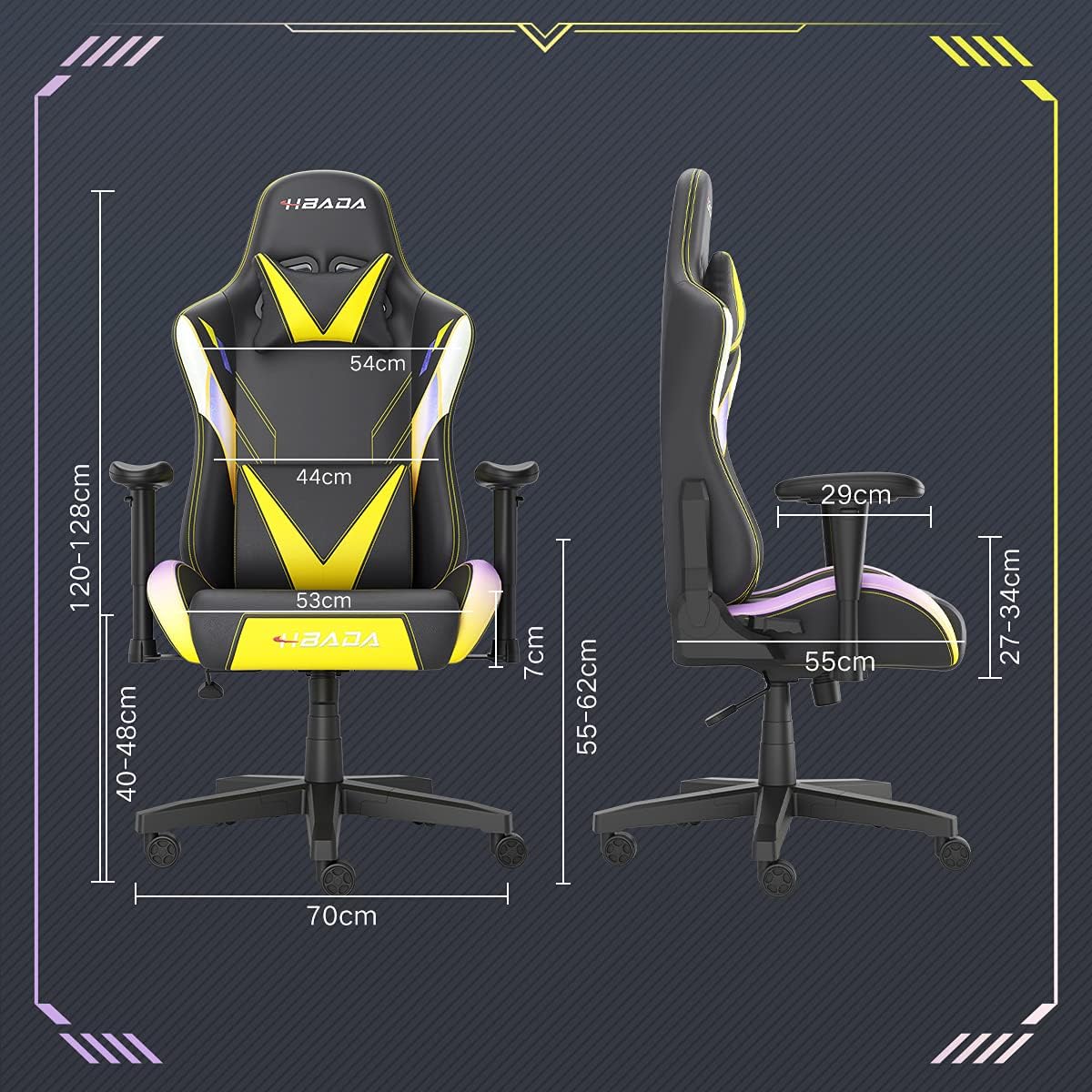
Image: A detailed diagram illustrating the various dimensions of the Hbada Gaming Chair, including height, width, and depth measurements.
- Üldkõrgus: 120–128 cm (reguleeritav)
- Istme kõrgus: 40–48 cm (reguleeritav)
- Istme laius: 53 cm
- Istme sügavus: 55 cm
- Seljatoe laius: 54 cm (shoulder area), 44 cm (lumbar area)
- Käetoe kõrgus (istmelt): 7 cm (reguleeritav)
- Aluse läbimõõt: 70 cm
Seadistamine ja kokkupanek
Please follow these steps carefully to assemble your Hbada Gaming Chair. It is recommended to have a clear, spacious area for assembly.
Kokkupanemise etapid:
- Step 1: Assemble the Base and Wheels
Insert the five casters into the holes on the star base. Then, place the gas lift cylinder into the center hole of the base.

Image: Illustration of attaching the five casters to the chair's star-shaped base and inserting the gas lift cylinder.
- Step 2: Attach the Seat and Backrest
Connect the backrest to the seat using the provided screws and mounting plates. Ensure all screws are tightened securely.

Image: Diagram showing the process of securing the backrest to the seat cushion using screws and brackets.
- 3. samm: paigaldage käetoed
Attach the armrests to the sides of the seat using the designated screws. Make sure they are firmly attached.

Image: Visual guide for attaching the armrests to the chair's seat base.
- Step 4: Connect Seat to Base
Carefully place the assembled seat onto the gas lift cylinder, ensuring it is properly seated and stable.

Image: Depiction of lowering the assembled seat onto the gas lift cylinder, connecting the upper and lower parts of the chair.
- Step 5: Attach Headrest and Lumbar Pillow
Secure the detachable headrest and lumbar support pillow to the chair as desired for optimal comfort.

Image: Instructions for attaching the headrest and lumbar support pillows to the gaming chair.
Kasutusjuhised
Your Hbada Gaming Chair is designed with several adjustable features to provide personalized comfort and support.
Key Adjustable Functions:
- Adjustable Sitting Height: Use the lever located under the seat on the right side to raise or lower the chair. Pull the lever up to adjust the height, then release it at your desired position. The seat has an 8 cm elevation range.
- Reclining Backrest (90° to 155°): The backrest can be reclined from 90 degrees (upright) to 155 degrees (nearly flat). Use the recline lever on the side of the chair to adjust the angle. Lean back to your preferred position and lock the lever.
- Reguleeritavad käetoed: The armrests can be adjusted in height by 7 cm. Locate the button or lever on the side of each armrest to unlock, adjust, and then lock them into your desired height.
- 360° Free Swivel: The chair features a full 360-degree swivel function, allowing for easy movement and access to your surroundings without needing to move the entire chair.
- Detachable Headrest and Lumbar Support: The chair includes a removable headrest pillow and lumbar support cushion for enhanced ergonomic comfort. Adjust their positions or remove them based on your preference.

Pilt: Ülemineview of the chair's ergonomic systems, highlighting adjustable sitting height, armrests, 155° reclining, 360° swivel, cool racing casters, and durable base.

Image: The Hbada Gaming Chair demonstrated in its 155-degree reclined position, illustrating the recline controller.
Hooldus
Regular maintenance will help prolong the life and appearance of your Hbada Gaming Chair.
- PU-naha puhastamine: Pühkige PU-nahast pindu pehme lapigaamp lapiga. Kangekaelsete plekkide korral kasutage õrna seebilahust ja seejärel pühkige puhta lapiga.amp lapiga. Vältige karme kemikaale või abrasiivseid puhastusvahendeid, kuna need võivad materjali kahjustada.
- Rataste hooldus: Periodically check the casters for accumulated dust or hair. Clean them with a brush or vacuum cleaner to ensure smooth movement and prevent damage to your flooring.
- Raam ja komponendid: Kontrollige regulaarselt kõiki kruvisid ja polte, et need oleksid kindlalt kinni. Vajadusel pingutage neid stabiilsuse säilitamiseks.
- Vältige otsest päikesevalgust: Prolonged exposure to direct sunlight can cause the PU leather to fade and crack. Position your chair away from direct sunlight when possible.
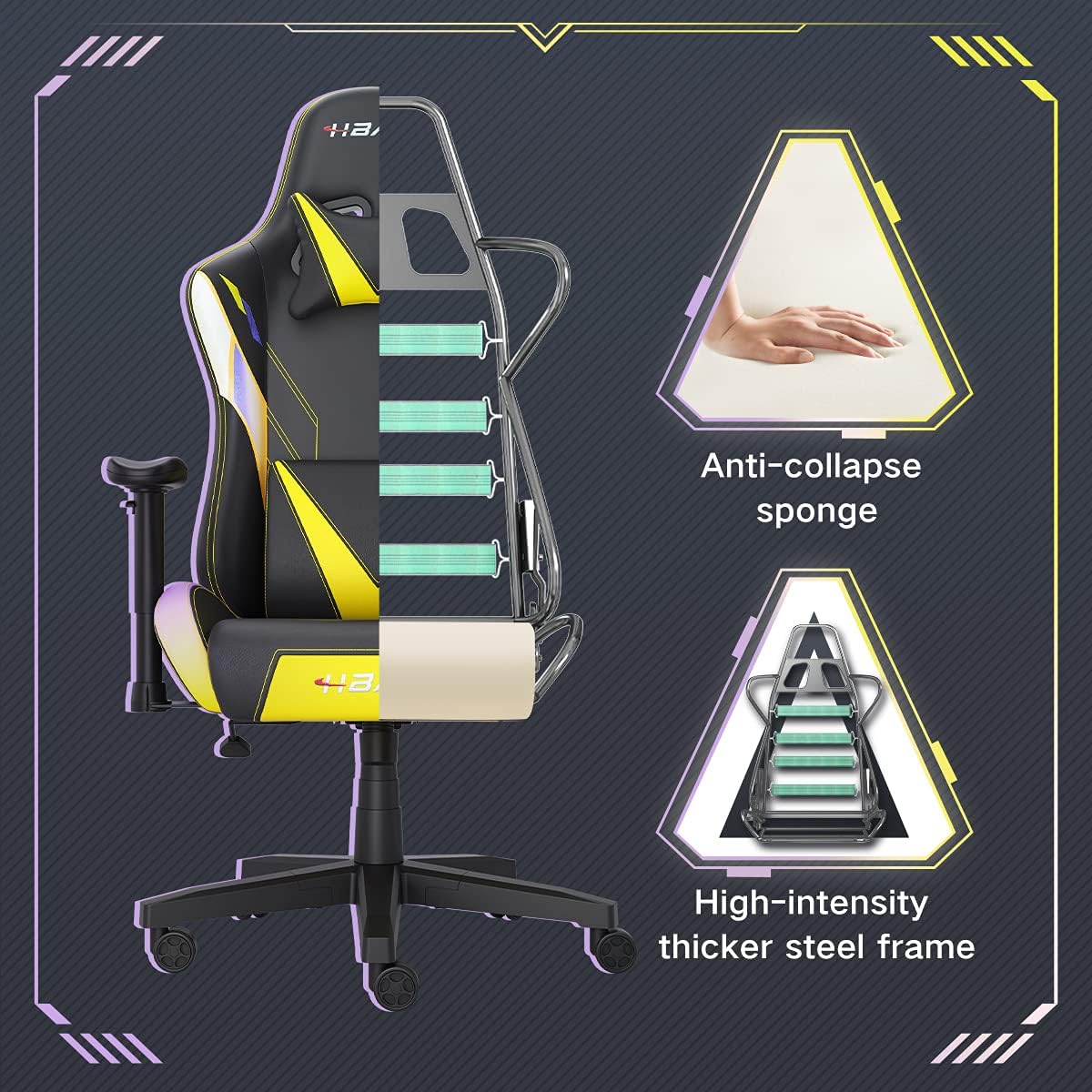
Pilt: Lõige view of the chair's internal structure, highlighting the anti-collapse sponge padding and the high-intensity thicker steel frame, indicating durable construction.
Veaotsing
If you encounter any issues with your Hbada Gaming Chair, refer to the following common problems and solutions:
| Probleem | Võimalik põhjus | Lahendus |
|---|---|---|
| Tooli kõrgust ei saa reguleerida | Gaasitõstuki rike või hoob pole rakendatud. | Veenduge, et kõrguse reguleerimise hoob on täielikult rakendatud. Kui probleem püsib, võib gaasitõstuk vajada väljavahetamist. Võtke ühendust klienditoega. |
| Tool on kõikuv või ebastabiilne | Lahtised kruvid või vale kokkupanek. | Check all assembly screws and bolts, and tighten them securely. Refer to the assembly instructions. |
| Rattad ei veere sujuvalt | Rataste vahele jäänud praht (juuksed, tolm). | Pöörake tool ümber ja eemaldage ratastelt praht. |
| Seljatugi ei lange ega lukustu | Seljatoe mehhanism on kinni kiilunud või hoob pole rakendatud. | Ensure the recline lever is fully engaged. Check for any obstructions around the mechanism. |
Tehnilised andmed
| Funktsioon | Detail |
|---|---|
| Kaubamärk | Hbada |
| Mudeli number | W203YMA/EU |
| ASIN | B095PSFLKX |
| Värv | Kollane |
| Materjal | PU Leather, Metal Frame |
| Toote mõõtmed | 70 x 70 x 128 cm (pikkus x laius x kõrgus) |
| Toote kaal | 22 kilogrammi |
| Eriomadused | Ergonomic, Swivel, Casters, Headrest Support, Adjustable Recline (90°-155°), Adjustable Seat Height (8cm range), Adjustable Armrests (7cm range) |
| Ühikute arv | 1.0 Arv |
Garantii ja tugi
Your Hbada Gaming Chair comes with a üheaastane garantii alates ostukuupäevast. See garantii katab tootmisdefektid ja materjalivead normaalse kasutamise korral.
If you experience any issues during use, including problems with installation, damage, or missing parts, please do not hesitate to contact Hbada customer service. We are committed to providing reliable service and can offer free exchanges for covered issues.
For support, please visit the official Hbada websaidil või võtke ühendust oma edasimüüjaga.


