Sissejuhatus
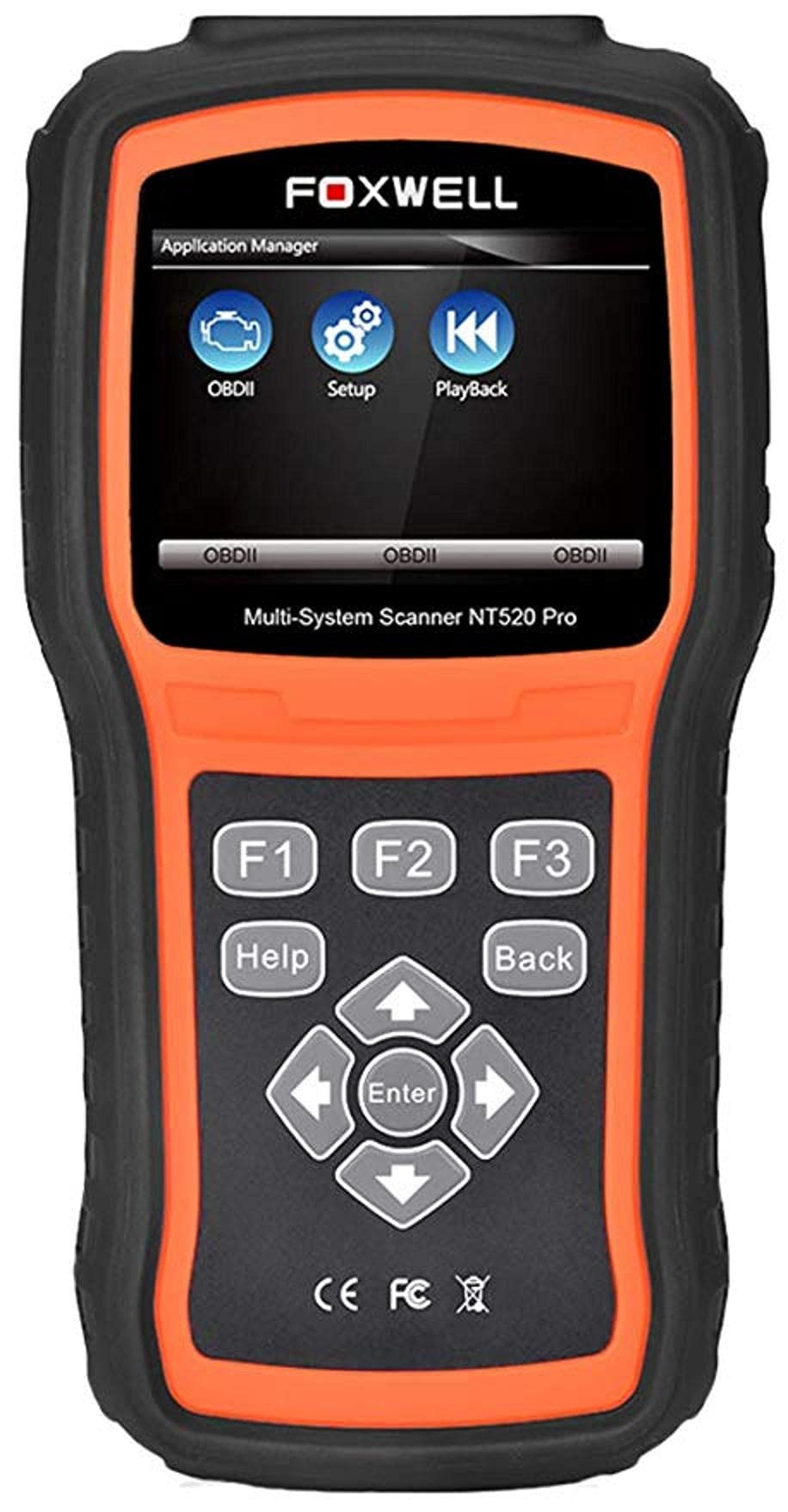
The Foxwell NT520 PRO is a professional-grade car fault diagnostic tool designed to help users identify and resolve issues in various vehicle systems. This device offers comprehensive diagnostic functions, including reading and clearing fault codes, viewing live data streams, and performing specialized tests and coding functions. It supports a wide range of car makes and models equipped with an OBD II - 16 pin connector.
1. Seadistamine
1.1 Pakendi sisu
- Foxwell NT520 PRO Diagnostic Tool
- OBD II diagnostikakaabel
- USB Cable (for updates and data transfer)
- Kasutusjuhend (see dokument)
1.2 Seadme esmane sisselülitamine
- Connect the OBD II diagnostic cable to the NT520 PRO device.
- Locate the vehicle's OBD II port, typically found under the dashboard on the driver's side.
- Plug the diagnostic cable into the vehicle's OBD II port. The device should power on automatically. If not, ensure the vehicle's ignition is in the ON position.
1.3 Tarkvaravärskendused
The NT520 PRO offers free updates for one selected car brand. Additional brands (up to five) can be added via internet for a fee. Regular software updates ensure compatibility with newer vehicle models and provide access to the latest diagnostic features.
- Ühendage seade kaasasoleva USB-kaabli abil arvutiga.
- Install the Foxwell update client software on your computer (refer to the official Foxwell weballalaadimise sait).
- Follow the on-screen instructions in the update client to register your device and perform software updates.
2. Kasutusjuhised
The NT520 PRO features a color screen for easy navigation and data display.
2.1 Lihtne navigeerimine
- Use the arrow keys to navigate through menus.
- Press the 'Enter' or 'OK' button to select an option.
- Press the 'Back' or 'Exit' button to return to the previous screen.
2.2 Diagnostikafunktsioonid
The device supports diagnostics for most available control units in a vehicle, including:
- Mootori juhtimismoodul (ECM)
- Käigukasti juhtimismoodul (TCM)
- Mitteblokeeruv pidurisüsteem (ABS)
- Turvapadjasüsteem
- Keha juhtimismoodul (BCM)
2.2.1 Veakoodide lugemine ja kustutamine
- From the main menu, select 'Diagnostics' or 'Scan'.
- Valige sõiduki mark ja mudel.
- Select the desired control unit (e.g., Engine, ABS).
- Valige „Loe koode”, et view current and stored Diagnostic Trouble Codes (DTCs).
- Select 'Clear Codes' to erase the detected fault codes. This will also turn off the Malfunction Indicator Lamp (MIL) if the fault is no longer present.
2.2.2 Otseülekanne
View reaalajas andmeid erinevatelt anduritelt ja komponentidelt.
- After selecting the control unit, choose 'Live Data'.
- Valige parameetrid, mida soovite jälgida.
- Andmed kuvatakse numbrilisel või graafilisel kujul.
2.2.3 ECU teave
Access information about the Electronic Control Unit.
- After selecting the control unit, choose 'ECU Information'.
- View details such as VIN, calibration ID, and software version.
2.2.4 Component Testing and Coding
The device can perform tests on various car parts and supports programming and coding for different components.
- Component Tests: Select 'Active Test' or 'Component Test' from the menu to activate specific components and check their functionality.
- Programming and Coding: This function allows for programming and coding of various parts. Use with caution and only if you are familiar with the specific vehicle's requirements.
- Key Coding: For certain models, the device supports key coding functionality. Refer to your vehicle's service manual for specific procedures.
3. Hooldus
3.1 Seadme hooldus
- Hoidke seadet puhtana ning tolmu- ja niiskusevabana.
- Hoidke seadet jahedas ja kuivas kohas, kui seda ei kasutata.
- Vältige seadme maha pillamist ega tugevate löökide saamist.
- Do not use harsh chemicals for cleaning; a soft, damp riidest piisab.
3.2 Tarkvarahooldus
Regularly check for and install software updates to ensure optimal performance and compatibility with the latest vehicle models. Refer to section 1.3 for update instructions.
4. Veaotsing
4.1 Seade ei lülitu sisse
- Ensure the OBD II cable is securely connected to both the device and the vehicle's OBD II port.
- Veenduge, et sõiduki süüde on ON-asendis.
- Kontrollige sõiduki OBD II pordi kaitset (vaadake oma sõiduki kasutusjuhendit).
4.2 Sideviga
- Confirm the vehicle supports the OBD II protocol (most vehicles manufactured after 1996 do).
- Ensure the diagnostic cable is not damaged.
- Sõidukispetsiifilise probleemi välistamiseks proovige ühenduda teise sõidukiga.
- Värskendage seadme tarkvara uusimale versioonile.
4.3 Rikkeindikaator Lamp (MIL) Remains On
After clearing fault codes, if the MIL (Check Engine Light) remains illuminated, it indicates that the underlying fault has not been resolved or a new fault has occurred. Address the root cause of the fault before attempting to clear codes again.
5. Tehnilised andmed
| Funktsioon | Detail |
|---|---|
| Tootja | Foxwell |
| Kaubamärk | Foxwell |
| Mudeli number | 111111111111 |
| Tootja osanumber | 111111111111 |
| Toiteallikas | Juhtmega elekter |
| Kauba kaal | 818 g |
| Saatmise mõõtmed | 21.2 x 17.8 x 8.2 cm |
| ASIN | B092326PXZ |
| Esimene vaba kuupäev | 8. aprill 2021 |
6. Garantii ja tugi
6.1 Toote garantii
Please refer to the warranty card included with your product or visit the official Foxwell website for detailed warranty information. Warranty terms typically cover manufacturing defects for a specified period from the date of purchase.
6.2 Tehniline tugi
For technical assistance, software updates, or troubleshooting not covered in this manual, please contact Foxwell customer support through their official website or authorized service centers. Have your product model and serial number ready when contacting support.


