1. Sissejuhatus
Tänan ostu eestasing the Blackstar ID:Core Stereo 10 Sugar Skull V2 Limited Edition amplifier. This 10-watt (2x5W) stereo combo amplifier is designed to provide a versatile and high-quality sound experience for electric guitarists. It features Blackstar's patented ISF (Infinite Shape Feature) control, a range of voices, and built-in effects, making it ideal for practice, recording, and small performances. This manual provides essential information for safe and effective use of your ampelujõulisem.
2. Olulised ohutusjuhised
- Lugege juhiseid: Enne selle toote kasutamist lugege läbi kõik ohutus- ja kasutusjuhised.
- Säilitage juhised: Hoidke need juhised edaspidiseks kasutamiseks alles.
- Pange tähele hoiatusi: Järgige kõiki tootel ja kasutusjuhendis toodud hoiatusi.
- Vesi ja niiskus: Ärge kasutage seda seadet vee lähedal.
- Puhastamine: Puhastage ainult kuiva lapiga.
- Ventilatsioon: Ärge blokeerige ühtegi ventilatsiooniava. Paigaldage vastavalt tootja juhistele.
- Kuumus: Ärge paigaldage soojusallikate, näiteks radiaatorite, küttekehade, ahjude või muude seadmete (sh amptõsteseadmed), mis toodavad soojust.
- Toitejuhtme kaitse: Kaitske toitejuhet selle peale kõndimise või muljumise eest, eriti pistikute, pistikupesade ja nende seadmest väljumise kohta.
- Tormi ajal vooluvõrgust lahti ühendamine: Ühendage seade vooluvõrgust lahti äikesetormide ajal või siis, kui seda pikka aega ei kasutata.
- Teenindus: Andke kõik hooldustööd kvalifitseeritud teeninduspersonalile. Hooldus on vajalik, kui seade on mingil viisil kahjustatud, nt toitejuhe või pistik on kahjustatud, vedelikku või seadmesse on kukkunud esemeid, seade on sattunud vihma või niiskuse kätte, ei tööta normaalselt või on maha kukkunud.
3. Pakendi sisu
Palun märkige järgmiste üksuste ruut:
- Blackstar ID:Core Stereo 10 Sugar Skull V2 Limited Edition Ampelujõulisem
- Toiteallikas
- USB kaabel
- Kasutusjuhend (see dokument)
4. Juhtnupud ja funktsioonid
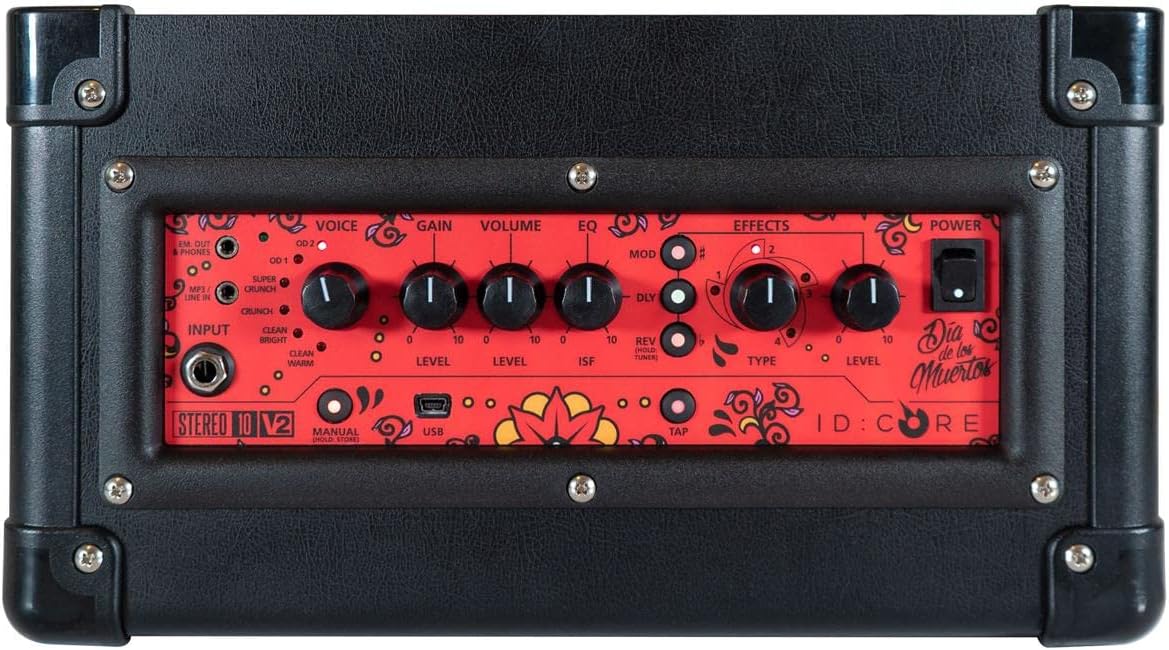
Pilt: Ülemine view kohta amplifier's control panel, showing all knobs, buttons, and input/output jacks.
Esipaneeli juhtnupud:
- Sisend: 6.35mm (1/4") jack for connecting your guitar.
- Hääl: Rotary switch to select one of six Blackstar voices: Clean Warm, Clean Bright, Crunch, Super Crunch, OD 1, OD 2.
- Kasum: Kontrollib üledrive'i või moonutuse hulka.
- Maht: Reguleerib üldist väljundtaset ampelujõulisem.
- EQ: Tooni juhtimine.
- ISF (lõpmatu kuju funktsioon): Patented control that shifts the tone stack response between a USA-style (counter-clockwise) and a UK-style (clockwise) ampelujõulisem.
- Modifikatsioon (modulatsioon): Rotary switch to select and adjust the level of modulation effects (Chorus, Flanger, Phaser, Tremolo).
- Dly (Delay): Rotary switch to select and adjust the level of delay effects (Linear, Analogue, Tape, Multi).
- Rev (Reverb): Rotary switch to select and adjust the level of reverb effects (Room, Hall, Spring, Plate).
- Tüüp: Selects the specific effect type within the Mod, Dly, or Rev categories.
- Tase: Adjusts the overall level of the selected effect.
- Puudutage: Button to set the tempo for time-based effects (Delay, Tremolo).
- Võimsus: Sisse/välja lüliti ampelujõulisem.
- USB: USB-B port for connecting to a computer for recording and using Blackstar's Architect software.
- Em. Out / Phones: 6.35mm (1/4") jack for headphones or direct recording output with speaker emulation.
- MP3 / Line In: 3.5mm (1/8") stereo jack for connecting external audio devices like MP3 players or phones.

Pilt: Esikülg view of the Blackstar ID:Core Stereo 10 ampelujõud, showcasing the unique Sugar Skull V2 design on the speaker grille.
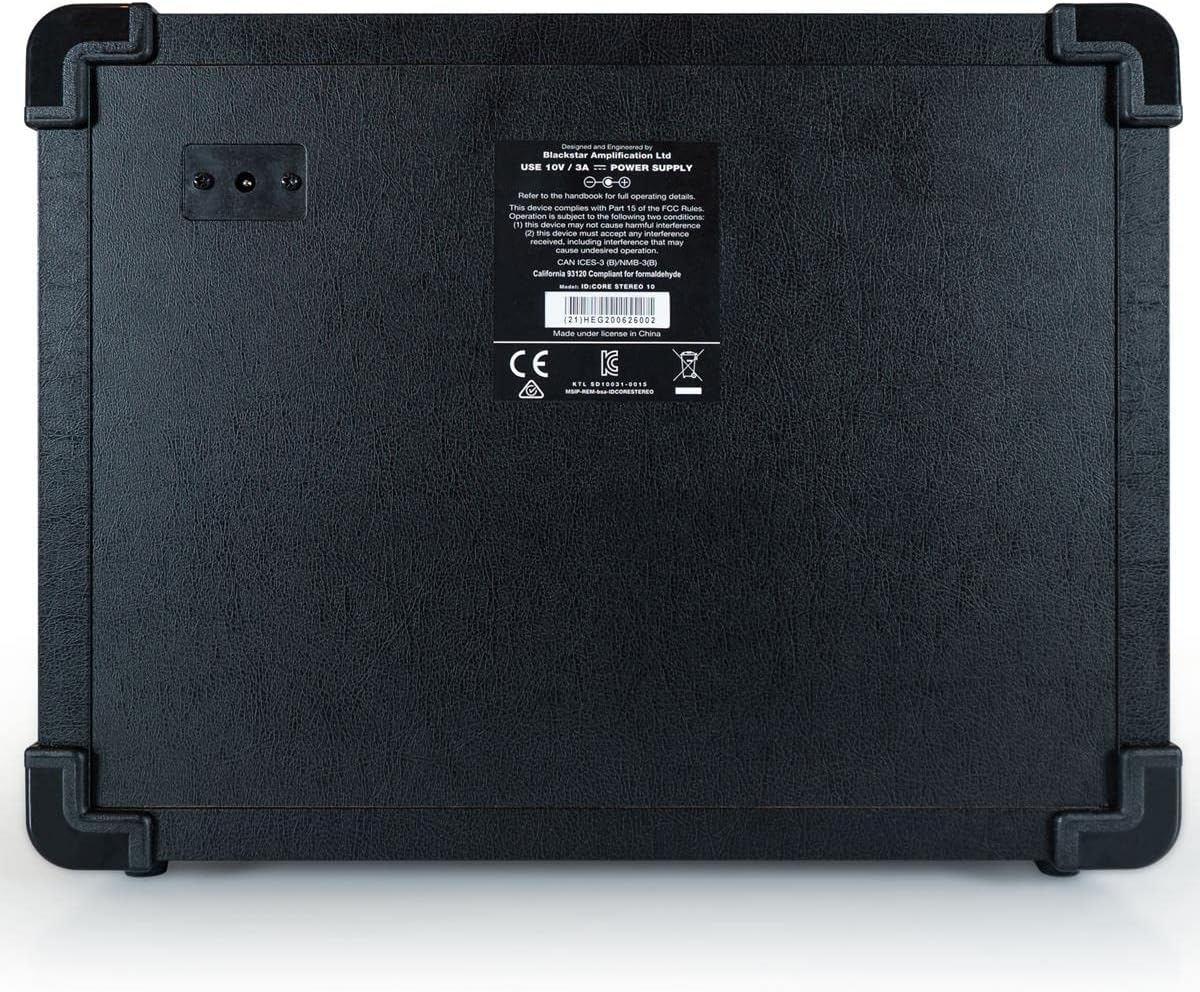
Pilt: Tagumine view of the Blackstar ID:Core Stereo 10 amplifier, displaying the product information label and power input.
5. Seadistamine
- Lahtipakkimine: Eemaldage ettevaatlikult amplifier and all accessories from the packaging. Retain the packaging for future transport or storage.
- Paigutus: Asetage amplifier on a stable, flat surface. Ensure adequate ventilation around the unit. Avoid placing it near heat sources or in direct sunlight.
- Toiteühendus: Connect the supplied power supply unit to the DC input jack on the rear of the amplifier. Plug the power supply into a suitable mains outlet. Ensure the ampEnne ühendamist veenduge, et seadme toitelüliti on OFF-asendis.
- Kitarri ühendus: Ühendage oma elektrikitarr seadmega Sisend jack on the front panel using a standard 6.35mm (1/4") instrument cable.
- External Audio (Optional): To play along with music, connect an MP3 player, phone, or other audio source to the MP3 / Line In jack using a 3.5mm stereo cable.
- USB-ühendus (valikuline): For recording or using the Blackstar Architect software, connect the amplifier to your computer using the supplied USB cable.
6. Kasutusjuhised
- Toide sisse: Ensure all connections are secure, then switch the Võimsus button to the ON position. The power indicator light will illuminate.
- Helitugevuse määramine: Alustage Helitugevus knob at a low setting to avoid sudden loud sounds.
- Valige hääl: Pöörake Hääl switch to choose your desired amplifier type (e.g., Clean Warm, Crunch, OD 1).
- Reguleerige võimendust: Kasutage Kasu knob to control the amount of drive. Lower settings provide cleaner tones, while higher settings introduce more distortion.
- Shape Tone with EQ and ISF: Reguleerige EQ knob for general tone shaping. Experiment with the ISF control to blend between American (tight low-end, aggressive mids) and British (woodier, less aggressive) ampelupäästja omadused.
- Rakenda efektid:
- Select a modulation, delay, or reverb effect using the Mod, Dly, või Rev rotary switches.
- Kasutage Tüüp knob to select a specific effect within that category (e.g., Chorus, Flanger for Mod).
- Adjust the effect's intensity with the Tase nupp.
- For time-based effects (Delay, Tremolo), press the Puudutage button repeatedly at your desired tempo to synchronize the effect.
- Headphone/Recording Output: Ühendage kõrvaklapid Em. Out / Phones jack for silent practice. This output also provides a speaker-emulated signal for direct recording.
- USB -heli: When connected to a computer via USB, the amplifier acts as an audio interface, allowing you to record your guitar directly into a DAW or use the Blackstar Architect software for deeper editing and patch management.
- Toide välja: When finished, turn the Helitugevus down, then switch the Võimsus nuppu OFF asendisse.
7. Hooldus
- Puhastamine: Puhastage amplifier's exterior with a soft, dry cloth. Do not use abrasive cleaners, solvents, or waxes.
- Hoiustamine: Kui seadet pikemat aega ei kasutata, pange see hoiule amplifier in a dry, cool place, away from direct sunlight and extreme temperatures.
- Ventilatsioon: Ensure that the ventilation openings are always clear to prevent overheating.
- Kaabli hooldus: Always handle power and instrument cables carefully. Avoid bending or kinking them sharply.
8. Veaotsing
| Probleem | Võimalik põhjus | Lahendus |
|---|---|---|
| Ei mingit heli ampelujõulisem |
|
|
| Poor sound quality / Buzzing noise |
|
|
| Efektid ei tööta |
|
|
9. Tehnilised andmed
- Mudel: IDCORE10 V3
- Väljund vattage: 10 Watts (2 x 5W Stereo)
- Kõlarid: 2 x 3" Blackstar Speakers
- Hääled: 6 (Puhas soe, Puhas ere, Krõmps, Superkrõmps, OD 1, OD 2)
- Efektid: Modulation (Chorus, Flanger, Phaser, Tremolo), Delay (Linear, Analogue, Tape, Multi), Reverb (Room, Hall, Spring, Plate)
- Juhtelemendid: Voice, Gain, Volume, EQ, ISF, Mod, Dly, Rev, Type, Level, Tap, Power
- Sisendid: Guitar Input (6.35mm jack), MP3/Line In (3.5mm stereo jack), USB-B
- Väljundid: Emulated Out/Headphones (6.35mm jack)
- Toiteallikas: Juhtmega elekter
- Ühilduvad seadmed: Elektrikitarr
- Kauba kaal: 10 naela (4.54 kg)
- Toote mõõtmed: 16 x 18 x 14 tolli (40.6 x 45.7 x 35.6 cm)
- ASIN: B08Z88WN8T
10. Garantii ja tugi
Blackstar Amplification products are designed and manufactured to the highest standards. For detailed warranty information specific to your region and product, please refer to the warranty card included with your purchase or visit the official Blackstar Amplifikatsioon website. For technical support or service inquiries, please contact your authorized Blackstar dealer or Blackstar customer support directly.
Interneti-ressursid:
- Blackstar Amplitsentseerimisametnik Websait: www.blackstaramps.com
- Blackstar Architect Software: www.blackstaramps.com/architect


