Sissejuhatus
Tänan ostu eestasing the Bytech True Wireless Bluetooth Boost Link True Speaker. This manual provides essential information for setting up, operating, and maintaining your new speakers. Please read this manual thoroughly before use to ensure proper operation and to maximize your listening experience. These speakers feature True Wireless Stereo (TWS) functionality, Bluetooth connectivity, FM Radio, and Bass Boost for rich audio.
Ohutusteave
- Ärge jätke kõlareid äärmuslike temperatuuride, niiskuse ega otsese päikesevalguse kätte.
- Avoid dropping or subjecting the speakers to strong impacts.
- Do not disassemble, repair, or modify the speakers yourself. Refer all servicing to qualified personnel.
- Keep the speakers away from water and other liquids.
- Kasutage ainult ettenähtud laadimiskaablit ja toiteadapterit.
- Clean the speakers with a soft, dry cloth. Do not use abrasive cleaners or solvents.
- Listen at moderate volume levels to avoid hearing damage.
Pakendi sisu

Image: The Bytech Boost Link True Wireless Speakers shown in their retail packaging, highlighting the two speakers and the Bluetooth connectivity feature.
Palun kontrollige, et kõik esemed oleksid olemas ja heas seisukorras:
- 2 x Bytech Boost Link True Wireless Speakers
- 1 x laadimiskaabel (USB)
- 1 x Kasutusjuhend (käesolev dokument)
Toode läbiview

Pilt: Lähivõte eestpoolt view of the two Bytech Boost Link True Wireless Speakers, showing the speaker grilles and control buttons at the bottom.
Tutvuge kõlari komponentide ja juhtnuppudega:
- Kõlari võre: Protects the speaker driver.
- Juhtnupud:
- Toitenupp: Power On/Off, Play/Pause.
- Režiimi nupp: Switch between Bluetooth, FM Radio, etc.
- Eelmise loo/helitugevuse vähendamise nupp: Eelmise loo kerimiseks lühike vajutus, helitugevuse vähendamiseks pikk vajutus.
- Järgmise loo/helitugevuse suurendamise nupp: Lühike vajutus järgmise loo jaoks, pikk vajutus helitugevuse suurendamiseks.
- Laadimisport: USB-laadimiskaabli ühendamiseks.
- LED indikaator: Näitab toite olekut, laadimise olekut ja sidumise olekut.
Seadistamine
Kõlarite laadimine
Before first use, fully charge both speakers. Connect the supplied USB charging cable to the charging port on each speaker and plug the other end into a USB power adapter (not included) or a computer's USB port. The LED indicator will show charging status and turn off or change color when fully charged.
Sisse/välja lülitamine
- Sisselülitamiseks: Press and hold the Power button on each speaker until the LED indicator lights up and you hear a power-on prompt.
- Väljalülitamiseks: Press and hold the Power button on each speaker until the LED indicator turns off and you hear a power-off prompt.
Kasutusjuhised
Bluetoothi sidumine (ühe kõlari režiim)
- Veenduge, et kõlar on sisse lülitatud ja Bluetoothi sidumisrežiimis (LED-indikaator vilgub).
- Luba oma seadmes (nutitelefon, tahvelarvuti, sülearvuti) Bluetooth ja otsi saadaolevaid seadmeid.
- Select "BYTECH BOOST LINK" (or similar name) from the list.
- Once paired, the LED indicator will stop flashing and remain solid, and you will hear a confirmation sound.
True Wireless Stereo (TWS) Pairing (Two Speakers)
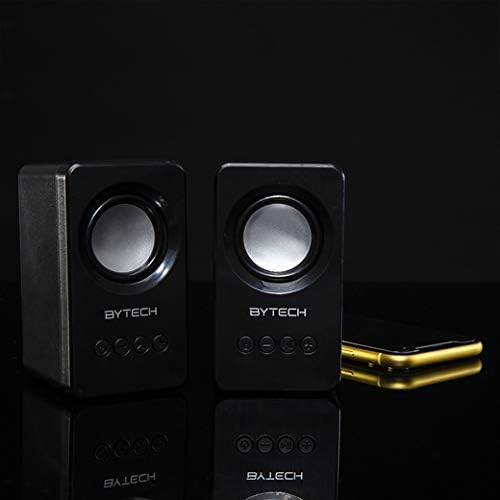
Image: The two Bytech Boost Link True Wireless Speakers positioned next to a smartphone, symbolizing their ability to connect wirelessly to each other and a device for stereo sound.
For a true stereo sound experience, you can pair both speakers together:
- Power on both Bytech Boost Link speakers. Do not connect them to your Bluetooth device yet.
- The speakers will automatically attempt to pair with each other. You will hear a confirmation sound when they are successfully linked for TWS. One speaker will become the master (left channel) and the other the slave (right channel).
- Once TWS paired, the master speaker will enter Bluetooth pairing mode (LED flashing).
- On your device, enable Bluetooth and search for "BYTECH BOOST LINK". Connect to this single entry.
- Mõlemad kõlarid esitavad nüüd heli stereos.
- Märkus. If the speakers do not automatically pair, try double-pressing the Mode button on one of the speakers to initiate TWS pairing.
FM-raadio töö
- Power on the speaker(s).
- Vajutage nuppu Režiim nuppu korduvalt, kuni kuulete FM-raadio teavitust.
- Jaamade automaatseks skannimiseks ja salvestamiseks vajutage ja hoidke all Esita/Paus button. The speaker will scan and store available FM stations.
- Kasutage Eelmine lugu ja Järgmine lugu nupud salvestatud jaamade vahel navigeerimiseks.
Heli taasesitus ja helitugevuse reguleerimine
- Esita/peata: Vajutage lühidalt toitenuppu.
- Järgmine lugu: Short press the Next Track/Volume Up button.
- Eelmine lugu: Short press the Previous Track/Volume Down button.
- Helitugevuse suurendamine: Long press the Next Track/Volume Up button.
- Hääl maha: Long press the Previous Track/Volume Down button.
Hooldus
- Puhastamine: Use a soft, dry, lint-free cloth to clean the surface of the speakers. Do not use liquid cleaners, aerosols, or solvents.
- Hoiustamine: Kui kõlareid pikemat aega ei kasutata, hoidke neid jahedas ja kuivas kohas, eemal otsesest päikesevalgusest ja äärmuslikest temperatuuridest.
- Aku hooldus: To prolong battery life, avoid fully discharging the battery frequently. Charge the speakers regularly, even if not in use.
Veaotsing
| Probleem | Võimalik põhjus | Lahendus |
|---|---|---|
| Kõlar ei lülitu sisse. | Aku tühi. | Laadige kõlar täielikult. |
| Ei saa Bluetoothi kaudu siduda. | Kõlar ei ole sidumisrežiimis; seadme Bluetooth on välja lülitatud; seadmest liiga kaugel. | Ensure speaker LED is flashing; Turn on Bluetooth on your device; Move speaker closer to device (within 10 meters). |
| Ei mingit heli. | Volume too low; Speaker not connected; Incorrect mode. | Increase volume on speaker and device; Re-pair Bluetooth; Ensure correct mode (Bluetooth/FM). |
| TWS-i sidumine ebaõnnestus. | Kõlarid on juba seadmega ühendatud; kõlarid on üksteisest liiga kaugel. | Disconnect speakers from any device; Power off and on both speakers, then try TWS pairing again; Ensure speakers are close to each other. |
| Halb FM-raadio vastuvõtt. | Nõrk signaal; Häired. | Relocate the speaker to an area with better reception; Extend the charging cable (can act as an antenna). |
Tehnilised andmed
- Mudel: BY-AU-BS-152-BK
- Kaubamärk: Bytech
- Ühenduvustehnoloogia: Juhtmeta (Bluetooth)
- Heliväljundi režiim: Ümbritsev
- Kõlari tüüp: Ruumiline heli
- Eriomadused: Wireless Bluetooth, Bass Boost, FM Radio, True Wireless Stereo (TWS)
- Soovitatavad kasutusalad: Muusikamängijatele
- Ühilduvad seadmed: Sülearvuti, tahvelarvuti, nutitelefon
- Kontrolleri tüüp: Seadmel olevad nupud
- Pakendi mõõtmed: 20.7 x 16 x 9 cm
- Kaal: 560 g
Garantii ja tugi
Bytech products are designed and manufactured to the highest quality standards. For information regarding warranty coverage, technical support, or service inquiries, please refer to the warranty card included with your purchase or visit the official Bytech webPalun hoidke oma ostutõend garantiinõuete esitamiseks alles.
For further assistance, please contact Bytech customer support.


