Sissejuhatus
The Mi Electric Toothbrush T100 is designed to provide an efficient and superior cleaning experience compared to traditional manual toothbrushes. It incorporates advanced features such as high-frequency vibrations, multiple brushing modes, and a smart timer to enhance your daily oral hygiene routine. This manual provides essential information for the proper use, maintenance, and care of your device.

Joonis 1: Mi Electric Toothbrush T100 and packaging.
Peamised omadused:
- Ultra Soft Bristles: Designed for effective yet gentle cleaning.
- Kõrgsageduslik vibratsioon: Up to 18,000 vibrations per minute for thorough cleaning.
- Dual Pro Brush Modes: Two distinct modes to suit individual preferences.
- EquiClean Auto Timer: Ensures optimal brushing duration for each quadrant of your mouth.
- IPX7 veekindel disain: Allows for safe use and easy cleaning under running water.
- Kauakestev aku: Up to 30 days of usage on a single charge.
- USB kiirlaadimine: Mugav ja kiire laadimine.
- LED indikaator: Provides battery status alerts.
- Madala müratasemega töö: Töötab umbes 60 dB müratasemel.
- Libisemisvastane disain: Ensures a secure grip during use.
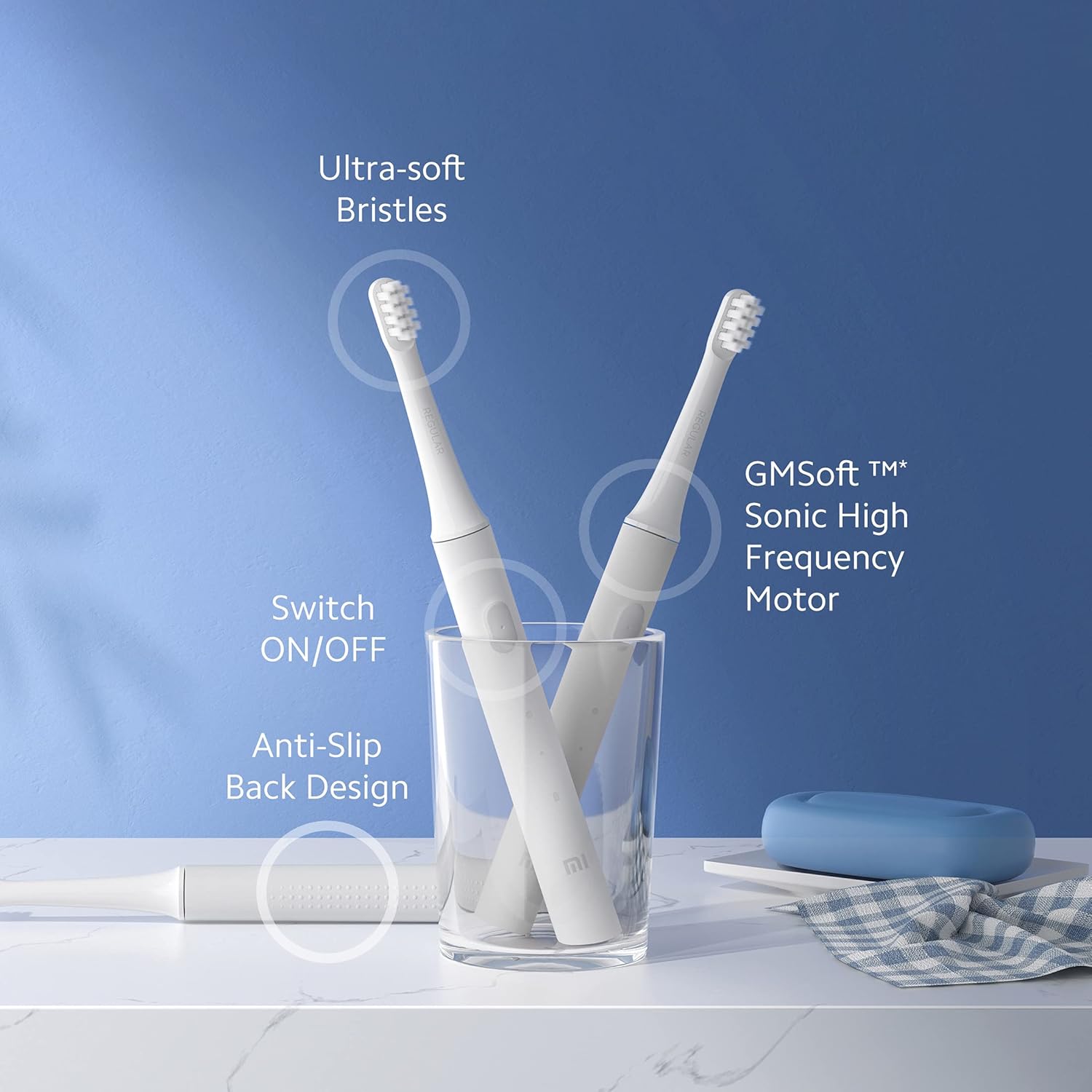
Joonis 2: Läbiview of Mi Electric Toothbrush T100 features.
Pakendi sisu
Enne seadistamise jätkamist veenduge, et pakendis on kõik esemed olemas:
- Mi Electric Toothbrush T100 Handle
- Brush Head (Ultra Soft Bristles)
- USB laadimiskaabel
- Kasutusjuhend (see dokument)
Seadistamine
1. Esialgne laadimine
Before first use, fully charge the toothbrush. The device is equipped with a rechargeable Lithium-Ion battery.
- Locate the USB charging port at the bottom of the toothbrush handle.
- Avage laadimispordi kaitsekate.
- Connect the provided USB charging cable to the toothbrush and a compatible USB power adapter (not included).
- Plug the adapter into a power outlet. The LED indicator on the handle will illuminate to show charging status.
- Allow the toothbrush to charge until the LED indicator shows a full charge (refer to the LED indicator section for details). A full charge typically provides up to 30 days of usage.

Joonis 3: USB fast charging port.
2. Harjapea kinnitamine
Joondage harjapea hambaharja käepidemel oleva metallvarrega ja suruge seda kindlalt allapoole, kuni see klõpsuga oma kohale lukustub. Enne kasutamist veenduge, et see on kindlalt kinnitatud.
Kasutusjuhised
1. Hammaste pesemine
- Tehke harjased märjaks ja kandke väike kogus hambapastat.
- Asetage harjapea oma hammaste vastu igemepiiri suunas kerge nurga all.
- Vajutage hambaharja sisselülitamiseks toitenuppu.
- Gently move the brush head slowly across each tooth, allowing the high-frequency vibrations to clean. Avoid scrubbing vigorously.
- The EquiClean Auto Timer will pause briefly every 30 seconds to indicate when to move to the next quadrant of your mouth. After 2 minutes, the toothbrush will automatically turn off, signaling the completion of the recommended brushing time.
- After brushing, press the power button again to turn off the toothbrush if it hasn't already.
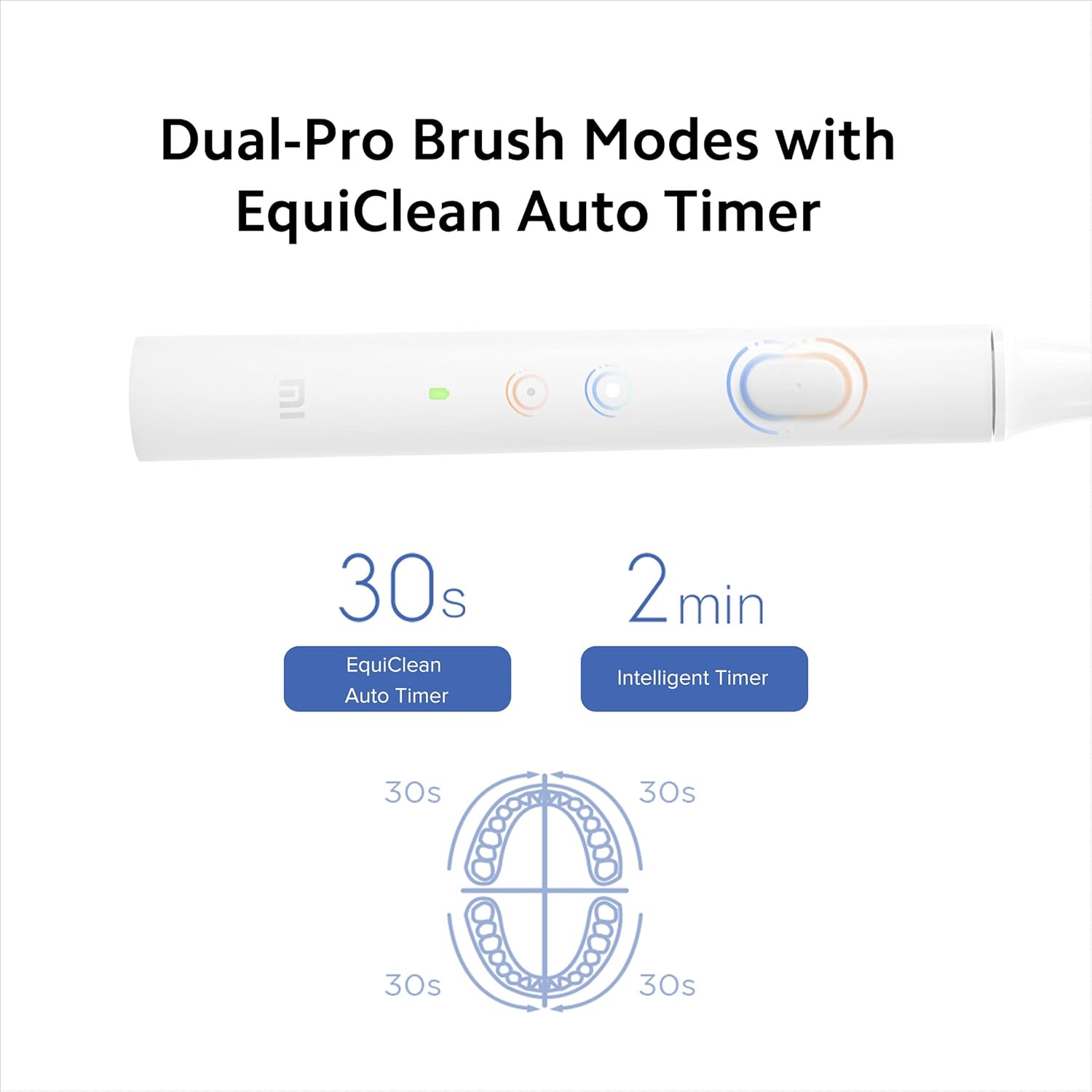
Joonis 4: Dual-Pro Brush Modes and EquiClean Auto Timer.
2. Dual Pro Brush Modes
The Mi T100 offers two brushing modes. Press the power button repeatedly to cycle through the modes:
- Standardrežiim: Igapäevaseks puhastamiseks.
- Õrn režiim: For sensitive teeth and gums.

Joonis 5: GMSoft Sonic High Frequency Motor for multi-dimensional cleaning.
Hooldus
1. Hambaharja puhastamine
Regular cleaning ensures hygiene and extends the lifespan of your toothbrush.
- After each use, rinse the brush head thoroughly under running water while the toothbrush is still on to remove any remaining toothpaste or debris.
- Lülitage hambahari välja ja eemaldage harjapea.
- Rinse both the brush head and the handle separately under running water. Pay attention to the junction area between the head and the handle to prevent accumulation of residue.
- Pühkige käepide pehme lapiga kuivaks.
- The toothbrush is IPX7 waterproof, allowing it to be safely rinsed under water.

Joonis 6: IPX7 Waterproof design for easy cleaning.
2. Harjapea vahetus
It is recommended to replace the brush head every three months, or sooner if the bristles become frayed or worn. Worn bristles are less effective at cleaning and can irritate gums.
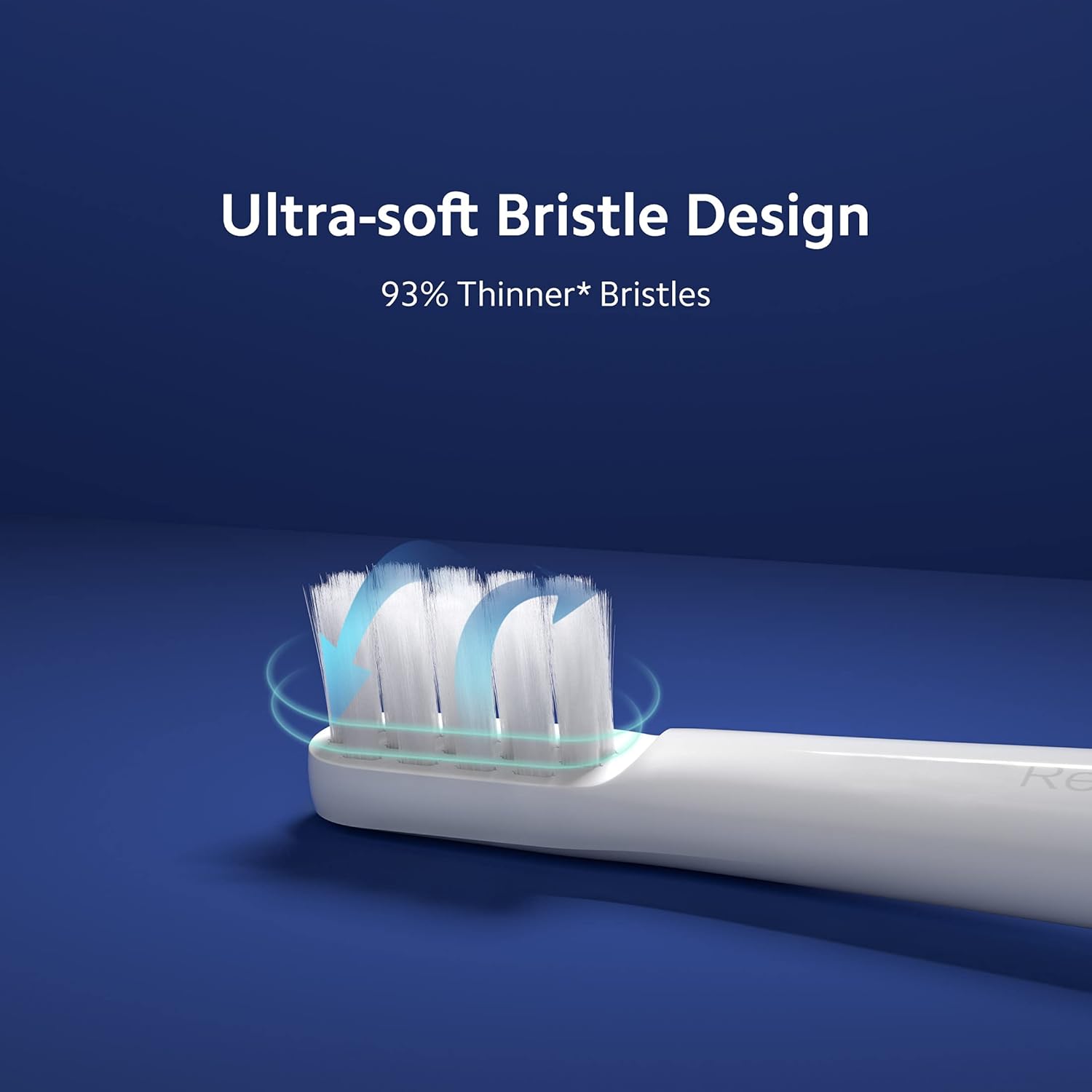
Joonis 7: Ultra-soft bristle design.
3. Aku hooldus
To maintain optimal battery performance, avoid fully discharging the battery frequently. Recharge the toothbrush when the LED indicator signals low battery.
Veaotsing
If you encounter issues with your Mi Electric Toothbrush T100, refer to the following common problems and solutions:
| Probleem | Võimalik põhjus | Lahendus |
|---|---|---|
| Hambahari ei lülitu sisse. | Tühja või madala laetuse tasemega aku. | Charge the toothbrush fully using the provided USB cable. |
| Vähendatud vibratsiooni intensiivsus. | Aku tühjenemas või harjapea kulunud. | Recharge the battery. Replace the brush head if it is old or worn. |
| Toothbrush stops unexpectedly during use. | Battery protection mechanism or residue accumulation. | Ensure the battery is sufficiently charged. Clean the junction between the brush head and handle thoroughly to remove any dried toothpaste or water residue. |
| Laadimise indikaator ei tööta. | Vigane kaabel või toiteallikas. | Proovige teist USB-kaablit või toiteadapterit. Veenduge, et laadimisport oleks puhas ja prahist vaba. |
Tehnilised andmed
| Funktsioon | Detail |
|---|---|
| Mudel | T100 (Item model number: 26283) |
| Mõõdud (PxLxK) | 21.9 x 2.1 x 2 cm |
| Kaal | 46 g |
| Vibratsiooni sagedus | Kuni 18,000 pööret minutis |
| Aku tööiga | Kuni 30 päeva (tüüpilise kasutuse põhjal) |
| Veekindluse reiting | IPX7 |
| Harjaste tüüp | Ultra Pehme |
| Toiteallikas | Akutoitel (taaslaetav liitiumioon) |
| Müra tase | Umbes 60 dB |
| Värv | Valge |
| Materjali omadus | Taaskasutatav |
| Soovitatav vanusevahemik | 15 kuni 65 aastat |
| Tootja | Wuxi Qinghe Xiaobei Technolody Co. Ltd. |
| Maaletooja | Xiaomi Technology India Pvt. Ltd. |

Joonis 8: Low noise design for comfortable use.

Joonis 9: Anti-slip design for secure handling.
Garantii ja tugi
Garantii teave
The Mi Electric Toothbrush T100 comes with a One Year Pan-India Warranty covering all manufacturing defects. Please retain your purchase receipt for warranty claims.
Ohutusteave
- See toode on mõeldud kasutamiseks täiskasvanutele.
- Recommended for individuals 18 years and older.
- Do not use if you have severe oral conditions or have recently undergone oral surgery without consulting a dentist.
Klienditugi
For further assistance, technical support, or warranty inquiries, please contact Xiaomi Technology India Pvt. Ltd. customer service. Refer to the official MI webKontaktandmete saamiseks külastage veebisaiti või ostudokumentatsiooni.