Sissejuhatus
This manual provides essential information for the proper installation, operation, and maintenance of your Zebronics Zeb-D370S DVD Player. Please read this manual thoroughly before using the device to ensure safe and efficient operation. Keep this manual for future reference.
Oluline ohutusteave
- Ärge jätke seadet vihma ega niiskuse kätte, et vältida tulekahju või elektrilööki.
- Ärge avage c-dasing. Kõik hooldustööd suunake kvalifitseeritud personalile.
- Tagage seadme ümber piisav ventilatsioon. Ärge blokeerige ventilatsiooniavasid.
- Kasutage ainult seadmega kaasasolevat või tootja poolt ette nähtud toiteadapterit.
- Vältige seadme asetamist ebastabiilsele pinnale.
- Ühendage toitejuhe lahti äikese ajal või kui seadet pikka aega ei kasutata.
Pakendi sisu
Veenduge, et pakendis on kõik esemed olemas:
- Zebronics Zeb-D370S DVD Player Unit
- Kaugjuhtimispult
- AV Cable
- Toitekaabel
- Kasutusjuhend
Toode läbiview
The Zebronics Zeb-D370S is a versatile DVD player featuring a built-in stereo speaker and amplifier, HDMI, USB, and SD card support, and dual karaoke microphone inputs. It supports multiple formats and offers 5.1 channel, coaxial, and optical audio outputs.
Esipaneeli juhtnupud ja pordid
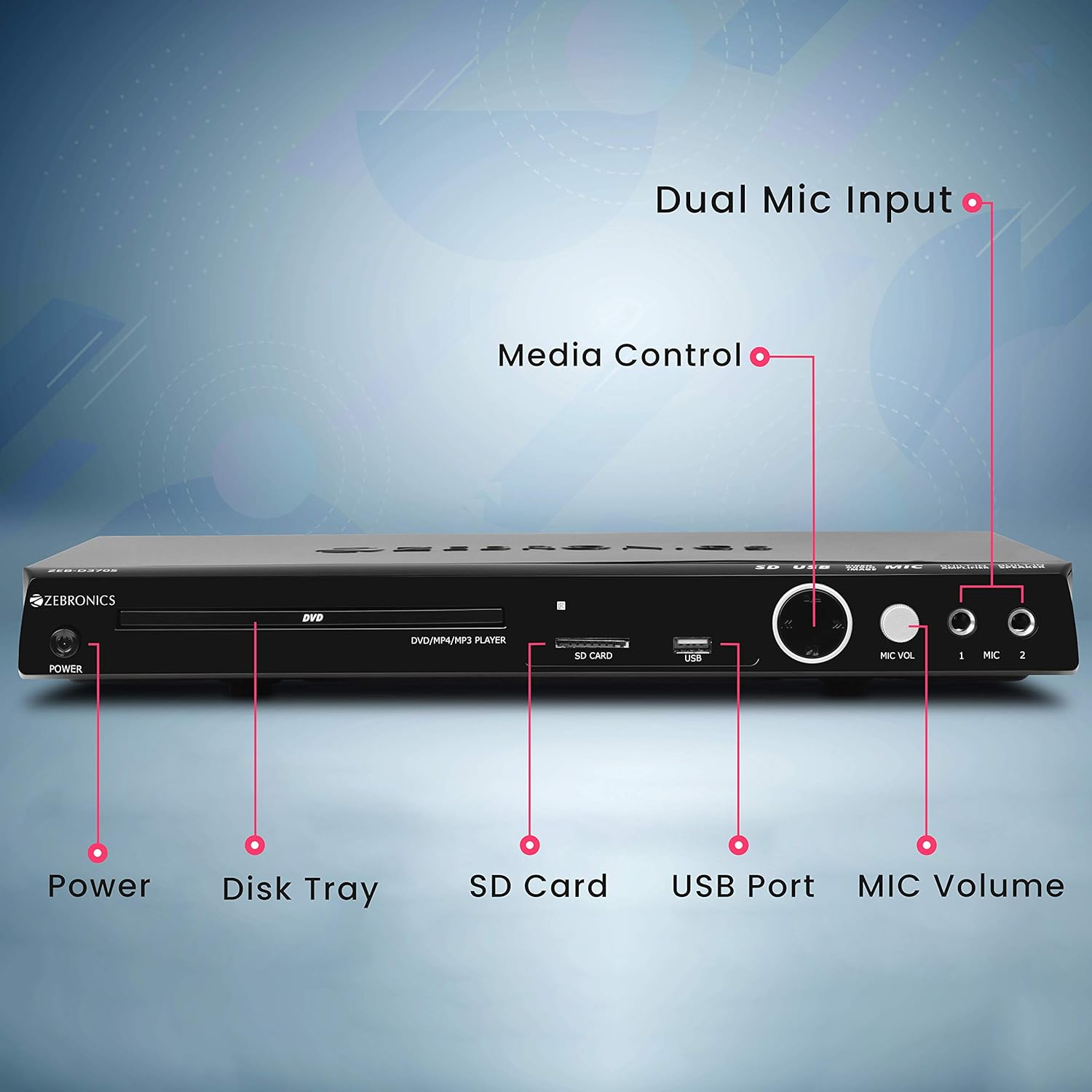
Front panel of the Zebronics Zeb-D370S DVD Player, showing the Power button, Disk Tray, SD Card slot, USB Port, MIC Volume control, and two Microphone inputs (MIC 1, MIC 2).
- Toitenupp: Lülitab seadme sisse või välja.
- Disk Tray: For inserting DVDs, CDs, VCDs, and SVCDs.
- SD-kaardi pesa: Meedia esitamiseks files SD-kaardilt.
- USB-port: Meedia esitamiseks files USB-draivilt.
- MIC helitugevus: Reguleerib ühendatud mikrofonide helitugevust.
- MIKROFONI 1 JA MIKROFONI 2: Inputs for connecting microphones for karaoke.
- Meediumi juhtnupud: Play/Pause, Stop, Skip, etc.
Tagapaneeli ühendused

Rear panel of the Zebronics Zeb-D370S DVD Player, detailing the Coaxial Output, Optical Output, 5.1 Channel Output, HDMI port, Composite video output, Component video output, S-Video output, and Ext-Audio Output.
- HDMI väljund: For high-definition video and audio connection to a TV or display.
- Komposiitvideo väljund: Standard definition video output.
- Komponentvideo väljund: Higher quality analog video output (YPbPr).
- S-video väljund: Improved analog video output.
- Digital Audio Output (Optical & Coaxial): For connecting to external audio receivers or sound systems.
- Analog 5.1 Channel Output: For connecting to a 5.1 channel speaker system.
- Ext-Audio Output: Additional audio output connections.
- Kõlari väljund: Terminals for connecting external speakers, utilizing the built-in ampelujõulisem.

Tagumine view of the Zebronics Zeb-D370S DVD Player highlighting the built-in amplifier, built-in speaker, and speaker output terminals.
Seadistusjuhised
1. Toiteühendus
- Veenduge, et DVD-mängija oleks asetatud stabiilsele, tasasele ja piisava ventilatsiooniga pinnale.
- Connect the power cable to the AC input on the rear of the DVD player.
- Plug the other end of the power cable into a standard electrical outlet (110V - 260V AC).
2. Video Connection to TV/Display
Valige üks järgmistest ühendusviisidest.
- HDMI (soovitatav parima kvaliteedi saavutamiseks): Connect an HDMI cable from the HDMI output on the DVD player to an HDMI input on your TV.
- Komponentvideo: Connect component video cables (Red, Green, Blue) from the DVD player's component outputs to the corresponding inputs on your TV.
- Komposiitvideo: Connect a composite video cable (Yellow) from the DVD player's composite output to the yellow video input on your TV.
- S-video: Connect an S-Video cable from the DVD player's S-Video output to the S-Video input on your TV.
3. Heliühendus
Valige üks järgmistest heliühenduse loomise meetoditest:
- HDMI: If using HDMI for video, audio will also be transmitted via the HDMI cable.
- 5.1 Channel Analog Output: Connect RCA cables from the 5.1 channel outputs (Front Left, Front Right, Center, Subwoofer, Surround Left, Surround Right) on the DVD player to a compatible 5.1 channel amptõsteseade või kõlarisüsteem.
- Digital Audio (Optical/Coaxial): Connect an optical or coaxial cable from the respective output on the DVD player to a digital audio input on your amplifier or home theater system for surround sound.
- Sisseehitatud kõlari väljund: If using the built-in speakers, ensure no external speakers are connected to the 5.1 channel outputs unless desired.
4. Mikrofoni ühendus (valikuline)
- Plug your microphones into the MIC 1 and/or MIC 2 inputs on the front panel.
- Adjust the MIC Volume knob to control microphone audio levels.
Kasutusjuhised

Zebronics Zeb-D370S DVD Player with a disc inserted, remote control, and a visual representation of content playing on a screen, illustrating its multimedia capabilities.
1. Plaadi taasesitus
- Vajutage nuppu Võimsus nuppu DVD-mängija sisselülitamiseks.
- Vajutage nuppu Ava/Sule button (usually on the remote or front panel) to open the disc tray.
- Place a compatible disc (DVD Video, DVD+RW/-RW/+R/-R, Dual Layer Disc, CD Audio, CD-R/-RW, VCD, SVCD) onto the disc tray with the label side facing up.
- Vajutage nuppu Ava/Sule button again to close the tray. The player will automatically begin playback or display a menu.
- Use the remote control for playback functions such as Play, Pause, Stop, Fast Forward, Rewind, and Chapter Skip.
2. USB/SD Media Playback
- Insert a USB drive into the USB port or an SD card into the SD card slot on the front panel.
- The player should automatically detect the media and display a menu to browse files. If not, select the USB or SD source using the remote control's Allikas or Sisend nuppu.
- Navigeeri oma files (VOB, MP4, DIVX, AVI, MPEG-1, MPEG-2, 3GP, MP3, WMA, AAC, JPEG, TXT) using the remote control and press Mängi taasesituse alustamiseks.
3. Karaoke funktsioon
- Connect one or two microphones to the MIC 1 and MIC 2 inputs.
- Play a karaoke disc or a media file with instrumental tracks.
- Adjust the MIC Volume knob on the front panel to control the microphone audio level.
4. Täpsemad funktsioonid
- CD rippimine: Convert audio CDs to digital formats (refer to on-screen menu for options).
- Picture Slideshow: View JPEG images from disc, USB, or SD card as a slideshow.
- Progressiivne skaneerimine: Provides a smoother, flicker-free image on compatible displays.
- Zoom IN/OUT: Magnify or reduce the displayed image during playback.
- High Speed Search: Quickly scan through disc or media content.
- Vanemalukk: Restrict playback of certain content based on ratings.
- Kohene taasesitus: Jump back a few seconds during playback.
- Disc Resume: Resume playback from where it was last stopped on a disc.
Hooldus
- Seadme puhastamine: Use a soft, dry cloth to clean the exterior of the DVD player. Do not use liquid cleaners or abrasive materials.
- Plaadi hooldus: Käsitsege plaate servadest. Hoidke need puhtad ja kriimustusteta. Pühkige plaate pehme, ebemevaba lapiga, suunaga keskelt väljapoole.
- Ventilatsioon: Ülekuumenemise vältimiseks veenduge, et ventilatsiooniavad ei oleks blokeeritud.
Veaotsing
If you encounter issues with your DVD player, refer to the table below for common problems and solutions:
| Probleem | Võimalik põhjus | Lahendus |
|---|---|---|
| Pole jõudu | Toitekaabel pole ühendatud; pistikupesa ei tööta | Kontrollige toitekaabli ühendust; proovige teist pistikupesa |
| Videoväljund puudub | Incorrect video cable connection; Incorrect input selected on TV | Ensure video cables are securely connected; Select the correct input source on your TV (e.g., HDMI 1, AV) |
| Heliväljund puudub | Incorrect audio cable connection; TV/amplifier volume too low; Mute activated | Check audio cable connections; Increase volume; Deactivate mute function |
| Plaat ei mängi | Disc is dirty or scratched; Disc format not supported; Disc inserted incorrectly | Clean the disc; Ensure disc is compatible; Insert disc with label side up |
| USB/SD media not detected | USB drive/SD card not inserted correctly; Incompatible file format; Corrupted media | Reinsert USB/SD; Check supported file formats; Try a different USB/SD device |
Tehnilised andmed

Dimensions of the Zebronics Zeb-D370S DVD Player: 360mm (width), 220mm (depth), and 50mm (height).
| Funktsioon | Detail |
|---|---|
| Mudeli nimi | Zeb D370S |
| Kaubamärk | SEBROONIKA |
| Toote mõõtmed | 28 x 39 x 82 mm (1.4 kg) |
| Resolutsioon | 1920 x 1080 (Supported resolutions: 480i/576i/480p/576p/720p/1080i/1080p) |
| Eriomadused | Surround Sound, Built-in Amplifier, Built-in Stereo Speaker, Karaoke Mic Input |
| Heliväljundi režiim | Stereo, Surround (2CH / 5.1CH / Virtual Surround Sound) |
| Kõlarite ruumilise heli kanali konfiguratsioon | 5.1 |
| Toetatud helivormingud | Dolby Digital, MP3, WMA, AAC |
| Video Playback System | NTSC / PAL / AUTO |
| Ühenduse tüüp | HDMI, USB, SD Slot, MIC 1 & MIC 2, Composite, Component, S-Video, Digital Audio Output (Optical & Coaxial), Analog 5.1Ch Output, Ext-Audio Output x 2 |
| Media Type (Playback Disc) | DVD Video, DVD+RW/-RW/+R/-R, Dual Layer Disc, CD Audio, CD-R/-RW, VCD, SVCD |
| Meedia Files Toetatud | VOB, MP4, DIVX, AVI, MPEG-1, MPEG-2, 3GP, MP3, WMA, AAC, JPEG, TXT |
| Operation Voltage | 110V - 260V AC |
| Funktsioonid | CD Ripping, Picture SlideShow, Progressive scan, Zoom IN/OUT, High speed search, Parental lock, Instant replay, Disc resume |
Garantii ja tugi
For warranty information, technical support, or service inquiries, please refer to the warranty card included with your product or visit the official Zebronics webÄrge proovige seadet ise parandada.


