1. Sissejuhatus
This ANRAN AR-W657 Wireless Security Camera System offers advanced surveillance features for home and business use. It includes 3MP high-definition cameras, a built-in 1TB HDD for extensive recording, and supports expansion up to 8 cameras. The system is designed for easy installation and provides robust protection with IP66 waterproof rating, night vision, motion detection, and remote monitoring capabilities.
2. Mis on karbis
Palun veenduge, et kõik allpool loetletud komponendid on teie pakendis olemas:
- 8-channel WiFi NVR (1 unit)
- 1TB HDD (sisseehitatud)
- 3MP Cameras (4 units)
- Camera Power Adapters (4 units)
- NVR toiteadapter (1 ühik)
- Strong Adhesive Tape (4 pieces)
- USB-hiir (1 ühik)
- Japanese Instruction Manual (1 copy)
- Security Sticker (1 piece)
- 1m LAN Cable (1 piece)
- Camera Mounting Screws (4 sets)

Image: Contents of the ANRAN AR-W657 Wireless Security Camera System package.
3. Seadistusjuhised
Follow these steps to set up your ANRAN wireless security camera system:
- Ühendage NVR: Connect the NVR to a power source and a display (monitor/TV) using an HDMI or VGA cable.
- Kaamerate ühendamine: Power on each camera using its dedicated power adapter. The cameras will automatically pair with the NVR.
- Kinnituskaamerad: Use the provided mounting screws and adhesive tape to securely install the cameras in your desired outdoor or indoor locations. Refer to the installation video for detailed guidance.
- Network Connection (Optional for Remote Access): Connect the NVR to your router using the provided LAN cable for remote viewing via the mobile app.
- Mobiilirakenduse seadistamine: Download the 'ARCCCTV' app from your smartphone's app store. Register an account, then add your device by scanning the QR code or manually entering the device ID.

Image: Diagram showing the connection of the NVR to a display, router, and cameras.
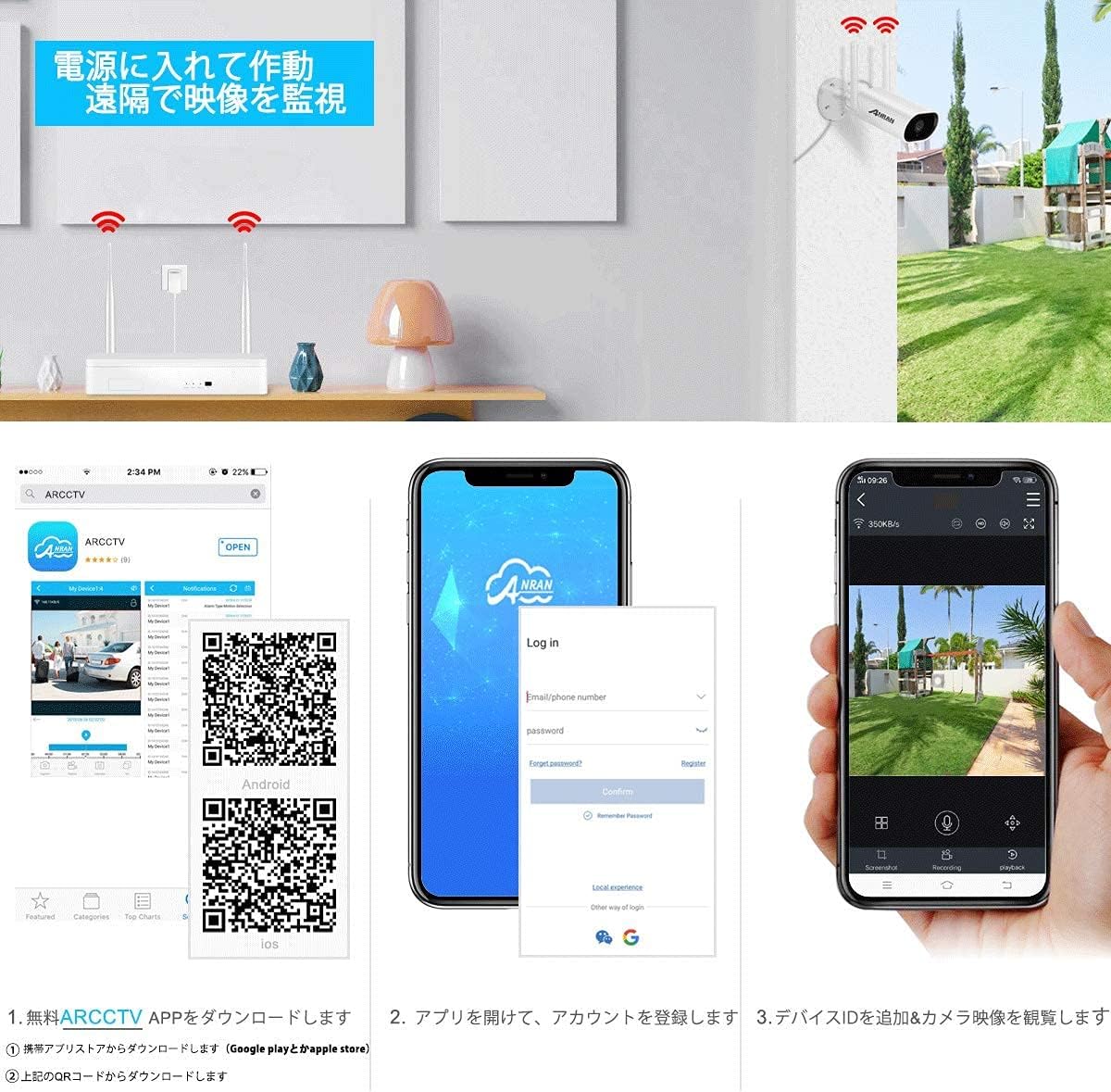
Image: Visual guide for downloading the ARCCCTV app, registering, and adding a device for remote viewing.
Video: This video demonstrates the physical installation process for the ANRAN security camera system, including mounting the camera bracket and attaching the camera unit.
Download the ARCCCTV app: Google Play | Apple App Store
4. Kasutusjuhised
4.1. Ela View ja taasesitus
Kui olete ühendatud, saate seda teha view ela lolltage from your cameras on the connected display or via the ARCCCTV mobile app. The 1TB HDD allows for continuous recording, and you can easily playback recorded footage through the NVR interface or the app.

Image: Illustration of the NVR with a built-in 1TB hard disk drive for 24/7 recording.
4.2. Kaugseire
With the ARCCCTV app, you can remotely monitor your property from anywhere using your smartphone, tablet, or PC. The system supports multi-screen viewing, allowing you to see footage mitmest kaamerast korraga.
Image: Depicts remote monitoring of the camera system via smartphone, tablet, and PC.
4.3. Liikumistuvastus
The cameras feature motion detection. When motion is detected, you will receive push notifications via the app and email alerts, ensuring you are immediately aware of any activity.

Image: Illustrates how motion detection triggers app notifications and email alerts, showing a person being detected.
5. Põhiomadused
- 3MP High-Definition Video: Capture clear and detailed images with 3-megapixel resolution.
- H.264+ tihendamine: Advanced compression technology saves storage space while maintaining video quality.
- IP66 veekindel: Cameras are built with IP66-rated weather-resistant casing, suitable for outdoor use in various conditions.
- Öine nägemine: Equipped with high-sensitivity CMOS sensors and HDR technology for clear imaging in low-light conditions and at night.
- Front Microphone Audio: Built-in audio pickup allows for recording sound within a 20-meter range, providing valuable evidence.
- Laiendatav süsteem: The 8-channel NVR supports up to 8 cameras, allowing you to expand your surveillance coverage.

Image: Demonstrates the camera's night vision capabilities, showing clear footage pimedates tingimustes.

Image: Compares H.264 and H.264+ compression, highlighting the storage efficiency and improved image clarity of H.264+.

Image: Shows the system's expandability, allowing up to 8 cameras to be connected to the NVR.
6. Hooldus
To ensure optimal performance and longevity of your security system, regular maintenance is recommended:
- Puhastage kaamera objektiive: Pühkige kaamera objektiivi regulaarselt pehme lapigaamp cloth to remove dust and smudges that may affect image clarity.
- Kontrollige ühendusi: Veenduge, et kõik toite- ja võrgukaablid on kindlalt ühendatud ja kahjustusteta.
- Püsivara värskendused: Kontrollige tootja poolt website or app for any available firmware updates to improve system stability and features.
- Kõvaketta tervis: Monitor the health of the 1TB HDD and ensure sufficient storage space for recordings.
7. Veaotsing
If you encounter any issues with your ANRAN security camera system, please refer to the following common solutions:
- Kujutist pole ekraanil: Ensure the NVR is powered on and correctly connected to the display via HDMI or VGA. Check the display input source.
- Cameras Not Connecting: Verify that cameras are powered on and within range of the NVR. If issues persist, try resetting the cameras and re-pairing them with the NVR.
- Kaugjuhtimispult Viewküsimused: Confirm the NVR is connected to the internet via LAN cable. Check your router's internet connection and ensure the ARCCCTV app is properly configured and updated.
- Kehv pildikvaliteet: Clean camera lenses. Ensure cameras are installed in well-lit areas or that night vision is functioning correctly. Check for obstructions.
- Liikumistuvastus ei tööta: Verify motion detection settings in the NVR or app. Adjust sensitivity and detection zones as needed.
Lisateabe saamiseks võtke ühendust ANRAN-i klienditoega.
8. Tehnilised andmed
| Funktsioon | Spetsifikatsioon |
|---|---|
| Kaubamärk | ANRAN |
| Mudeli nimi | AR-W657 |
| Video jäädvustamise eraldusvõime | 1536p (3MP) |
| Ühenduvustehnoloogia | Juhtmeta (Wi-Fi) |
| Erifunktsioon | Veekindel (IP66) |
| Toiteallikas | Juhtmega elekter |
| Ühilduvad seadmed | Apple, Mac, Android, Microsoft Windows |
| Toote mõõtmed | 30 x 22 x 12 cm |
| Kauba kaal | 2.6 kilogrammi |
| Soovitatavad kasutusalad | Home Security, Night Vision |
9. Garantii ja tugi
The ANRAN AR-W657 Wireless Security Camera System comes with a 1-aastane garantii. All electrical components, including the power adapter, are certified according to Japanese Electrical Appliance and Material Safety Law (PSE). The product has also passed GITEKI radio wave law inspection, ensuring safe use.
ANRAN offers Japanese language support for after-sales service. For any questions during consideration or use, or in case of malfunctions, please feel free to contact us. Contact information can be found on the last page of the physical instruction manual.
Telefonitoe lahtiolekuajad: Monday - Friday, 10:00 - 13:00 and 14:30 - 19:30
E-posti tugi: 24-tunnine reageerimine


