1. Toote lõppview
The Sharp Digital Clock is designed for simplicity and convenience, featuring a clear green LED display and dual USB FastCharge ports for charging your devices. It includes an alarm function and a battery backup system to retain settings during power outages.

Joonis 1: Esiosa view of the Sharp Digital Clock, highlighting the large green LED display and dual USB charging ports.
2. Seadistusjuhend
2.1 Toiteühendus
Connect the provided power adapter to the DC IN jack located at the back of the clock. Plug the other end into a standard electrical outlet. The display will illuminate, and the clock will be ready for time setting.
2.2 Aku varundamine (valikuline)
For battery backup functionality, which retains time and alarm settings during a power outage, install two (2) AAA batteries (not included) into the battery compartment located on the bottom of the unit. During battery backup, the display will go blank to conserve power, but settings will be preserved.
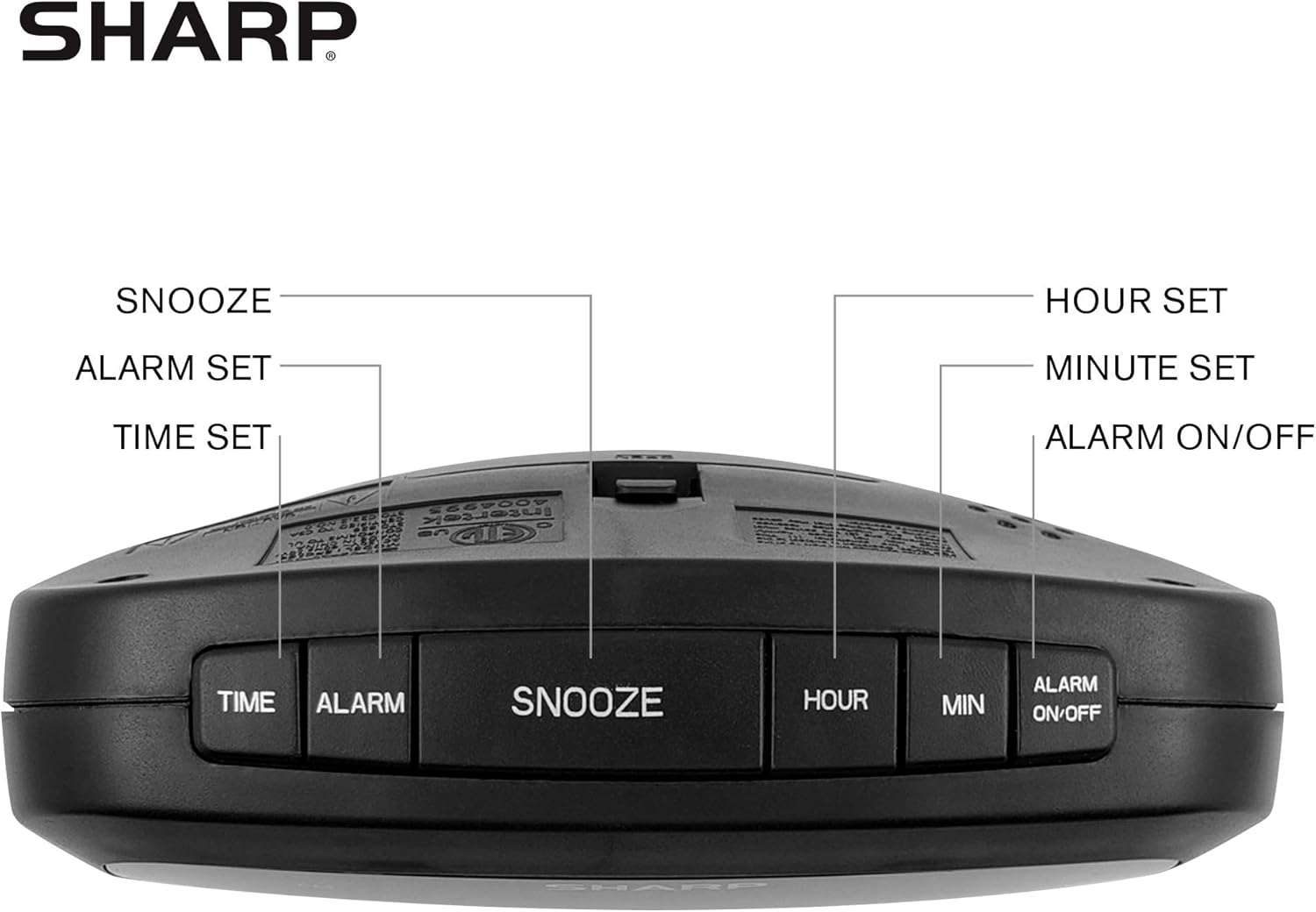
Figure 2: Underside of the clock with the battery compartment visible, requiring 2 AAA batteries for backup.
3. Kasutusjuhised
The clock features intuitive top-mounted buttons for easy operation.

Figure 3: Top panel of the clock with clearly labeled buttons for time, alarm, snooze/dimmer, hour, minute, and alarm on/off.
3.1 Kellaaja seadistamine
- Vajutage ja hoidke all nuppu AEG nuppu, kuni tunninumbrid hakkavad vilkuma.
- Vajutage nuppu TUND button to adjust the hour. Pay attention to the PM indicator if setting a PM time.
- Vajutage nuppu MIN nupp minutite reguleerimiseks.
- Vajutage nuppu AEG kinnitamiseks ja aja salvestamiseks vajutage uuesti nuppu.
3.2 Alarmi seadistamine
- Vajutage ja hoidke all nuppu ALARM nuppu, kuni äratuse tunninumbrid hakkavad vilkuma.
- Vajutage nuppu TUND nuppu äratustundide reguleerimiseks.
- Vajutage nuppu MIN nuppu äratuse minutite reguleerimiseks.
- Vajutage nuppu ALARM button again to confirm and save the alarm time.
- Äratuse aktiveerimiseks või deaktiveerimiseks vajutage ALARM ON / OFF button. An alarm indicator light will appear on the display when the alarm is active.
3.3 Snooze and Dimmer Function
- Kui äratuskell kõlab, vajutage suurt nuppu EDASTUS/DIMMER button to temporarily silence the alarm for a few minutes.
- To adjust the brightness of the green LED display, repeatedly press the EDASTUS/DIMMER button when the alarm is not sounding. Cycle through bright, medium, and low brightness settings.
3.4 Using the USB Charging Ports
The clock is equipped with two 2 AMP USB charging ports on the front, allowing you to conveniently charge your smartphone or other USB-powered devices directly from the clock.

Figure 4: The clock demonstrating its dual USB charging capability with two smartphones connected.
- Simply connect your device's USB charging cable to one of the USB ports on the front of the clock.
- Ensure your device is compatible with 2 AMP charging for optimal speed.
4. Hooldus
To ensure the longevity and proper functioning of your Sharp Digital Clock, follow these simple maintenance guidelines:
- Puhastamine: Wipe the clock with a soft, dry cloth. Do not use abrasive cleaners, waxes, or solvents as they may damage the finish.
- Paigutus: Asetage kell stabiilsele ja tasasele pinnale, eemal otsesest päikesevalgusest, soojusallikatest ja liigsest niiskusest.
- Patarei vahetus: If using the battery backup, replace the AAA batteries annually or when the clock consistently loses time during power interruptions.
5. Veaotsing
| Probleem | Võimalik põhjus | Lahendus |
|---|---|---|
| Kella ekraan on tühi. | Pole jõudu ega jõudutage. | Ensure the power adapter is securely plugged into the clock and a working electrical outlet. If there was a power outage, check if backup batteries are installed and functional. |
| Äratus ei helise. | Äratus pole seatud või aktiveeritud. | Verify that the alarm time is correctly set and that the alarm indicator light is visible on the display (press ALARM ON/OFF). |
| USB-pordid ei ole laadimisseadmed. | Device incompatibility or faulty cable. | Ensure your device is compatible with USB charging. Try a different USB cable. Confirm the clock is powered on. |
| Ekraan on liiga hele/tuhm. | Heleduse seadistust on vaja reguleerida. | Press the SNOOZE/DIMMER button repeatedly to cycle through brightness levels (bright, medium, low). |
6. Toote spetsifikatsioonid
- Kaubamärk: Terav
- Mudel: B08H3STVWG
- Kuva tüüp: Digital Green LED
- Toiteallikas: Juhtmega elekter
- Aku varundamine: 2 x AAA patareid (ei kuulu komplekti)
- USB-pordid: 2 x 2 AMP USB FastCharge Ports
- Toote mõõtmed: 5.95 cm lai ja 2.3 cm kõrge
- Kauba kaal: 9.59 untsi
- Värv: Roheline Led
- Materjal: Plastikust
- UPC: 049353005089
7. Garantii ja tugi
This Sharp Digital Clock comes with a limited warranty. For detailed warranty information, product support, or to purchase accessories, please visit the official Sharp websaidil või võtke ühendust nende klienditeenindusega. Võite külastada ka Sharpi pood Amazonis.
Palun hoidke oma ostutšekk garantiinõuete esitamiseks alles.


