1. Sissejuhatus
The ELECDER D19 True Wireless Earbuds are designed to provide a superior audio experience with advanced features such as Bluetooth 5.0 connectivity, noise cancellation, and IPX7 waterproofing. This manual provides comprehensive instructions for setting up, operating, and maintaining your earbuds to ensure optimal performance and longevity.
Peamised omadused:
- Bluetooth 5.0: Fast and stable wireless transmission with CVC8.0 noise cancellation for clear calls.
- Premium Hi-Fi Stereo Audio: APTX audio for lossless transmission, delivering immersive sound with crystal clarity and deep bass.
- IPX7 veekindel: Resistant to sweat, water, and rain, ideal for workouts and outdoor activities.
- Ergonoomiline disain: Lightweight (5g per earbud) with flexible silicone ear-fins and S/M/L ear caps for a secure and comfortable fit.
- Quick Pairing Technology: Automatic power-on and pairing upon removal from the charging case.
- USB Quick Charge & Wireless Charging: Up to 4.5 hours of music on a single charge, with an additional 18 hours from the charging case, supporting both USB and wireless charging.
2. Toote lõppview

Figure 2.1: ELECDER D19 True Wireless Earbuds in their charging case. The earbuds are black, sleek, and designed for in-ear use, while the compact charging case is also black with a smooth finish.
Mis on karbis:
- ELECDER D19 True Wireless Earbuds (Left and Right)
- Laadimisümbris
- USB laadimiskaabel
- Ear Tips (S/M/L sizes)
- Kasutusjuhend (see dokument)
3. Seadistusjuhend
3.1 Kõrvaklappide ja ümbrise laadimine
Before first use, fully charge the earbuds and the charging case. The charging case supports both USB cable charging and wireless charging.
- USB laadimine: Connect the provided USB cable to the charging port on the case and plug the other end into a USB power source (e.g., computer, wall adapter). The indicator light on the case will show charging status.
- Juhtmeta laadimine: Place the charging case on a compatible wireless charging pad. The indicator light will flash to confirm charging.

Figure 3.1: The ELECDER D19 charging case being charged wirelessly on a charging pad, also showing the Micro USB port for wired charging. This image highlights the dual charging capabilities of the case.
A full charge for the earbuds provides approximately 4.5 hours of music playback, and the charging case provides an additional 18 hours of battery life.
3.2 Seadmega sidumine
The ELECDER D19 earbuds feature quick pairing technology for seamless connection.
- 1. samm: Open the charging case and take out both earbuds. They will automatically power on and pair with each other.
- 2. samm: Ava oma nutitelefonis või Bluetooth-toega seadmes Bluetoothi sätted.
- 3. samm: Otsi available devices and select "Elecder D19" from the list to connect.
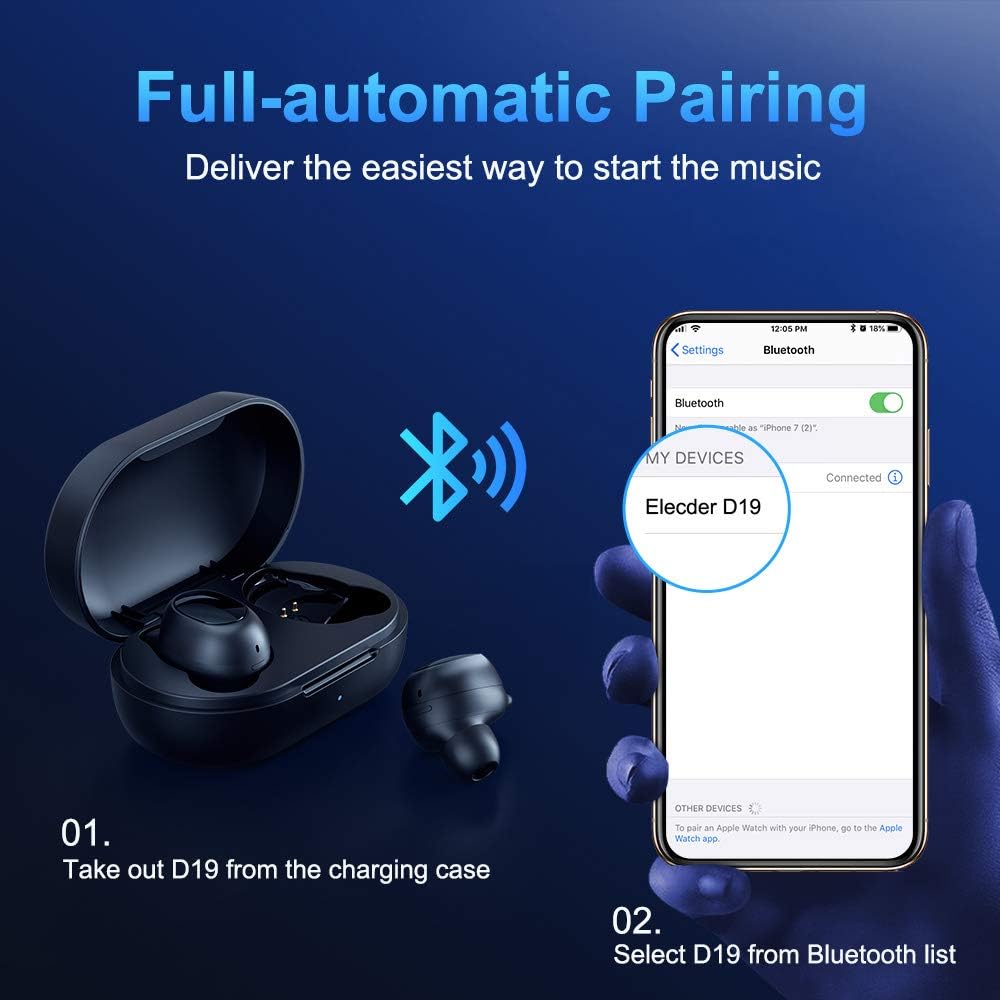
Figure 3.2: A visual guide demonstrating the automatic pairing process. The image shows the earbuds being taken out of the case and then the "Elecder D19" option appearing in a smartphone's Bluetooth settings for connection.
Pärast esmast sidumist ühenduvad kõrvaklapid laadimisümbrisest väljavõtmisel automaatselt viimati seotud seadmega.

Figure 3.3: An illustration showing the stable Bluetooth connection between the ELECDER D19 earbuds and various smart devices, including smartphones and tablets.
4. Kasutusjuhised
4.1 Kõrvaklappide kandmine
For optimal sound quality and comfort, choose the ear tips that best fit your ears. The earbuds come with S, M, and L sizes. Insert the earbuds into your ears and gently rotate them to find a secure and comfortable fit. The ergonomic ear-fin design helps ensure stability during movement.
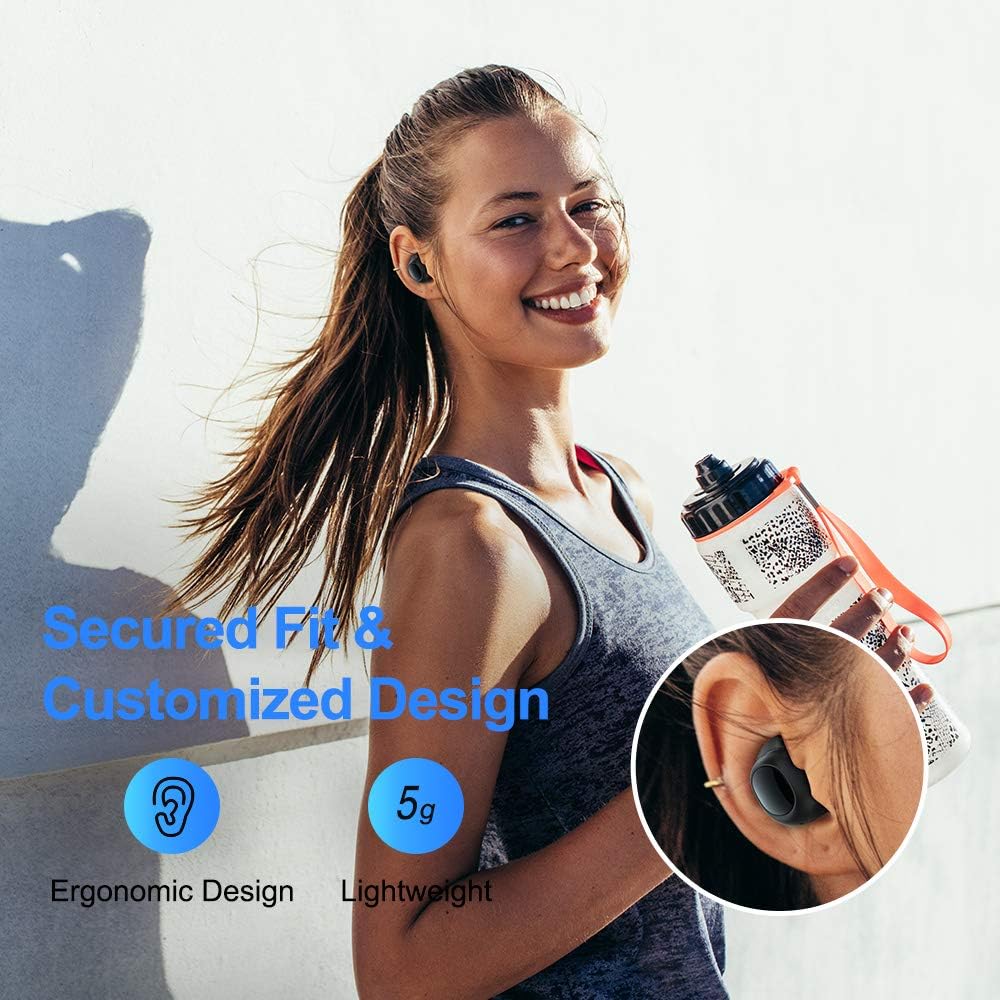
Figure 4.1: A person wearing the ELECDER D19 earbuds during a workout, demonstrating the secure and comfortable fit provided by the ergonomic design and customizable ear tips.
4.2 Meediakontroll
The ELECDER D19 earbuds feature physical buttons for media control. Specific button functions may vary slightly based on the device and operating system, but common controls include:
- Esita/peata: Vajutage üks kord kummalgi kõrvaklapil.
- Järgmine lugu: Kaks korda vajutades paremal kõrvaklapil.
- Eelmine lugu: Vajuta vasakul kõrvaklapil kaks korda.
- Helitugevuse suurendamine: Triple press on the right earbud.
- Hääl maha: Triple press on the left earbud.
4.3 Kõnede haldamine
Manage your calls directly from the earbuds:
- Kõnele vastamine/lõpetamine: Vajutage üks kord kummalgi kõrvaklapil.
- Keeldu kõnest: Vajutage ja hoidke kumbagi kõrvaklappi 2 sekundit all.
- Hääleabi aktiveerimine: Vajutage ja hoidke ükskõik millist kõrvaklappi 3 sekundit all (nt Siri või Google Assistant).
5. Hooldus ja hooldus
Proper maintenance ensures the longevity and optimal performance of your ELECDER D19 earbuds.
5.1 Puhastamine
- Puhastage kõrvaklappe ja laadimisümbrist regulaarselt pehme, kuiva ja ebemevaba lapiga.
- Eemaldage kõrvaotsad ja puhastage neid õrna seebi ja veega, seejärel kuivatage need enne tagasipanekut hoolikalt.
- Kõrvaklappide ja ümbrise laadimiskontaktide õrnalt puhastamiseks kasutage vatitupsu või väikest harja.
- Vältige abrasiivsete materjalide, alkoholi või keemiliste puhastusvahendite kasutamist.
5.2 Veekindlus (IPX7)
The ELECDER D19 earbuds are IPX7 waterproof, meaning they can withstand submersion in up to 1 meter of water for 30 minutes. This makes them suitable for protection against sweat, rain, and accidental splashes.

Figure 5.1: The ELECDER D19 earbuds shown with water droplets, illustrating their IPX7 waterproof rating, which protects them from sweat, rain, and splashes.
Märkus. The charging case is not waterproof. Ensure earbuds are dry before placing them back into the charging case.
5.3 Säilitamine
Kui kõrvaklappe ei kasutata, hoidke neid laadimisümbrises, et neid kaitsta ja laetuna hoida. Hoidke ümbrist jahedas ja kuivas kohas, eemal äärmuslikest temperatuuridest ja otsesest päikesevalgusest.
6. Veaotsing
If you encounter issues with your ELECDER D19 earbuds, refer to the following common solutions:
| Probleem | Võimalik põhjus | Lahendus |
|---|---|---|
| Kõrvaklapid ei ühendu seadmega. | Bluetooth on seadmel välja lülitatud; kõrvaklapid ei ole sidumisrežiimis; eelnevalt seotud seade tekitab probleeme. | Ensure Bluetooth is enabled. Place earbuds back in case, then take them out to re-enter pairing mode. Forget "Elecder D19" from your device's Bluetooth list and re-pair. |
| Ainult üks kõrvaklapp töötab. | Earbuds not paired with each other; low battery on one earbud. | Place both earbuds back into the charging case, close the lid, wait a few seconds, then open and take them out again. Ensure both earbuds are charged. |
| Heli puudub või on vaikne. | Device volume too low; ear tips not properly sealed; debris in earbud nozzle. | Increase volume on your device. Adjust earbud position or try different sized ear tips for a better seal. Clean earbud nozzles. |
| Laadimisümbris ei lae. | Faulty cable/charger; improper placement on wireless charger. | Try a different USB cable and power adapter. Ensure the case is correctly aligned on the wireless charging pad. |
| Bluetooth-ühendus ebastabiilne. | Interference; distance from device; low earbud battery. | Reduce distance between earbuds and device. Avoid environments with strong Wi-Fi or other Bluetooth signals. Ensure earbuds are fully charged. |
7. Tehnilised andmed
Detailed technical specifications for the ELECDER D19 True Wireless Earbuds:
| Funktsioon | Detail |
|---|---|
| Mudeli nimi | ELECDER D19 |
| Ühenduvustehnoloogia | Traadita (Bluetooth 5.0) |
| Bluetoothi vahemik | 33 jalga |
| Kõrvade paigutus | Kõrvas |
| Vormitegur | Kõrvas |
| Mürakontroll | Active Noise Cancellation (CVC8.0) |
| Mikrofon | Kaasas |
| Veekindluse tase | IPX7 veekindel |
| Aku tööiga (kõrvaklapid) | Up to 4.5 hours (music) / 4 hours (calling) |
| Laadimisümbris Lisamänguaeg | 18 tundi |
| Laadimisaeg | Umbes 2 tundi |
| Laadimisliides | Micro USB, Wireless Charging |
| Kauba kaal | 1.92 ounces (total) / 5g (each earbud) |
| Toote mõõtmed | 3.89 x 3.89 x 1.65 tolli |
| Ühilduvad seadmed | iOS-i ja Androidi nutitelefonid |
| Materjal | Silikoon (kõrvaotsad) |
| Värv | Must |

Figure 7.1: An infographic detailing the battery life of the ELECDER D19 earbuds and charging case, showing 4 hours for calls, 4.5 hours for music, and a total of 18 hours with the 500mAh charging case.
8. Garantii ja tugi
ELECDER products are manufactured to high quality standards. For information regarding warranty coverage, technical support, or service inquiries, please refer to the contact information provided with your product packaging or visit the official ELECDER websaidile.
Lisateabe saamiseks võite pöörduda ka jaemüüja poole, kellelt toote ostsite.


