1. Sissejuhatus
This instruction manual provides comprehensive information for the YOSUN Universal Replacement Remote Control, model RMT-TX100U. Designed for seamless compatibility with a wide range of Sony Bravia LCD LED HDTV Smart TVs, this remote offers a direct replacement solution without requiring complex programming. It aims to restore full control over your television with reliable performance and an intuitive layout.
2. Toote omadused
- Lai ühilduvus: Fully compatible with all Sony Bravia LCD LED HDTV Smart TVs.
- Programmeerimine pole vajalik: Ready to use straight out of the box, eliminating the need for manual setup.
- Stabiilne jõudlus: Equipped with an upgraded smart chip for consistent and reliable operation.
- Laiendatud ulatus: Transmits signals effectively over long distances, up to 10 meters (33 feet).
- Kiire reageerimise aeg: Features a rapid transmission response time of approximately 0.2 seconds for immediate command execution.
- Vastupidav konstruktsioon: Made from high-quality ABS and silicone materials for a sturdy, non-slip shell and comfortable, sensitive buttons.
- Identical Layout: Designed to be visually and functionally identical to the original Sony remote control.
- Netflix Shortcut: Includes a dedicated Netflix button for quick access to the streaming service.
3. Seadistusjuhend
3.1 Aku paigaldamine
Kaugjuhtimispuldi tööks on vaja kahte (2) AAA-patareid (ei kuulu komplekti). Patareide paigaldamiseks järgige neid samme:
- Leidke kaugjuhtimispuldi tagaküljelt patareipesa kate.
- Sahtli avamiseks libistage kaant allapoole.
- Sisestage kaks AAA-patareid, veendudes, et positiivsed (+) ja negatiivsed (-) klemmid joonduvad õigesti sahtlis olevate indikaatoritega.
- Lükake aku kate oma kohale tagasi, kuni see kindlalt klõpsatab.

Figure 3.1: Battery installation and remote dimensions. The remote is 7.8 inches long, 1.8 inches wide, and 0.7 inches thick. The diagram shows sliding the battery cover and inserting two AAA batteries.
3.2 Esmane kasutamine (programmeerimist pole vaja)
This YOSUN replacement remote control is designed to work immediately with compatible Sony TVs without any programming or pairing. Once batteries are installed, point the remote towards your TV and begin using it.
Video 3.2: Demonstration of the remote control's simple operation, highlighting that no pairing is required for use with Sony TVs.
4. Kasutusjuhised
The remote control features a standard layout with clearly labeled buttons for easy navigation and control of your Sony TV. Refer to the diagram below for button identification and their primary functions.
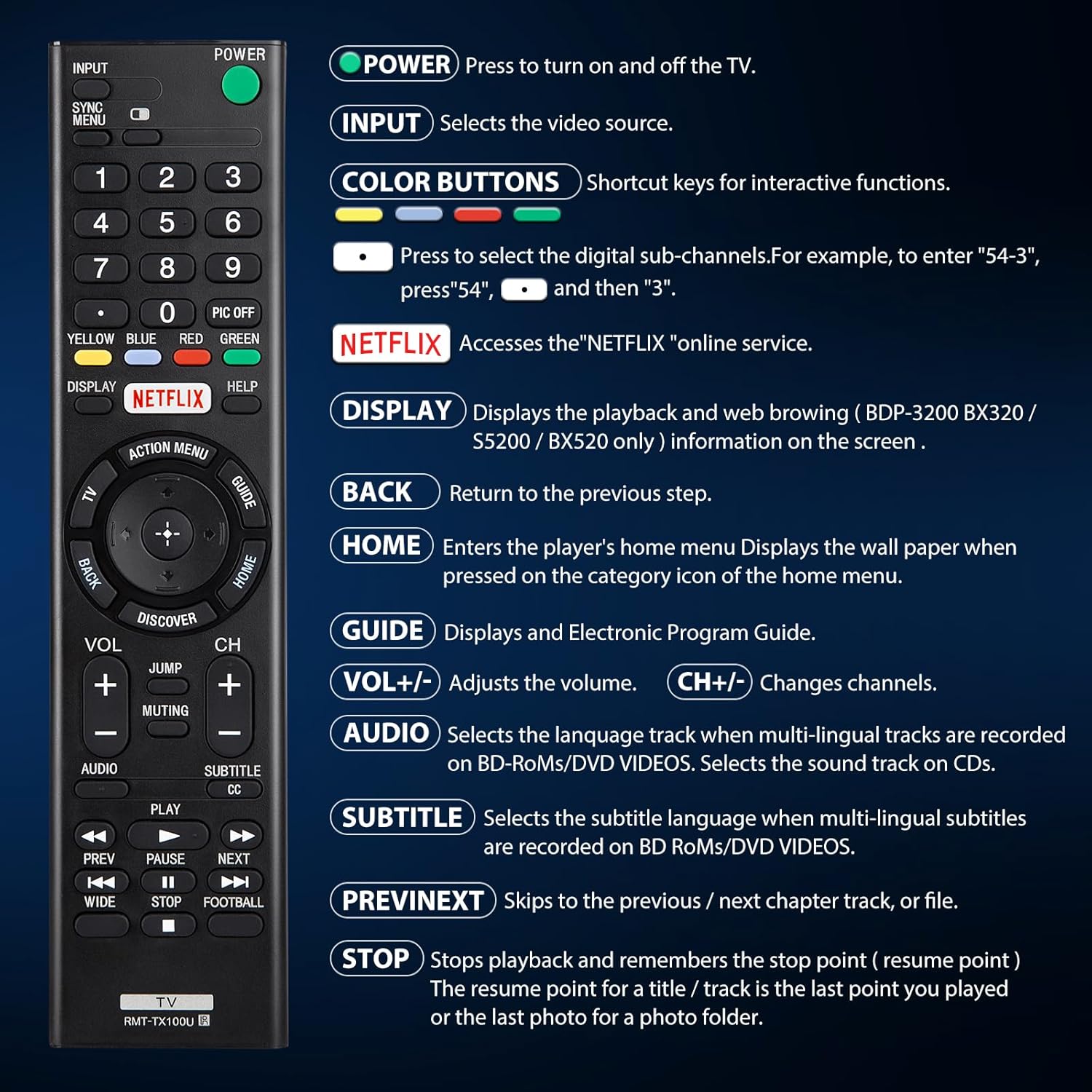
Joonis 4.1: Üleview of remote control buttons and their functions.
| Nupp | Funktsioon |
|---|---|
| VÕIMSUS | Press to turn the TV on and off. |
| SISEND | Selects the video source (e.g., HDMI 1, AV). |
| COLOR BUTTONS (Yellow, Blue, Red, Green) | Shortcut keys for interactive functions or digital sub-channels (e.g., to enter "5-4", press "5", then "4"). |
| NETFLIX | Directly accesses the Netflix online streaming service. |
| EKRAAN | Displays playback and web browsing information on the screen (for compatible models like BDP-3200 BX320 / S5200 / BX520 only). |
| TAGASI | Naaseb eelmise sammu või menüü juurde. |
| KODU | Enters the player's home menu or displays the wallpaper when pressed on the category icon of the home menu. |
| JUHEND | Kuvab elektroonilise saatekava (EPG). |
| Vol +/- | Reguleerib helitugevust. |
| Ch +/- | Vahetab telekanaleid. |
| AUDIO | Selects the language track when multi-lingual tracks are recorded on BD-ROMs/DVD VIDEOS. Selects the sound track on CDs. |
| Subtiitrid CC | Selects the subtitle language when multi-lingual subtitles are recorded on BD ROMs/DVD VIDEOS. |
| PREV/JÄRGMINE | Skips to the previous or next chapter, track, or file meedia taasesituse ajal. |
| STOP | Stops playback and remembers the stop point (resume point) for a title/track, or the last photo for a photo folder. |
5. Ühilduvus
5.1 ühilduvat seadet
This remote control is specifically designed for and compatible with the following:
- All Sony Bravia LCD LED HDTV Smart TVs.

Figure 5.1: The remote is compatible with Sony Smart TVs, Sony Bravia TVs, and Sony Google TVs.
5.2 Mitteühilduvad seadmed
See kaugjuhtimispult on EI ühildub järgmiste seadmetega:
- Blu-ray Disc Players
- DVD-mängijad
- AV vastuvõtjad
- Subwooferid
- Heliribad
- Kodukinosüsteemid

Figure 5.2: The remote is not compatible with Blu-ray players, DVD players, AV receivers, subwoofers, sound bars, or home theater systems.
6. Veaotsing
If you experience issues with your remote control, please consider the following common troubleshooting steps:
- Kontrollige patareisid: Ensure that the batteries are correctly installed with the proper polarity and are not depleted. Replace with fresh AAA batteries if necessary.
- Vaateväli: Make sure there are no obstructions between the remote control and the TV's infrared receiver. The remote operates using an infrared signal, which requires a clear line of sight.
- Kaugühilduvus: Verify that your TV model is a compatible Sony Bravia LCD LED HDTV Smart TV. Refer to Section 5 for detailed compatibility information.
- Kauglähtestamine: Remove the batteries, press and hold any button on the remote for 5 seconds to discharge any residual power, then reinsert the batteries.
- TV Power Cycle: Unplug your TV from the power outlet for 60 seconds, then plug it back in. This can sometimes resolve minor communication issues.
7. Hooldus
Kaugjuhtimispuldi pikaealisuse ja optimaalse jõudluse tagamiseks järgige neid hooldusjuhiseid:
- Puhastamine: Pühkige kaugjuhtimispulti regulaarselt pehme ja kuiva lapiga. Kangekaelse mustuse korral kuivatage seda kergelt.ampLoputage lappi veega või õrnatoimelise mitteabrasiivse puhastusvahendiga. Vältige tugevate kemikaalide või abrasiivsete materjalide kasutamist.
- Patarei vahetus: Vahetage patareid kohe, kui puldi jõudlus halveneb või see enam ei reageeri. Eemaldage patareid, kui pulti pikemat aega ei kasutata, et vältida leket.
- Hoiustamine: Hoidke kaugjuhtimispulti jahedas ja kuivas kohas, eemal otsesest päikesevalgusest, äärmuslikest temperatuuridest ja kõrgest õhuniiskusest.
- Vältige kukkumisi: Kuigi see on vastupidav, võivad korduvad kukkumised sisemisi komponente kahjustada. Käsitsege pulti ettevaatlikult.
8. Tehnilised andmed
| Atribuut | Detail |
|---|---|
| Toote mõõtmed | 7.87 x 1.89 x 0.78 tolli |
| Kauba kaal | 3.17 untsi |
| Mudeli number | RMT-TX100U |
| Nõutavad patareid | 2 AAA patareid (ei kuulu komplekti) |
| Erifunktsioon | Programmeerimine pole vajalik |
| Värv | Must |
| Toetatud seadmete maksimaalne arv | 18 (Refers to the range of Sony TV models it can control) |
| Ühilduvad seadmed | Television (Sony Bravia LCD LED HDTV Smart TVs) |
| Tootja | YOSUN |
9. Garantii ja tugi
YOSUN offers an unlimited return and refund service for this remote control within 30 days of purchase. If you have any questions, concerns, or require assistance with your order or the product, please do not hesitate to contact YOSUN customer service directly. Our team is committed to providing support and will respond to your inquiries within 12 hours during the work week.
For further assistance, please refer to the contact information provided with your purchase or visit the official YOSUN websaidile.


