1. Sissejuhatus
Thank you for choosing the tectake Gaming Chair Model 403209. This ergonomic office and computer chair is designed to provide comfort and support for both focused work and intense gaming sessions. Featuring a robust construction, thick padding, adjustable armrests, and a continuously adjustable gas lift, this chair ensures a comfortable seating experience. The five smooth-rolling double casters are floor-friendly and highly wear-resistant. This manual provides essential information for assembly, operation, maintenance, and troubleshooting to ensure optimal use and longevity of your chair.

Image 1.1: The tectake Gaming Chair Model 403209 in a typical usage environment.
2. Ohutusjuhised
- Enne kokkupanekut ja kasutamist lugege hoolikalt läbi kõik juhised.
- Hoidke kõik pakkematerjalid lastele kättesaamatus kohas, et vältida lämbumisohtu.
- Enne kasutamist veenduge, et kõik kruvid ja poldid on kindlalt kinni keeratud. Kontrollige neid perioodiliselt ja pingutage vastavalt vajadusele.
- Do not stand on the chair. Use it only for seating.
- Ärge kasutage tooli, kui mõni osa on kahjustatud või puudu. Varuosade saamiseks võtke ühendust klienditoega.
- Vältige tooli jätmist otsese päikesevalguse või äärmuslike temperatuuride kätte, et vältida materjali halvenemist.
- Maksimaalne kandevõime: 120 kg (264 naela). Ärge ületage seda piiri.
- Kasutage tooli tasasel pinnal, et vältida ümberkukkumist.
3. Pakendi sisu
Before assembly, please ensure all components are present and undamaged. If any parts are missing or damaged, do not proceed with assembly. Contact tectake customer service for assistance.
- Seljakott
- Iste
- Käetoed (2x)
- Tähealus
- Rattad (5x)
- Gaasi tõstesild
- Gaasitõstuki kate
- Mehhanismi plaat
- Lumbar support cushion
- Kaela padi
- Riistvarakomplekt (kruvid, seibid, kuuskantvõti)
- Kokkupanekujuhised (käesolev juhend)

Pilt 3.1: esikülg view of the chair, illustrating the main components.
4. Montaažijuhised
Tooli korrektseks kokkupanekuks järgige neid samme hoolikalt. Kahjustuste vältimiseks on soovitatav tool kokku panna pehmel ja puhtal pinnal.
- Kinnitage rattad tähekujulisele alusele: Sisestage kõik viis ratast tähtjala otsas olevatesse aukudesse, kuni need kindlalt oma kohale klõpsavad.
- Sisestage gaasitõstuk: Asetage gaasitõstuki silinder tähtjala keskmisesse auku. Katke gaasitõstuk teleskoopilise plastkaanega.
- Kinnitage mehhanismiplaat istmele: Align the mechanism plate with the pre-drilled holes on the underside of the seat. Ensure the front of the mechanism plate faces the front of the seat. Secure with screws provided in the hardware kit.
- Käetugede kinnitamine istmele: Secure the armrests to the sides of the seat using the provided screws. Do not overtighten initially, allow for minor adjustments.
- Seljatoe kinnitamine istmele: Align the backrest with the mounting brackets on the seat. Secure with screws. Once all screws are in place, tighten all armrest and backrest screws firmly.
- Ühendage istmekomplekt gaasitõstukiga: Carefully place the assembled seat and backrest onto the gas lift cylinder, ensuring the central hole of the mechanism plate aligns with the top of the gas lift. Press down firmly to secure.
- Padjade kinnitamine: Place the lumbar support cushion and neck cushion onto the chair. The lumbar cushion typically attaches with straps around the backrest, and the neck cushion can be positioned as desired.
5. Kasutusjuhised
Your tectake Gaming Chair offers several adjustment options for personalized comfort.
5.1. Kõrguse reguleerimine
To adjust the chair height, locate the lever on the right side, beneath the seat (Image 5.1). While seated, pull the lever up to lower the chair. To raise the chair, stand up and pull the lever up. Release the lever to lock the height.

Image 5.1: Control levers for chair adjustments.
5.2. Seljatoe kallutamine
To recline the backrest, pull the lever on the left side of the chair (Image 5.1). Lean back to the desired angle (88-125 degrees) and release the lever to lock the position. To return the backrest to an upright position, pull the lever and lean forward slightly.

Image 5.2: Illustration of the backrest recline mechanism.
5.3. Käetoe reguleerimine
The armrests are height-adjustable. Locate the button or lever on the side of each armrest (Image 5.3). Press or lift it and move the armrest up or down to your preferred height. Release the button/lever to lock the armrest in place.

Image 5.3: Armrest height adjustment feature.
5.4. Lumbar and Neck Cushion Adjustment
The lumbar and neck cushions are removable and adjustable. The lumbar cushion can be moved up or down along the backrest to provide support where you need it most (Image 5.4). The neck cushion can be positioned for optimal head and neck support.

Image 5.4: Lumbar cushion adjustment for personalized support.
5.5. Swivel and Casters
The chair features a 360-degree swivel function for easy movement. The five double casters (Image 5.5) are designed for smooth gliding on various floor types, providing mobility within your workspace.
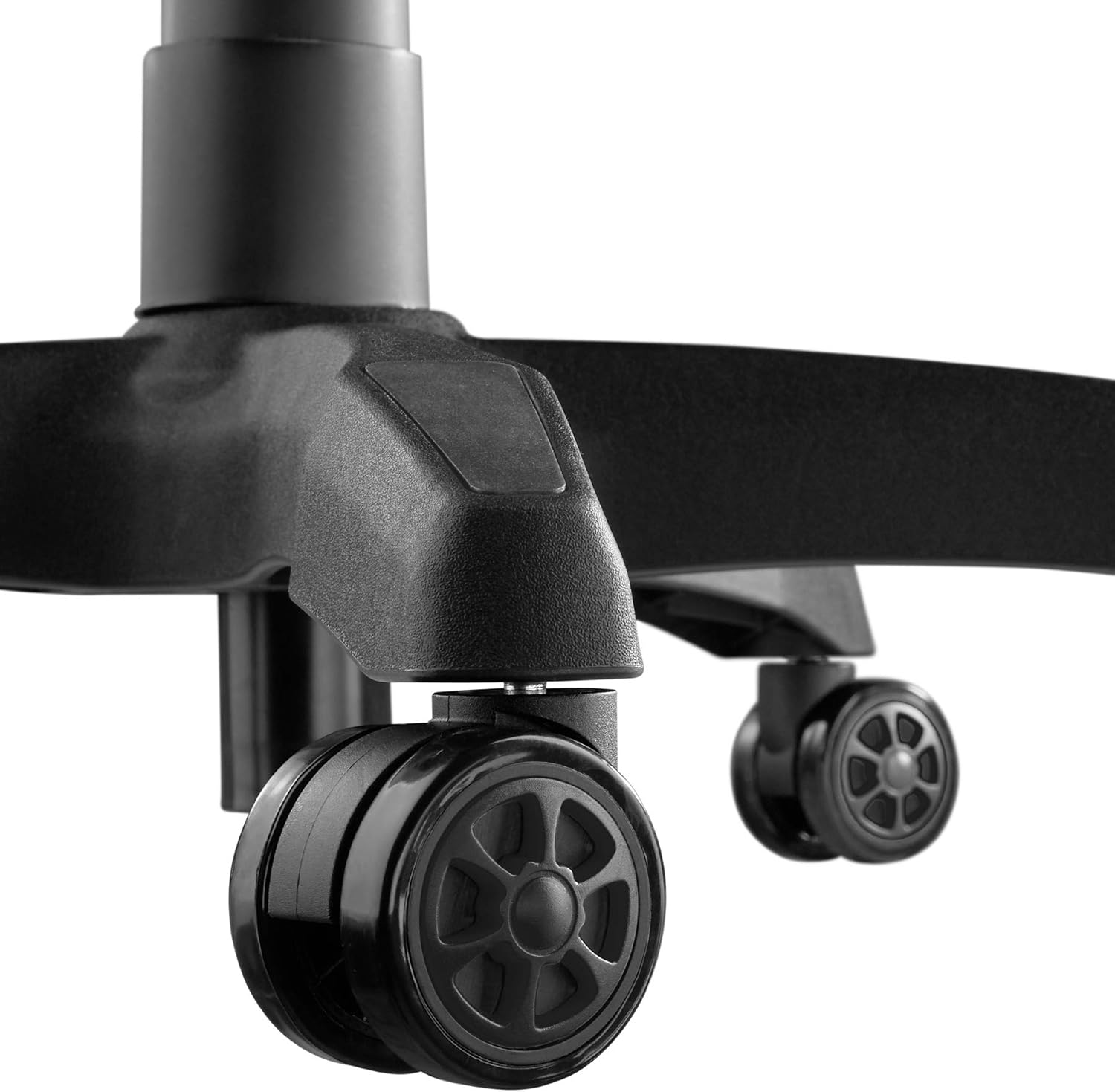
Image 5.5: Durable double casters for smooth mobility.
6. Hooldus
6.1. Puhastamine
- Pühkige tooli pinda pehme lapigaamp riie.
- For stubborn stains, use a mild soap solution and wipe immediately with a clean, damp lapiga, seejärel kuivatage hoolikalt.
- Avoid using abrasive cleaners, solvents, or harsh chemicals, as these can damage the PU/PVC material.
- Regularly vacuum or wipe the casters to remove dust and debris that could hinder smooth movement.
6.2. Üldhooldus
- Kontrollige regulaarselt kõiki kruvisid ja polte, et need oleksid kindlalt kinni. Vajadusel pingutage neid uuesti, et säilitada stabiilsus ja ohutus.
- Avoid placing heavy objects on the armrests or backrest when not seated.
- Keep the chair away from sharp objects that could puncture or tear the upholstery.
7. Veaotsing
| Probleem | Võimalik põhjus | Lahendus |
|---|---|---|
| Tool kõigub või tundub ebastabiilne. | Lahtised kruvid või ebatasane põrand. | Kontrollige ja pingutage kõiki kinnituskruvisid. Veenduge, et tool oleks tasasel ja horisontaalsel pinnal. |
| Tooli kõrgust ei saa reguleerida. | Gaasitõstuki hoob pole rakendatud või gaasitõstuki silinder on vigane. | Ensure the height adjustment lever is fully pulled. If the issue persists, the gas lift may need replacement. Contact support. |
| Rattad ei veere sujuvalt. | Rataste vahele jäänud praht või kahjustatud rattad. | Clean casters to remove hair, dust, or other debris. If damaged, replace casters. |
| Seljatugi ei kalluta ega lukustu. | Recline lever not engaged or mechanism faulty. | Ensure the recline lever is fully pulled/released. Check for any obstructions in the mechanism. |
| Krigisevad hääled. | Lahtised ühendused või hõõrdumine osade vahel. | Tighten all screws. Apply a small amount of silicone lubricant to moving parts if necessary, avoiding upholstery. |
8. Tehnilised andmed

Image 8.1: Key dimensions of the tectake Gaming Chair.
| Funktsioon | Detail |
|---|---|
| Mudeli number | 403209 |
| Üldmõõtmed (L x S x K) | Approx. 68 x 69 x 117.5 - 125 cm (26.8 x 27.2 x 46.3 - 49.2 inches) |
| Istme kõrgus | Approx. 42.5 - 50 cm (16.7 - 19.7 inches) |
| Istme mõõtmed (L x S) | Ligikaudu 51 x 50 cm (20.1 x 19.7 tolli) |
| Istme paksus | u. 8 cm (3.1 tolli) |
| Lumbar Cushion Dimensions (W x D x H) | Ligikaudu 29 x 7.5 x 19 cm (11.4 x 3.0 x 7.5 tolli) |
| Neck Cushion Dimensions (W x D x H) | Ligikaudu 26 x 10 x 17.5 cm (10.2 x 3.9 x 6.9 tolli) |
| Seljatoe kõrgus | u. 81 cm (31.9 tolli) |
| Seljatoe kaldenurk | 88–125 kraadi |
| Armrest Dimensions (W x D) | Ligikaudu 7.5 x 28 cm (3.0 x 11.0 tolli) |
| Armrest Height from Floor | Approx. 57 - 71.5 cm (22.4 - 28.1 inches) |
| Armrest Height Adjustment Range | u. 7 cm (2.8 tolli) |
| Star Base Diameter | u. 70 cm (27.6 tolli) |
| Caster Diameter/Width | Approx. 6 cm / 5.6 cm (2.4 inches / 2.2 inches) |
| Maksimaalne kandevõime | 120 kg (264 naela) |
| Kaal | u. 19 kg (41.9 naela) |
| Materjal | Polyurethane (PU), Polyvinyl Chloride (PVC), Plastic |
| Värv | Must |
9. Garantii ja tugi
For warranty information, replacement parts, or technical support, please refer to the purchase documentation or contact tectake customer service directly. Keep your proof of purchase for any warranty claims.
Contact information for tectake can typically be found on their official webveebisaidilt või jaemüüjalt, kellelt toode osteti.