1. Sissejuhatus
This manual provides detailed instructions for the setup, operation, maintenance, and troubleshooting of your iProda T1045A 10.1 inch Android Tablet. Please read this manual thoroughly before using your device to ensure proper functionality and to maximize your user experience.
The iProda T1045A is a 10.1-inch tablet featuring an HD IPS display with 1280x800 resolution, powered by a 64-bit Quad-core processor running Android 9 Pie. It includes 3GB RAM, 64GB internal storage expandable up to 128GB via TF card, dual-band Wi-Fi, HDMI output, and a 5000mAh battery for extended use.
2. Toote lõppview
2.1 Pakendi sisu
Paki avamisel veenduge, et kõik esemed on olemas:
- iProda T1045A 10.1 inch Android Tablet
- USB kaabel
- Toiteadapter
- Kasutusjuhend (see dokument)

Image: Contents of the iProda T1045A tablet package.
2.2 Seadme paigutus
Familiarize yourself with the physical components and ports of your tablet:
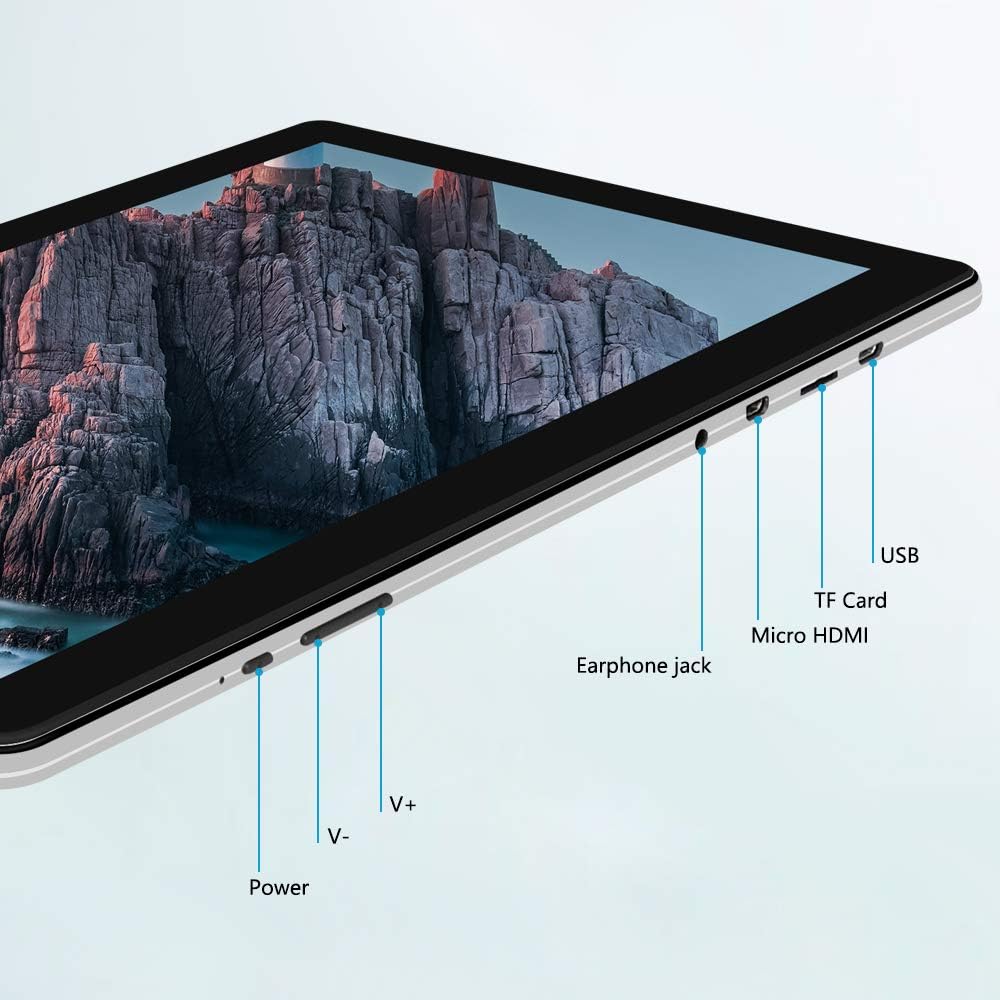
Pilt: Külg view of the iProda T1045A tablet highlighting port locations.
- Toitenupp: Press and hold to power on/off or restart the tablet. Short press to turn the screen on/off.
- Helitugevuse nupud (V+, V-): Reguleerige helitugevust.
- Kõrvaklubi pistik: Ühendage 3.5 mm kõrvaklapid.
- TF-kaardi pesa: Salvestusruumi laiendamiseks sisesta microSD-kaart (kuni 128 GB).
- Mikro-HDMI-port: Connect to an external display using a Micro HDMI to HDMI cable.
- USB-port: Connect to a computer for data transfer or for charging the device.
3. Seadistamine
3.1 Esmane laadimine
Before first use, fully charge the tablet. Connect the provided USB cable to the tablet's USB port and the power adapter, then plug the adapter into a wall outlet. The charging indicator will typically illuminate. A full charge may take several hours.
3.2 Sisse-/väljalülitamine
- Sisselülitamiseks: Vajutage ja hoidke toitenuppu all, kuni ekraan süttib.
- Väljalülitamiseks: Vajutage ja hoidke toitenuppu all, kuni ekraanile ilmub toitemenüü. Valige „Lülita välja” ja kinnitage.
- Taaskäivitamiseks: From the power menu, select "Restart".
- Ekraan sisse/väljas: Briefly press the Power button to turn the screen off (sleep mode) or wake it up.
3.3 Esialgse seadistuse viisard
The first time you power on the tablet, you will be guided through an initial setup process. Follow the on-screen prompts to:
- Valige eelistatud keel.
- Ühendage Wi-Fi võrguga.
- Looge oma Google'i konto (valikuline, kuid rakenduste allalaadimiseks soovitatav).
- Konfigureerige kuupäeva ja kellaaja seaded.
3.4 Inserting a TF Card (MicroSD)
To expand the tablet's storage:
- Locate the TF card slot on the side of the tablet.
- Carefully insert a microSD card (up to 128GB) into the slot with the gold contacts facing down until it clicks into place.
- Eemaldamiseks lükake kaarti õrnalt sissepoole, kuni see välja hüppab.
4. Kasutusjuhised
4.1 Lihtne navigeerimine
The iProda T1045A uses a touch-sensitive screen for navigation:
- Puudutage: Valige üksus või avage rakendus.
- Puudutage ja hoidke: Avage kontekstimenüüd või liigutage ikoone.
- Pühkige: Kerige loendeid või vahetage avakuvasid.
- Näputäis: Suumige pilte sisse või välja ja web lehekülgi.
4.2 Wi-Fi-ühendus
Traadita võrguga ühenduse loomiseks toimige järgmiselt.
- Mine aadressile Seaded > Võrk ja Internet > Wi-Fi.
- Lülita WiFi sisse/välja On.
- Valige loendist soovitud võrk.
- Sisestage parool, kui seda küsitakse, ja seejärel puudutage Ühendage.
The tablet supports both 2.4G and 5G dual-band Wi-Fi for faster and more stable connections.
4.3 Bluetoothi sidumine
Bluetooth-seadmetega (nt kõrvaklapid, kõlarid) sidumiseks tehke järgmist.
- Mine aadressile Seaded > Ühendatud seadmed > Bluetooth.
- Lülitage Bluetooth sisse On.
- Veenduge, et teie Bluetooth-seade oleks sidumisrežiimis.
- Valige saadaolevate seadmete loendist oma seade ja järgige sidumise lõpuleviimiseks ekraanil kuvatavaid juhiseid.
4.4 Kaamerate kasutamine
Tahvelarvuti on varustatud 2MP esikaamera ja 5MP tagakaameraga.
- Avage Kaamera application from the app drawer.
- Esi- ja tagakaamera vahel vahetamiseks puudutage kaameraikooni.
- Fotode tegemiseks või video salvestamise alustamiseks/peatamiseks puudutage katiku nuppu.

Image: Tablet in use, showcasing its camera capabilities.
4.5 Connecting to an External Display (HDMI)
To display your tablet's screen on a larger monitor or TV:
- Connect one end of a Micro HDMI cable to the tablet's Micro HDMI port.
- Connect the other end of the cable to an HDMI input on your external display.
- Select the correct HDMI input source on your external display.
- The tablet's screen content should now be mirrored on the external display.
4.6 Rakenduste haldus
The tablet runs Android 9 Pie and supports applications from the Google Play Store.
- Rakenduste installimine: Avage Play pood rakendus, otsige üles soovitud rakendus ja puudutage Installige.
- Rakenduste desinstallimine: Tap and hold an app icon on the home screen or in the app drawer, then drag it to "Uninstall" or select "App info" and choose "Uninstall". Alternatively, go to Seaded > Rakendused ja märguanded, valige rakendus ja puudutage Desinstalli.
5. Hooldus
5.1 Seadme puhastamine
Tahvelarvuti puhastamiseks:
- Enne puhastamist lülitage tahvelarvuti välja.
- Kasutage pehmet, ebemevaba lappi, mis on kergelt kuivanudampveega või ekraanipuhastusvahendiga niisutatud ekraani ja korpuse pühkimiseks.
- Vältige karmide kemikaalide, abrasiivsete puhastusvahendite ja liigse niiskuse kasutamist.
5.2 Tarkvaravärskendused
Periodically check for software updates to ensure optimal performance and security:
- Mine aadressile Seaded > Süsteem > Täiustatud > Süsteemi värskendus.
- Follow the on-screen instructions to download and install any available updates. Ensure your tablet is sufficiently charged or connected to power during updates.
5.3 Salvestushaldus
To manage internal storage and the TF card:
- Mine aadressile Seaded > Säilitamine.
- Siin saate view storage usage, free up space, and manage files on both internal storage and the inserted TF card.
6. Veaotsing
This section addresses common issues you might encounter with your iProda T1045A tablet.
6.1 Seade ei lülitu sisse
- Ensure the tablet is sufficiently charged. Connect it to the power adapter and allow it to charge for at least 30 minutes before attempting to power on again.
- Proovige taaskäivituse sundimiseks toitenuppu 10–15 sekundit all hoida.
6.2 WiFi-ühenduse probleemid
- Verify that Wi-Fi is enabled in Seaded.
- Veenduge, et sisestaksite õige Wi-Fi parooli.
- Taaskäivitage oma WiFi-ruuter ja tahvelarvuti.
- Try connecting to a different Wi-Fi network to determine if the issue is with the tablet or the network.
6.3 Aeglane jõudlus
- Sulgege mittevajalikud taustarakendused.
- Clear cached data for apps in Seaded > Rakendused ja märguanded > [Rakenduse nimi] > Salvestusruum ja vahemälu > Tühjenda vahemälu.
- Ensure sufficient free storage space. Uninstall unused apps or move large files TF-kaardile.
- Taaskäivitage tahvelarvuti.
6.4 Aku kiire tühjenemine
- Vähendage ekraani heledust.
- Keela WiFi, Bluetooth ja GPS, kui neid ei kasutata.
- Sulgege taustal töötavad rakendused, mis tarbivad märkimisväärselt energiat.
- Kontrollige aku kasutusaega jaotises Seaded > Aku energiat tarbivate rakenduste tuvastamiseks.
- Ensure the tablet is not allowed to run below 15% charge frequently, as this can impact battery longevity.
6.5 Tehaseseadetele lähtestamine
Püsivate probleemide korral võib tehase lähtestamine need lahendada. Hoiatus: See kustutab kõik teie tahvelarvutis olevad andmed. Enne jätkamist varundage olulised andmed.
- Mine aadressile Seaded > Süsteem > Täiustatud > Lähtesta valikud.
- Valige Kustuta kõik andmed (tehaseseadetele lähtestamine).
- Kinnitage oma otsus ja järgige ekraanil kuvatavaid juhiseid.
7. Tehnilised andmed
Below are the technical specifications for the iProda T1045A tablet:
| Mudeli nimi | T1045A |
| Operatsioonisüsteem | Android 9 Pie |
| Ekraani suurus | 10.1 tolli |
| Ekraani eraldusvõime | 1280 x 800 pikslit (HD IPS) |
| Protsessor | MediaTek Quad-core 1.5Ghz |
| RAM | 3 GB |
| Sisemälu | 64 GB SSD |
| Laiendatav salvestusruum | Up to 128 GB via TF Card (MicroSD) |
| Graafika kaasprotsessor | ARM Mali-T720 MP2 |
| Tagumine kaamera | 5 MP |
| Esikaamera | 2 MP |
| Aku mahutavus | 5000 mAh liitiumpolümeer |
| Keskmine aku tööiga | Kuni 8 tundi |
| Traadita ühenduvus | Dual-Band Wi-Fi (802.11a/b/g/n), Bluetooth 4.0 |
| Sadamad | 1x USB 2.0, 1x Micro HDMI, 3.5mm Earphone Jack, TF Card Slot |
| Mõõtmed | 34.5 x 19.7 x 5.5 cm |
| Kaal | 550 g |

Image: Key performance specifications of the tablet.

Image: Tablet portability and battery details.
8. Garantii ja tugi
8.1 Toote garantii
The iProda T1045A tablet comes with a 12-kuuline garantii alates ostukuupäevast. See garantii katab tootmisdefektid ja normaalse kasutamise korral esinevad rikkeid. See ei kata kahjustusi, mis on tekkinud väärkasutuse, õnnetuste, volitamata remondi või normaalse kulumise tagajärjel.
8.2 Klienditugi
If you encounter any issues not covered in the troubleshooting section or require further assistance, please contact iProda customer support. Refer to your purchase documentation or the iProda official websait kontaktteabe saamiseks.
When contacting support, please have your tablet's model number (T1045A) and purchase details readily available.


