1. Sissejuhatus
The ANCEL FX1000 is a professional vehicle diagnostic tool designed to read and clear trouble codes, view live data, and perform various special functions for a single-car manufacturer. It supports full OBD service modes and is compatible with vehicles manufactured from 1996 onwards. This manual provides detailed instructions for setting up and operating your device.
2. Toote omadused
- Full OBDII Service Modes: Supports 8 OBDII service modes for comprehensive diagnostics.
- Multi-System Diagnostics: Capable of diagnosing all major vehicle systems including Engine, Transmission, SRS (Supplemental Restraint System), SAS (Steering Angle Sensor), TPMS (Tire Pressure Monitoring System), ABS (Anti-lock Braking System), and more.
- Erifunktsioonid: Includes advanced functions such as DPF (Diesel Particulate Filter) Regeneration, Battery Replacement, ABS Bleeding, Oil Service Reset, EPB (Electronic Parking Brake) Reset, and Throttle Position Adaption.
- Mitme keele tugi: Supports 7 languages: English, French, Spanish, German, Russian, Polish, and Portuguese.
- Manufacturer-Specific Tool: Designed for a single-car manufacturer, allowing in-depth diagnostics for a specific brand's vehicle series.
- Lifetime Free Online Updates: Ensures your device always has the latest software and vehicle coverage.
3. Pakendi sisu
Your ANCEL FX1000 package should include the following items:
- ANCEL FX1000 Diagnostic Tool
- OBDII ühenduskaabel
- Micro USB Cable (for PC connection and updates)
- Laadige alla juhend
- Hard Shelli kandekott
4. Seadme paigutus
Familiarize yourself with the buttons and ports on your ANCEL FX1000 device for optimal operation.

Image: ANCEL FX1000 device showing LCD display, Return button, Scroll Left/Right/Up/Down buttons, Fn button, and Ok button. Dimensions are also indicated.
- LCD ekraan: Shows diagnostic information and menu options.
- Tagastusnupp: Liigub tagasi eelmisele ekraanile või menüüsse.
- Scroll Buttons (Up/Down/Left/Right): Used to navigate through menus and select options.
- Fn Button: Function button, may have context-specific uses.
- OK nupp: Kinnitab valikuid või siseneb alammenüüdesse.
- OBDII-pistik: Ühendab seadme sõiduki OBDII-porti.
- USB-port: For connecting to a computer for software updates.
5. Seadistamine ja ühendus
Follow these steps to connect your ANCEL FX1000 to your vehicle:
- Leidke oma sõiduki OBDII-port. See asub tavaliselt armatuurlaua all juhi poolel.
- Ensure the vehicle's ignition is ON, but the engine is NOT running. For push-button start vehicles, press the start button until all dashboard lights illuminate without starting the engine.
- Plug the OBDII connector from the ANCEL FX1000 into your vehicle's OBDII port. The device will power on automatically.
- Once powered on, the device is ready for use.
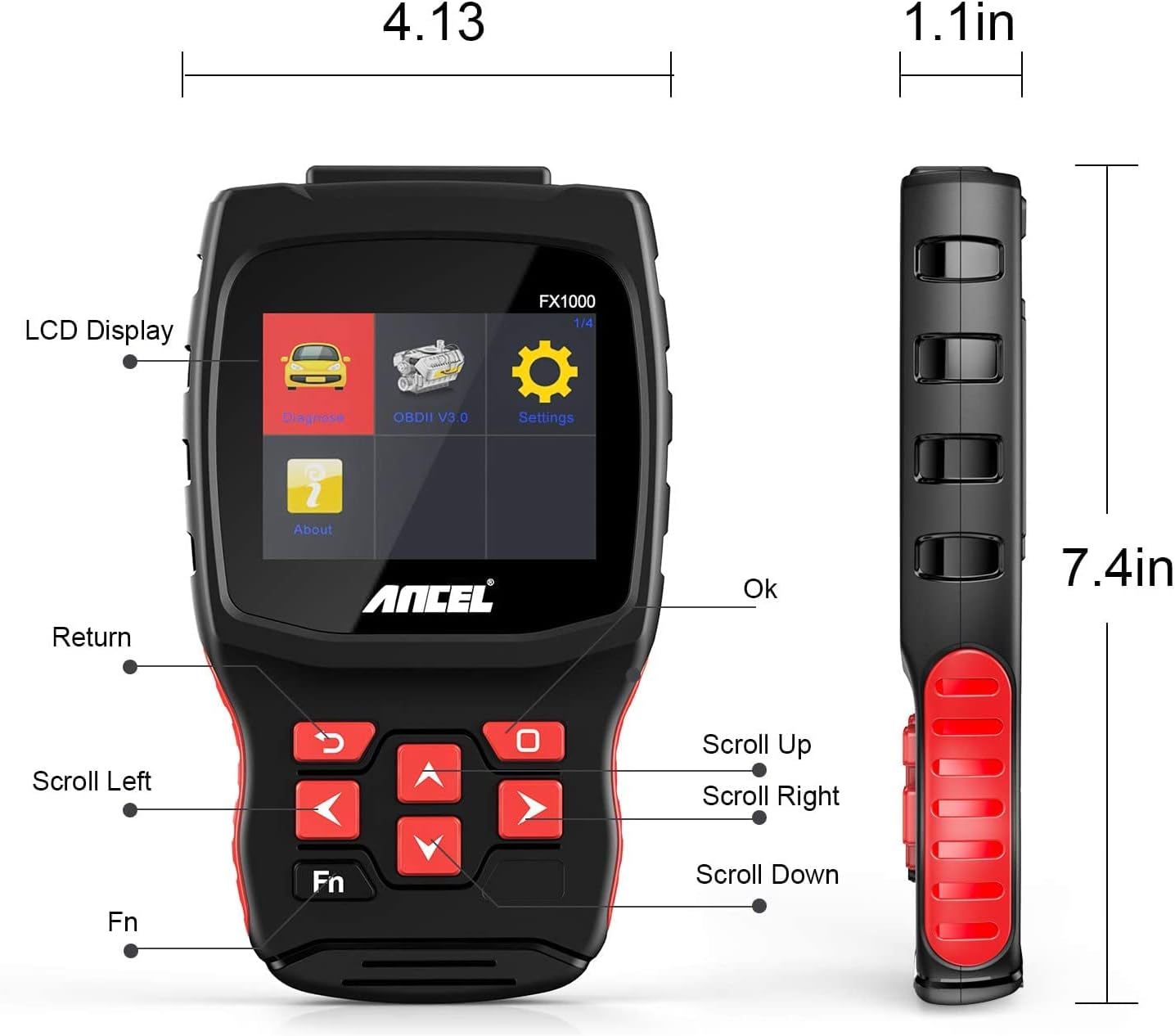
Image: A hand holding the ANCEL FX1000 connected to a vehicle's OBDII port, with the car's dashboard visible.
6. Navigeerimine ja sätted
The ANCEL FX1000 features a user-friendly interface. Use the arrow buttons to navigate and the OK button to select.
- Diagnoos: Juurdepääs sõidukispetsiifilistele diagnostikafunktsioonidele.
- OBDII V3.0: Access general OBDII functions for all compatible vehicles.
- Seaded: Seadme eelistuste konfigureerimine.
- Teave: View device information such as serial number, firmware version, and software version.
Seadete menüü Valikud:
- Keel: Ekraani keele muutmine.
- Ühik: Temperatuurinäitude jaoks vahetage Celsiuse ja Fahrenheiti vahel.
- Piiks: Enable or disable audible feedback.
- Salvestus: View recorded diagnostic data.
- Nupu test: Test the functionality of the device buttons.
- LCD Test: Test the LCD display.
7. Süsteemi diagnostika
The ANCEL FX1000 allows you to perform in-depth diagnostics on various vehicle systems. After selecting 'Diagnose' and your vehicle's manufacturer (e.g., Toyota), you can choose specific systems.
Image: Visual representation of systems diagnosed by FX1000, including Engine, ABS, TPMS, Transmission, Oil Service, Airbag, Battery, Audio, and Headlight Activate.
Diagnostilised funktsioonid:
- Read Trouble Code: Retrieves current, pending, and history Diagnostic Trouble Codes (DTCs).
- Clear Trouble Code: Erases DTCs from the vehicle's computer.
- Lugege andmevoogu: Kuvab sõiduki anduritelt saadud reaalajas andmeparameetreid.
- Aktiivne test: Allows bidirectional control to test specific components.
- Special Function: Accesses advanced maintenance and service functions.
8. Erifunktsioonid
The ANCEL FX1000 offers several special functions for vehicle maintenance:

Image: Visual representation of special functions including Oil Service Reset, ABS Bleeding, TPMS Reset, and EPB Reset.
- Õliteenuse lähtestamine: Lähtestab õlivahetuse tule pärast õlivahetust.
- ABS-i verejooks: Teostab mitteblokeeruva pidurisüsteemi õhutusfunktsioone.
- Elektrilise pidurisüsteemi lähtestamine: Resets the Electronic Parking Brake system.
- Throttle Position Adaption: Adapts the throttle position sensor.
- DPF-filtri regenereerimine: Käivitab diislikütuse tahkete osakeste filtri regenereerimisprotsessi.
- Patarei vahetus: Registers new battery replacements.
9. OBDII Functions (General)
The 'OBDII V3.0' menu provides general diagnostic functions compatible with all OBDII-compliant vehicles (1996 and newer).
- Read Current Trouble Code: Displays active DTCs.
- Clear Trouble Code: Erases all stored DTCs.
- Read Current Data: View live sensor data.
- Read Pending Trouble Code: Displays DTCs that have not yet fully matured.
- Jäädvustatud kaadri andmete lugemine: Shows a snapshot of vehicle conditions when a DTC was set.
- Readiness Tests: Kontrollib emissiooniga seotud monitoride olekut.
Readiness Test:
The Readiness Test is crucial for emissions inspections. It indicates whether various emission control systems have completed their self-tests. Look for 'Complete' or 'Supported' status for all monitors. If a monitor shows 'Not Complete' or 'Not Supported', it may indicate an issue or that the drive cycle has not been completed.
10. Clearing Trouble Codes
To clear trouble codes, navigate to the 'Clear Trouble Code' option within the relevant diagnostic menu. The device will prompt you to confirm. After clearing, it is recommended to cycle the vehicle's ignition off and on to ensure all related warning lights are reset.
Note: The ANCEL FX1000 can only read and clear SRS error codes; it does NOT support SRS reset functions.
11. Tarkvarauuendus
To ensure your ANCEL FX1000 has the latest vehicle coverage and features, regular software updates are recommended. The device offers lifetime free online updates.
- Connect the device to your computer using the provided Micro USB cable.
- Follow the instructions in the 'Download Guide' included in your package to install the update software on your computer.
- Register your device using the serial number and your email address.
- Select the specific car manufacturer software you need for your device.
- Perform the update as prompted by the software.

Image: ANCEL FX1000 connected via USB cable to a laptop, illustrating the update process.
12. Veaotsing
If you encounter issues while using your ANCEL FX1000, refer to the following common scenarios:
-
Seotud dokumendid - FX1000

ANCEL VD500 kasutusjuhend: OBD2 diagnostikavahendi juhend
ANCEL VD500 OBD2 diagnostikaskanneri põhjalik kasutusjuhend. Siit leiate teavet oma auto diagnostikavahendi ohutusnõuete, funktsioonide, töö, spetsifikatsioonide ja garantiiteabe kohta.
ANCEL VOD700 kasutusjuhend - Volvo mitmesüsteemne skanner
Põhjalik kasutusjuhend ANCEL VOD700 mitmesüsteemse skänneri jaoks, mis annab üksikasjalikke juhiseid Volvo sõidukite kohta, sh diagnostika, erifunktsioonid, tööriistade seadistamine ja värskendused.
ANCEL DS160, DS100, DS200 kasutusjuhend – autodiagnostika tööriistad
ANCEL DS160, DS100 ja DS200 autodiagnostika tööriistade kasutusjuhend. Hõlmab nende OBD2-skannerite omadusi, parameetreid, kasutamist, funktsioone, KKK-d ja garantiid.
ANCEL BD300 OBD2 skänneri kasutusjuhend
Põhjalik kasutusjuhend ANCEL BD300 OBD2 skänneri jaoks. Siit saate teada, kuidas alla laadida ANCEL rakendus, luua ühendus Bluetoothi kaudu, teha sõiduki diagnostikat, värskendada tarkvara ja kasutada erifunktsioone, nagu EPB, CBS, ABS ja turvapatjade lähtestamine. Toetab BMW ja teiste sõidukite täielikku süsteemidiagnostikat.
ANCEL FD500 kasutusjuhend: autodiagnostika põhjalik juhend
Avastage ANCEL FD500, mitmesüsteemne OBD2-skanner hallis värvitoonis, mis on loodud Fordi, Lincolni ja Mercury sõidukitele. See kasutusjuhend annab üksikasjalikud juhised selle omaduste, ohutusmeetmete ja diagnostikafunktsioonide kohta, sealhulgas mootori, ABS-i, SRS-i, käigukasti, 4WD-süsteemide, EPB, õli lähtestamise ja aku registreerimise kohta.
ANCEL BD300 kasutusjuhend ja kiirjuhend
Põhjalik kasutusjuhend ANCEL BD300 Bluetooth OBD2 diagnostikavahendile, mis hõlmab BMW/Mini sõidukite seadistamist, kasutamist ja funktsioone. Sisaldab juhiseid rakenduse ühendamiseks, süsteemi diagnostikaks ja hoolduse lähtestamiseks.