1. Sissejuhatus
Thank you for choosing the Techmade TM-W007C-NGR Hybrid Smartwatch. This manual provides essential information for setting up, operating, maintaining, and troubleshooting your device. Please read it carefully to ensure optimal performance and longevity of your smartwatch. The TM-W007C-NGR combines classic quartz watch aesthetics with modern digital smartwatch functionalities, offering a versatile and stylish experience.
2. Toote lõppview
The Techmade TM-W007C-NGR is a hybrid smartwatch designed for men, featuring a robust steel case and a comfortable green rubber strap. It integrates a precise quartz movement for traditional timekeeping with a digital display for smart features. Key functionalities include multi-functions, smartphone compatibility, and 3 ATM water resistance.

Joonis 2.1: Esiosa view of the Techmade TM-W007C-NGR Hybrid Smartwatch.
Peamised omadused:
- Kvarts liikumine: Reliable analog time display.
- Digitaalne kuva: Integrated screen for smart notifications and data.
- Multifunctions: Access various smart features directly from your wrist.
- 3 ATM-i veekindlus: Suitable for everyday use, including splashes and brief immersion.
- Vastupidav konstruktsioon: Steel case with a comfortable rubber strap.
- Nutitelefonide ühilduvus: Connects to your smartphone for enhanced features.
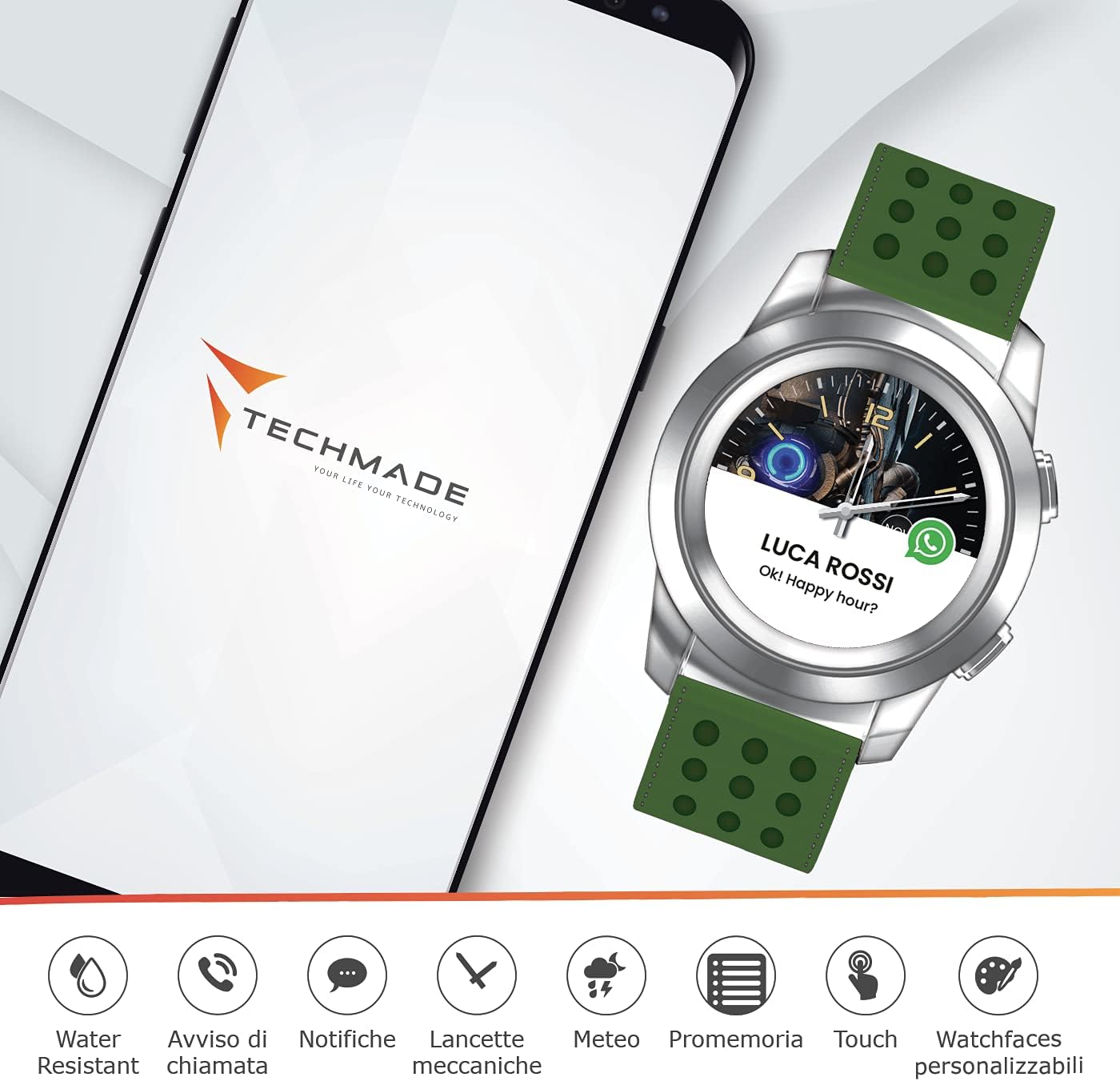
Figure 2.2: The smartwatch connected to a smartphone, illustrating various smart features like water resistance, call alerts, notifications, mechanical hands, weather, reminders, touch control, and customizable watch faces.

Joonis 2.3: Plahvatanud view illustrating the hybrid nature of the watch, combining traditional watch mechanisms with digital components for features like heart rate monitoring, step counting, and battery status.
3. Seadistamine
3.1 Esmane laadimine
Before first use, fully charge your smartwatch. Connect the charging cable to the designated charging port on the watch and plug the other end into a USB power adapter (not included) or a computer's USB port. A full charge typically takes approximately 2 hours.
3.2 Rakenduse allalaadimine ja sidumine
- Laadige rakendus alla: Otsi the official Techmade smartwatch application in your smartphone's app store (Google Play Store for Android or Apple App Store for iOS). Install the application.
- Bluetoothi lubamine: Veenduge, et Bluetooth oleks teie nutitelefonis lubatud.
- Ava rakendus ja sidu: Open the Techmade app, create an account or log in, and follow the on-screen instructions to search for and pair with your TM-W007C-NGR smartwatch. You may need to confirm a pairing code on both devices.
3.3 Aja sünkroonimine
Once paired, the smartwatch will automatically synchronize its time and date with your smartphone. If the time is incorrect, ensure your phone's time settings are accurate and try re-pairing the device.
4. Kasutusjuhised
4.1 Lihtne navigeerimine
The TM-W007C-NGR features a combination of physical buttons and a touch-sensitive digital display for navigation. Refer to the in-app guide for specific button functions and touch gestures.
- Külgmised nupud: Typically used for power on/off, returning to the home screen, or accessing specific functions.
- Digitaalne kuva: Swipe left/right or up/down to navigate through menus and notifications. Tap to select items.
4.2 Teavitused
Once connected to your smartphone, the smartwatch can display notifications for calls, messages, and other app alerts. Configure which notifications you wish to receive through the Techmade app settings.
4.3 Kella sihverplaatide kohandamine
Personalize your smartwatch by changing the watch face. This can typically be done through the Techmade app or directly on the watch's digital display by long-pressing the screen or navigating to the watch face settings.
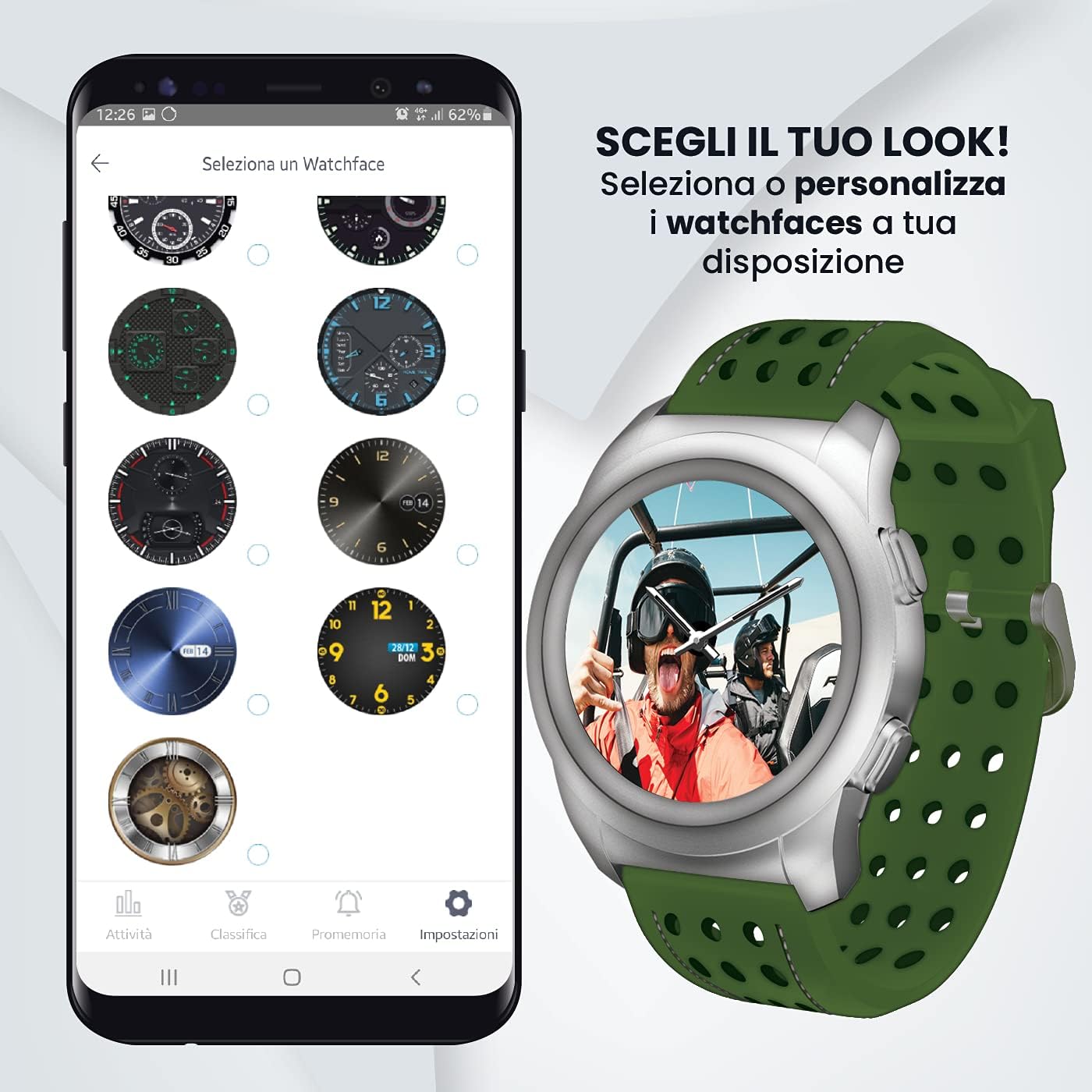
Figure 4.1: The Techmade app interface displaying a selection of customizable watch faces.
4.4 Muud funktsioonid
Explore additional features such as activity tracking, weather updates, and reminders via the smartwatch's menus and the companion app. Refer to the app's help section for detailed instructions on each function.
5. Hooldus
5.1 Puhastamine
To clean your smartwatch, gently wipe the case and strap with a soft, damp cloth. Avoid using harsh chemicals, abrasive materials, or strong detergents, as these can damage the finish or internal components. Ensure the watch is dry before charging.
5.2 Veekindlus
The TM-W007C-NGR is rated for 3 ATM (30 meters) water resistance. This means it is suitable for daily use, splashes, rain, and brief immersion in water. It is mitte recommended for swimming, diving, or showering with hot water, as steam and high pressure can compromise the seals.

Figure 5.1: The smartwatch demonstrating its water resistance capabilities.
5.3 Aku hooldus
To prolong battery life, avoid extreme temperatures. Charge the device regularly and avoid letting the battery completely drain for extended periods. If storing the watch for a long time, ensure it has at least a 50% charge.
6. Veaotsing
6.1 Seade ei lülitu sisse
- Veendu, et kell on täielikult laetud. Ühenda see laadijaga vähemalt 30 minutiks.
- Sunnitud taaskäivituse proovimiseks hoidke toitenuppu 10–15 sekundit all.
6.2 Nutitelefoniga sidumine ebaõnnestus
- Verify Bluetooth is enabled on your smartphone and the watch.
- Veenduge, et kell on teie telefoni Bluetoothi levialas (tavaliselt 10 meetrit).
- Taaskäivitage nii nutitelefon kui ka nutikell.
- Tühjendage oma telefoni Bluetoothi vahemälu (Android) või unustage seade Bluetoothi seadetes (iOS) ja proovige uuesti siduda.
6.3 Inaccurate Time or Data
- Check if the watch is properly connected to the app and your smartphone.
- Ensure your smartphone's time and date settings are correct.
- Synchronize data manually through the app if available.
6.4 App Not Functioning Correctly
- Veenduge, et rakendus oleks värskendatud uusimale versioonile.
- Clear the app's cache and data (Android) or reinstall the app.
- Check your phone's operating system for updates.
7. Tehnilised andmed
| Kaubamärk | Techmade |
| Mudeli number | TM-W007C-NGR |
| Liikumine | Kvarts |
| Kuva tüüp | Digitaalne |
| Veekindlus | 3 sularahaautomaati (30 meetrit) |
| Korpuse materjal | Teras |
| Rihma materjal | Kumm |
| Rihma värv | Roheline |
| Ühilduvad seadmed | Nutitelefon |
| Päritoluriik | Itaalia |
8. Garantii ja tugi
Your Techmade TM-W007C-NGR Hybrid Smartwatch is covered by a manufacturer's warranty. Please refer to the warranty card included with your purchase for specific terms and conditions, including warranty duration and coverage details. For technical support, service, or further inquiries, please visit the official Techmade websaidil või võtke ühendust oma klienditeenindusega.
Ametlik Websait: www.techmade.eu


