1. Sissejuhatus ja lõppview
The OSD Audio MX1680 GEN2 is a high-performance, multi-channel amplifier designed for distributed audio systems. This Class D amplifier provides 16 channels across 8 independent zones, delivering 80 Watts per channel into 4 Ohms or 50 Watts per channel into 8 Ohms. It is suitable for both residential and commercial audio installations, serving as a main amplifier for multi-room audio or integrating into home theater systems.
Key features include front-panel on/off buttons for each zone, efficient Class D amplification for low distortion, and built-in protection circuitry against thermal overload and short circuits. Its slim, 2U rack-mountable design (hardware included) allows for flexible installation.

Pilt 1.1: Ees ja taga view of the OSD Audio MX1680 GEN2 Multi-Zone Digital Ampelujõulisem.
2. Ohutusalane teave
Please read and understand all safety instructions before operating this device. Retain this manual for future reference.
- Toiteallikas: Ühendage ampKasutage ainult seadmel näidatud toiteallika tüübi jaoks. Veenduge, et toitepingetage on teie piirkonna jaoks õige.
- Ventilatsioon: Ärge blokeerige ühtegi ventilatsiooniava. Paigaldage vastavalt tootja juhistele. Jätke seadme ümber piisavalt ruumi nõuetekohaseks õhuvooluks.
- Vesi ja niiskus: Ärge jätke seadet vihma ega niiskuse kätte. Ärge asetage seadmele vedelikega täidetud esemeid, näiteks vaase.
- Kuumus: Ärge paigaldage soojusallikate, näiteks radiaatorite, küttekehade, ahjude või muude seadmete (sh amptõsteseadmed), mis toodavad soojust.
- Maandus: This appliance must be grounded. Ensure the power cord is connected to a properly grounded outlet.
- Teenindus: Ärge proovige seda toodet ise hooldada. Andke kõik hooldustööd kvalifitseeritud hooldustöötajatele.
- Puhastamine: Enne puhastamist eemaldage seade vooluvõrgust. Puhastamiseks kasutage kuiva lappi.
3. Seadistamine ja installimine
3.1 Lahtipakkimine
Eemaldage ettevaatlikult amplifier from its packaging. Verify that all components listed in the 'What's in the Box' section are present. This includes the MX1680 GEN2 amplifier and the Quick Start Guide.
3.2 Paigutus
The MX1680 GEN2 is designed for rack mounting (2U height) or placement on a flat, stable surface. Ensure adequate ventilation around the unit to prevent overheating. Avoid placing it near other heat-generating equipment.
3.3 Ühendused
Refer to the rear panel diagram for all input and output connections.
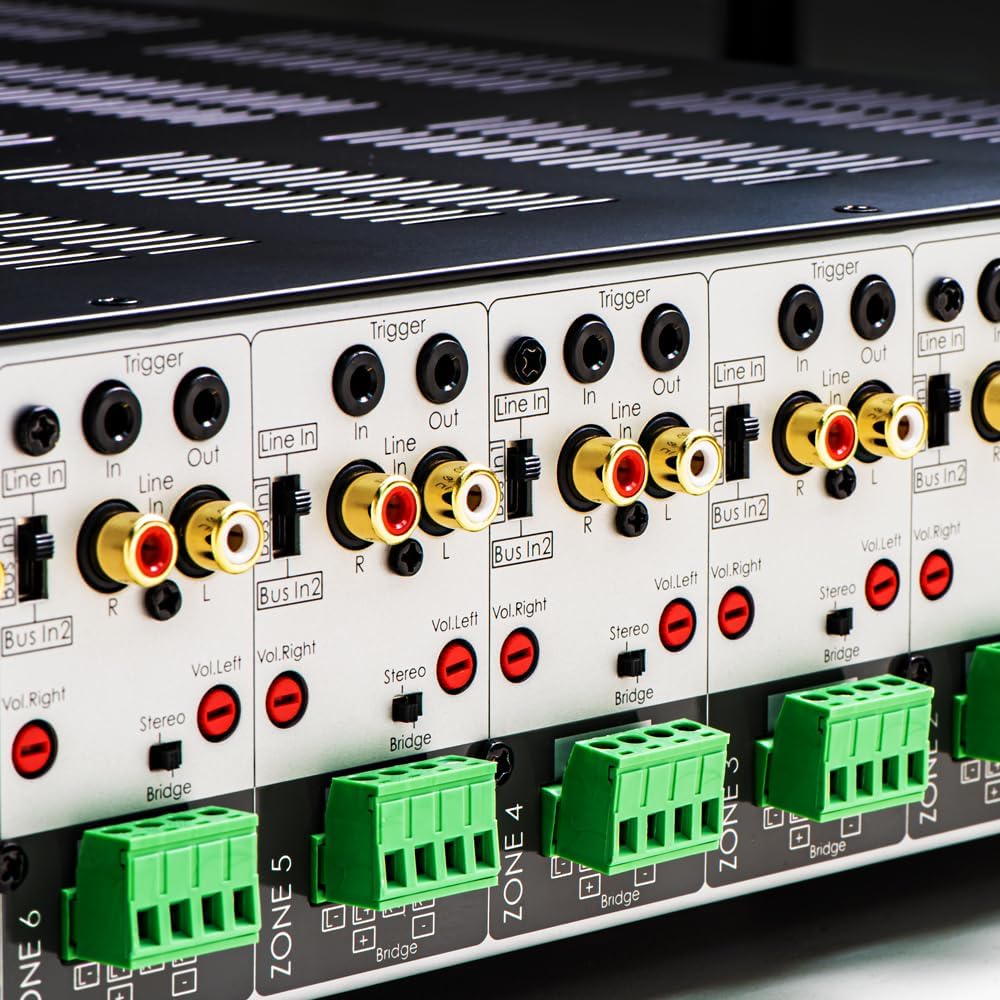
Pilt 3.1: Detailne view of the rear panel input and output connections.
- Kõlarite väljundid: Connect your speakers to the corresponding zone terminals. Ensure correct polarity (+ to + and - to -). The amplifier supports both 4-ohm and 8-ohm speakers. For bridged mode operation, refer to section 4.3.
- Line Inputs (RCA): Each zone has a dedicated stereo RCA Line In. Connect your audio sources (e.g., pre-amplifier, media player) to these inputs.
- Bus Inputs (RCA): The amplifier features two stereo Bus Inputs (Bus In 1, Bus In 2). These allow a single audio source to be distributed to multiple zones.
- Line väljundid (RCA): Each zone also has a stereo RCA Line Out, allowing the audio signal from that zone to be passed to another amptõsteseade või heliseade.
- Käivitage sisse/välja: The 12V Trigger In allows the amplifier to be turned on/off by an external device. The 12V Trigger Out can be used to control other devices.
- Vahelduvvoolu sisend: Connect the supplied power cord to the AC IN receptacle and then to a suitable wall outlet.

Pilt 3.2: Detailne view of Bus inputs and Trigger connections on the rear panel.
4. Kasutusjuhised
4.1 Toide sisse/välja
Press the main power button on the front panel to turn the amplifier on or off. A red LED indicator will illuminate when the unit is powered on.

Image 4.1: Front panel power button.
4.2 tsooni kontroll
Each of the 8 zones has a dedicated button on the front panel. Pressing a zone button will activate or deactivate that specific audio zone. The corresponding LED will indicate the zone's status.

Image 4.2: Front panel zone selection buttons.
4.3 Input Selection and Volume Adjustment
On the rear panel, each zone features switches for input selection and rotary controls for volume adjustment:
- Sisendi valija: A slide switch allows you to select the audio input for each zone: Rida sisse (dedicated input for that zone), Bus In 1, või Bus In 2.
- Helitugevuse regulaatorid: Separate rotary controls for Left and Right channels (Vol. Left, Vol. Right) allow for precise volume balancing within each zone.
- Stereo/Bridge Switch: A switch allows you to configure the zone for stereo operation or bridged mono operation. In bridged mode, two amplifier channels combine to deliver higher power to a single speaker. Ensure the speaker impedance is appropriate for bridged mode (typically 8 ohms minimum).
4.4 Audio Sensing
The amplifier incorporates an audio sense feature that automatically activates a zone when an input signal is detected and turns it off after a period of no signal. This helps conserve power and prolong the unit's lifespan.

Pilt 4.3: Näideample of multi-zone audio distribution with the ampelujõulisem.
5. Hooldus
The OSD Audio MX1680 GEN2 amplifier requires minimal maintenance. Follow these guidelines to ensure optimal performance and longevity:
- Puhastamine: Periodically wipe the exterior surfaces with a soft, dry cloth. Do not use liquid cleaners or aerosol sprays, as they may damage the finish or internal components.
- Ventilatsioon: Ensure that the ventilation openings on the top and sides of the unit remain clear of dust and obstructions. Dust accumulation can impede airflow and lead to overheating.
- Ühendused: Occasionally check all cable connections to ensure they are secure and free from corrosion. Loose connections can lead to signal loss or degradation.
- Hoiustamine: Kui säilitate amppikemat aega kasutamata, eemaldage see vooluvõrgust ja hoidke jahedas, kuivas kohas, eemal otsesest päikesevalgusest ja äärmuslikest temperatuuridest.
6. Veaotsing
If you experience issues with your MX1680 GEN2 amplifier, consult the following troubleshooting guide. For problems not resolved here, please contact OSD Audio support.
| Probleem | Võimalik põhjus | Lahendus |
|---|---|---|
| Pole jõudu | Toitejuhe lahti ühendatud; pistikupesa on vigane; Ampkaitselüliti läbipõlenud | Check power cord connection; Test outlet with another device; Contact service for fuse replacement. |
| No sound from a zone | Zone not activated; Incorrect input selected; Source device off/muted; Speaker wires loose/incorrectly connected; Volume too low | Press the zone button on the front panel; Verify input selector switch position; Check source device; Inspect speaker connections; Adjust zone volume controls. |
| Moonutatud heli | Input signal too high; Speaker impedance mismatch; Faulty speaker cable; Amptõstuki ülekuumenemine | Reduce source device output level; Ensure correct speaker impedance (4 or 8 ohms, or 8 ohms for bridged); Check speaker cables; Ensure proper ventilation. |
| Amplifier shuts off unexpectedly | Overheating; Short circuit in speaker wiring; Protection circuit activated | Ensure proper ventilation; Check all speaker wiring for shorts; Allow unit to cool down before restarting. |
7. Tehnilised andmed
| Funktsioon | Spetsifikatsioon |
|---|---|
| Mudeli number | MX1680-GEN2 |
| Kanalid | 16 Channels (8 Zones) |
| Väljundvõimsus (4 oomi) | 80 Watts per channel (1KHz) |
| Väljundvõimsus (8 oomi) | 50 Watts per channel (1KHz) |
| Ampeluklass | D klass |
| Toote mõõtmed (P x L x K) | 16.81 x 16.14 x 3.46 tolli |
| Kauba kaal | 23 naela |
| Rack monteeritav | Yes (2U, hardware included) |
| Tootja | OSD heli |
| Esmakordselt saadaval olev kuupäev | 31. jaanuar 2020 |
8. Garantii teave
Warranty information for the OSD Audio MX1680 GEN2 amplifier is typically provided with your purchase documentation or can be found on the official OSD Audio webveebisait. Garantiitingimuste ja -tingimuste kohta leiate lisateavet järgmistest ressurssidest.
9. Toetus
For technical assistance, product inquiries, or service requests, please contact OSD Audio customer support. You can typically find contact information, including phone numbers and email addresses, on the official OSD Audio websait:
Please have your model number (MX1680-GEN2) and purchase details ready when contacting support.


