1. Sissejuhatus
The EPEVER Tracer1210AN MPPT Solar Charge Controller is designed to efficiently manage power from your solar panels to charge batteries. It features advanced Maximum Power Point Tracking (MPPT) technology, ensuring high tracking efficiency of over 99.5%. This controller supports 12V and 24V battery systems automatically and can handle a maximum PV input voltage of 100V. It is compatible with various battery types, including sealed lead-acid, gel, flooded, and lithium batteries. The built-in LCD screen displays key charging parameters, and multiple connectivity options allow for personalized settings and monitoring via remote meter, mobile app, or PC software.
2. Toote omadused
The Tracer1210AN controller integrates several features for optimal performance and user interaction.

- LCD ekraan: Shows real-time operating data and fault information.
- Vali nupp: Used to navigate through different display interfaces.
- Enter nupp: Used to confirm selections or enter settings menus.
- Paigaldusaugud: For secure installation of the controller.
- Temperatuurianduri port: Connects the Remote Temperature Sensor (RTS) for accurate battery temperature compensation.
- Solar Panel Terminals: Connects to the solar panel array.
- Aku klemmid: Ühendab akupangaga.
- Load Terminals: Connects to DC loads.
- COM Port (RS485): For communication with accessories like the MT50 remote meter, PC software, or mobile app.

3. Seadistamine ja installimine
Proper installation is crucial for the safe and efficient operation of your solar charge controller. Follow these steps carefully.
3.1 Karbist lahtivõtmine ja komponendid
Before installation, ensure all components are present and undamaged. The package typically includes the Tracer1210AN controller, an MT50 remote meter, a Remote Temperature Sensor (RTS), and an RS485 PC communication cable.

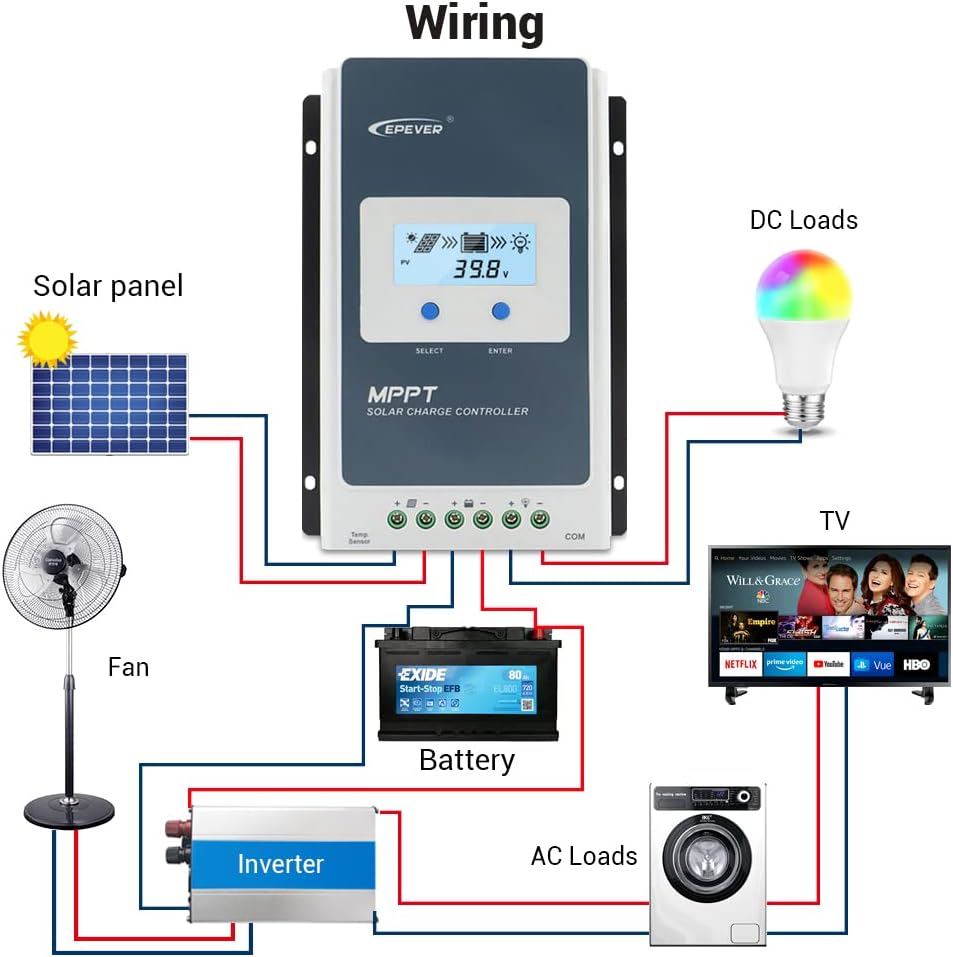
3.2 Ühendusskeem
Connect the components in the specified order to prevent damage. The connection order is: Battery → Solar Panel → Load. The disassembly order is the reverse: Load → Solar Panel → Battery.
3.3 Communication Ports and Accessories
The controller features various ports for enhanced monitoring and control.

- Remote Temperature Sensor (RTS): Connect the RTS300R47K3.81A to the designated port for accurate battery temperature compensation. The standard cable length is 3m.
- RS485 sideport: This RJ45 port allows connection to various accessories for monitoring and parameter setting.
3.4 Paigaldamise etapid
- Paigaldage kontroller kindlalt ettenähtud kinnitusavade abil.
- Connect the battery to the controller's battery terminals. Ensure correct polarity.
- Connect the solar panel to the controller's solar panel terminals. Ensure correct polarity.
- Connect the DC loads to the controller's load terminals. Ensure correct polarity.
- Connect the temperature sensor probe to the controller.
3.5 Video: Unboxing and Installation
Watch this video for a visual guide on unboxing and installing the EPEVER Tracer-AN controller and its accessories.
4. Kasutusjuhised
This section covers basic operation and how to configure essential settings on your controller.
4.1 Manual Control Mode
The controller supports manual control of the load. Press the 'ENTER' button to toggle the load on or off.
4.2 Setting the Battery Type
It is essential to set the correct battery type for optimal charging and battery longevity. The controller supports various battery types including Sealed (default), Gel, Flooded, and different Lithium battery configurations.
Aku tüübi määramiseks:
- Press and hold the 'ENTER' button for 5 seconds when the battery voltagKuvatakse liides.
- Press the 'SELECT' button when the battery type interface is flashing to cycle through available battery types.
- Press the 'ENTER' button to confirm your selection.
4.3 Setting the Load Mode
The load working mode determines how the connected DC loads operate. Options include Light ON/OFF, various timer settings, test mode, and manual mode.
To set the load mode:
- Press and hold the 'ENTER' button for 5 seconds when the load mode interface is displayed.
- Press the 'SELECT' button when the load mode interface is flashing to cycle through available modes.
- Press the 'ENTER' button to confirm your selection.
5. Tehnilised andmed
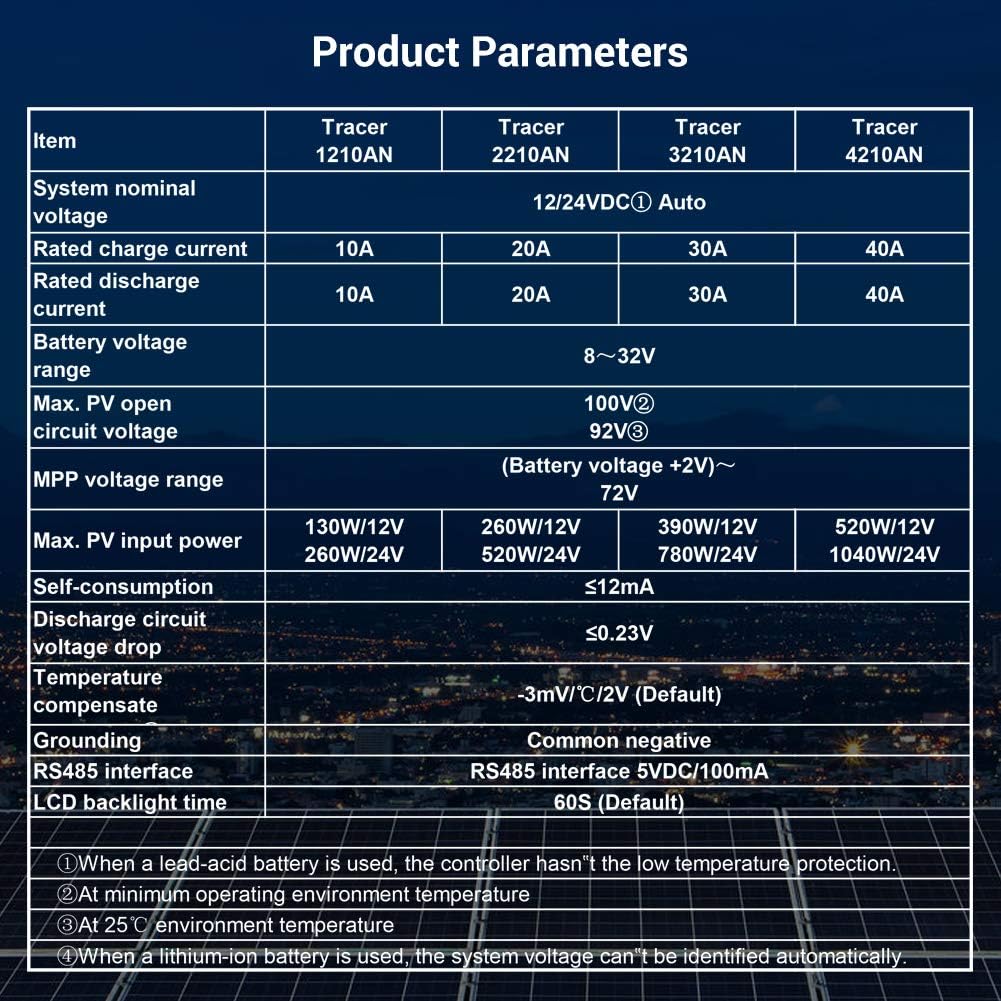
Below are the technical specifications for the Tracer1210AN MPPT Solar Charge Controller.
| Parameeter | Väärtus (Tracer1210AN) |
|---|---|
| System Nominal Voltage | 12 / 24VDC automaatne |
| Nimilaadimisvool | 10A |
| Nimitühjendusvool | 10A |
| Aku mahttage Vahemik | 8 ~ 32 V |
| Max PV Open Circuit Voltage | 100 V (keskkonnatemperatuuril 25 °C) |
| MPP Voltage Vahemik | Aku mahttag+2V ~ 72V |
| Max PV sisendvõimsus | 130 W/12 V, 260 W/24 V |
| Omatarbimine | ≤12mA |
| Discharge Circuit Voltage Kukk | ≤0.23 V |
| Temperature Compensate | -3mV/°C/2V (vaikimisi) |
| Maandus | Ühine negatiivne |
| RS485 liides | 5VDC / 100mA |
| LCD taustvalgustuse aeg | 60S (vaikimisi) |
6. Aksessuaarid
The EPEVER Tracer1210AN controller is often bundled with or compatible with several accessories to enhance its functionality.
- MT50 kaugmõõtur: This remote meter can display various operating data and fault information. It features easy-to-operate buttons and a clear numeric display. It is used for monitoring and setting controller parameters.
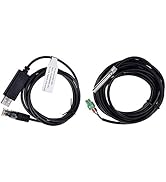
- Kaugjuhtimisega temperatuuriandur (RTS300R47K3.81A): Acquires battery temperature for accurate temperature compensation of control parameters. The standard length of the cable is 3m.
- USB-RS485 kaabel (CC-USB-RS485-150U): Used to connect the controller to a PC for monitoring and setting parameters via Solar Station PC software. The cable length is 1.5m.
- OTG Cable (OTG-12CM): Used to connect a mobile communication cable to achieve real-time monitoring and parameter modification via a mobile APP.
- WiFi jadapordi adapter (eBox-Wifi-01): Allows monitoring and setting parameters via mobile APP software through WiFi signals.
- RS485 Bluetooth-adapter (eBox-BLE-01): Enables monitoring and setting parameters via mobile APP software through Bluetooth signals.
- Logija (eLOG01): Records the operating status of the controller for later review.

7. Veaotsing
If you encounter issues with your EPEVER Tracer1210AN controller, refer to the following common troubleshooting tips:
- LCD-ekraanil puudub ekraan: Kontrollige aku ühendusi ja veenduge, et aku pinge ontage on tööpiirkonnas.
- Laadimine puudub: Verify solar panel connections and ensure sufficient sunlight. Check for any shading on the solar panels. Confirm the battery type setting is correct.
- Laadimine ei tööta: Check load connections and ensure the load mode is set correctly (e.g., Manual ON, Light ON/OFF). Verify that the battery voltage on üle madala voltage lahtiühendamise lävi.
- Ebatäpne temperatuurinäit: Ensure the Remote Temperature Sensor (RTS) is properly connected and positioned near the battery.
- Suhtlusprobleemid: Check the RS485 cable connections to the remote meter, PC, or adapter. Ensure drivers are installed for PC communication.
For more detailed troubleshooting, consult the full product manual or contact EPEVER customer support.
8. Hooldus
Regular maintenance helps ensure the longevity and optimal performance of your solar charge controller.
- Puhtus: Hoidke kontroller puhas ja tolmu- ning prahivaba. Puhastamiseks kasutage kuiva lappi.
- Ühendused: Periodically check all wiring connections for tightness and corrosion. Loose connections can cause overheating and damage.
- Ventilatsioon: Ensure adequate airflow around the controller to facilitate heat dissipation. Do not block the heat sink fins.
- Aku seisund: Monitori aku mahttage and health regularly. Ensure the battery type setting on the controller matches your battery.
- Püsivara värskendused: Kontrollige tootja poolt websaidilt, et leida saadaolevaid püsivara värskendusi jõudluse parandamiseks või uute funktsioonide lisamiseks.
9. Garantii ja tugi
EPEVER products are designed for reliability and performance. For warranty information and technical support, please refer to the official EPEVER websaidil või võtke ühendust oma kohaliku edasimüüjaga.
You can also visit the official iSunergy store on Amazon for product information and support: iSunergy Amazon Store.


