Sissejuhatus
The Power Dynamics PDM25 is a compact and versatile 100V amplifier designed for small installations such as shops, restaurants, and offices. It offers easy operation, reliable performance, and a range of features including Bluetooth connectivity, an integrated MP3 player, USB input, AUX input, and a wireless remote control. This manual provides essential information for the safe and efficient use of your PDM25 ampelujõulisem.
Ohutusjuhised
- Enne toote kasutamist lugege see kasutusjuhend hoolikalt läbi.
- Hoidke see juhend edaspidiseks kasutamiseks alles.
- Järgige kõiki hoiatusi ja juhiseid.
- Ärge kasutage seda seadet vee lähedal.
- Puhastage ainult kuiva lapiga.
- Ärge blokeerige ühtegi ventilatsiooniava. Paigaldage vastavalt tootja juhistele.
- Ärge paigaldage soojusallikate, näiteks radiaatorite, küttekehade, ahjude või muude seadmete (sh amptõsteseadmed), mis toodavad soojust.
- Ärge kahjustage polariseeritud või maandatud pistiku ohutust. Polariseeritud pistikul on kaks laba, millest üks on laiem kui teine. Maandustüüpi pistikul on kaks laba ja kolmas maandushark. Lai tera või kolmas haru on teie ohutuse tagamiseks. Kui kaasas olev pistik teie pistikupessa ei sobi, pöörduge vananenud pistikupesa väljavahetamiseks elektriku poole.
- Kaitske toitejuhet selle peale kõndimise või muljumise eest, eriti pistikute, pistikupesade ja nende seadmest väljumise kohta.
- Kasutage ainult tootja poolt määratud lisaseadmeid/tarvikuid.
- Ühendage seade vooluvõrgust lahti äikesetormide ajal või siis, kui seda pikka aega ei kasutata.
- Andke kõik hooldustööd kvalifitseeritud teeninduspersonalile. Hooldus on vajalik, kui seade on mingil viisil kahjustatud, nt toitejuhe või pistik on kahjustatud, vedelikku või seadmesse on kukkunud esemeid, seade on sattunud vihma või niiskuse kätte, ei tööta normaalselt või on maha kukkunud.
- HOIATUS: Tulekahju või elektrilöögi ohu vähendamiseks ärge jätke seda seadet vihma või niiskuse kätte.
- ETTEVAATUST. Do not open the cover. No user-serviceable parts inside. Refer servicing to qualified personnel only.
Toode läbiview
The PDM25 amplifier features a user-friendly front panel with controls for various audio sources and volume adjustments, along with a clear digital display. The rear panel provides all necessary connections for speakers, external audio sources, and power.

Joonis 1: Esipaneeli ülaosaview of the PDM25 Ampelujõulisem.

Figure 2: Rear Panel Connections of the PDM25 Ampelujõulisem.
Seadistamine
1. Lahtipakkimine
Eemaldage ettevaatlikult amplifier from its packaging. Inspect the unit for any signs of damage during transit. Retain the original packaging for future transport or storage.
2. paigutus
Asetage ampAsetage seade stabiilsele ja tasasele pinnale. Tagage seadme ümber piisav ventilatsioon, et vältida ülekuumenemist. Vältige selle asetamist soojusallikate lähedale või otsese päikesevalguse kätte.
3. Kõlari ühendus
The PDM25 supports both 100V line speakers and low impedance (4-16 Ohm) speakers.
- For 100V Line Speakers: Connect the positive (+) terminal of your 100V speaker system to the "100V" terminal on the amplifier's rear panel. Connect the negative (-) terminal to the "COM" terminal.
- For Low Impedance Speakers (4-16 Ohm): Connect the positive (+) terminal of your speaker to the "4-16 Ohm" terminal on the amplifier's rear panel. Connect the negative (-) terminal to the "COM" terminal.
Ensure correct polarity (+ to + and - to -) for optimal sound quality. Do not connect both 100V and low impedance speakers simultaneously to the same output.
4. Heliallika ühendus
- AUX sisend: Connect external audio devices (e.g., CD player, mixer) to the RCA "AUX" input jacks on the rear panel using an RCA cable.
- Mikrofoni sisend: Connect a microphone to the 6.3mm jack on the front panel.
- USB sisend: Sisestage MP3-vormingus USB-mälupulk fileesipaneelil asuvasse USB-porti.
5. Toiteühendus
Connect the supplied power cable to the AC inlet on the rear panel of the amplifier and then to a suitable mains power outlet (230 Vac/50 Hz).
Kasutusjuhised
1. Toide sisse/välja
Press the "ON/OFF" switch on the front panel to power on or off the ampelujõulisem.
2. Allika valik
Use the "MODE" button on the front panel or the remote control to cycle through available input sources: Bluetooth, USB/MP3, AUX, and Radio. The selected mode will be displayed on the digital screen.

Figure 3: Front Panel Controls and USB Input.
3. Helitugevuse juhtimine
- Põhimaht: Adjust the main output volume using the large "VOLUME" knob on the front panel.
- Individual Source Volume: Adjust the volume for MP3, AUX, and MIC inputs using their respective smaller "VOLUME" knobs.
4. Tooni juhtimine
Use the "TREBLE" and "BASS" knobs on the front panel to adjust the high and low frequencies of the audio output.
5. Bluetoothi kasutamine
- Select "Bluetooth" mode using the "MODE" button. The display will show "BLUE".
- On your Bluetooth-enabled device (smartphone, tablet, etc.), search for available devices and select "PDM25".
- Pärast sidumist saate heli juhtmevabalt voogedastada ampelujõulisem.
6. USB/MP3 Player Operation
- Insert a USB flash drive into the USB port. The amplifier will automatically switch to USB mode and begin playing MP3 files.
- Use the play/pause, next, and previous track buttons on the front panel or remote control to manage playback.
7. Raadiooperatsioon
In Radio mode, use the control buttons to scan for and select radio stations.
8. Kaugjuhtimispult
The included remote control provides convenient access to power, mode selection, volume, track control, and equalizer presets.
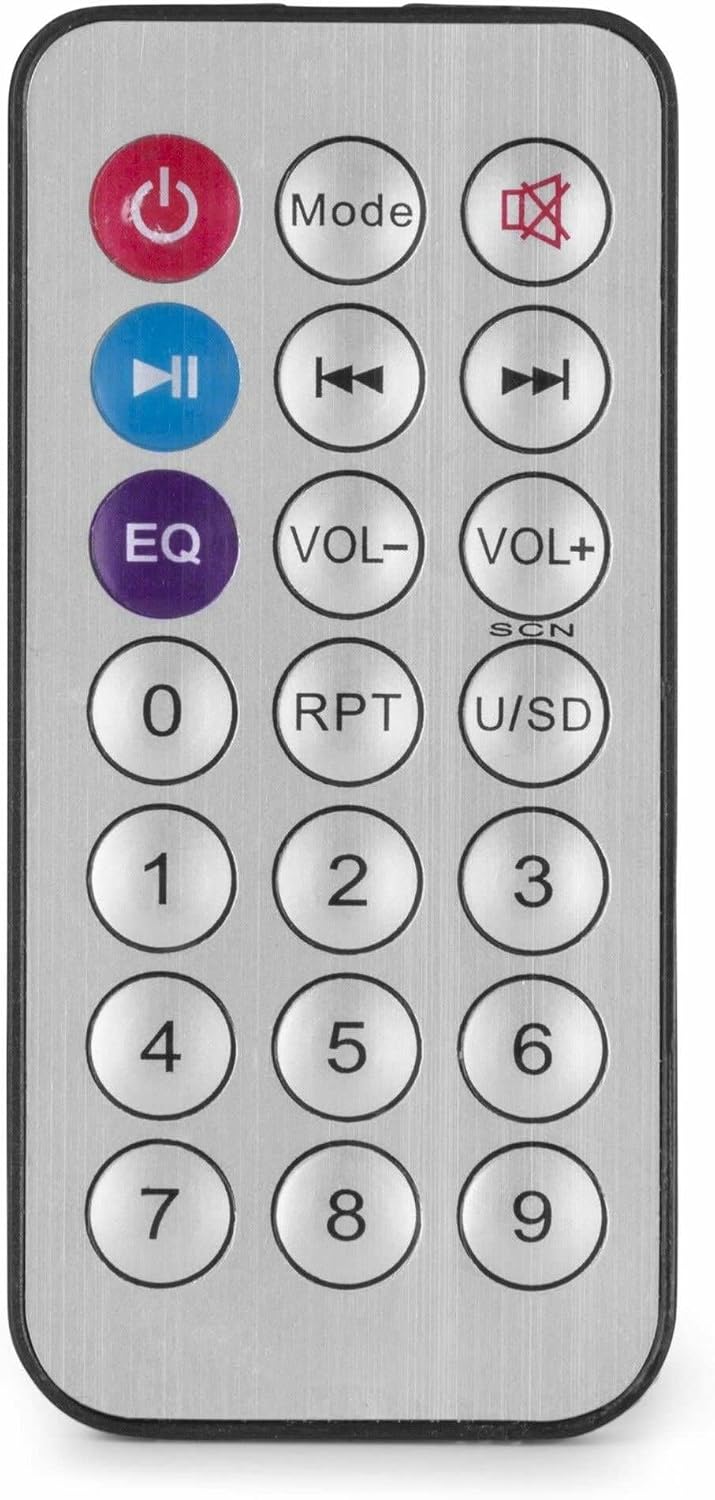
Joonis 4: Juhtmevaba kaugjuhtimispult.
Hooldus
- Puhastamine: Disconnect the power before cleaning. Use a soft, dry cloth to wipe the exterior of the ampÄrge kasutage vedelaid puhastusvahendeid ega aerosoole.
- Ventilatsioon: Veenduge, et ventilatsiooniavad oleksid tolmust ja prahist puhtad, et tagada korralik õhuvool.
- Hoiustamine: Kui seadet pikemat aega hoiustatakse, ühendage see vooluvõrgust lahti ja hoidke jahedas ja kuivas kohas, eelistatavalt originaalpakendis.
Veaotsing
| Probleem | Võimalik põhjus | Lahendus |
|---|---|---|
| Pole jõudu | Power cable not connected; Power outlet faulty; Amptõsteseadme väljalülitamine. | Check power cable connection; Test power outlet; Ensure amplifier switch is ON. |
| Heliväljund puudub | Incorrect source selected; Volume too low; Speaker connections faulty; Mute activated. | Select correct input source; Increase master and source volume; Check speaker wiring; Deactivate mute function on remote. |
| Bluetooth ei loo ühendust | AmpLifier ei ole Bluetooth-režiimis; Seade on liiga kaugel; Seade on juba teise seadmega seotud. | Tagada amplifier is in Bluetooth mode ("BLUE" displayed); Move device closer; Disconnect from other devices and try again. |
| USB taasesituse probleemid | USB-draiv pole õigesti vormindatud; Ühildumatu file vormindamine; USB-draiv on vigane. | Veenduge, et USB-draiv oleks FAT32-vormingus; Kasutage MP3-vormingut files; Proovige teist USB-mäluseadet. |
| Moonutatud heli | Volume too high; Incorrect impedance matching for speakers; Faulty audio source. | Reduce volume; Verify speaker impedance matches amplifier output; Test with a different audio source. |
Tehnilised andmed
- Väljundvõimsus: 25 W
- Kõlari väljund: 100V and 4-16 Ohm
- Sagedusvahemik: 50 Hz–18 kHz
- Signaali ja müra suhe: >75 dB
- Ühendus Voltage: 230 Vac/50 Hz
- Mõõdud (P x L x K): 205 x 285 x 65 mm
- Kaal: 1.5 kg
- Omadused: Bluetooth, USB MP3 Player, Radio, AUX Input, Microphone Input, Bass/Treble Control, Integrated Equalizer, Remote Control
- Mudeli number: PDM25
- Tootja: Tronios BV
Garantii ja tugi
For warranty information and technical support, please refer to the documentation provided with your purchase or visit the official Power Dynamics webveebisait. Hoidke ostutõendit alles garantiinõuete esitamiseks.
Tootja: Tronios BV
Websait: www.power-dynamics.eu


