1. Sissejuhatus
Thank you for choosing the Kungfuking Surge Protector Power Strip with USB Ports. This device is designed to provide convenient power access and surge protection for your electronic devices. It features two AC outlets and two USB ports, along with a 6.56 ft extension cord and a flat plug for versatile placement. This manual provides essential information for safe installation, operation, and maintenance of your power strip.

Figure 1: Kungfuking Surge Protector Power Strip (Model: Kungfuking 2AC+2USB)
2. Olulised ohutusjuhised
Enne toote kasutamist lugege läbi kõik ohutusjuhised ja mõistke neid. Nende juhiste eiramine võib põhjustada elektrilöögi, tulekahju või tõsiseid vigastusi.
- EI TOHI exceed the electrical ratings of 120V, 12A, 60Hz, and 2.1A for USB ports.
- EI TOHI use in wet environments or near water.
- EI TOHI disassemble or modify the device.
- EI TOHI use with aquariums or other water-related products.
- EI TOHI ühendage teise ümberpaigutatava toitekraaniga.
- EI TOHI use if the cord or plug is damaged.
- Hoida lastele kättesaamatus kohas.
- Veenduge, et pistik oleks täielikult seinakontakti sisestatud.
- See toode on mõeldud kasutamiseks ainult siseruumides.
3. Toote omadused
The Kungfuking Surge Protector Power Strip is designed for convenience and safety, offering multiple power options in a compact form factor.
- 2 vahelduvvoolu pistikupesa: Provides standard power for electronic devices.
- 2 USB-A-porti: Delivers 5V/2.1A for charging smartphones, tablets, and other USB-powered devices.
- 6.56 jala pikkune pikendusjuhe: Offers flexibility in placement, reaching distant outlets.
- Lameda pistiku disain: Minimizes obstruction and allows furniture to be placed closer to the wall.
- Ülepingekaitse: Kaitseb ühendatud seadmeid voolupingete ja piikide eest.
- Vastupidav konstruktsioon: Built with fireproof ABS+PC materials for enhanced safety.
- Paigaldatav disain: Can be easily mounted on or under desks, walls, or other surfaces.

Joonis 2: Peamised omadused ja tehnilised andmed

Figure 3: All-in-One Charging Station in use
4. Seadistamine ja installimine
The power strip can be installed in various locations to suit your needs. Mounting screws are included for secure installation.
4.1 Paigaldusvalikud
The power strip offers flexible mounting options:
- Under Desk/Table: Mount horizontally or vertically under a desk or table to keep surfaces clear.
- Seinakinnitus: Secure to a wall for convenient access, such as near a TV or bedside.
- Side of Cabinets/Headboards: Install vertically on the side of furniture for discreet power access.

Figure 4: Installation Options and Dimensions
4.2 Paigaldamise etapid
- Valige asukoht: Select a flat, stable surface for mounting, ensuring it is within reach of a wall outlet and your devices.
- Märkige kruviaugud: Place the power strip in the desired position and mark the locations for the mounting screws using a pencil.
- Drill Pilot Holes (Optional): For wood surfaces, you may pre-drill small pilot holes to prevent wood splitting.
- Secure the Power Strip: Use the provided screws to firmly attach the power strip to the surface. Ensure it is securely fastened before use.
- Ühendage vooluvõrku: Plug the power strip's flat plug into a standard 120V wall outlet. The flat plug design allows for placement behind furniture.
4.3 Ntample Installatsioonid
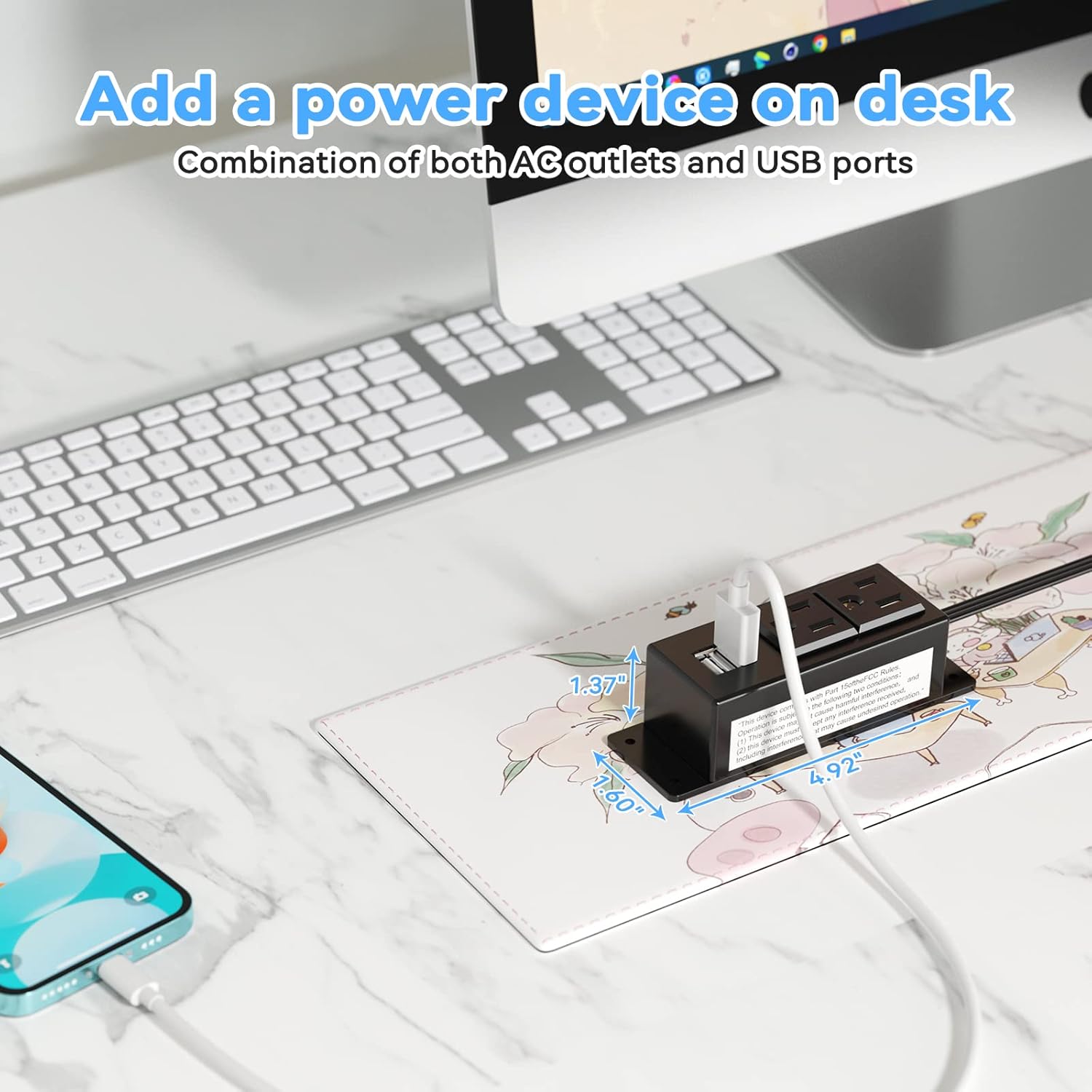
Figure 5: Desk Surface Installation

Figure 6: Under-Desk Installation

Figure 7: Wall-Mounted for TV

Figure 8: Nightstand Installation

Figure 9: Kitchen Cabinet Installation

Figure 10: Flat Plug for Space-Saving Placement
5. Kasutusjuhised
Using your Kungfuking Surge Protector Power Strip is straightforward:
- Ühendage seinakontakti: Ensure the power strip's flat plug is securely connected to a grounded 120V AC wall outlet.
- Ühendage vahelduvvooluseadmed: Insert the power cords of your electronic devices into the two AC outlets.
- USB-seadmete ühendamine: Plug your USB charging cables into the two USB-A ports to charge compatible devices.
- Toide sisse: The power strip is designed for continuous operation once plugged in. There is no on/off switch.
- Monitori kasutamine: Avoid overloading the power strip by ensuring the total power consumption of connected devices does not exceed the rated capacity (12A, 120V).
6. Veaotsing
If you encounter issues with your power strip, refer to the following common problems and solutions:
| Probleem | Võimalik põhjus | Lahendus |
|---|---|---|
| Vahelduvvoolu pistikupesadest ega USB-portidest ei tule voolu. |
|
|
| USB-seadmed ei lae. |
|
|
| Power strip feels hot. |
|
|
7. Tehnilised andmed
| Funktsioon | Detail |
|---|---|
| Mudel | Kungfuking 2AC+2USB |
| Vahelduvvoolu pistikupesad | 2 |
| USB-pordid | 2 (USB-A) |
| Sisend Voltage | 120V AC |
| Vahelduvvoolu voolu reiting | 12A |
| Sagedus | 60 Hz |
| USB väljund | 5 V / 2.1 A (kokku) |
| Juhtme pikkus | 6.56 jalga (2 meetrit) |
| Pistiku tüüp | Lame pistik |
| Materjal | Tulekindel ABS+PC |
| Mõõdud (umbes) | 4.92 x 3.74 x 1.37 tolli (P x L x K) |
| Kaal (umbes) | 10.5 untsi |
| Eriomadused | Surge Protection, Mountable Design |
8. Hooldus
Nõuetekohane hooldus tagab teie pikendusjuhe pikaealisuse ja ohutu töö:
- Puhastamine: Enne puhastamist eemaldage pikendusjuhe seinakontaktist. Pühkige välispinda kuiva ja pehme lapiga. Ärge kasutage vedelaid puhastusvahendeid ega pihusteid.
- Ülevaatus: Periodically inspect the power cord, plug, and housing for any signs of damage, such as cuts, fraying, or cracks. If damage is found, discontinue use immediately.
- Hoiustamine: Kui pikendusjuhet pikemat aega ei kasutata, hoidke seda jahedas ja kuivas kohas, eemal otsesest päikesevalgusest ja niiskusest.
9. Garantii ja tugi
Kungfuking products are designed for reliability and performance. For warranty information, technical support, or any questions regarding your product, please refer to the contact information provided at the point of purchase or visit the official Kungfuking websaidile.
Garantiinõuete esitamiseks säilitage ostutõend.


