1. Sissejuhatus
Thank you for choosing the Soundmaster Eliteline IR300SI Internet DAB+ FM Radio. This device offers a wide range of audio entertainment options, including Internet Radio, DAB+ digital radio, FM radio, Bluetooth connectivity, and USB playback. It also features Amazon Alexa compatibility for voice control and can be managed via the UNDOK app. This manual provides essential information for setting up, operating, and maintaining your radio.
2. Ohutusalane teave
- Enne kasutamist lugege kõik juhised hoolikalt läbi ja hoidke need alles edaspidiseks kasutamiseks.
- Ärge jätke seadet vihma, niiskuse ega äärmuslike temperatuuride kätte.
- Tagage piisav ventilatsioon; ärge blokeerige ühtegi ventilatsiooniava.
- Kasutage ainult seadmega kaasas olevat toiteadapterit.
- Ärge proovige seadet ise avada ega parandada. Jätke kogu hooldus kvalifitseeritud personalile.
- Hoidke seadet eemal tugevatest magnetväljadest.
3. Pakendi sisu
Palun kontrollige, kas kõik esemed on olemas:
- Soundmaster Eliteline IR300SI Internet DAB+ FM Radio
- Toiteadapter
- Kaugjuhtimispult
- Kasutusjuhend (see dokument)
- Installation material (e.g., antenna, if separate)
4. Toote lõppview
Familiarize yourself with the various parts and controls of your Soundmaster IR300SI radio.

Joonis 4.1: Eesmine nurga all view of the Soundmaster IR300SI radio, showing the display, speakers, and control buttons.
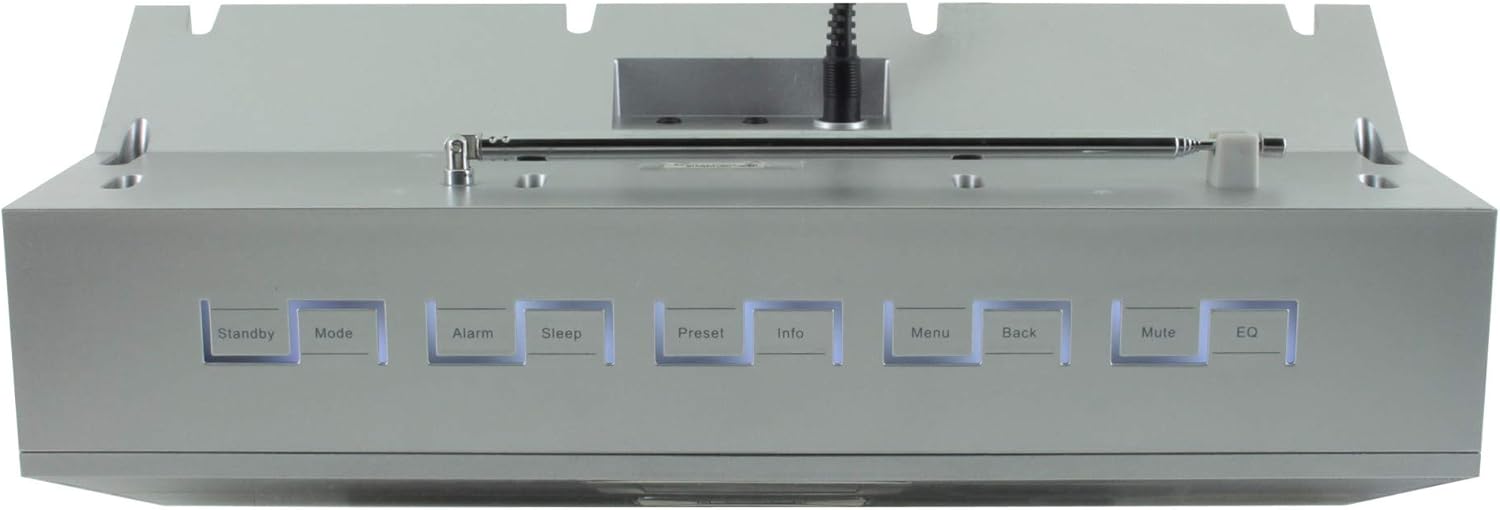
Joonis 4.2: Ülemine view of the Soundmaster IR300SI radio, highlighting the control buttons: Standby, Mode, Alarm, Sleep, Preset, Info, Menu, Back, Mute, and EQ.
Esipaneel
- 2.4" / 6 cm TFT Color Display: Shows station information, menus, and time.
- Kõlarid: Stereo sound output.
- Juhtketas/nupud: Navigeerimiseks ja valiku tegemiseks.
Ülemise paneeli juhtnupud
- Ooterežiim: Toide sisse / välja.
- Režiim: Switch between Internet Radio, DAB+, FM, Bluetooth, USB, AUX.
- Alarm: Määrake ja hallake äratusi.
- Uni: Activate sleep timer.
- Eelseadistatud: Access and save favorite stations.
- Info: Display additional information about the current broadcast.
- Menüü: Juurdepääs süsteemi seadetele ja valikutele.
- Tagasi: Eelmisesse menüüsse naasmine.
- Vaigista: Heli vaigistamine/heli sisselülitamine.
- EQ: Valige ekvalaiseri eelseadistused.
Rear/Side Panel Connections
- Toite sisend: Ühendage kaasasolev toiteadapter.
- Teleskoopantenn: For DAB+ and FM reception.
- USB-port: For MP3 playback from USB storage devices.
- 3.5mm Aux-In Port: Ühendage välised heliallikad.
- Kõrvaklappide pesa: Privaatseks kuulamiseks.
5. Seadistamine
5.1 Toiteühendus
- Connect the power adapter to the DC input on the rear of the radio.
- Ühendage toiteadapter seinakontakti.
- Vajutage nuppu Ooterežiim button on the top panel or remote control to turn on the radio.
5.2 Antenni seadistamine
Optimaalse DAB+ ja FM-raadio vastuvõtu saavutamiseks pikendage teleskoopantenn täielikult.
5.3 Initial Wi-Fi Network Setup
Upon first power-on, the radio will guide you through the initial setup wizard:
- Select your preferred language using the control dial and confirm.
- Raadio otsib saadaolevaid WiFi-võrke.
- Valige loendist oma võrk.
- Enter your Wi-Fi password using the on-screen keyboard and control dial. Confirm to connect.
- Once connected, the radio will display the main menu.
6. Kasutusjuhised
Kasutage Režiim button to switch between different audio sources.
6.1 Interneti-raadio
- Vajutage Režiim to select "Internet Radio".
- Navigate through categories (e.g., Location, Genre, Popular) using the control dial.
- Valige jaam taasesituse alustamiseks.
- Jaama eelhäälestatud jaamana salvestamiseks vajutage ja hoidke all Eelseadistatud nuppu ja seejärel valige eelhäälestatud number.
6.2 DAB+ raadio
- Vajutage Režiim to select "DAB+ Radio".
- Raadio otsib automaatselt saadaolevaid DAB+ jaamu.
- Use the control dial to browse and select stations.
- Vajutage ja hoidke all Eelseadistatud to save a station.
6.3 FM -raadio
- Vajutage Režiim to select "FM Radio".
- The radio will automatically scan for available FM stations.
- Use the control dial to browse and select stations.
- Vajutage ja hoidke all Eelseadistatud to save a station.
6.4 Bluetooth-ühenduvus
- Vajutage Režiim to select "Bluetooth". The radio will enter pairing mode.
- Luba oma mobiilseadmes (nutitelefonis, tahvelarvutis) Bluetooth ja otsi saadaolevaid seadmeid.
- Select "Soundmaster IR300SI" from the list to pair.
- Kui ühendus on loodud, saate oma seadmest raadiosse heli voogesitada.
6.5 USB-taasesitus
- Sisestage MP3-faile sisaldav USB-mäluseade (FAT32-vormingus). files USB-porti.
- Vajutage Režiim et valida "USB".
- Navigate through folders and select tracks using the control dial.
6.6 AUX sisend
- Connect an external audio device (e.g., MP3 player) to the 3.5mm Aux-In port using an audio cable (not supplied).
- Vajutage Režiim to select "AUX".
- Juhtige taasesitust oma välisest seadmest.
6.7 Äratused ja unetaimer
- Äratused: Vajutage nuppu Alarm button to set up to two alarms. Configure time, source (buzzer, radio), and frequency (daily, weekdays, weekends).
- Unetaimer: Vajutage nuppu Magama button to set a countdown timer (e.g., 15, 30, 60 minutes) after which the radio will automatically turn off.
6.8 Ekvalaiser (EQ)
Vajutage nuppu EQ button to cycle through pre-programmed sound settings (e.g., Normal, Jazz, Rock, Classical, Pop, News) to optimize audio output for different content.
6.9 Amazon Alexa and UNDOK App Control
- Amazon Alexa: The radio is compatible with Amazon Alexa. Follow the instructions in the Alexa app to link your Soundmaster IR300SI for voice control functionalities.
- UNDOK App: Download the UNDOK app from your mobile device's app store. Ensure your mobile device and the radio are on the same Wi-Fi network. The app allows you to control the radio, browse stations, and manage settings remotely.
7. Hooldus
7.1 Puhastamine
- Enne puhastamist eemaldage raadio alati vooluvõrgust.
- Välispindade pühkimiseks kasutage pehmet ja kuiva lappi.
- Ärge kasutage abrasiivseid puhastusvahendeid, vaha ega lahusteid, kuna need võivad viimistlust kahjustada.
7.2 Säilitamine
If you plan to store the radio for an extended period, unplug it from the power source and store it in a cool, dry place, away from direct sunlight and extreme temperatures.
8. Veaotsing
Probleemide korral vaadake järgmisi levinud probleeme ja lahendusi.
| Probleem | Võimalik põhjus | Lahendus |
|---|---|---|
| Pole jõudu | Toiteadapter pole ühendatud või pistikupesa on vigane. | Kontrollige toiteühendusi. Proovige teist pistikupesa. |
| Ei mingit heli | Helitugevus on liiga madal, vaigistatud või valitud on vale allikas. | Suurenda helitugevust. Vajuta Vaigista. Ensure correct mode (Internet Radio, DAB+, etc.) is selected. |
| Wi-Fi-ga ei saa ühendust | Vale parool, nõrk signaal või ruuteri probleem. | Verify password. Move radio closer to router. Restart router. |
| Halb DAB+/FM vastuvõtt | Antenn pole välja tõmmatud või on leviala nõrk. | Fully extend the telescopic antenna. Reposition the radio. |
| Bluetoothiga sidumine ebaõnnestub | Radio not in pairing mode, or device too far. | Ensure radio is in Bluetooth mode. Move devices closer. Restart Bluetooth on both devices. |
9. Tehnilised andmed
| Funktsioon | Spetsifikatsioon |
|---|---|
| Mudeli nimi | IR300SI |
| Kaubamärk | Helimeister |
| Ühenduvustehnoloogia | Bluetooth, USB, WiFi |
| Eriomadused | Integrated Clock, Internet Radio, DAB+, FM, Bluetooth, USB MP3 Playback, AUX-In, Headphone Jack, 2 Alarms with Weekend Function, Sleep Timer, Equalizer, Amazon Alexa Compatible, UNDOK App Control, Network Music Player (DLNA) |
| Heliväljundi režiim | Stereo |
| Kõlari maksimaalne väljundvõimsus | 2 x 10 W RMS |
| Ekraan | 2.4" / 6 cm TFT Color Display |
| Kontrollimeetod | Remote Control, UNDOK App, On-device Buttons |
| Toiteallikas | AC Powered (100 Volts input) |
| Toote mõõtmed (P x L x K) | 17 x 18 x 15 cm |
| Kauba kaal | 2.3 kilogrammi |
| Värv | Hõbedane |
| Ühilduvad seadmed | Personaalarvuti, Televisioon, Tahvelarvuti, Nutitelefon, Sülearvuti |
| Paigaldustüüp | Lauaplaat |
10. Garantii ja tugi
The Soundmaster Eliteline IR300SI comes with a spare parts availability period of 1 year from the date of purchase. For technical support, warranty claims, or further assistance, please contact your retailer or the Soundmaster customer service department. Refer to the contact information provided with your purchase documentation.