Sissejuhatus
This user manual provides detailed instructions for the operation and maintenance of your Sunbuck AS-29BU Karaoke Wireless Bluetooth Stereo Amplifier System. Please read this manual thoroughly before using the device to ensure proper functionality and to prevent damage.
The Sunbuck AS-29BU is a compact yet powerful home audio amplifier receiver designed to enhance your listening experience. It features built-in Bluetooth for wireless audio streaming, support for SD cards and USB flash drives, FM radio, and RCA audio inputs. It is compatible with a wide range of devices including smartphones, tablets, PCs, and traditional audio equipment.
Pakendi sisu
Paki avamisel palun kontrollige, et kõik allpool loetletud esemed oleksid olemas ja heas seisukorras:
- 1 x Sunbuck AS-29BU Bluetooth Amptõsteseade (110V)
- 1x kaugjuhtimispult
- 1 x Kasutusjuhend (käesolev dokument)
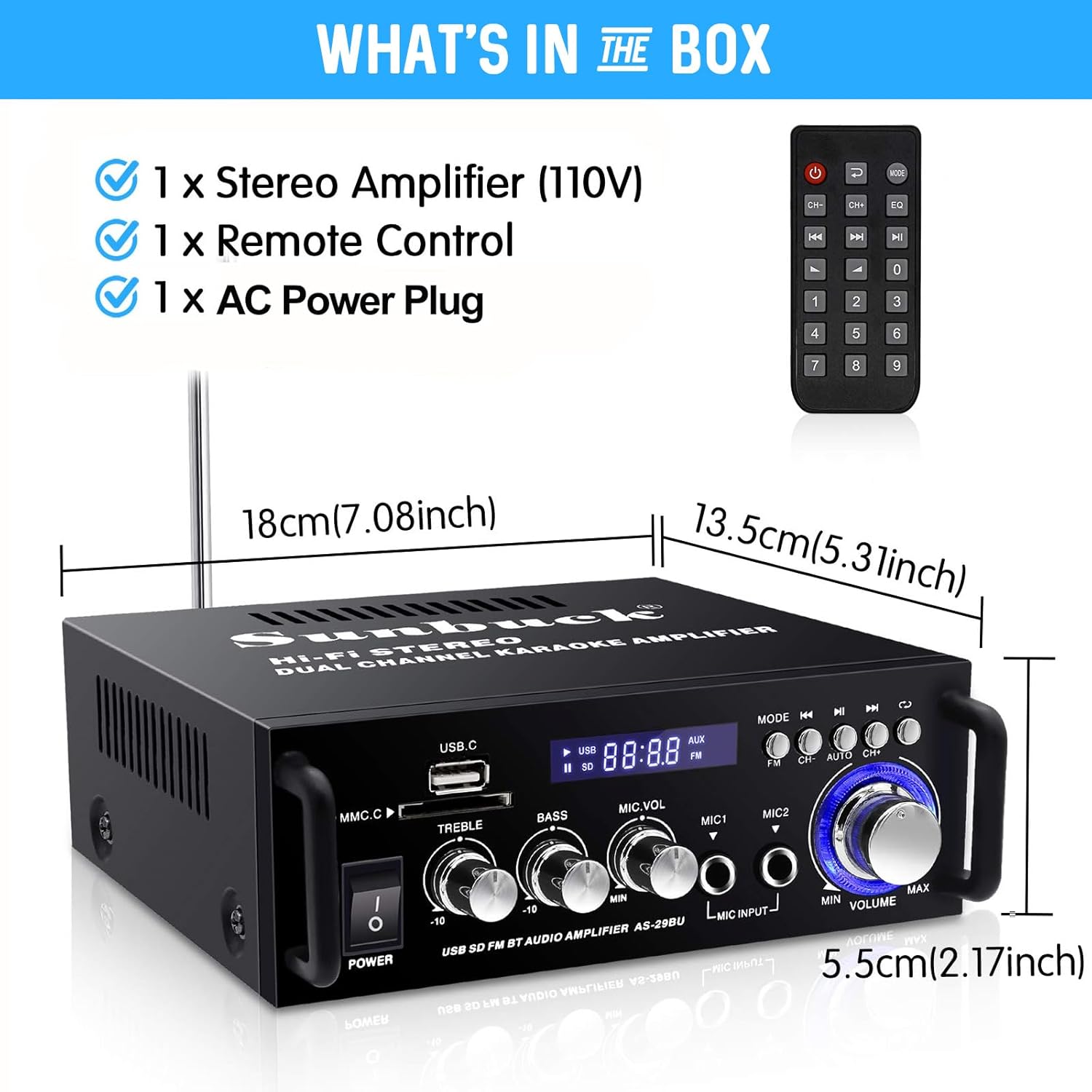
Figure 1: Package Contents and Dimensions. This image displays the amplifier unit, the remote control, and indicates the product dimensions: 18cm (7.08 inches) length, 13.5cm (5.31 inches) width, and 5.5cm (2.17 inches) height.
Toode läbiview
The Sunbuck AS-29BU amplifier features a user-friendly front panel and comprehensive rear panel connections for versatile audio setups.

Figure 2: Front Panel and Remote Control. This image shows the front of the amplifier with its various controls including power switch, USB and SD card slots, treble, bass, microphone volume controls, microphone inputs, mode selection, and master volume knob. The included remote control is also visible.

Figure 3: Rear Panel Connections. This image illustrates the rear panel of the amplifier, highlighting the RCA audio input (L/R), speaker system outputs (4Ω-16Ω), FM antenna input, and power input (DC12V/5A). It also shows various compatible devices such as TVs, Blu-ray players, outdoor speakers, computer speakers, ceiling speakers, and car/motorcycle speakers.

Figure 4: Compact Desktop Placement. This image shows the amplifier placed on a desk in front of a television, illustrating its compact size and suitability for various home or office environments.
Seadistusjuhend
1. Toiteühendus
- Tagada amplifieri toitelüliti on OFF-asendis.
- Connect the provided AC power plug to the "POWER DC INPUT" port on the rear panel of the ampelujõulisem.
- Plug the other end of the power cable into a standard 110V AC power outlet.
2. Kõlari ühendus
The amplifier supports 2.0 channel stereo output. Connect your passive speakers to the "SPEAKER SYSTEM 4Ω-16Ω" terminals on the rear panel.
- Tuvastage kõlarite ja seadme positiivsed (+) ja negatiivsed (-) klemmid. ampelujõulisem.
- Connect the positive terminal of the left speaker to the "L+" terminal on the amplifier and the negative terminal to the "L-" terminal.
- Repeat the process for the right speaker, connecting to the "R+" and "R-" terminals.
- Veenduge, et kõik ühendused oleksid kindlalt paigas, et vältida lühiseid või halba helikvaliteeti.
3. Helisisendi ühendus
The amplifier offers multiple input methods:

Figure 5: Flexible and Diverse Input Methods. This image visually represents the various audio input options available on the amplifier, including Bluetooth, USB, SD card, CD/DVD players, microphone inputs, and FM radio.
- RCA heli sisend: Connect external audio sources (e.g., CD/DVD players, TVs, computers) to the "AUDIO INPUT (L/R)" RCA ports on the rear panel using an RCA cable.
- USB/SD-kaart: Insert a USB flash drive or SD memory card into the respective slots on the front panel. The amplifier will automatically detect and play compatible audio files (WMA, WAV).
- Mikrofoni sisend: Connect up to two microphones to the "MIC INPUT" jacks on the front panel for karaoke or public address functions.
- FM-antenn: Connect the FM antenna to the "FM ANT" port on the rear panel for improved radio reception.
Kasutusjuhised
1. Toide sisse/välja
Press the "POWER" button on the front panel to turn the amplifier ON or OFF. The display will illuminate when the unit is powered on.
2. Helitugevuse juhtimine
- Põhimaht: Rotate the large "VOLUME" knob on the front panel to adjust the overall output volume.
- Mikrofoni helitugevus: Use the "MIC.VOL" knob to adjust the volume of the connected microphones.
3. Tooni juhtimine
Adjust the "TREBLE" and "BASS" knobs on the front panel to fine-tune the audio's high and low frequencies according to your preference.
4. Sisendrežiimi valik
Press the "MODE" button on the front panel or the remote control to cycle through available input sources: Bluetooth, USB, SD Card, FM Radio, and AUX (RCA input).
5. Bluetoothi kasutamine

Figure 6: Excellent Bluetooth Compatibility. This image demonstrates the amplifier's Bluetooth connectivity, showing a smartphone wirelessly streaming music to the unit.
- Select "Bluetooth" mode using the "MODE" button. The display will show "BLUE" or a similar indicator.
- Otsi oma Bluetooth-toega seadmes (nutitelefon, tahvelarvuti, arvuti) saadaolevaid Bluetooth-seadmeid.
- Select "Sunbuck AS-29BU" or a similar name from the list to pair.
- Pärast sidumist saate oma seadmest heli juhtmevabalt voogedastada. ampelujõulisem.
6. USB/SD-kaardi taasesitus
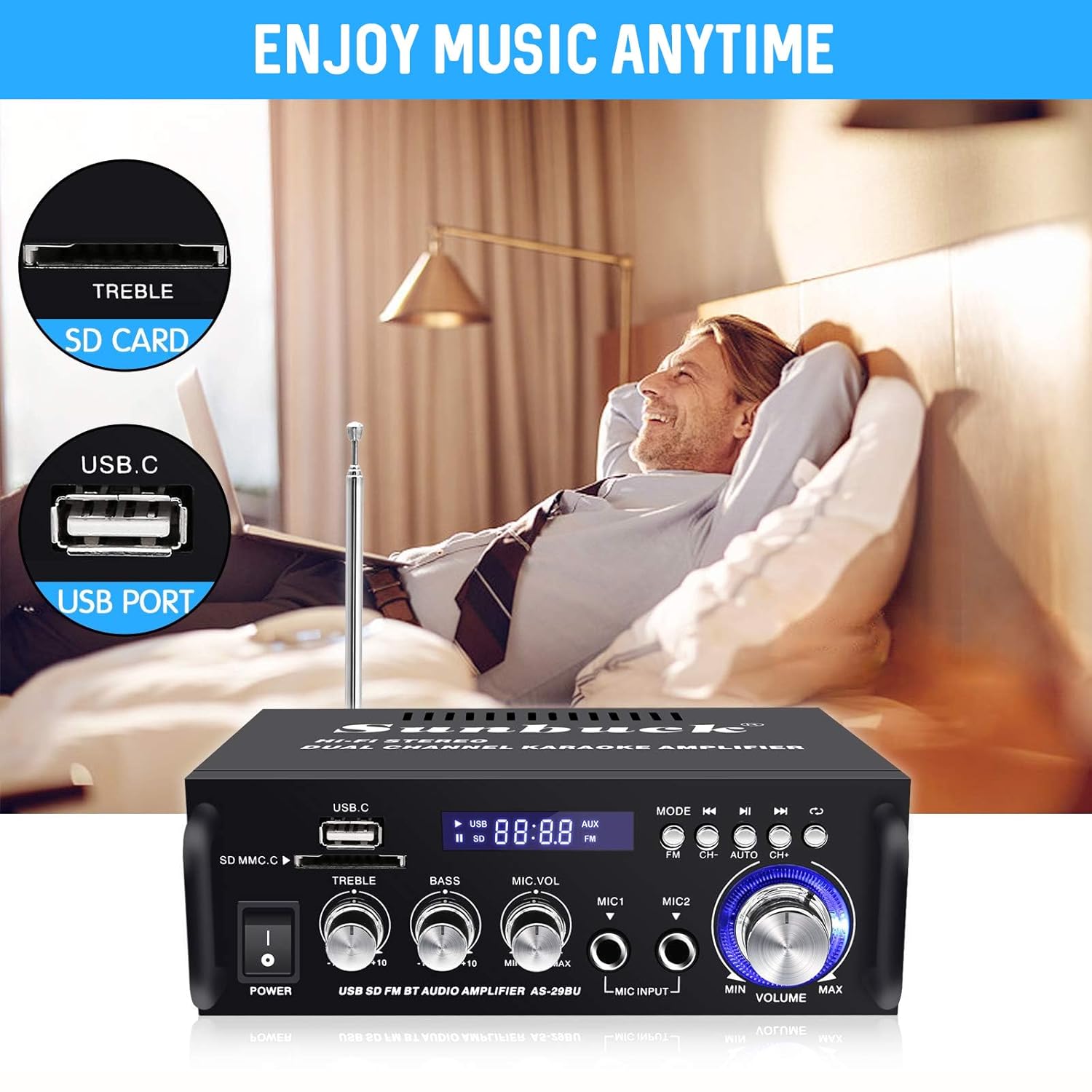
Figure 7: Enjoy Music Anytime with USB/SD Card. This image highlights the convenience of playing music directly from USB drives and SD cards inserted into the amplifier's front panel slots.
- Insert a USB flash drive or SD card containing WMA or WAV audio files vastavasse pessa.
- The amplifier lülitub automaatselt USB/SD-režiimile ja alustab taasesitust.
- Use the playback controls (Play/Pause, Next/Previous Track) on the front panel or remote control.
7. FM-raadio kasutamine
- Select "FM" mode using the "MODE" button.
- Press the "AUTO" button (or "CH+" / "CH-" for manual tuning) to scan and save available FM stations.
- Use the "CH+" and "CH-" buttons to navigate through saved stations.
8. Kaugjuhtimispult
The included remote control provides convenient access to all amplifier functions from a distance. Ensure line of sight to the amplifier's IR receiver for optimal performance.
Hooldus ja hooldus
- Puhastamine: Kasutage puhastamiseks pehmet kuiva lappi amplifier's exterior. Do not use liquid cleaners or abrasive materials, as they may damage the finish or internal components.
- Ventilatsioon: Tagada seadme ümber piisav ventilatsioon amplifier. Do not block the ventilation openings, as this can lead to overheating.
- Paigutus: Asetage amplifier on a stable, flat surface away from direct sunlight, heat sources, and excessive moisture.
- Toide välja: Lülitage alati välja amplifier and unplug it from the power outlet before performing any cleaning or maintenance.
Veaotsing
| Probleem | Võimalik põhjus | Lahendus |
|---|---|---|
| Pole jõudu | Power cable not connected; Power outlet faulty; Amptõsteseadme väljalülitamine. | Ensure power cable is securely connected. Test power outlet with another device. Turn ampElekter toitelüliti sisse lülitatud. |
| Heliväljund puudub | Speakers not connected correctly; Volume too low; Incorrect input mode selected; Audio source issue. | Check speaker wire connections (positive/negative). Increase master volume. Select correct input mode. Verify audio source is playing and connected properly. |
| Bluetoothi sidumise tõrge | Amplifier not in Bluetooth mode; Device too far; Bluetooth interference; Device already paired. | Tagada ampLifier on Bluetooth-režiimis. Liigutage seadet Bluetooth-režiimile lähemale. amplifier. Reduce interference from other wireless devices. Disconnect from previously paired devices. |
| USB/SD-kaart ei mängi | Toetamata file Vormindamine; Kaart/draiv pole õigesti sisestatud; Rikutud files. | Tagada files are WMA or WAV format. Reinsert card/drive. Try a different USB/SD card. |
| Kehv FM-raadio vastuvõtt | Antenn pole ühendatud; nõrk signaal. | Connect the FM antenna. Adjust antenna position for better reception. |
Tehnilised andmed
| Kaubamärk | Sunbuck |
| Mudeli number | AS-29BU |
| Värv | Must ja hõbedane |
| Väljund vattage | 180 vatti |
| Kanalid | 2.0 Stereo |
| Ühenduvustehnoloogia | Bluetooth, USB |
| Eriomadused | Built-In Bluetooth, FM Tuner, SD Card Input |
| Ühilduvad seadmed | Kõlarid |
| Digitaalse meedia formaat | WMA, WAV |
| Kauba kaal | 1.2 kg (2.65 naela) |
| Toote mõõtmed (PxLxK) | 18.01 x 13.49 x 5.51 cm (7.09 x 5.31 x 2.17 tolli) |
| Voltage | 12 Volts (DC Input) |
| Kontrolleri tüüp | Kaugjuhtimispult |
Garantii ja tugi
For warranty information and technical support, please refer to the documentation provided at the time of purchase or contact Sunbuck customer service. Keep your purchase receipt as proof of purchase for warranty claims.
For further assistance, please visit the official Sunbuck websaidil või võtke ühendust nende tugikanalitega.


