1. Toote lõppview
The Intermatic ET2725C is a versatile electronic timer designed for precise control of electrical loads. It features an easy-to-use interface for scheduling, offering to-the-minute programming capabilities for a wide range of applications. This model supports 50 holiday blocks with independent scheduling and up to 96 ON/OFF events, accommodating complex scheduling requirements. A key feature is its 100-hour backup power, provided by a supercapacitor, eliminating the need for batteries.
Peamised omadused:
- 100-hour supercapacitor backup, eliminating battery requirements.
- Up to 96 programmable set points or events.
- Kuni 50 pühadeblokki sõltumatute ajastamisvõimalustega.
- Automaatne sisend voltage selection from 120 to 277 Vac, 60 Hz.
- Additional mode of operation that converts ON/OFF buttons into 2-hour overrides.
2. Mis on karbis
Paki avamisel veenduge, et kõik komponendid on olemas ja kahjustamata.
- Intermatic Electronic Timer (Model ET2725C)
- Kasutusjuhend (see dokument)
3. Ohutusalane teave
HOIATUS: Tulekahju või elektrilöögi oht
- Always disconnect power at the circuit breaker(s) or disconnect switch(es) before installing or servicing this equipment.
- More than one circuit breaker or disconnect switch may be required to de-energize the equipment completely before servicing.
- Installation and/or wiring must be performed in accordance with all national and local electrical code requirements.
- Use COPPER conductors ONLY for wiring connections.
- ÄRGE eemaldage sisemist isolaatorit.
For wiring, lift the terminal cover, remove the screw, and swing it aside. Replace the screw and plastic insulator covering the terminal before powering on the device.
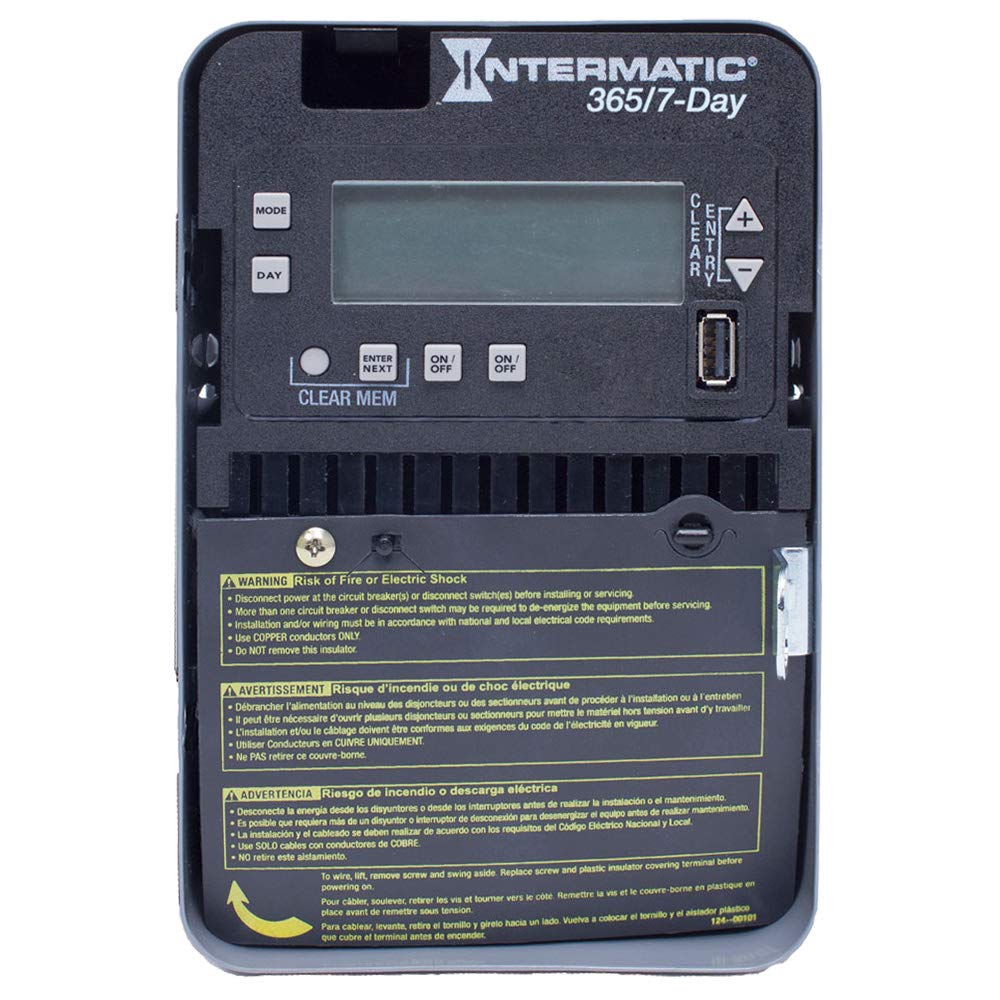
Figure 1: Front panel of the Intermatic ET2725C Electronic Timer, showing the display, control buttons (MODE, DAY, ENTER/NEXT, ON/OFF, CLEAR/ENTRY, +, -), and multi-language safety warnings at the bottom.
4. Paigaldamine ja juhtmestik
Proper installation is crucial for the safe and reliable operation of the ET2725C timer. Ensure all safety precautions are followed.
4.1 Paigaldamine
Mount the timer securely in a suitable enclosure or location, ensuring it is protected from environmental elements and accessible for programming and maintenance. Refer to local electrical codes for specific mounting requirements.
4.2 Juhtmete ühendamise juhised
- Toite lahtiühendamine: Before beginning any wiring, ensure that power to the circuit is completely disconnected at the main circuit breaker or disconnect switch. Verify with a voltage testija.
- Access Terminals: To access the wiring terminals, lift the terminal cover, remove the retaining screw, and swing the cover aside.
- Ühendage juhtmestik: Connect the appropriate copper conductors to the timer terminals as per the wiring diagram provided with the unit and local electrical codes. The timer supports 120 to 277 Vac, 60 Hz.
- Turvalised ühendused: Veenduge, et kõik juhtmeühendused on tihedad ja kindlad.
- Replace Insulator: Before restoring power, replace the plastic insulator covering the terminals and secure the terminal cover with its screw. This is critical for safety.
- Toite taastamine: Once all wiring is complete and verified, restore power to the circuit.
5. Kasutamine ja programmeerimine
The ET2725C timer features a user-friendly interface for setting time, date, and programming events. The display and buttons (MODE, DAY, ENTER/NEXT, ON/OFF, CLEAR/ENTRY, +, -) are used for navigation and input.
5.1 Initial Setup (Setting Time and Date)
- Esmakordsel sisselülitamisel või pärast pikemat voolukatkestusttage (beyond 100 hours), the display may show default settings or require time/date input.
- Vajutage nuppu REŽIIM nuppu häälestusmenüüsse sisenemiseks.
- Kasutage + or - buttons to adjust the current time (hour and minute).
- Vajutage PÄEV praeguse nädalapäeva määramiseks.
- Vajutage ENTER/NEXT to confirm settings and move to the next parameter.
- Continue adjusting year, month, and day as prompted until the current date and time are correctly set.
5.2 Sisse/välja lülitamise sündmuste programmeerimine
The timer allows for up to 96 ON/OFF events. Each event can be programmed for specific times and days.
- Vajutage REŽIIM repeatedly until "PROG" or "EVENT" mode is displayed.
- Kasutage ENTER/NEXT to select an event number (e.g., P1 ON).
- Kasutage + or - to set the desired ON time for the event.
- Vajutage PÄEV to select the days of the week for this event (e.g., Mon-Fri, Daily, Weekends, or individual days).
- Vajutage ENTER/NEXT to move to the OFF time for the same event (e.g., P1 OFF).
- Repeat steps 3-4 for the OFF time.
- Jätkake ENTER/NEXT to program additional events or exit programming mode.
5.3 Holiday Programming
The ET2725C supports up to 50 holiday blocks, allowing for temporary schedule overrides for specific dates.
- Access the holiday programming mode (refer to the on-screen prompts or specific button combinations).
- Select a holiday block.
- Määrake puhkuseperioodi algus- ja lõppkuupäev.
- Define the desired ON/OFF state or program a specific schedule for the holiday period.
- Confirm and save the holiday block.
5.4 Käsitsi tühistamine
The ON/OFF buttons can be used for manual overrides. In a specific mode, these buttons can provide a 2-hour override function, temporarily changing the load state without affecting the programmed schedule.
- Vajutage nuppu SISSE/VÄLJA button to manually switch the load ON or OFF.
- In override mode, a single press may activate a 2-hour override. Consult the display for confirmation.
5.5 Clearing Memory
To clear all programmed events and reset the timer to factory defaults (excluding current time/date), use the TÜHJENDA MÄLU function. This typically involves pressing and holding the TÜHJENDA MÄLU button for a few seconds until the display confirms the reset.
6. Hooldus
The Intermatic ET2725C timer is designed for long-term, reliable operation with minimal maintenance.
- Puhastamine: Pühkige taimeri välispinda regulaarselt pehme ja kuiva lapiga. Ärge kasutage abrasiivseid puhastusvahendeid ega lahusteid.
- Ühendused: Annually, or as required by local codes, inspect wiring connections to ensure they remain tight and free from corrosion. Always disconnect power before inspecting connections.
- Superkondensaator: The internal supercapacitor provides backup power for up to 100 hours. No user maintenance or replacement is required for this component.
7. Veaotsing
Kui teil tekib ET2725C taimeriga probleeme, vaadake järgmisi levinud tõrkeotsingu samme.
| Probleem | Võimalik põhjus | Lahendus |
|---|---|---|
| Taimeri ekraan on tühi. | No power to the unit; circuit breaker tripped. | Check circuit breaker and ensure power is supplied to the timer. Verify wiring connections. |
| Programmid ei tööta. | Incorrect time/date setting; program not enabled; manual override active. | Verify current time and date. Ensure programs are correctly set and enabled. Check for active manual overrides. |
| Load does not switch ON/OFF. | Incorrect wiring; faulty load; timer malfunction. | Verify wiring connections (power off first). Test the load independently. If issues persist, contact Intermatic support. |
| Time/date resets after power outage. | Jõudu sulletage exceeded 100-hour supercapacitor backup. | Reset the current time and date manually. This is normal behavior if the outage on pikenenud. |
If troubleshooting steps do not resolve the issue, please contact Intermatic customer support.
8. Tehnilised andmed
| Funktsioon | Detail |
|---|---|
| Mudeli number | ET2725C |
| Voltage | 120 to 277 Vac, 60 Hz (Automatic Selection) |
| Ampajastu | 30 Amps |
| Töörežiim | 7/365 päeva |
| Kanalite arv | 2 |
| Programmiüritused | Kuni 96 sisse/välja lülitamise sündmust |
| Pühadeplokid | Up to 50 with independent scheduling |
| Varutoide | 100-hour supercapacitor (no batteries required) |
| Materjal | Plastikust |
| Toote mõõtmed | 7 cm S x 7 cm L x 7 cm K (ligikaudne) |
| Kauba kaal | 0.01 Ounces (approximate) |
9. Garantii ja tugi
For warranty information, technical support, or service inquiries regarding your Intermatic ET2725C Electronic Timer, please contact Intermatic customer service directly. Refer to the official Intermatic webUusimate kontaktandmete ja garantiitingimuste saamiseks külastage veebisaiti või toote pakendit.
Tootja: Intermaatiline
Esmakordse saadavaloleku kuupäev: 13. mai 2019


