1. Sissejuhatus
This manual provides comprehensive instructions for the safe and effective operation of your Nestling HK-688 Walkie Talkies. These mini 2-way radios are designed for clear communication over long distances, making them ideal for children's outdoor adventures, camping, hiking, and general play.
The Nestling HK-688 Walkie Talkies feature 22 UHF channels, a generous range, and user-friendly controls. Please read this manual thoroughly before using the device to ensure proper functionality and to maximize your experience.

Image: Three Nestling HK-688 walkie talkies in camo blue, camo pink, and camo green, displayed with their product packaging.
2. Toote lõppview
2.1 Pakendi sisu
Standardpakett sisaldab järgmisi esemeid:
- 3x Nestling HK-688 Camo Kids Walkie Talkies (Camo Blue, Camo Pink, Camo Green)
- 1x Kasutusjuhend (käesolev dokument)
- Märkus: AAA patareid ei kuulu komplekti ja need tuleb eraldi osta.
2.2 Põhifunktsioonid
- 22 FRS/GMRS kanalit: Provides multiple communication options.
- Pikamaa: Up to 3km (1.9 miles) in typical conditions, and up to 5km (3.1 miles) in open fields.
- Selge helikvaliteet: Ensures effective communication.
- LCD taustvalgustusega ekraan: Lihtsalt viewing of channel, battery status, and other indicators.
- Built-in Mini LED Torch: Kasulik hämaras pildistamiseks.
- Automatic Channel Scan: Quickly finds active channels.
- Automaatne mürasummuti: Reduces background noise for clearer reception.
- CTCSS 99 Sub-codes: Enhances privacy by filtering unwanted signals.
- Kõnehoiatus: Teavitab teid sissetulevatest kõnedest.
- Kanali lukk: Prevents accidental channel changes.
- PTT/VOX Function: Push-to-Talk for manual transmission or Voice Operated Exchange for hands-free communication.
- Aku säästmise funktsioon: Pikendab aku tööiga.
- Väikese võimsuse hoiatus: Indicates when batteries are running low.
- Reguleeritav helitugevus: Control the listening level.
- Kerge ja kaasaskantav: Designed for easy carrying with a built-in belt clip.
- Drop Resistant Design: Enhanced durability for active use.

Image: Visual representation of the walkie talkie's dimensions and key features like drop resistance, low battery alert, flashlight, and communication range.

Image: Features of the walkie talkie, including 22 channels with privacy codes, extended range, noise reduction, drop resistance, and a built-in flashlight.
2.3 Seadme komponendid

Image: Detailed diagram illustrating the various parts of the walkie talkie, including buttons, display, and audio components.
- Antenn: Signaalide edastamiseks ja vastuvõtmiseks.
- Lamp (Flashlight): Sisseehitatud LED-valgus.
- Mikrofon: For speaking into the device.
- PTT-nupp (PTT-nupp): Oma hääle edastamiseks hoidke all.
- LCD ekraan: Shows channel, battery level, and other indicators.
- Call Lock Button: Locks the current channel.
- Monitori nupp: Allows listening to weak signals on the current channel.
- Lamp Skannimise nupp: Activates the flashlight and initiates channel scan.
- Nupp alla: Liigub menüüdes või vähendab väärtusi.
- Toite-/menüünupp: Lülitab seadme sisse/välja ja avab menüü.
- Kõlar: For listening to incoming transmissions.
3. Seadistamine
3.1 Aku paigaldamine
Each Nestling HK-688 Walkie Talkie requires 4x AAA batteries (not included).
- Release the Belt Clip: Press the lock on the top of the belt clip and lift the clip up to detach it from the radio.
- Avatud patareipesa: Locate the battery cover on the back of the walkie talkie. Gently push down on the tab and slide the cover off.
- Sisestage patareid: Insert 4x AAA batteries into the compartment, ensuring correct polarity (+/-) as indicated inside the compartment.
- Sulgege patareipesa: Replace the battery cover and slide it until it clicks securely into place. Reattach the belt clip if desired.
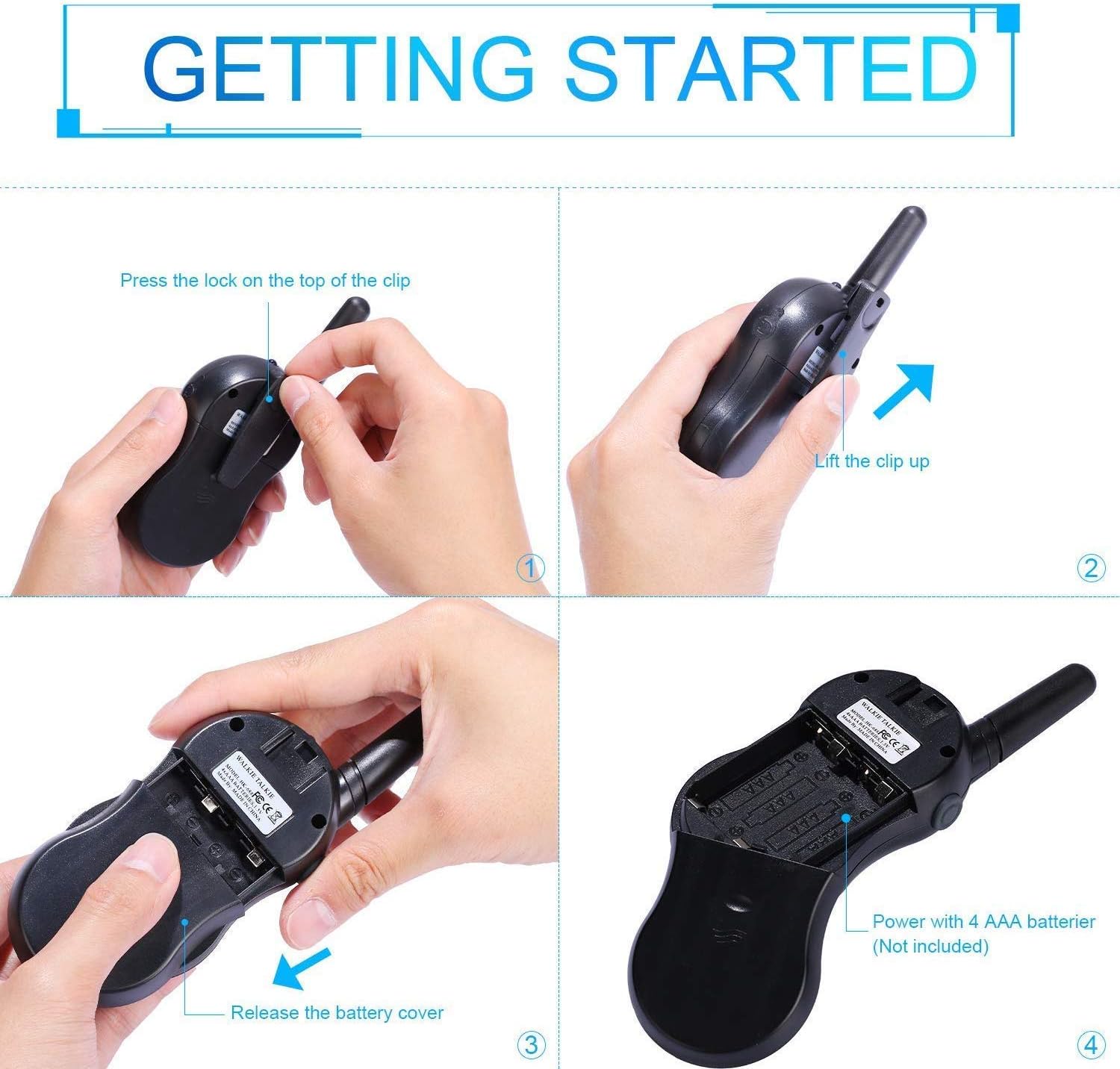
Image: Step-by-step instructions for opening the battery compartment and inserting AAA batteries into the walkie talkie.

Image: An open battery compartment of the walkie talkie, ready for battery insertion.
3.2 Sisse-/väljalülitamine
To turn the walkie talkie on or off, press and hold the Toide/menüü button until the LCD screen illuminates or turns off.
4. Kasutusjuhised
4.1 Basic Communication (Push-to-Talk)
- Valige kanal: Ensure all walkie talkies you wish to communicate with are set to the same channel and sub-code. Use the Up ja Alla nuppe kanalite vahetamiseks.
- Edastada: Vajutage ja hoidke all nuppu PTT button (located on the side of the radio). Speak clearly into the microphone, holding the radio approximately 2-3 inches from your mouth.
- Saate: Vabastage PTT button to listen for incoming transmissions.
Tip: For optimal range and clarity, avoid obstructions like buildings, dense foliage, or large metal objects. Adverse weather conditions can also affect range.
4.2 Channel Selection and Sub-codes (CTCSS/DCS)
Your walkie talkie supports 22 FRS/GMRS channels and 99 CTCSS/DCS sub-codes. Sub-codes help filter out unwanted conversations on the same channel, enhancing privacy.
- Vajutage nuppu Menüü button once to enter channel selection mode. The channel number will flash.
- Kasutage Up or Alla nuppe, et valida soovitud kanal (1-22).
- Vajutage nuppu Menüü button again to enter sub-code selection mode. The sub-code number will flash.
- Kasutage Up or Alla buttons to select your desired sub-code (0-99). Setting to 0 disables the sub-code.
- Vajutage nuppu PTT button or wait a few seconds for the setting to be saved and exit the menu.
4.3 VOX-funktsioon (häälega juhitav kõnevahetus)
VOX-funktsioon võimaldab käed-vabad suhtlust. Aktiveerimisel hakkab raadio automaatselt edastama, kui tuvastab teie hääle.
- Vajutage nuppu Menüü button multiple times until the VOX icon (VOX) appears on the LCD and flashes.
- Kasutage Up or Alla buttons to select the VOX sensitivity level (e.g., 1-3, with 1 being most sensitive). Select "OFF" to disable VOX.
- Vajutage nuppu PTT button or wait a few seconds to save the setting and exit.
4.4 Taskulambi kasutamine
Sisseehitatud LED-taskulambi sisse- või väljalülitamiseks vajutage lühidalt nuppu Lamp button (often combined with the Scan button).
4.5 Call Alert Tone
Kõne märguande saatmiseks teistele samal kanalil töötavatele raadiotele vajutage lühidalt nuppu Helista button (often represented by a musical note icon).
4.6 Kanali lukk
To prevent accidental channel changes, you can lock the current channel.
- Vajutage ja hoidke all nuppu Call Lock button (often represented by a key icon) until a key icon appears on the LCD.
- Avamiseks vajutage ja hoidke all nuppu Call Lock nuppu uuesti, kuni võtmeikoon kaob.

Pilt: ntamples of suitable scenarios for using the walkie talkies, such as outdoor play, family activities, and leisure.

Image: Illustrations of walkie talkies being used for communication in both play and household settings.
5. Hooldus
5.1 Aku hooldus
- Kasutage alati uusi ja kvaliteetseid AAA-patareisid.
- Remove batteries from the walkie talkie if it will not be used for an extended period to prevent leakage and damage.
- Kõrvaldage kasutatud patareid vastutustundlikult vastavalt kohalikele eeskirjadele.
5.2 Puhastamine ja ladustamine
- Clean the walkie talkie with a soft, damp riie. Ärge kasutage tugevatoimelisi kemikaale ega abrasiivseid puhastusvahendeid.
- Do not immerse the walkie talkie in water, as it is not water-resistant.
- Hoidke raadiosaatjat jahedas ja kuivas kohas, eemal otsesest päikesevalgusest ja äärmuslikest temperatuuridest.
6. Veaotsing
| Probleem | Võimalik põhjus | Lahendus |
|---|---|---|
| Pole jõudu | Patareid on tühjad või valesti paigaldatud. | Asendage patareid uutega, tagades õige polaarsuse. |
| Ei saa edastada ega vastu võtta | Not on the same channel/sub-code; out of range; PTT button not pressed/released. | Ensure all radios are on the same channel and sub-code. Move closer to the other radio. Press and hold PTT to transmit, release to receive. |
| Halb helikvaliteet / staatiline heli | Out of range; obstructions; low battery; squelch setting. | Move closer. Avoid obstructions. Replace batteries. Check squelch settings. |
| Channel changes accidentally | Channel lock is not activated. | Activate the channel lock function. |
| VOX not working | VOX sensitivity too low or VOX is off. | Adjust VOX sensitivity to a higher level or ensure VOX is enabled. |
7. Tehnilised andmed
| Funktsioon | Detail |
|---|---|
| Kaubamärk | Poeg |
| Mudel | HK-688 |
| Sagedusvahemik | 400-470 MHz |
| Kanalid | 22 FRS/GMRS kanalit |
| Alamkoodid | CTCSS 99 |
| Edastamise võimsus | <=0.5 W |
| Modulatsiooni tüüp | FM-F3E |
| Vahemik | Up to 3km (1.9 miles) typical, MAX 5km (3.1 miles) in open field |
| Kihisema | Automaatne summutus |
| Kuva tüüp | LCD taustvalgustusega |
| Kõrvaklappide pesa | 2.5mm / 0.1inch |
| Toiteallikas | 4x AAA batteries per radio (Not Included) |
| Product Dimensions (H x L x D) | 14 cm x 5.5 cm x 3.5 cm (5.5 x 2.2 x 1.4 tolli) |
| Pakendi kaal | 370 g |
| Värv | Camo Blue, Camo Pink, Camo Green |
| Veekindluse tase | Ei ole veekindel |
8. Garantii ja tugi
Nestling HK-688 Walkie Talkies come with a 12-kuuline garantii alates ostukuupäevast.
For any support inquiries, troubleshooting assistance beyond this manual, or warranty claims, please refer to the contact information provided on the product packaging or the retailer's websait, kust toode osteti.


