1. Sissejuhatus ja lõppview
Thank you for choosing the Lorex Analog 4K Weatherproof Indoor/Outdoor HD Wired Add-On Security Camera. This manual provides essential information for the proper installation, operation, and maintenance of your new security camera. This camera is designed as an add-on unit and requires a compatible Lorex recorder (DVR/NVR) for full functionality.
This camera features 4K resolution for superior image clarity, robust weatherproof construction for reliable indoor and outdoor use, and advanced deterrence features such as motion-activated lights and remote-triggered sirens. Its long-range night vision ensures comprehensive surveillance even in low-light conditions.
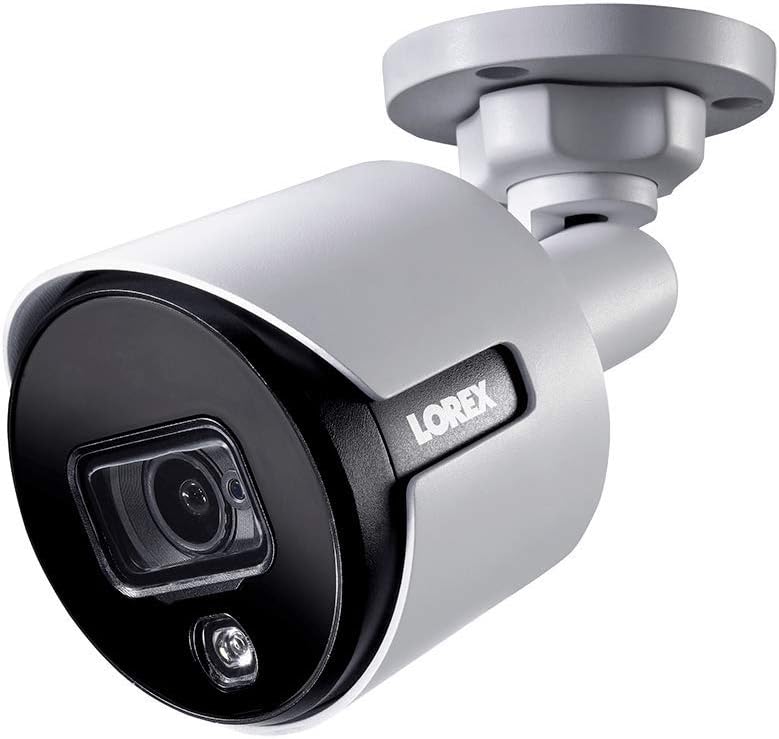
Joonis 1.1: Eesmine nurk view of the Lorex 4K Weatherproof Security Camera. This image shows the camera's bullet form factor, lens, and integrated light.
2. Pakendi sisu
The Lorex Analog 4K Weatherproof Indoor/Outdoor HD Wired Add-On Security Camera package includes:
- 1 x Lorex Analog 4K Weatherproof Indoor/Outdoor HD Wired Add-On Security Camera (Model: LBV8543XW)
- Kinnituskomplekt (kruvid ja tüüblid)
- Allen Key (for adjustment)
Note: This is an add-on camera. Video cables, power adapters, and a compatible Lorex recorder are sold separately and are required for operation.
3. Põhiomadused
- 4K Ultra HD eraldusvõime: Provides exceptional detail and clarity with an 8MP effective still resolution.
- Ilmastikukindel disain (IP67): Durable metal housing ensures reliable performance in various weather conditions, suitable for both indoor and outdoor installation.
- Long Range Night Vision: See clearly up to 150 feet (45m) in ambient night conditions and up to 98 feet (30m) in total darkness. Features Color Night Vision for enhanced detail in low light.
- Motion-Activated Warning Light: Integrated LED light can be triggered by motion to deter intruders.
- Remote-Triggered Siren: Activate a loud siren directly from your Lorex recorder or connected app to scare away unwanted visitors.
- Wired Connectivity (BNC): Ensures a stable and secure connection to your Lorex DVR/NVR system.
- Lai töötemperatuur: Functions reliably in temperatures up to 60 degrees Celsius.
4. Seadistamine ja installimine
Before installation, ensure you have a compatible Lorex recorder (DVR/NVR) and necessary video/power cables.
4.1 Asukoha valimine
Valige asukoht, mis pakub soovitud viewing angle and is within reach of your Lorex recorder and a power source. Consider areas prone to intrusion, such as entry points or vulnerable perimeters. The camera is suitable for ceiling mount and wall mount applications.

Joonis 4.1: Külg view of the Lorex 4K Weatherproof Security Camera, showing its adjustable mounting base.
4.2 Kaamera paigaldamine
- Märkige puuriaugud: Use the mounting template (if provided) or the camera base to mark the positions for drilling.
- Puurida augud: Drill pilot holes for the mounting screws. If mounting on drywall or masonry, insert the provided wall plugs.
- Turvaline kaamera: Joondage kaamera alus puuritud aukudega ja kinnitage see kaasasolevate kruvidega.
- Reguleerige nurka: Loosen the adjustment screws on the camera body using the Allen key to position the camera for the optimal viewnurk. Pärast reguleerimist pingutage kruvisid.
4.3 Kaamera ühendamine
- Ühendage videokaabel: Connect one end of the BNC video cable (not included) to the camera's BNC port and the other end to an available video input channel on your Lorex recorder.
- Ühendage toide: Connect the camera's power input to a compatible power adapter (not included). Ensure the power adapter is connected to a power outlet.
- Power On Recorder: Ensure your Lorex recorder is powered on and properly configured.
5. Kasutusjuhised
Once the camera is physically installed and connected to your Lorex recorder, you can begin operation.
5.1 Viewreaalajas voogu
Access your Lorex recorder's interface (via monitor, Lorex Home app, or client software) to view the live video feed from the camera. Ensure the correct channel is selected.

Joonis 5.1: Lähivõte view of the Lorex 4K Weatherproof Security Camera's lens and integrated light.
5.2 Motion Detection and Smart Deterrence
Your Lorex recorder manages motion detection settings. Refer to your recorder's manual for detailed instructions on configuring motion zones and sensitivity.
- Motion-Activated Light: The camera's integrated light can be set to activate automatically upon motion detection. This setting is typically configured within your Lorex recorder's deterrence or alarm settings.
- Remote-Triggered Siren: You can manually activate the camera's siren through your Lorex recorder's interface or the Lorex Home app. This feature is useful for immediate deterrence.

Figure 5.2: The Lorex 4K Weatherproof Security Camera mounted on a brick wall at night, demonstrating its motion-activated light feature.
5.3 Öine nägemine
The camera automatically switches to night vision mode in low-light conditions. The infrared (IR) LEDs provide illumination for clear black and white video. Color Night Vision (CNV) may be available if there is sufficient ambient light, providing full-color video in low-light scenarios.
6. Hooldus
Regulaarne hooldus tagab teie turvakaamera optimaalse jõudluse ja pikaealisuse.
- Puhastamine: Puhastage kaamera objektiivi ja korpust regulaarselt pehme lapigaamp lapiga. Vältige abrasiivseid puhastusvahendeid või lahusteid, mis võivad viimistlust või läätse kahjustada.
- Kontrollige ühendusi: Ensure all cable connections (BNC and power) are secure and free from corrosion, especially for outdoor installations.
- Püsivara värskendused: Regularly check the Lorex website or your recorder's settings for available firmware updates for your camera and recorder to ensure the latest features and security enhancements.
- Keskkonnatingimused: While weatherproof, extreme conditions outside the specified operating temperature range (up to 60°C) may affect performance.
7. Veaotsing
If you encounter issues with your Lorex camera, refer to the following common troubleshooting steps:
| Probleem | Võimalik põhjus | Lahendus |
|---|---|---|
| No video feed from camera | Lahtine kaabliühendus Kaameral pole voolu Incorrect channel selected on recorder | Check BNC and power connections. Ensure power adapter is working and connected. Verify the correct input channel on your Lorex recorder. |
| Poor image quality / blurry video | Määrdunud objektiiv Improper focus (if adjustable) Cable interference/damage | Puhastage kaamera objektiivi pehme lapiga. Ensure the camera is properly focused (if applicable). Check video cable for damage or interference. Use high-quality cables. |
| Öine nägemine ei tööta | IR-LED-id on takistatud Ebapiisav võimsus Kaamera seaded | Ensure nothing is blocking the IR LEDs. Veenduge stabiilses toiteallikas. Check night vision settings on your Lorex recorder. |
| Motion detection not triggering | Incorrect motion zone setup Tundlikkus liiga madal Takistus sisse view | Review and adjust motion detection zones on your recorder. Suurendage liikumistundlikkust. Clear any obstructions from the camera's field of view. |
For more advanced troubleshooting, consult your Lorex recorder's user manual or visit the Lorex support websaidile.
8. Tehnilised andmed
| Funktsioon | Spetsifikatsioon |
|---|---|
| Mudeli number | LBV8543XW |
| Video jäädvustamise eraldusvõime | 4K (8MP efektiivne fotode eraldusvõime) |
| Ühenduvustehnoloogia | BNC (juhtmega) |
| Kasutamine siseruumides/välistingimustes | Toas, Väljas |
| Rahvusvaheline kaitse hinnang | IP67 (ilmastikukindel) |
| Öise nägemise ulatus | 150 jalga (45 m) |
| Eriomadused | Motion Sensor, Night Vision, Motion Activated Lights, Remote-Triggered Siren |
| Vormitegur | Täpp |
| Materjal | Metallist |
| Operating Temperature (Upper) | 60 kraadi Celsiuse järgi |
| Toote mõõtmed (P x L x K) | 16 x 6 x 6 tolli |
| Kauba kaal | 0.01 untsi |
| UPC | 695529017136 |
| Kontrollimeetod | App, Remote (via compatible Lorex recorder) |
9. Garantii ja tugi
Lorexi tooted on loodud töökindlust ja jõudlust silmas pidades. Teavet oma toote garantii kohta leiate garantiipoliitikast, mis on saadaval Lorexi ametlikul veebilehel. website or the documentation included with your Lorex recorder.
For technical support, product registration, or to download the latest software and firmware updates, please visit the official Lorex support page or the Lorex Store:
- Lorex Store: Visit the Lorex Store on Amazon
- Kasutusjuhend (PDF): Põhjalik kasutusjuhend PDF-formaadis on allalaadimiseks saadaval ka aadressilt: Laadige alla kasutusjuhend
When contacting support, please have your product model number (LBV8543XW) and serial number ready.