iLight Mini Smartphone 16 Pro Max User Manual
Model: xs16 | Brand: iLight
1. Sissejuhatus
Welcome to the iLight Mini Smartphone 16 Pro Max user manual. This compact and powerful Android mobile phone is designed for convenience and full functionality in a miniature form factor. With its 3-inch touchscreen, 4G LTE capabilities, and Android 10.0 operating system, it offers a complete smartphone experience in a tiny package. This manual will guide you through setting up, operating, maintaining, and troubleshooting your new device.
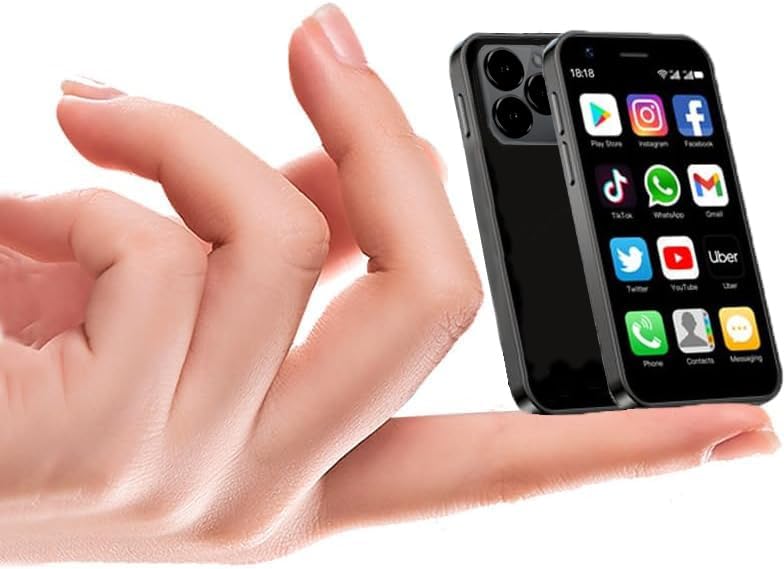
Figure 1: The iLight Mini Smartphone 16 Pro Max, demonstrating its compact size in hand.
2. Mis on karbis
Upon unboxing your iLight Mini Smartphone 16 Pro Max, please ensure all the following items are present:
- iLight Mini Smartphone 16 Pro Max (Model: xs16)
- SIM-i salve väljastus
- Kiirjuhend
- USB-laadimiskaabel (pole otseselt loetletud, kuid eeldab laadimist)
3. Seadistusjuhend
3.1. SIM-kaardi sisestamine ja sisselülitamine
To begin using your iLight Mini Smartphone, insert your SIM card using the provided SIM tray ejector. This device supports dual SIM functionality. After inserting the SIM card, press and hold the power button located on the side of the device until the screen lights up.

Figure 2: Size comparison of the iLight Mini Smartphone 16 Pro Max with a standard phone and a lighter.
3.2. Initial Setup and Network Compatibility
Follow the on-screen prompts to complete the initial setup, including language selection, Wi-Fi connection, and Google account login. Ensure your network carrier is compatible with the phone's 2G, 3G, and 4G bands. This phone is unlocked and compatible with major US carriers like Cricket, Straight Talk, NET10, MetroPCS, Simple Mobile, Google Project Fi, T-Mobile, Verizon, and AT&T. Always verify band compatibility with your carrier before purchase.
4. Seadme kasutamine
4.1. Basic Navigation and App Usage
The iLight Mini Smartphone runs on Android 10.0, providing a familiar and intuitive touchscreen interface. Navigate through menus, open applications, and customize your home screen with ease. You can download a wide range of applications from the Google Play Store, including popular social media apps like Facebook, YouTube, Twitter, WhatsApp, Instagram ja TikTok.

Figure 3: The phone's display showing a variety of pre-installed and downloadable applications.
4.2. Calls, Messaging, and Internet Connectivity
Make and receive voice calls with clear and stable connections. The device supports SMS and MMS messaging. Utilize the 4G LTE connectivity for fast internet browsing, email, and streaming. Wi-Fi and Bluetooth connectivity are also available for seamless integration with other devices and networks.
4.3. Kaamera funktsionaalsus
The iLight Mini Smartphone features dual cameras (front and rear) for capturing photos and videos. The front camera includes a beautifying feature. Despite its size, the camera is designed for daily use and capturing memorable moments.

Joonis 4: üksikasjalik view of the phone's rear camera setup.
4.4. Media Playback and OTG Support
Enjoy MP3 playback and video viewing on the 3-inch HD screen. The device supports OTG (On-The-Go) functionality, allowing you to connect external USB devices like flash drives to access files otse.
Video 1: Üleview of iLight Mini Smartphone features, including size, power, and camera capabilities.
Video 2: Demonstrates the iLight Mini Smartphone's compact size, features like OTG support, and various color options.
4.5. Kuumala funktsionaalsus
The iLight Mini Smartphone can be used as a mobile hotspot, allowing you to share its internet connection with other devices. This feature provides flexibility for working or staying connected anywhere.
5. Hooldus ja hooldus
To ensure the longevity and optimal performance of your iLight Mini Smartphone, follow these care guidelines:
- Aku hooldus: The device is equipped with a 2000mAh Lithium Ion battery. To maximize battery life, avoid extreme temperatures and do not overcharge.
- Puhastamine: Telefoni ekraani ja korpuse puhastamiseks kasutage pehmet ja ebemevaba lappi. Vältige karme kemikaale ega abrasiivseid materjale.
- Tarkvaravärskendused: Keep your Android 10.0 operating system updated to the latest version to ensure security and performance improvements.
- Füüsiline kaitse: The phone comes with a transparent case for added protection against drops and scratches.
6. Veaotsing
If you encounter any issues with your iLight Mini Smartphone, refer to the following common troubleshooting tips:
- Võrguühenduse probleemid: If you experience problems with calls or internet, verify your SIM card is correctly inserted and your carrier's network is active. Check your phone's network settings to ensure it's configured for the correct bands.
- Rakenduse load: If an app is not functioning correctly, check its permissions in the phone's settings. Grant necessary permissions for the app to operate as intended.
- Battery Heating: Some users have reported the battery warming up. If this occurs frequently, try closing background applications, reducing screen brightness, or avoiding prolonged heavy usage. If heating persists, contact support.
- Seade ei reageeri: If the device becomes unresponsive, perform a force restart by holding down the power button for several seconds until it reboots.
7. Tehnilised andmed
| Funktsioon | Spetsifikatsioon |
|---|---|
| Toote mõõtmed | 3.54 x 1.81 x 0.35 tolli |
| Kauba kaal | 3.52 untsi |
| Kauba mudeli number | xs16 |
| Operatsioonisüsteem | Android 10.0 |
| RAM | 2 GB |
| Mälu salvestusmaht | 16 GB |
| Ekraani suurus | 3 tolli |
| Resolutsioon | 480 x 854 |
| CPU mudel | Mediatek 8389 Quadcore |
| CPU kiirus | 1.3 GHz |
| Aku mahutavus | 2000 miljonitamp Tundi |
| Telefonikõnede aeg | 6 tundi |
| Juhtmevaba kandja | Avatud kõigi vedajate jaoks |
| Ühenduvustehnoloogiad | Bluetooth, Wi-Fi, USB |
| Värv | Valge |
8. Garantii ja tugi
For warranty information and customer support, please refer to the documentation provided with your purchase or contact the seller directly. Protection plans are available for extended coverage.


