1. Sissejuhatus
The Eizo ColorEdge CS2731 is a 27-inch IPS LCD monitor designed for creative professionals who demand exceptional color accuracy and image quality. This manual provides detailed instructions for setting up, operating, and maintaining your monitor to ensure optimal performance.

Joonis 1.1: Esiosa view of the Eizo ColorEdge CS2731 Monitor, showcasing oma elegantse disaini ja kuvamisvõimalustega.
2. Põhiomadused
- 27-inch Wide Gamut LCD: Features a 2560x1440 resolution IPS panel for fine detail and wide viewnurgad.
- 99% Adobe RGB Color Space: Ensures accurate reproduction of a wide range of colors, crucial for professional photo and video editing.
- Hardware Calibration Support: Compatible with free calibration software (ColorNavigator 7) for precise color management.
- Mitmekülgsed sisendid: Includes USB Type-C, DisplayPort, HDMI, and DVI-D for broad connectivity.
- 5-aastane tootjagarantii: Provides long-term assurance of product quality and reliability.
3. Seadistamine
3.1 Lahtipakkimine ja kokkupanek
Carefully remove the monitor and its components from the packaging. Assemble the stand according to the included quick setup guide, ensuring all connections are secure before placing the monitor on a stable surface.
3.2 Monitori ühendamine
Connect the monitor to your computer using one of the available input ports. The ColorEdge CS2731 supports USB Type-C, DisplayPort, HDMI, and DVI-D connections. For optimal performance and color depth, DisplayPort or USB Type-C are recommended.

Figure 3.1: USB Type-C connection allows for video, USB signal, and power delivery (up to 60W) with a single cable.
Ensure the power cable is securely connected to the monitor and a power outlet. The monitor supports 240 Volts input.
3.3 Füüsilised kohandused
The monitor stand allows for various adjustments to enhance your viewing comfort and efficiency:
- Kõrguse reguleerimine: Adjust the monitor's height to your eye level.
- Kallutuse reguleerimine: Peegelduse vähendamiseks ja pildi parandamiseks kallutage ekraani ette- või tahapoole. viewnurk.
- Pöördfunktsioon: Pöörake ekraani vertikaalseks muutmiseks 90 kraadi viewing, ideal for editing long documents or images.

Figure 3.2: Adjusting the monitor height for ergonomic viewing.


Figure 3.3: Monitor tilt adjustments (+5° to -35°).
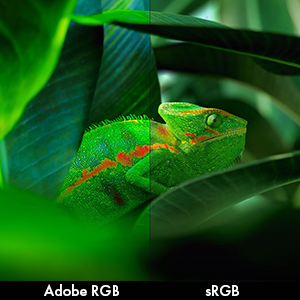
Figure 3.4: Monitor pivot function for portrait orientation.
4. Monitori kasutamine
4.1 Toide sisse/välja
Press the power button located on the front bezel to turn the monitor on or off. The power indicator light will illuminate when the monitor is active.
4.2 Color Management and Calibration
The Eizo ColorEdge CS2731 is designed for precise color reproduction. It features a wide color gamut covering 99% of the Adobe RGB color space, ensuring accurate and vibrant colors.

Figure 4.1: Illustration of the monitor's 99% Adobe RGB color gamut coverage, ideal for creative work.
The monitor also includes a Digital Uniformity Equalizer (DUE) to ensure consistent brightness and chromaticity across the entire screen, minimizing variations that can affect color accuracy.

Figure 4.2: The Digital Uniformity Equalizer corrects tone deviations for consistent display across the screen.
For hardware calibration, use Eizo's ColorNavigator 7 software. This software, combined with an optional calibration sensor, simplifies the calibration process and ensures predictable, accurate results across all units.

Figure 4.3: ColorNavigator 7 software facilitates precise hardware calibration for various creative workflows.
Video 4.1: Ülelöökview of the ColorEdge CS Series Monitors, highlighting their features for creative professionals, including color reproduction, image quality, and ease of use. This video demonstrates the wide color gamut, digital uniformity equalizer, and hardware calibration capabilities.
5. Hooldus
5.1 Monitori puhastamine
Monitori ekraani puhastamiseks pühkige seda õrnalt pehme ja ebemevaba lapiga. Kangekaelsete plekkide korral pühkige seda kergeltampLoputage lappi veega või ekraanipuhastuslahusega. Vältige tugevate kemikaalide või abrasiivsete materjalide kasutamist.
5.2 Üldine hooldus
Keep the monitor in a well-ventilated area, away from direct sunlight and excessive heat or moisture. Avoid placing heavy objects on the monitor or its cables. When moving the monitor, ensure it is powered off and disconnected from all cables.
6. Veaotsing
6.1 Toide puudub
- Kontrollige, kas toitekaabel on korralikult ühendatud nii monitori kui ka pistikupessa.
- Veenduge, et pistikupesa töötab, ühendades sellega teise seadme.
6.2 Ekraanil pole pilti
- Verify that the video cable (USB-C, DisplayPort, HDMI, or DVI-D) is securely connected to both the monitor and your computer.
- Ensure the correct input source is selected on the monitor's OSD (On-Screen Display) menu.
- Check your computer's display settings to ensure it is configured to output to the monitor.
6.3 Värviebatäpsused
- Perform a hardware calibration using Eizo ColorNavigator 7 software and a compatible sensor.
- Veenduge, et teie graafikakaardi draiverid on ajakohased.
- Check the monitor's color mode settings in the OSD menu.
For further assistance, please refer to the comprehensive troubleshooting guide available on the Eizo support websaidile.
7. Tehnilised andmed

Figure 7.1: Key dimensions of the Eizo ColorEdge CS2731 Monitor.
| Atribuut | Väärtus |
|---|---|
| Ekraani suurus | 27 tolli |
| Resolutsioon | 2560 x 1440 (QHD lainurk 1440p) |
| Kuvasuhe | 1.78:1 |
| Pildi heledus | 350 cd/m2 |
| Ekraani pinna kirjeldus | Matt |
| Sisendid | USB Type-C, DisplayPort, HDMI, DVI-D |
| USB-pordid kokku | 3 |
| Voltage | 240 volti |
| Kauba kaal | 22.2 naela |
| Kauba mudeli number | CS2731-BK |
| Esmakordselt saadaval olev kuupäev | 8. aprill 2019 |
Note: Some regional models may have specific voltage requirements or warranty limitations. Refer to your product's specific documentation.

Figure 7.2: Specific warranty and input voltage information for models intended for the Japanese market.
8. Garantii ja tugi
The Eizo ColorEdge CS2731 monitor comes with a 5-aastane tootjagarantii. See garantii katab tavakasutusel esinevad materjali- ja tootmisdefektid.
For warranty claims, technical support, or additional product information, please visit the official Eizo support websaidil või võtke ühendust nende klienditeenindusega. Lisateavet ja ressursse leiate aadressilt Eizo Store on Amazon.
Please note that the warranty may be region-specific. For example, some models may have a warranty valid only in Japan, as indicated in certain product images.


