1. Sissejuhatus
The Brinno Empower TLC2000 is a versatile time lapse camera designed for capturing long-term projects, creative videos, and monitoring activities. It offers three distinct capture modes: Time Lapse, Step Video, and Stop Motion, delivering high-quality footage in HDR and Full HD resolutions. With its flexible scheduling capabilities and long-lasting battery, the TLC2000 is suitable for various indoor and outdoor applications.
2. Mis on karbis
Palun kontrollige, kas pakis on kõik esemed olemas:
- Brinno Empower TLC2000 Time Lapse Camera
- Kandekott
- USB kaabel
- Kasutusjuhend (see dokument)
- Kinnituspandla
- Pöidlakruvi
- 2 AA patareid (kaasas)
3. Toote lõppview
Familiarize yourself with the components of your Brinno TLC2000 camera.

Joonis 3.1: Esiosa View. This image displays the front of the Brinno TLC2000 camera, highlighting the central lens and the Brinno branding at the bottom.

Joonis 3.2: Tagumine View. This image shows the back of the camera, featuring the LCD screen and the 'Previous', 'OK/Return', and 'Next' control buttons below it.

Joonis 3.3: Külg View (Sadamad). This image illustrates the side of the camera with the MicroSD card slot and USB port clearly visible.
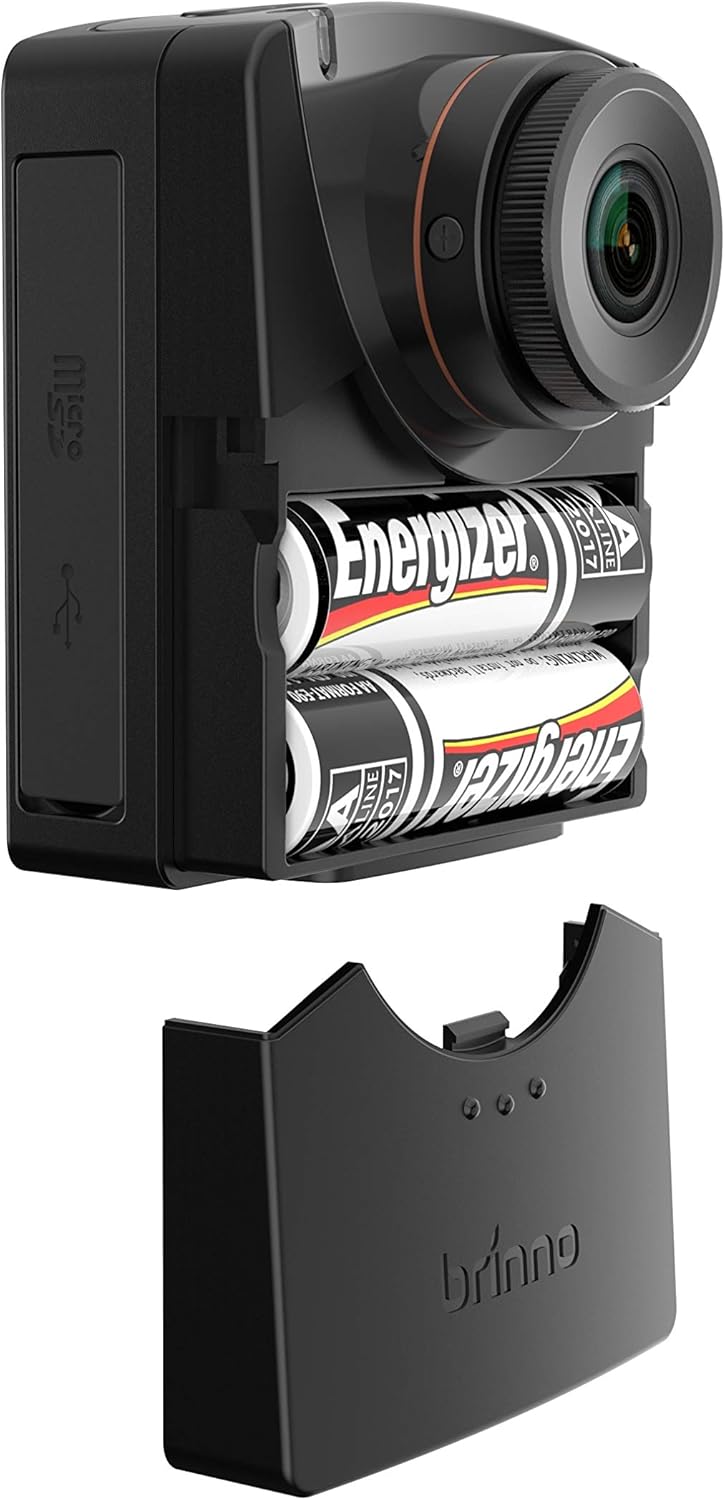
Joonis 3.4: Akupesa. This image shows the camera with its battery compartment open, revealing the two AA batteries required for operation.
4. Seadistamine
4.1. Aku paigaldamine
- Open the battery compartment cover located on the side of the camera (refer to Figure 3.4).
- Sisestage kaks (2) AA-patareid, jälgides õiget polaarsust (+/-), nagu on näidatud sahtlis.
- Sulgege akupesa kaas kindlalt.
4.2. MicroSD-kaardi paigaldamine
- Locate the MicroSD card slot on the side of the camera (refer to Figure 3.3).
- Gently insert a compatible MicroSD card (up to 128GB, Class 10 or higher recommended) into the slot until it clicks into place.
- Eemaldamiseks lükake kaarti sissepoole, kuni see välja hüppab.
4.3. Toite sisse / välja lülitamine
- Sisselülitamiseks: Press and hold the power button (usually located on the top or side) until the LCD screen illuminates.
- Väljalülitamiseks: Press and hold the power button until the screen turns off.
4.4. Esialgsed seaded
Upon first power-on or after battery replacement, you may need to set the date, time, and language. Use the 'Previous' and 'Next' buttons to navigate and the 'OK/Return' button to confirm selections on the LCD screen.
5. Töörežiimid
The Brinno TLC2000 offers three primary recording modes:
- Aeg: Captures still images at predefined intervals (e.g., every 5 seconds, 1 minute) and automatically stitches them into a video file. Ideal for documenting construction projects, plant growth, or weather changes.
- Step Video: Records short video clips at set intervals. This mode is suitable for capturing events with more motion between frames, such as traffic flow or crowd movements.
- Stop Motion: Allows for manual capture of individual frames, providing precise control for creating animated sequences. Each press of the capture button records one frame.
5.1. Flexible Schedule Setup
The camera supports a flexible scheduling feature, allowing you to specify recording days of the week and specific hours. This ensures the camera only records when needed, conserving battery life and storage space. Access this feature through the camera's menu settings on the LCD screen.
5.2. Image Quality and Lenses
The TLC2000 captures images in HDR (High Dynamic Range) and Full HD (1080p) resolutions, providing clear and detailed visuals. It features a CS-mount interface, making it compatible with Brinno BCS zoom-in lenses for enhanced optical flexibility and framing precision.
6. Hooldus
6.1. Puhastamine
- Kaamera korpuse puhastamiseks kasutage pehmet ja kuiva lappi.
- Objektiivi puhastamiseks kasutage objektiivi puhastuslappi ja spetsiaalset objektiivi puhastuslahust. Vältige abrasiivseid materjale.
6.2. Püsivara värskendused
Brinno periodically releases firmware updates to improve camera performance and address issues. It is recommended to check the official Brinno website for the latest firmware version (e.g., 2020 Updated Firmware) and follow the provided instructions for installation. Keeping your firmware updated ensures optimal functionality.
7. Veaotsing
- Probleem: lühike aku tööiga
- Lahendus: While the TLC2000 features a proprietary power control system, actual battery life can vary based on recording intervals, temperature, and battery quality. For extended projects, especially outdoors, consider using an external power source or Brinno's ATH2000 housing which accommodates additional AA batteries.
- Issue: Settings Reset After Battery Change
- Lahendus: This is a known characteristic of some firmware versions. Always re-check and re-apply your desired settings (date, time, recording mode, schedule) after replacing batteries.
- Issue: Video Files Split into Multiple Segments
- Lahendus: The camera may split video files into segments (e.g., around 500MB) during long recordings. This is often due to file system limitations. You may need to use video editing software to combine these segments into a single continuous video.
- Issue: Corrupted or Intermittent Footage
- Lahendus: Ensure you are using a high-quality, genuine MicroSD card (Class 10 or higher). Format the MicroSD card regularly within the camera's settings. If the issue persists, try a different MicroSD card. Ensure the camera's firmware is up to date.
- Issue: Display is Dim or Difficult to See
- Lahendus: The LCD screen's brightness may be limited, especially in bright sunlight. Try to shade the screen when framing shots or reviewlolltage. Ensure the screen protection film (if any) has been removed.
8. Tehnilised andmed
| Funktsioon | Detail |
|---|---|
| Toote mõõtmed | 1.65 x 2.36 x 2.76 tolli |
| Kauba kaal | 3 untsi |
| Kauba mudeli number | TLC 2000 |
| Patareid | Vaja on 2 AA patareid (kaasas) |
| Fotosensori tehnoloogia | CMOS |
| Video jäädvustamise eraldusvõime | 1080p (täis-HD) |
| Maksimaalne fookuskaugus | 35 millimeetrit |
| Maksimaalne ava | 2 millimeetrit |
| Välkmälu tüüp | Micro SD |
| Ekraani suurus | 2 tolli |
| Ühenduvustehnoloogia | USB |
| Värv | Must |
| Tootja | Brinno |
| Esmakordselt saadaval olev kuupäev | 5. detsember 2018 |
9. Garantii ja tugi
The Brinno Empower TLC2000 camera comes with a 30-päevane raha tagasi garantii ja a piiratud 1-aastane garantii alates ostukuupäevast. See garantii katab tootmisdefektid ja tagab, et toode toimib ettenähtud otstarbel normaalse kasutamise korral.
For technical support, warranty claims, or to access the latest firmware updates, please visit the official Brinno website or contact Brinno customer service directly. Keep your proof of purchase for warranty validation.
Lisateabe saamiseks külastage aadressi Brinno Store on Amazon.


