1. Sissejuhatus
Tänan ostu eestasing the MIFA A30 Bluetooth Speaker. This manual provides essential information for setting up, operating, and maintaining your device. Please read it thoroughly before use to ensure optimal performance and longevity of your speaker.
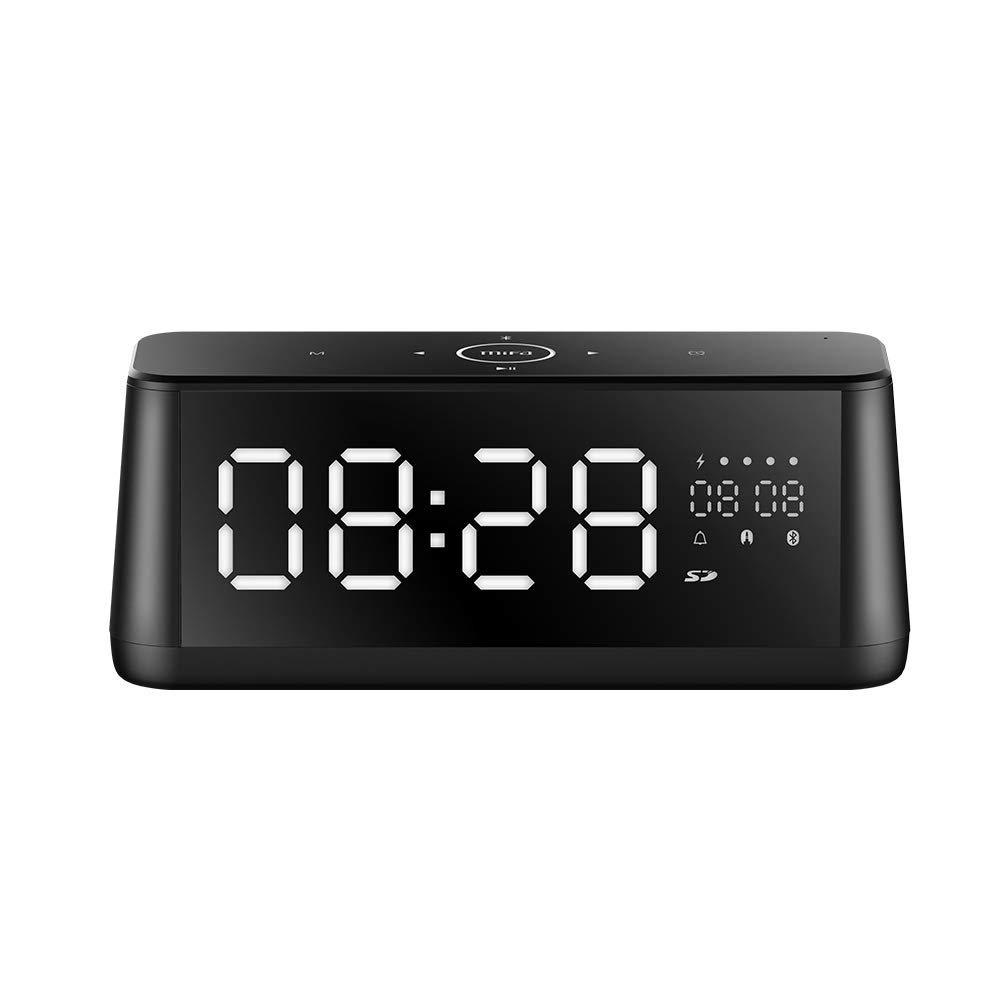
Pilt 1.1: esikülg view of the MIFA A30 Bluetooth Speaker, displaying the time on its large LED screen.
2. Ohutusalane teave
- Ärge jätke kõlarit äärmuslike temperatuuride, otsese päikesevalguse ega kõrge õhuniiskuse kätte.
- Vältige kõlari mahakukkumist või tugevate löökide allutamist.
- Ärge seadet ise lahti võtke, parandage ega muutke. Remonditöödeks võtke ühendust volitatud hoolduspersonaliga.
- Keep the speaker away from water and other liquids, despite its waterproof rating, to prevent damage to ports when open.
- Kasutage ainult ettenähtud laadimiskaablit ja adapterit.
- Puhastage kõlarit pehme ja kuiva lapiga. Ärge kasutage abrasiivseid puhastusvahendeid.
3. Pakendi sisu
Palun kontrollige pakendilt järgmisi esemeid:
- MIFA A30 Bluetooth Speaker
- USB laadimiskaabel
- 3.5 mm helikaabel
- Kasutusjuhend (see dokument)
4. Toote lõppview
4.1. Komponendid
The MIFA A30 speaker features a robust design with advanced audio components for high-quality sound reproduction.

Pilt 4.1: Lõhkekujuline view illustrating the internal components of the MIFA A30, including two 15-watt drivers and two low-frequency passive radiators.
4.2. Control Panel and Ports
The speaker's top panel features capacitive touch controls, and the rear panel houses various connectivity ports.
Pilt 4.2: Ülalt alla view of the MIFA A30 control panel, indicating the functions of each touch button for mode, playback, volume, and clock adjustment.
- M (režiimi) nupp: Short press to switch between Bluetooth, TF Card, and AUX modes.
- Bluetoothi juhtimine: Long press to turn off Bluetooth, short press to turn on.
- Eelmine pala nupp: Eelmise loo juurde liikumiseks vajutage lühidalt.
- Play/Pause/Hands-Free Button: Lühike vajutus muusika esitamiseks/peatamiseks. Lühike vajutus kõnedele vastamiseks/lõpetamiseks. Pikk vajutus kõnedest keeldumiseks.
- Järgmise pala nupp: Järgmise loo juurde liikumiseks vajutage lühidalt.
- Kella nupp: Long press for clock adjustment.
- Helitugevuse suurendamine: Helitugevuse suurendamiseks keerake päripäeva.
- Hääl maha: Helitugevuse vähendamiseks pöörake vastupäeva.
- Mikrofon: Sisseehitatud mikrofon käed-vabad kõnede jaoks.
- LED-ekraan: Shows time, date, battery level, and current mode.
5. Seadistamine
5.1. Kõlari laadimine
Before first use, fully charge the speaker. Connect the provided USB charging cable to the speaker's charging port and the other end to a USB power adapter (not included) or a computer's USB port. The LED display will indicate charging status.
5.2. Toite sisse / välja lülitamine
- Sisselülitamiseks: Press and hold the Play/Pause button until the LED display lights up.
- Väljalülitamiseks: Press and hold the Play/Pause button until the LED display turns off. The speaker will automatically screen out and power off to save battery after a period of inactivity.
6. Kasutusjuhised
6.1. Bluetoothi sidumine
- Ensure the speaker is powered on and in Bluetooth mode (indicated by the Bluetooth icon on the LED display). If not, short press the 'M' button to switch to Bluetooth mode.
- Lubage oma nutitelefonis või tahvelarvutis Bluetooth ja otsige saadaolevaid seadmeid.
- Select "MIFA A30" from the list of devices.
- Pärast sidumist kostab kinnitusheli ja ekraanil olev Bluetoothi ikoon lakkab vilkumast.
- The speaker will automatically re-connect to the last paired device when powered on, if the device is within range.
6.2. Heli taasesitus
- Esita/peata: Vajutage lühidalt nuppu Esita/Paus.
- Järgmine lugu: Short press the Next Track button.
- Eelmine lugu: Short press the Previous Track button.
- Helitugevuse reguleerimine: Helitugevuse suurendamiseks keerake helitugevusnuppu päripäeva, helitugevuse vähendamiseks vastupäeva.
6.3. Käed-vabad helistamine
Kui nutitelefoniga on Bluetoothi kaudu ühendus loodud:
- Vasta kõnele: Vajutage lühidalt nuppu Esita/Paus.
- Kõne lõpetamine: Kõne ajal vajutage lühidalt esitus-/pausinuppu.
- Keeldu kõnest: Sissetuleva kõne korral vajutage pikalt esitus-/pausinuppu.
6.4. TF-kaardi taasesitus
- Insert a Micro-SD (TF) card with supported audio files (FLAC/APE/MP3/WMA/WAV) into the TF card slot.
- Short press the 'M' button to switch to TF Card mode. The speaker will automatically begin playing music from the card.
6.5. AUX sisend
- Connect one end of the 3.5mm audio cable to the speaker's AUX input port and the other end to the audio output of your device (e.g., MP3 player, computer).
- AUX-režiimi lülitumiseks vajutage lühidalt nuppu „M”.
- Heli esitatakse nüüd ühendatud seadme kõlarist.
6.6. Clock and Display Settings
- Kella reguleerimine: Long press the Clock button to enter time setting mode. Use the Next/Previous buttons to adjust values and the Play/Pause button to confirm.
- Display Luminance: The LED display has 7 adjustable luminance levels. Refer to the full product documentation for specific adjustment steps, typically involving short presses of the Clock button or a combination with volume controls.
7. Hooldus
- Puhastamine: Wipe the speaker's surface with a soft, dry, lint-free cloth. Do not use liquid or aerosol cleaners.
- Hoiustamine: Kui kõlarit pikemat aega ei kasutata, hoidke seda jahedas ja kuivas kohas, eemal otsesest päikesevalgusest ja äärmuslikest temperatuuridest.
- Aku hooldus: Aku tööea pikendamiseks vältige aku sagedast täielikku tühjendamist. Laadige kõlarit regulaarselt, isegi kui seda ei kasutata.
8. Veaotsing
| Probleem | Võimalik põhjus | Lahendus |
|---|---|---|
| Kõlar ei lülitu sisse. | Aku tühi. | Laadige kõlarit vähemalt 2 tundi. |
| Ei mingit heli. | Volume too low; incorrect mode; device not connected. | Increase speaker and device volume. Ensure correct mode (Bluetooth/AUX/TF Card). Re-pair Bluetooth device or check AUX cable connection. |
| Bluetoothi sidumine nurjus. | Kõlar ei ole sidumisrežiimis; seade on liiga kaugel; interferents. | Ensure speaker is in Bluetooth mode. Move device closer to speaker. Turn off other Bluetooth devices. Try forgetting "MIFA A30" on your device and re-pairing. |
| TF Card not playing. | Incorrect mode; unsupported file format; card error. | Switch to TF Card mode. Ensure files are FLAC/APE/MP3/WMA/WAV. Reinsert TF card or try a different card. |
9. Tehnilised andmed
| Funktsioon | Detail |
|---|---|
| Mudeli nimi | A30 |
| Kõlari tüüp | Raamaturiiul |
| Ühenduvustehnoloogia | Bluetooth 4.2, Auxiliary (3.5mm), Micro-SD (TF Card) |
| Heliväljundi režiim | Stereo |
| Kõlari maksimaalne väljundvõimsus | 30 vatti (2 x 15 W draiverit) |
| Bassi suurendamine | Two low-frequency boosters |
| Aku mahutavus | 4000 mAh |
| Mänguaeg | Up to 10-12 hours (depending on volume and content) |
| Kontrollimeetod | Mahtuvuslik puutepaneel |
| Ekraan | 7.2" x 2.8" Mirror LED Screen with 106 LEDs, 7-level adjustable luminance |
| Toetatud helivormingud | FLAC/APE/MP3/WMA/WAV |
| Sisseehitatud mikrofon | Jah, käed-vabad kõnede jaoks |
| Veekindel | Yes (Note: Ensure ports are covered for water resistance) |
| Värv | Must |
| Paigaldustüüp | Lauaplaadi kinnitus |
10. Garantii ja tugi
The MIFA A30 Bluetooth Speaker typically comes with a 30-day warranty from the date of purchase, covering manufacturing defects. Please retain your proof of purchase for warranty claims.
For technical support, troubleshooting assistance beyond this manual, or warranty inquiries, please contact MIFA customer service through their official website or the retailer where the product was purchased. Provide your product model (A30) and purchase details when seeking support.


