Sissejuhatus
Thank you for choosing the MIFA A3 Soundbox Bluetooth Portable Speaker. This manual provides essential information for the safe and efficient use of your device. Please read it thoroughly before operating the speaker and retain it for future reference.
Ohutusteave
- Ärge jätke kõlarit äärmuslike temperatuuride, otsese päikesevalguse ega kõrge õhuniiskuse kätte.
- Vältige kõlari mahakukkumist või tugevate löökide allutamist.
- Do not disassemble or attempt to repair the speaker yourself. Contact qualified service personnel.
- Keep the speaker away from water and liquids, despite its waterproof rating, to prevent damage to charging ports or internal components.
- Kasutage ainult ettenähtud laadimiskaablit ja adapterit.
Pakendi sisu
Palun kontrollige pakendilt järgmisi esemeid:
- MIFA A3 Bluetooth Portable Speaker
- USB laadimiskaabel
- AUX helikaabel
- Kasutusjuhend (see dokument)
Toode läbiview
The MIFA A3 speaker features intuitive touch controls and multiple connectivity options. Familiarize yourself with the speaker's layout:
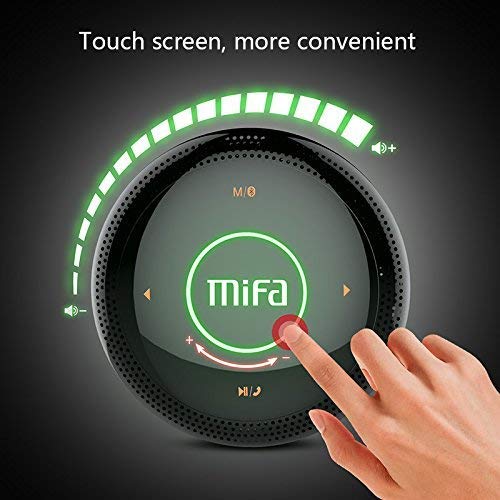
Joonis 1: Üles view of the MIFA A3 speaker, highlighting the touch-sensitive control panel. The panel displays volume indicators, play/pause, and track navigation buttons. A central 'Mifa' logo is also visible.
- Puudutage juhtpaneeli: Located on the top surface for volume adjustment, playback control, and mode selection.
- Mikrofon: Käed-vabad helistamiseks.
- Laadimisport: Micro USB-port laadimiseks.
- AUX sisend: 3.5 mm audiopesa juhtmega ühenduse loomiseks.
- Micro SD kaardi pesa: Muusika esitamiseks otse mälukaardilt.
Seadistamine
1. Kõlari laadimine
Enne esmakordset kasutamist laadige kõlar täielikult. Ühendage kaasasolev USB-laadimiskaabel kõlari laadimisporti ja teine ots USB-toiteadapteri (ei kuulu komplekti) või arvuti USB-porti.
- Laadimise ajal süttib laadimise indikaatortuli.
- The indicator will turn off or change color once fully charged.
- A full charge provides approximately 8 hours of continuous playtime.
2. Toide sisse/välja
- Sisselülitamiseks: Press and hold the Power button (usually integrated into the touch panel or a dedicated button) for 2-3 seconds until you hear an audible prompt or see an indicator light.
- Väljalülitamiseks: Press and hold the Power button again for 2-3 seconds.
Kasutusjuhised
1. Bluetoothi sidumine
- Ensure the speaker is powered on and in Bluetooth pairing mode (indicated by a flashing blue light or audible prompt).
- Luba oma seadmes (nutitelefon, tahvelarvuti, arvuti) Bluetooth ja otsi saadaolevaid seadmeid.
- Select "MIFA A3" from the list of devices.
- Once paired, the speaker will provide an audible confirmation, and the indicator light will become solid blue.
- The speaker will automatically connect to the last-paired device when powered on, if that device's Bluetooth is active and within range.
2. AUX-ühendus
For devices without Bluetooth, use the provided 3.5mm AUX audio cable:
- Ühendage AUX-kaabli üks ots kõlari AUX-sisendporti.
- Ühendage teine ots oma heliseadme kõrvaklappide pesaga.
- Kõlar lülitub automaatselt AUX-režiimile.
3. Micro SD-kaardi taasesitus
Insert a Micro SD card (up to 32GB, FAT32 format) with music files into the designated slot. The speaker will automatically detect the card and begin playback.
4. Touch Control Operations
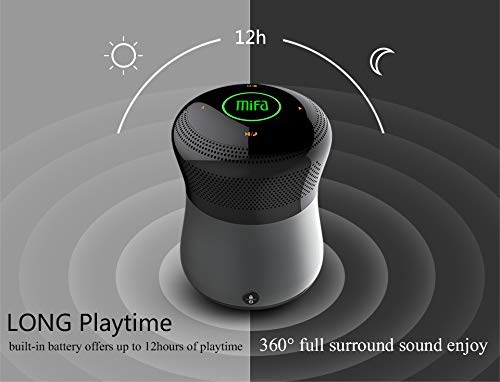
Joonis 2: The MIFA A3 speaker shown with an overlay indicating "LONG Playtime" (up to 12 hours) and "360° full surround sound enjoy." This image emphasizes the speaker's battery life and audio dispersion.
- Helitugevuse juhtimine: Slide your finger clockwise on the touch panel to increase volume, counter-clockwise to decrease.
- Esita/peata: Tap the central Play/Pause icon.
- Järgmine lugu: Tap the "Next" arrow icon.
- Eelmine lugu: Tap the "Previous" arrow icon.
- Režiimi lüliti: Tap the "M/O" icon to cycle between Bluetooth, AUX, and Micro SD card modes.
- Lukustusnupp: Press the lock icon to prevent accidental touch inputs.
5. Call Handling (Bluetooth Mode)
- Vasta kõnele: Tap the Play/Pause icon when a call comes in.
- Kõne lõpetamine: Tap the Play/Pause icon again.
- Keeldu kõnest: Press and hold the Play/Pause icon for 2 seconds.
Hooldus
- Puhastage kõlarit pehme ja kuiva lapiga. Ärge kasutage abrasiivseid puhastusvahendeid ega lahusteid.
- Hoidke kõlarit jahedas ja kuivas kohas, kui seda pikemat aega ei kasutata.
- Charge the battery at least once every three months to maintain battery health.
Veaotsing
| Probleem | Võimalik lahendus |
|---|---|
| Kõlar ei lülitu sisse. | Veenduge, et aku on laetud. Ühendage seade toiteallikaga ja proovige uuesti. |
| Ei saa Bluetoothi kaudu siduda. |
|
| Ei mingit heli. |
|
| Halb helikvaliteet. |
|
Tehnilised andmed
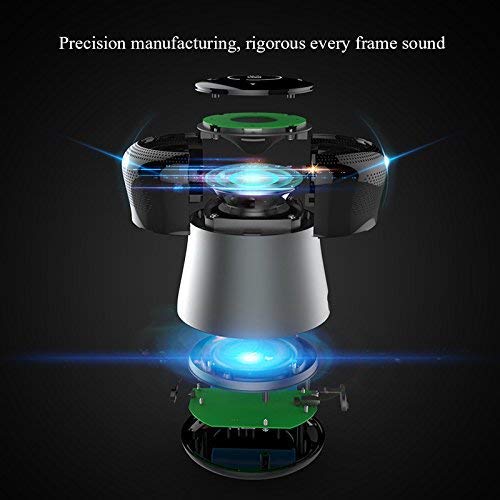
Joonis 3: An exploded diagram of the MIFA A3 speaker, illustrating its internal components and structural design, emphasizing precision manufacturing.
| Mudel | MIFA A3 |
| Väljundvõimsus | 10W |
| Ühenduvus | Bluetooth 4.2, AUX, Micro SD Card |
| Aku | 1800 mAh liitiumioon |
| Mänguaeg | Kuni 8 tundi (60% mahuga) |
| Laadimisaeg | Umbes 3-4 tundi |
| Mikrofon | Sisseehitatud käed-vabad kõnede jaoks |
| Veekindel | Yes (as per product specifications, but general caution advised for ports) |
| Kontrollimeetod | Puudutage |
| Ühilduvad seadmed | Sülearvuti, arvuti, nutitelefon, tahvelarvuti |
Garantii ja tugi
MIFA products are designed to provide reliable performance. For warranty information or technical support, please refer to the warranty card included with your purchase or visit the official MIFA webveebisait. Hoidke ostutõendit garantiinõuete esitamiseks.
For further assistance, you may contact MIFA customer support through their official channels.


