Sissejuhatus
Thank you for choosing the LENRUE A38S Computer Speakers. This manual provides essential information for setting up, operating, and maintaining your speakers to ensure optimal performance. The A38S speakers are designed to deliver clear audio for your desktop, laptop, and tablet, featuring a plug-and-play design with USB power and 3.5mm auxiliary audio input, complemented by dynamic RGB lighting.
Seadistamine
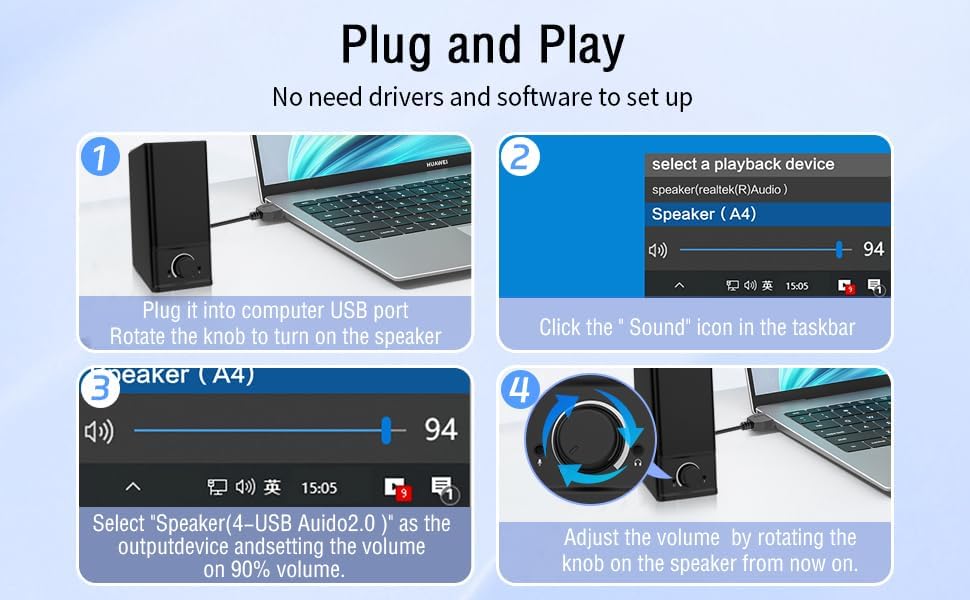
Follow these steps to connect your LENRUE A38S speakers to your device.
- Ühendage toide: Insert the USB-A plug into an available USB port on your computer or a USB power adapter. If your device has a USB-C port, use the provided USB-A to Type-C adapter. The speakers are powered via USB and contain an internal battery for portable use.
- Ühenda heli: Plug the 3.5mm audio jack into the headphone or audio output port of your computer, laptop, or tablet.
- Toide sisse: Rotate the main knob on the speaker clockwise to turn it on. The RGB lights will illuminate.
- Valige taasesitusseade: On your computer, navigate to your sound settings and select "Speaker (4-USB Audio 2.0)" or a similar option as the output device. Adjust the volume to approximately 90% on your computer for optimal control via the speaker knob.
Operatsioon
The LENRUE A38S speakers feature a multi-function knob for easy control.
- Toide sisse/välja: Rotate the knob clockwise to turn on the speakers. Rotate counter-clockwise until it clicks to turn off.
- Helitugevuse juhtimine: Helitugevuse suurendamiseks keerake nuppu päripäeva ja vähendamiseks vastupäeva.
- RGB valgustusrežiimid: Double-click the knob to cycle through the three dynamic RGB lighting modes.
- Turn Off RGB Lights: Triple-click the knob to turn off all RGB lighting.

Hooldus
Proper care ensures the longevity of your speakers.
- Puhastamine: Use a soft, dry cloth to wipe the speaker's surface. Do not use liquid cleaners or abrasive materials.
- Hoiustamine: Hoidke kõlareid jahedas ja kuivas kohas, eemal otsesest päikesevalgusest ja äärmuslikest temperatuuridest.
- Veekindlus: The speakers are waterproof. However, avoid prolonged submersion or exposure to high-pressure water jets to prevent damage. Ensure all ports are dry before connecting cables.
Veaotsing
Probleemide korral vaadake järgmisi levinud lahendusi.
| Probleem | Lahendus |
|---|---|
| Kõlaritest ei kosta heli |
|
| RGB tuled ei tööta |
|
| Moonutatud heli |
|
Tehnilised andmed
Detailed technical specifications for the LENRUE A38S Computer Speakers.
- Mudeli nimi: A38S
- Kõlari tüüp: Koaksiaalne
- Heliväljund: Dual 5W drivers (10W RMS total), 18W Max Output
- Ruumilise heli kanali konfiguratsioon: 2.0 Stereo
- Ühenduvus: USB (for power), 3.5mm Aux-in (for audio)
- Toiteallikas: USB Powered with internal Lithium Ion Battery
- Ühilduvad seadmed: Desktops, PCs, Laptops, Mac, Tablets, Phones, Projectors, PS4, MP3 players
- Omadused: Dynamic RGB Lighting, Plug-n-Play, Waterproof
- Toote mõõtmed: 2.1" (S) x 16" (L) x 2.5" (K)
- Kauba kaal: 286 grammi (10.1 untsi)
- Kaabli pikkus: Approximately 47.3 inches (USB and 3.5mm audio)
- Kaasatud komponendid: LENRUE A38S Speaker Unit, USB-A to Type-C Adapter, USB Power Cable, 3.5mm Audio Cable


Garantii ja tugi
LENRUE on pühendunud kvaliteetsete toodete ja klientide rahulolu pakkumisele.
- Garantii: Your LENRUE A38S speakers come with a 12-month worry-free replacement service from the date of purchase. This limited warranty covers manufacturing defects.
- Klienditeenindus: We offer lifetime customer service for any questions or issues you may encounter. For support, please refer to the contact information provided with your purchase or visit the official LENRUE websaidile.


