1. Sissejuhatus
Tänan ostu eestasing the Bytech Massive Bluetooth Long Bar Speaker-BK. This manual provides essential information for the proper setup, operation, and maintenance of your new speaker. Please read this manual thoroughly before using the product to ensure optimal performance and longevity.
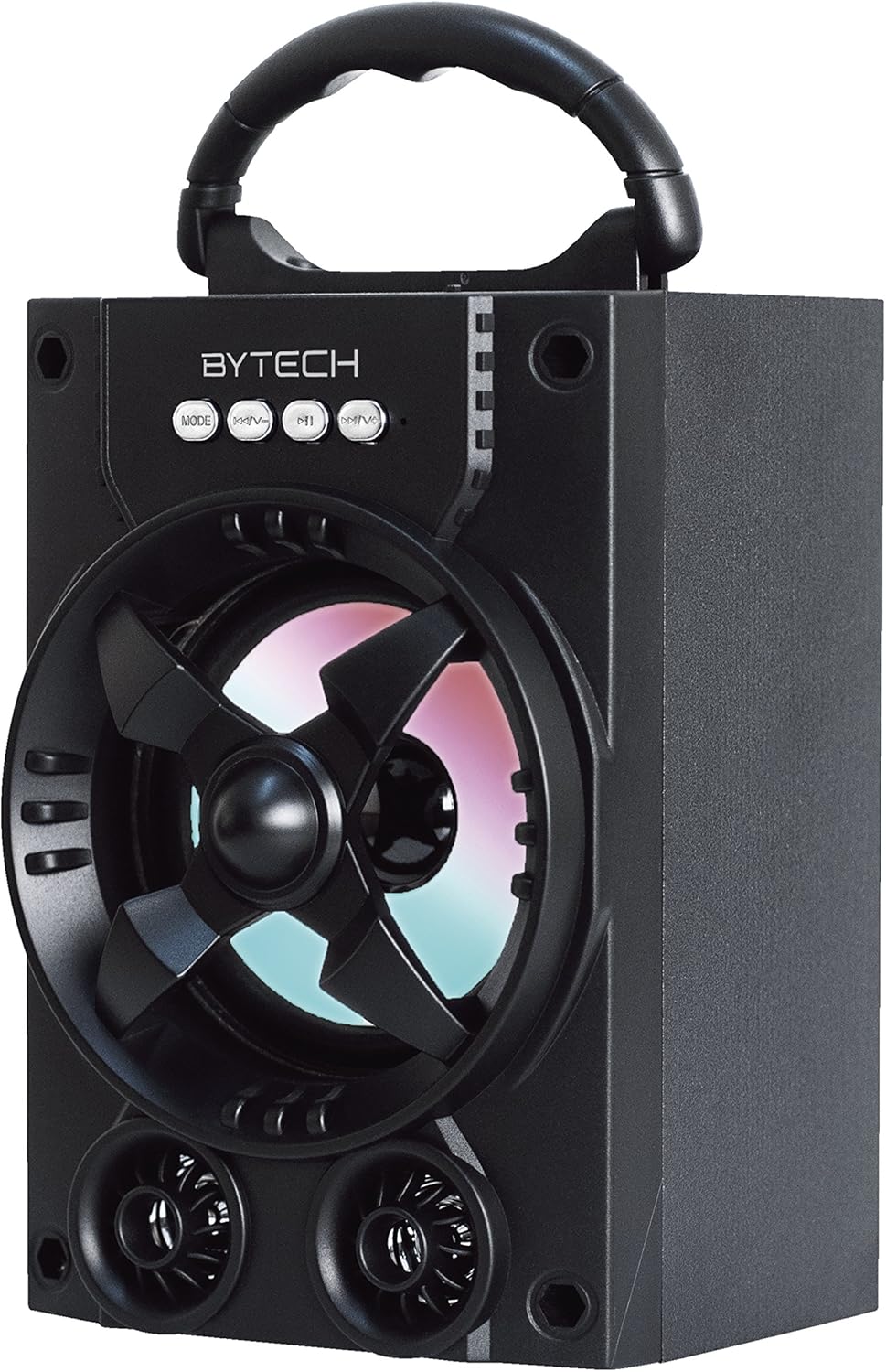
Joonis 1.1: Esiosa view of the Bytech Massive Bluetooth Long Bar Speaker-BK, showcasing its design, handle, and speaker grille with LED lights.
2. Pakendi sisu
Palun kontrollige pakendilt järgmisi esemeid:
- Bytech Massive Bluetooth Long Bar Speaker-BK
- USB laadimiskaabel
- Kasutusjuhend (see dokument)
Kui mõni ese on puudu või kahjustatud, võtke ühendust klienditoega.
3. Toote omadused
- LED Performance Lights: Dynamic LED lights that synchronize with your music for an enhanced audio-visual experience.
- Mugav kandekäepide: Integrated handle for easy portability, allowing you to take your music anywhere.
- Universal Bluetooth Connectivity: Seamlessly connect wirelessly to your smartphone, tablet, or other Bluetooth-enabled devices.
- Ruumiline heli: Designed to deliver a high-quality surround sound experience.
- Kaasaskantav disain: Ideal for various settings, including parties, outdoor gatherings, and personal use.

Figure 1.2: The speaker shown with its retail packaging, illustrating its key features such as multi-color LED lights, Bluetooth connectivity, and surround sound capability.
4. Juhtnupud ja indikaatorid
The speaker features intuitive controls and indicators for easy operation:
- MODE nupp: Press to switch between available input modes (e.g., Bluetooth).
- V-nupp: Press to decrease volume. Long press to skip to the previous track.
- V+ nupp: Press to increase volume. Long press to skip to the next track.
- M nupp: (Function not explicitly detailed, typically for mode or mute)
- LED tuled: Indicate power status, charging status, and provide dynamic light effects during audio playback.
5. Seadistusjuhend
5.1 Kõlari laadimine
- Ühendage USB-laadimiskaabli väiksem ots kõlari laadimisporti.
- Ühenda USB-laadimiskaabli suurem ots USB-toiteadapteriga (ei kuulu komplekti) või arvuti USB-porti.
- LED-indikaator näitab laadimise olekut (nt punane põleb laadimise ajal, kustub, kui aku on täielikult laetud).
- Enne esmakordset kasutamist laske aku täielikuks laadimiseks kuluda umbes 3-4 tundi.
5.2 Sisse-/väljalülitamine
- To power on, press and hold the Power button (location not specified, typically near charging port or on control panel) for a few seconds until you hear an audible prompt or see the LED lights activate.
- Väljalülitamiseks vajutage ja hoidke uuesti toitenuppu all, kuni kõlar lülitub välja.
5.3 Bluetoothi sidumine
- Ensure the speaker is powered on and in Bluetooth pairing mode (indicated by a flashing LED light or audible prompt).
- Navigeeri oma nutitelefonis või tahvelarvutis Bluetoothi seadetesse.
- Otsi available devices. The speaker will appear as "BYTECH" or a similar name.
- Sidumise alustamiseks valige loendist kõlar.
- Once successfully paired, the LED indicator will typically become solid, and you may hear a confirmation tone.
6. Kasutusjuhised
6.1 Heli esitamine Bluetoothi kaudu
- After successful Bluetooth pairing, open your preferred music application on your connected device.
- Select and play your desired audio. The sound will be streamed wirelessly to the speaker.
- Use the V+ and V- buttons on the speaker or your connected device to adjust the volume.
- Long press V+ or V- to skip tracks.
6.2 LED Performance Lights
The speaker features integrated LED lights that enhance your listening experience. These lights typically activate automatically when the speaker is powered on and playing audio. Specific controls for light modes are not detailed, but they are designed to provide dynamic visual effects.
6.3 Režiimi vahetamine
Vajutage nuppu REŽIIM button to cycle through available input modes. While Bluetooth is the primary connectivity, other modes (if available, such as FM radio or AUX input) can be accessed via this button.
7. Hooldus ja hooldus
- Puhastamine: Kõlari välispinna puhastamiseks kasutage pehmet ja kuiva lappi. Ärge kasutage abrasiivseid puhastusvahendeid, vaha ega lahusteid.
- Hoiustamine: Kui kõlarit pikemat aega ei kasutata, hoidke seda jahedas ja kuivas kohas, eemal otsesest päikesevalgusest ja äärmuslikest temperatuuridest.
- Aku hooldus: Aku tööea pikendamiseks vältige aku sagedast täielikku tühjendamist. Laadige kõlarit regulaarselt, isegi kui seda ei kasutata, et säilitada aku seisukord.
- Veekindlus: See toode on EI waterproof. Avoid exposure to water, rain, or excessive moisture to prevent damage.
8. Veaotsing
Kui teil tekib kõlariga probleeme, vaadake järgmisi levinud probleeme ja lahendusi.
| Probleem | Võimalik põhjus | Lahendus |
|---|---|---|
| Kõlar ei lülitu sisse. | Aku tühi. | Laadige kõlar täielikult. |
| Kõlarist ei kostu heli. | Volume too low; Not paired; Incorrect mode. | Increase volume on speaker and device; Ensure successful Bluetooth pairing; Press MODE button to select correct input. |
| Bluetooth-ühendus on ebastabiilne või katkeb. | Device too far; Interference; Pairing issue. | Move device closer to speaker (within 33 ft/10m); Avoid obstacles; Forget device on your phone and re-pair. |
| LED-tuled ei tööta. | Speaker not powered on or playing audio. | Ensure speaker is on and audio is playing. |
9. Tehnilised andmed
| Funktsioon | Detail |
|---|---|
| Kaubamärk | Bytech |
| Mudeli nimi | BYTECH |
| Kauba mudeli number | BCAUBS134BK |
| Kõlari tüüp | Ruumiline heli |
| Ühenduvustehnoloogia | Bluetooth |
| Traadita side tehnoloogia | Bluetooth |
| Ühilduvad seadmed | Nutitelefon |
| Kõlari maksimaalne väljundvõimsus | 20 vatti |
| Sagedusvastus | 20 KHz |
| Takistus | 1 oomi |
| Kõlari suurus | 5 tolli |
| Toiteallikas | Juhtmega elektriline (laadimiseks) |
| Aku tüüp | Vaja on 1 liitiumioonakut |
| Värv | Must |
| Toote mõõtmed | 4.75 x 5.5 x 8.5 tolli |
| Kauba kaal | 1.3 naela |
| On Veekindel | Ei |
| Päritoluriik | Hiina |
| UPC | 805112038121 |
10. Garantii teave
Bytech products are manufactured to the highest quality standards. For specific warranty terms and conditions, please refer to the warranty card included with your purchase or visit the official Bytech webveebisait. Hoidke ostutõendit garantiinõuete esitamiseks.
11. Klienditugi
For technical assistance, troubleshooting, or general inquiries, please contact Bytech customer support. Contact information can typically be found on the product packaging, the official Bytech websaidilt või ostutšekilt.
Märkus: Esitatud andmete põhjal polnud müüjalt ühtegi ametlikku tootevideot manustamiseks saadaval.


