BYTECH Wireless Optical Mouse User Manual
Model: BYTECH Wireless Optical Mouse
Sissejuhatus
This manual provides detailed instructions for the setup, operation, maintenance, and troubleshooting of your BYTECH Wireless Optical Mouse. Please read this manual thoroughly before using the device to ensure optimal performance and longevity.
Toode läbiview
The BYTECH Wireless Optical Mouse is designed for comfortable and efficient navigation. It features a precise optical sensor, a scroll wheel, and a DPI adjustment button for customizable sensitivity. Its ergonomic design and wireless connectivity provide a clutter-free workspace.

Joonis 1: Ülalt-alla view of the BYTECH Wireless Optical Mouse. The mouse is black with a silver stripe along its sides. A scroll wheel and a DPI button are visible on the top surface.
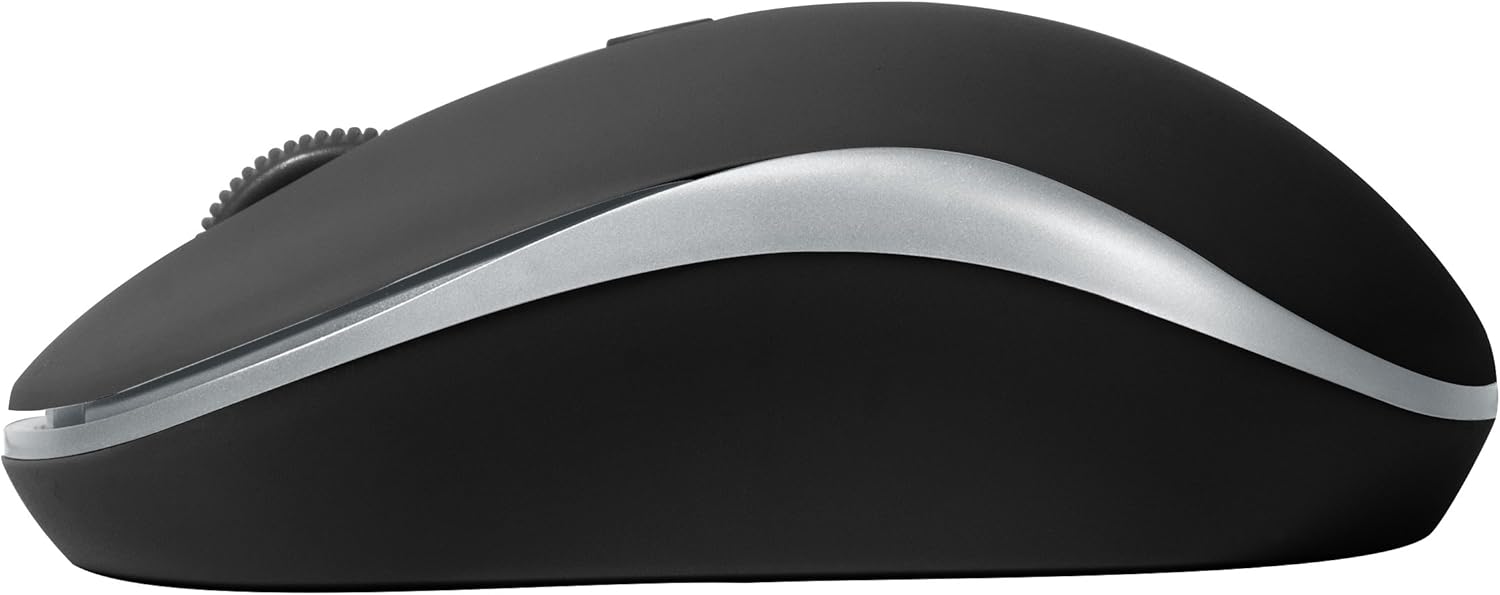
Joonis 2: Külg view of the BYTECH Wireless Optical Mouse. This angle highlights the ergonomic curve and the silver accent line that runs along the side of the mouse.
Seadistamine
1. Aku paigaldamine
- Leidke hiire alumisel küljel akupesa.
- Avage patareipesa kaas.
- Insert one AA battery (not included) into the compartment, ensuring the correct polarity (+/-) as indicated inside.
- Sulgege akupesa kaas kindlalt.
2. USB-vastuvõtja ühendus
- Eemaldage USB-vastuvõtja oma hoiupesast, mis tavaliselt asub akupesas või selle lähedal.
- Ühendage USB-vastuvõtja arvuti või sülearvuti vabasse USB-porti.
- Teie operatsioonisüsteem peaks automaatselt tuvastama ja installima vajalikud draiverid. See võib võtta paar hetke.
3. Sisselülitamine
- Locate the On/Off switch on the underside of the mouse.
- Slide the switch to the "On" position. The mouse should now be ready for use.
Kasutusjuhised
Põhifunktsioonid
- Vasak klõps: Vajutage vasakut nuppu üksuste valimiseks, linkide avamiseks või funktsioonide aktiveerimiseks.
- Paremklõps: Kontekstimenüüde avamiseks või lisavalikutele juurdepääsuks vajutage parempoolset nuppu.
- Kerimisratas: Dokumentide sirvimiseks kerige ratast üles või alla või web lehed. Keskmise hiireklõpsu funktsiooni kasutamiseks (nt linkide avamiseks uutel vahekaartidel) vajutage kerimisratast.
DPI reguleerimine
The mouse features a DPI (Dots Per Inch) button, typically located behind the scroll wheel. Press this button to cycle through different sensitivity settings. Each press will change the cursor speed, allowing you to find the optimal setting for your task.
- Vajutage nuppu DPI nupp once to switch to the next sensitivity level.
- Repeat until you find your preferred cursor speed.
Energiasäästurežiim
To conserve battery life, the BYTECH Wireless Optical Mouse is designed to automatically enter a sleep mode after a period of inactivity. To wake the mouse, simply move it or click any button.
Hooldus
Puhastamine
- Enne puhastamist veenduge, et hiir on välja lülitatud.
- Kasutage kergelt pehmet ebemevaba lappi damploputada vee või nõrga puhastuslahusega.
- Wipe the surface of the mouse gently. Avoid excessive moisture.
- Optilise anduri puhul kasutage tolmu ja prahi ettevaatlikuks eemaldamiseks kuiva vatitupsu.
- Ärge kasutage abrasiivseid puhastusvahendeid, alkoholi ega lahusteid, kuna need võivad pinda kahjustada.
Patarei vahetus
When the mouse performance degrades or the cursor becomes erratic, it may be time to replace the battery. Follow the battery installation steps outlined in the "Setup" section.
Säilitamine
When not in use for an extended period, it is recommended to turn off the mouse to conserve battery life. The USB receiver can be stored in its dedicated slot on the mouse's underside to prevent loss.
Veaotsing
- Hiir ei reageeri:
- Veenduge, et hiir oleks sisse lülitatud.
- Kontrollige aku taset ja vajadusel vahetage välja.
- Veenduge, et USB-vastuvõtja on kindlalt töötavasse USB-porti ühendatud. Proovige mõnda teist USB-porti.
- Taaskäivitage arvuti.
- Cursor erratic or jumping:
- Puhastage hiire alumisel küljel asuv optiline andur.
- Veenduge, et kasutate hiirt sobival pinnal (mittepeegeldaval, mitteläbipaistval). Soovitatav on kasutada hiirepatja.
- Kontrollige teiste seadmete tugevaid elektromagnetilisi häireid.
- Ühenduvusprobleemid:
- Vähendage hiire ja USB-vastuvõtja vahelist kaugust.
- Remove any large metal objects or electronic devices that might be obstructing the wireless signal.
- If using a USB hub, try connecting the receiver directly to the computer.
Tehnilised andmed
| Funktsioon | Detail |
|---|---|
| Kaubamärk | Bytech |
| Mudel | BYTECH Wireless Optical Mouse |
| Ühenduvustehnoloogia | Juhtmeta (USB-vastuvõtja) |
| Liikumise tuvastamise tehnoloogia | Optiline |
| Värv | Must |
| Toiteallikas | Patareitoitel (1x AA, ei kuulu komplekti) |
| Operatsioonisüsteemi ühilduvus | macOS, Android (and generally Windows) |
| Kauba kaal | 3.56 untsi |
| Toote mõõtmed (PxLxK) | 1 x 1 x 1 cm (ligikaudne) |
Märkus. Spetsifikatsioone võidakse ette teatamata muuta.
Garantii ja tugi
Bytech products are manufactured to the highest quality standards. For information regarding warranty coverage, technical support, or service, please refer to the warranty card included with your product or visit the official Bytech webveebisait. Hoidke ostutšekk ostutõendina garantiinõuete korral.
For further assistance, please contact Bytech customer support through their official channels.


