1. Sissejuhatus
This manual provides essential information for the safe and efficient operation of your Digi International WR21-L52A-DE1-TB Cellular Wireless Router. Please read this manual thoroughly before installation and use, and retain it for future reference. This device is designed to provide reliable cellular connectivity for various applications.
2. Ohutusalane teave
- Toiteallikas: Use only the power adapter supplied with the device. Using an incorrect adapter may damage the device and void the warranty.
- Ventilatsioon: Ensure adequate ventilation around the router. Do not block ventilation openings.
- Keskkond: Avoid exposing the device to extreme temperatures, humidity, direct sunlight, or corrosive environments.
- Teenindus: Ärge proovige seadet ise avada ega parandada. Jätke kogu hooldus kvalifitseeritud personalile.
- Antennid: Ensure antennas are securely connected before powering on the device.
3. Pakendi sisu
Veenduge, et pakendis on kõik esemed olemas:
- Digi International WR21-L52A-DE1-TB Cellular Wireless Router
- Toiteadapter
- Antennas (quantity may vary)
- Etherneti kaabel
- Kiirjuhend (kui on kaasas)
Kui mõni ese on puudu või kahjustatud, võtke viivitamatult ühendust oma müüjaga.
4. Toote lõppview
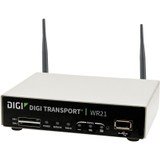
Pilt: Esikülg view of the Digi International WR21-L52A-DE1-TB Cellular Wireless Router. This image displays the compact form factor of the device, likely showing ports for antennas, power, and network connections.
The Digi International WR21-L52A-DE1-TB is a robust cellular wireless router designed for reliable and secure connectivity. It features multiple connectivity options and is suitable for various industrial and enterprise applications requiring remote access and data transfer over cellular networks.
5. Seadistamine
5.1. SIM-kaardi paigaldamine
- Veenduge, et ruuter on välja lülitatud ja toiteallikast lahti ühendatud.
- Locate the SIM card slot(s) on the device. Refer to the device's physical markings for exact location.
- Insert the activated cellular SIM card into the slot with the gold contacts facing down and the notched corner oriented correctly. Push until it clicks into place.
- If applicable, secure the SIM card tray or cover.
5.2. Antenni ühendus
- Identify the cellular antenna ports (typically labeled 'MAIN' and 'DIV' or similar).
- Screw the provided cellular antennas onto the corresponding ports until finger-tight. Do not overtighten.
- Paigutage antennid signaali optimaalseks vastuvõtmiseks.
5.3. Toiteühendus
- Ühendage toiteadapter ruuteri toite sisendporti.
- Ühendage toiteadapter sobivasse pistikupessa.
- The router will power on automatically or may require pressing a power button. Observe the LED indicators for power status.
5.4. Võrguühendus (valikuline)
- To connect a device via Ethernet, plug one end of an Ethernet cable into an available LAN port on the router.
- Plug the other end of the Ethernet cable into the network port of your computer or other network device.
6. Kasutusjuhised
6.1. Toite sisse / välja lülitamine
- Toide sisse: Connect the power adapter. The device will typically power on automatically. Observe the power LED.
- Toide välja: Disconnect the power adapter from the electrical outlet. For controlled shutdown, refer to the device's web interface or specific documentation for a software shutdown procedure if available.
6.2. Juurdepääs Web Liides
- Ensure your computer is connected to the router via Ethernet or Wi-Fi (if enabled).
- Avage a web brauser (nt Chrome, Firefox, Edge).
- Enter the router's default IP address (e.g., 192.168.1.1 or 192.168.0.1) into the address bar and press Enter. Refer to the Quick Start Guide or device label for the exact default IP address.
- Enter the default username and password when prompted. These are typically found on a label on the device or in the Quick Start Guide.
- Upon successful login, you will access the router's configuration interface.
6.3. Põhikonfiguratsioon
Piirkonnas web interface, you can configure various settings:
- Cellular Settings: Verify APN settings, signal strength, and connection status.
- Võrguseaded: Configure LAN IP address, DHCP server, and port forwarding.
- Turvalisus: Change default login credentials, configure firewall rules, and VPN settings.
- Püsivara värskendus: Check for and apply firmware updates to ensure optimal performance and security.
7. Hooldus
- Puhastamine: Ruuteri välispinna puhastamiseks kasutage pehmet ja kuiva lappi. Ärge kasutage vedelaid puhastusvahendeid ega aerosoole.
- Püsivara värskendused: Kontrollige regulaarselt tootja website for firmware updates. Keeping the firmware updated ensures the latest features, security patches, and performance improvements.
- Keskkonnatingimused: Ensure the router is operating within its specified temperature and humidity ranges to prevent overheating or damage.
8. Veaotsing
8.1. Mobiilsideühenduse puudumine
- Verify the SIM card is correctly inserted and activated with your cellular provider.
- Check antenna connections and ensure they are positioned for optimal signal.
- Logige sisse web interface to check cellular signal strength and connection status.
- Taaskäivitage ruuter.
8.2. Juurdepääs puudub Web Liides
- Veenduge, et teie arvuti oleks Etherneti kaudu otse ruuteriga ühendatud.
- Verify your computer's IP address is in the same subnet as the router (e.g., if router is 192.168.1.1, computer should be 192.168.1.x).
- Proovige oma brauseri vahemälu tühjendada või kasutage mõnda teist brauserit.
- If you forgot the password, a factory reset might be necessary (refer to specific device documentation for this procedure, as it will erase all configurations).
8.3. Aeglane ühenduse kiirus
- Check cellular signal strength in the web interface. Weak signal can lead to slow speeds.
- Veenduge, et antennid on õigesti paigutatud ja takistusteta.
- Verify your cellular data plan has not reached its data cap or is being throttled.
- Taaskäivitage ruuter ja ühendatud seadmed.
9. Tehnilised andmed
| Funktsioon | Kirjeldus |
|---|---|
| Mudel | WR21-L52A-DE1-TB |
| Kaubamärk | Digi International |
| Ühenduvusprotokoll | Mobiilne |
| Ühenduvustehnoloogia | USB |
| Kontrollimeetod | Kaugjuhtimispult |
| Erifunktsioon | WPS |
| Ühilduvad seadmed | Personaalarvuti |
| Soovitatavad kasutusalad | Kodu |
| UPC | 747356312219 |
10. Garantii ja tugi
For detailed warranty information, please refer to the warranty card included with your product or visit the official Digi International website. Technical support is available through the manufacturer's support channels. Please have your product model number (WR21-L52A-DE1-TB) and serial number ready when contacting support.


