1. Sissejuhatus
Tänan ostu eestasing the Sharp HT-SB140MT 2.0 150W Soundbar. This soundbar is designed to enhance your audio experience, providing clear and powerful sound for your television, music, and other media. With its sleek design and versatile connectivity options, including Bluetooth, HDMI ARC/CEC, Optical, and Auxiliary inputs, it integrates seamlessly into any home entertainment setup. This manual provides essential information for safe and effective use, including setup, operation, maintenance, and troubleshooting.
2. Ohutusalane teave
- Toiteallikas: Veenduge, et toiteallikas voltage matches the requirements specified on the soundbar. Use only the provided power cable.
- Ventilatsioon: Do not block any ventilation openings. Maintain adequate space around the soundbar for proper airflow.
- Vesi ja niiskus: Do not expose the soundbar to dripping or splashing water. Do not place objects filled with liquids, such as vases, on the apparatus.
- Kuumus: Do not place the soundbar near heat sources such as radiators, heat registers, stoves, or other apparatus (including amptõsteseadmed), mis toodavad soojust.
- Puhastamine: Unplug the soundbar from the power outlet before cleaning. Use a dry, soft cloth for cleaning. Do not use liquid cleaners or aerosol cleaners.
- Teenindus: Ärge proovige seda toodet ise hooldada. Andke kõik hooldustööd kvalifitseeritud hooldustöötajatele.
- Patareid: The remote control uses a CR2 battery. Ensure correct polarity when inserting batteries. Do not mix old and new batteries.
3. Pakendi sisu
Palun kontrollige, kas pakendis on kõik esemed olemas:
- Sharp HT-SB140MT Soundbar
- Kaugjuhtimispult
- Toitekaabel
- Kasutusjuhend (see dokument)
4. Toote lõppview

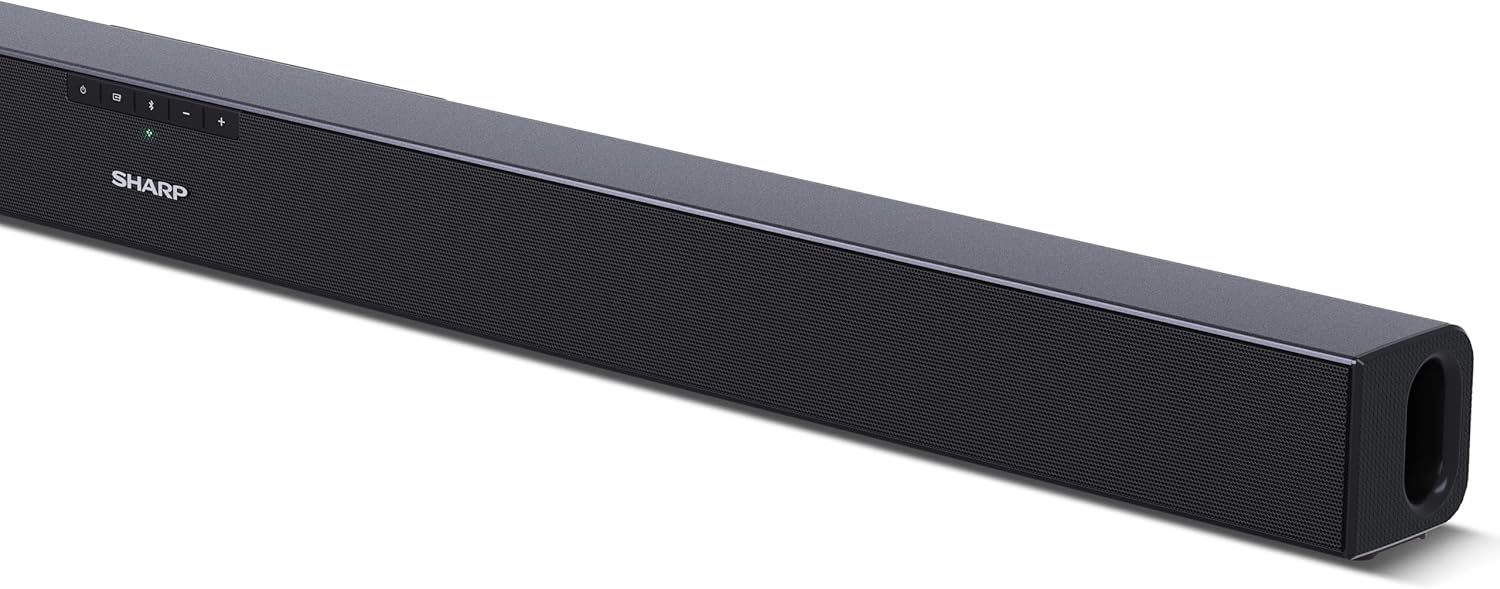
Joonis 4.1: Esiosa View
The front of the soundbar features the Sharp logo and LED indicators for source selection and status. Control buttons for power, input, and volume are located on the top panel.
Joonis 4.2: Tagumine View (Connections)
The rear panel provides all necessary connection ports: HDMI ARC, Optical (S/PDIF), and Auxiliary (3.5mm) input, along with the power input.

Joonis 4.3: Kaugjuhtimispult
The included remote control allows for convenient operation of the soundbar, including power, input selection, volume, bass, and treble adjustments.
5. Seadistamine
5.1 Paigutus
The Sharp HT-SB140MT Soundbar can be placed on a flat surface, such as a TV stand, or wall-mounted. Its slim profile of 6 cm allows it to fit easily under most TV screens without obstructing the view.

Figure 5.1: Soundbar Placement
The soundbar is ideally positioned directly in front of your television for optimal sound projection.
5.2 Teleriga ühendamine
Valige üks järgmistest ühendusviisidest.
- HDMI ARC/CEC (Recommended): Connect an HDMI cable (not included) from the HDMI ARC port on your TV to the HDMI ARC port on the soundbar. This allows your TV remote to control the soundbar's volume and power. Ensure HDMI ARC/CEC is enabled in your TV's settings.
- Digital Optical Audio (S/PDIF): Connect an optical cable (not included) from the Optical Out port on your TV to the OPTICAL IN port on the soundbar. Select the Optical input on the soundbar.
- Auxiliary (AUX): Connect a 3.5mm audio cable (not included) from the headphone jack or AUX Out port on your TV to the AUX IN port on the soundbar. Select the AUX input on the soundbar.
5.3 Toiteühendus
After connecting the audio cable, plug the power cable into the soundbar's power input and then into a wall outlet (220-240V / 50Hz).
6. Kasutusjuhised
6.1 Toide sisse/välja
Seadme sisse- või väljalülitamiseks vajutage heliribal või kaugjuhtimispuldil olevat toitenuppu.
6.2 Allika valik
Press the Input button on the soundbar or the remote control repeatedly to cycle through the available input sources: HDMI ARC, Optical, AUX, and Bluetooth. The LED indicator on the soundbar will change to reflect the selected source.
6.3 Helitugevuse reguleerimine
Use the Volume Up (+) and Volume Down (-) buttons on the soundbar or the remote control to adjust the sound level.
6.4 Bluetoothi sidumine
Bluetooth-seadme ühendamiseks tehke järgmist.
- Select Bluetooth input on the soundbar. The Bluetooth LED indicator will flash, indicating pairing mode.
- Luba oma nutiseadmes (nutitelefon, tahvelarvuti jne) Bluetooth ja otsi saadaolevaid seadmeid.
- Select "SHARP HT-SB140MT" from the list of devices.
- Once connected, the Bluetooth LED indicator will stop flashing and remain solid. You can now stream audio wirelessly to the soundbar.
6.5 Sound Modes (Equalizer)
The soundbar features an equalizer with different sound modes to optimize audio for various content types. Use the EQ button on the remote control to cycle through these modes (e.g., Movie, Music, News). You can also adjust Bass and Treble levels using dedicated buttons on the remote.
7. Hooldus
7.1 Puhastamine
To clean the soundbar, unplug it from the power outlet. Use a soft, dry, lint-free cloth to wipe down the surfaces. Do not use abrasive cleaners, waxes, or solvents as they may damage the finish.
7.2 Säilitamine
If you plan to store the soundbar for an extended period, disconnect it from the power supply and store it in a cool, dry place, away from direct sunlight and extreme temperatures.
8. Veaotsing
Kui teil tekib heliribaga probleeme, vaadake järgmisi levinud probleeme ja lahendusi.
| Probleem | Võimalik põhjus | Lahendus |
|---|---|---|
| Heliribast ei tule heli. | Heliriba on välja lülitatud või vaigistatud. Valitud on vale sisendallikas. Kaablid pole korralikult ühendatud. Teleri heliväljundi seaded on valed. | Veenduge, et heliriba oleks sisse lülitatud ja heli poleks vaigistatud. Select the correct input source (HDMI ARC, Optical, AUX). Check all cable connections (HDMI, Optical, AUX). Verify your TV's audio output settings are set to external speakers or the correct digital output. |
| Bluetooth-seade ei saa ühendust luua. | Heliriba ei ole sidumisrežiimis. Seade on levialast väljas. Teiste seadmete tekitatud häired. | Ensure the soundbar is in Bluetooth input mode and the LED is flashing. Move your Bluetooth device closer to the soundbar (within 10 meters). Turn off other Bluetooth devices nearby. Try unpairing and re-pairing. |
| Kaugjuhtimispult ei tööta. | Battery is low or inserted incorrectly. Takistus puldi ja heliriba vahel. Remote control is faulty. | Replace the CR2 battery and ensure correct polarity. Remove any obstructions between the remote and the soundbar's sensor. Kui probleemid püsivad, võtke ühendust klienditoega. |
9. Tehnilised andmed
| Mudeli nimi | HT-SB140(MT) |
| Kõlari tüüp | Soundbar |
| Ruumilise heli kanali konfiguratsioon | 2.0 |
| Kõlari maksimaalne väljundvõimsus | 150 vatti |
| Sagedusvastus | 60 Hz |
| Ühenduvustehnoloogia | Bluetooth, HDMI ARC/CEC, Digital Optical Audio (S/PDIF), 3.5mm Auxiliary (AUX) |
| Traadita side tehnoloogia | Bluetooth |
| Maksimaalne leviala (Bluetooth) | 10 meetrit |
| Kontrollimeetod | Kaugjuhtimispult |
| Toiteallikas | Vahelduvvool (vooluvõrk) |
| Sisend Voltage | 220-240 Voldid |
| Värv | Must |
| Materjal | Plastik, Metall |
| Paigaldustüüp | Seinakinnitus, Lauaplaat |
| Toote mõõtmed (P x L x K) | 95 x 6 x 6 cm |
| Kauba kaal | 1.5 kilogrammi |
| Kaasatud komponendid | Kaugjuhtimispult |
| Nõutav aku | 1 CR2 aku |
| Veekindel | Ei |
| Varuosade saadavus | 5 aastat |
| Tarkvarauuendused on garanteeritud kuni | Teave pole saadaval |
10. Garantii ja tugi
The Sharp HT-SB140MT Soundbar comes with a Limited Warranty. Please refer to the warranty card included in your package for specific terms and conditions. Spare parts are available for up to 5 years from the date of purchase.
For technical support, service, or warranty claims, please contact Sharp customer service through their official website or the contact information provided in your product documentation. When contacting support, please have your product model number (HT-SB140(MT)) and purchase details ready.


