1. Toote lõppview
The AT&T CD4930 is a corded telephone system designed for reliable communication with integrated digital answering system and Caller ID features. It offers user-friendly functionality with an extra-large tilt display and large buttons for enhanced visibility and ease of use.
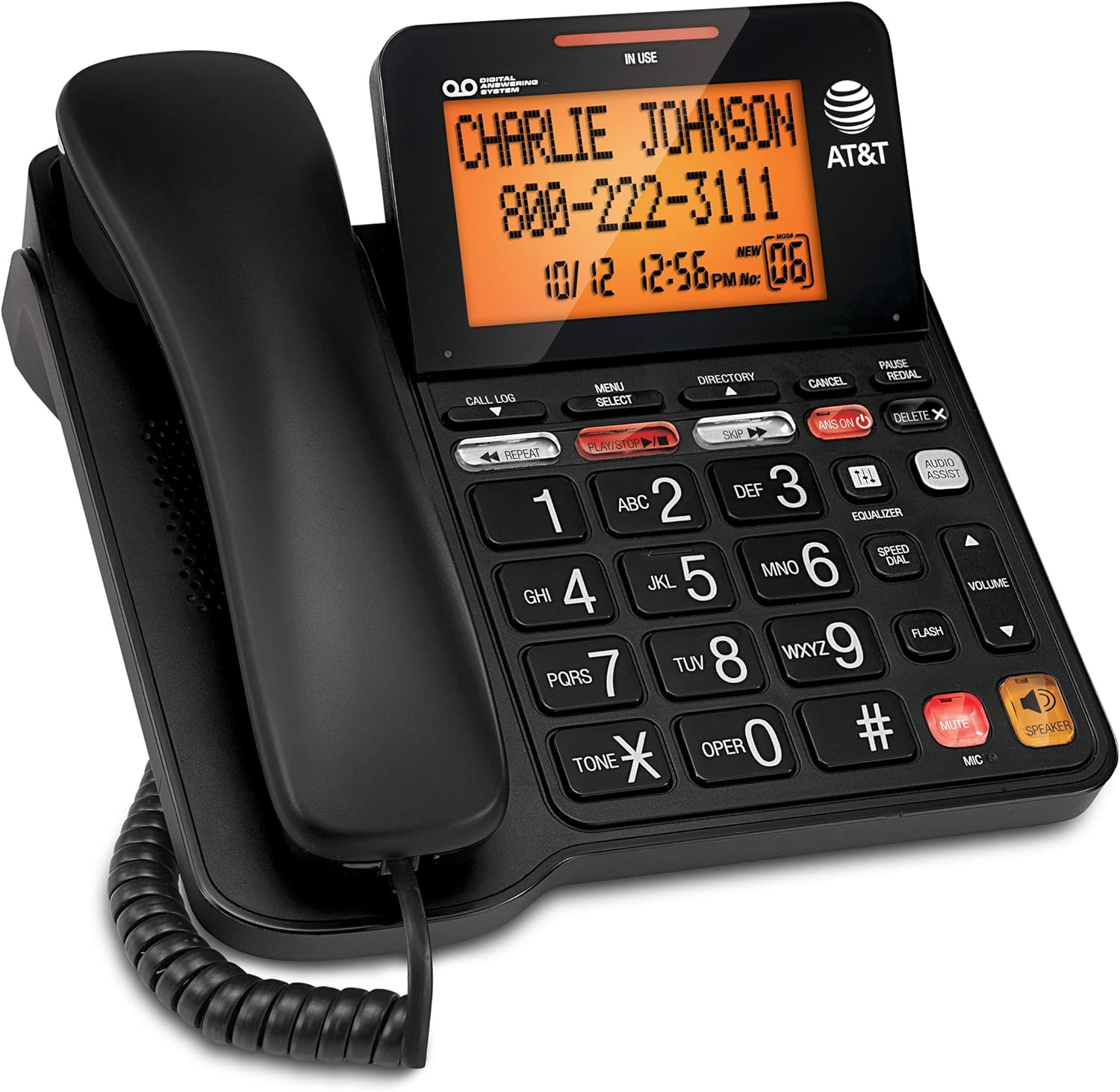
Figure 1: AT&T CD4930 Corded Phone with Digital Answering System and Caller ID.
Peamised omadused:
- Digitaalne automaatvastajasüsteem: Records up to 25 minutes of messages, announcements, and memos. Features instant playback, selective save/delete, and message skipping/repeating.
- Valjuhääldi: Allows hands-free conversation, enabling multiple participants to join calls.
- Taustvalgustusega ekraan: Provides clear visibility of caller information, time, and date.
- Helistaja ID: Displays name, number, time, and date of incoming calls, including call waiting.
- Extra-Large Tilt LCD: Adjustable display for optimal viewing of Caller ID and call history.
- Audio Assist: Temporarily increases overall volume and enhances sound frequencies for clearer speech.
- Equalizer: Customizable audio profiles (bass, treble, natural tones) to suit individual needs.
2. Seadistamine
2.1 Pakendi sisu
Veenduge, et kõik komponendid oleksid pakendis olemas:
- AT&T CD4930 Corded Phone Base Unit
- Telefon
- Keritud telefoni juhe
- Telefoniliini juhe
- Vahelduvvoolu adapter
2.2 Ühendus
- Ühendage käsitelefon: Plug one end of the coiled handset cord into the handset and the other end into the jack labeled TELEFON telefoni aluse küljel.
- Ühendage telefoniliin: Plug one end of the telephone line cord into the jack labeled JOON on the back of the phone base. Plug the other end into a telephone wall jack.
- Ühendage toide: Ühendage vahelduvvooluadapteri väiksem ots pistikupessa Alalisvool 6 V jack on the back of the phone base. Plug the large end into a standard electrical outlet.
Upon successful connection, the display will illuminate, and the phone will perform a self-check. Allow a few moments for the phone to initialize.
2.3 Initial Setup (Date and Time)
Setting the correct date and time is crucial for accurate Caller ID and answering system timestamps.
- Vajutage MENÜÜ/VALI.
- Kasutage ▼ or ▲ buttons to scroll to MÄÄRA KUUPÄEV/KELLAAEG, seejärel vajutage MENÜÜ/VALI.
- Enter the current month, day, and year using the dial pad. Press MENÜÜ/VALI pärast iga sissekannet.
- Enter the current hour and minute. Use the ▼ or ▲ valimiseks nuppe AM or PM, seejärel vajutage MENÜÜ/VALI kinnitamiseks.
- Vajutage TÜHISTA menüüst väljumiseks.
3. Kasutusjuhised
3.1 Helistamine ja kõnede vastuvõtmine
- Helistamiseks tehke järgmist. Tõstke telefonitoru üles või vajutage KÕLARVali telefoninumber.
- Kõnele vastamiseks: Kui telefon heliseb, tõstke toru või vajutage KÕLAR.
- Kõne lõpetamiseks: Place the handset back on the cradle or press KÕLAR if using speakerphone.
3.2 Valjuhääldi
The speakerphone allows for hands-free communication.
- Aktiveerimiseks: Kõne ajal vajutage KÕLAR nuppu.
- Deaktiveerimiseks: Lift the handset to switch back to handset mode, or press KÕLAR kõne lõpetamiseks uuesti.
3.3 Helitugevuse reguleerimine
Adjust the listening volume during a call.
- Kõne ajal vajutage HELIMAHT ▲ to increase volume or KÖIDE ▼ helitugevuse vähendamiseks.
3.4 Vaigistamise funktsioon
Temporarily disable your microphone during a call.
- Kõne ajal vajutage Vaigistama. The microphone will be muted.
- Vajutage Vaigistama uuesti, et vestlust jätkata.
3.5 Redial and Pause
- Kordusvalimine: Tõstke telefonitoru üles või vajutage KÕLAR, seejärel vajutage TAASVALIMINE to dial the last number called.
- Paus: When entering a phone number, press PAUS to insert a 4-second pause. Useful for dialing numbers that require access codes or extensions.
4. Digitaalne automaatvastaja
Integreeritud digitaalne automaatvastaja suudab salvestada kuni 25 minutit sõnumeid.
4.1 Turning the Answering System On/Off
- Vajutage ANS SISSE/VÄLJA to toggle the answering system on or off. When on, the VASTUSED SEES märgutuli süttib.
4.2 Sõnumite esitamine
- Vajutage MÄNGI/STOP to play new messages. If no new messages, it will play old messages.
- Taasesituse ajal:
- Vajutage KORDA to repeat the current message. Press twice to play the previous message.
- Vajutage JÄTA VÄLJA järgmise kirja juurde liikumiseks.
- Vajutage KUSTUTA to delete the current message.
- Vajutage MÄNGI/STOP taasesituse peatamiseks.
4.3 Recording an Outgoing Announcement
- Vajutage MENÜÜ/VALI.
- Kerige kuni TEADE ja vajutage MENÜÜ/VALI.
- Valige RECORD ANN. ja vajutage MENÜÜ/VALI.
- Speak clearly into the microphone on the phone base.
- Vajutage MÄNGI/STOP to end recording. The announcement will play back.
5. Helistaja ID funktsioonid
The Caller ID feature displays information about incoming calls.
5.1 Viewing Call Log
- Vajutage HELISTA LOGI.
- Kasutage ▼ or ▲ to scroll through the call entries.
- Vajutage TÜHISTA väljumiseks.
5.2 Dialing from Call Log
- Kuigi viewing a call log entry, lift the handset or press KÕLAR kuvatud numbri valimiseks.
5.3 Deleting Call Log Entries
- Kuigi viewing a call log entry, press KUSTUTA X to delete the current entry.
- To delete all entries, press MENÜÜ/VALI, kerige valikule DELETE ALL CALLSja vajutage MENÜÜ/VALI. Kinnitage, kui seda küsitakse.
6. Hooldus
6.1 Telefoni puhastamine
To keep your phone clean, wipe it with a soft, slightly damp cloth. Do not use cleaning sprays or harsh chemicals, as these may damage the finish or electrical components.
6.2 Üldine hooldus
- Vältige telefoni jätmist äärmuslike temperatuuride, otsese päikesevalguse või niiskuse kätte.
- Do not drop the phone or subject it to severe impact.
- Keep the phone away from sources of electrical noise, such as motors or fluorescent lighting.
7. Veaotsing
If you experience issues with your AT&T CD4930 phone, refer to the following common problems and solutions:
| Probleem | Lahendus |
|---|---|
| Valimistooni pole. |
|
| Ma ei kuule helistajat või helistaja ei kuule mind. |
|
| Caller ID is not displaying. |
|
| Answering system is not recording messages. |
|
For further assistance, please refer to the full user manual available on the AT&T support website or contact AT&T customer service.
8. Tehnilised andmed
| Funktsioon | Detail |
|---|---|
| Mudeli number | CD4930 |
| Kaubamärk | AT&T |
| Telefoni tüüp | Lauatelefon |
| Automaatvastaja tüüp | Digitaalne |
| Salvestusmaht | Kuni 25 minutit |
| Toiteallikas | Juhtmega elekter |
| Helistaja tüüp | Kahekordne klaviatuur |
| Materjal | Plastikust |
| Kauba kaal | 2.42 naela |
| Pakendi mõõtmed | 10.2 x 8.98 x 3.62 tolli |
| Tootja | VTech |
| Päritoluriik | Malaisia |
9. Garantii ja tugi
9.1 Garantii teave
For detailed warranty information regarding your AT&T CD4930 Corded Phone, please refer to the warranty card included in your product packaging or visit the official AT&T webGarantiitingimused võivad erineda.
9.2 Klienditugi
If you require technical assistance, have questions about your product, or need to report an issue, please contact AT&T Customer Support:
- Veebitugi: Külasta ametlikku AT&T tuge website for FAQs, troubleshooting guides, and downloadable manuals.
- Telefonitugi: Refer to your product documentation or the AT&T websait, kust leiad uusimad klienditeeninduse kontaktnumbrid.
Please have your product model number (CD4930) and serial number ready when contacting support.


