1. Sissejuhatus
The TOPENS TKP3 Wireless Keypad provides a secure and convenient keyless entry solution for automatic gate openers. This digital code panel utilizes advanced TOPENS code technology, allowing users to open their gate by simply entering a password. It is designed for both residential and commercial applications, offering enhanced security and ease of access.
This manual provides detailed instructions for the installation, programming, and operation of your TKP3 Wireless Keypad. Please read it thoroughly before proceeding to ensure proper setup and optimal performance.
2. Toote omadused
- Reliable Keyless Entry: Allows gate operation with a password, eliminating the need for physical keys. A single press of the OK button can stop the moving gate.
- Vastupidav disain: Constructed from high-quality UV-resistant, flame-retardant materials. The keypad is waterproof, ensuring functionality in various weather conditions.
- LED taustvalgus: Integrated LED backlight for clear visibility and operation in low-light conditions.
- Pikendatud aku tööiga: Powered by 3 x AAA alkaline batteries (included), providing up to 1 year of operation with 10 activations per day.
- Lai ühilduvus: Fully compatible with all TOPENS gate openers. Can also work with most third-party gate openers that accept a "Normally Open Dry Contact" signal for push buttons, when connected with the optional ERM12 External Receiver.
- Multiple Keypad Support: One TOPENS gate opener can pair with a maximum of 3 TKP3 keypads directly. With the ERM12 receiver (sold separately), up to 250 keypads can be paired.
- Individual Gate Control: A single TKP3 keypad can control multiple gate operators separately by assigning a different password to each.

Figure 2.1: High Convenience for Controlled Access with TOPENS TKP3 Keypad.
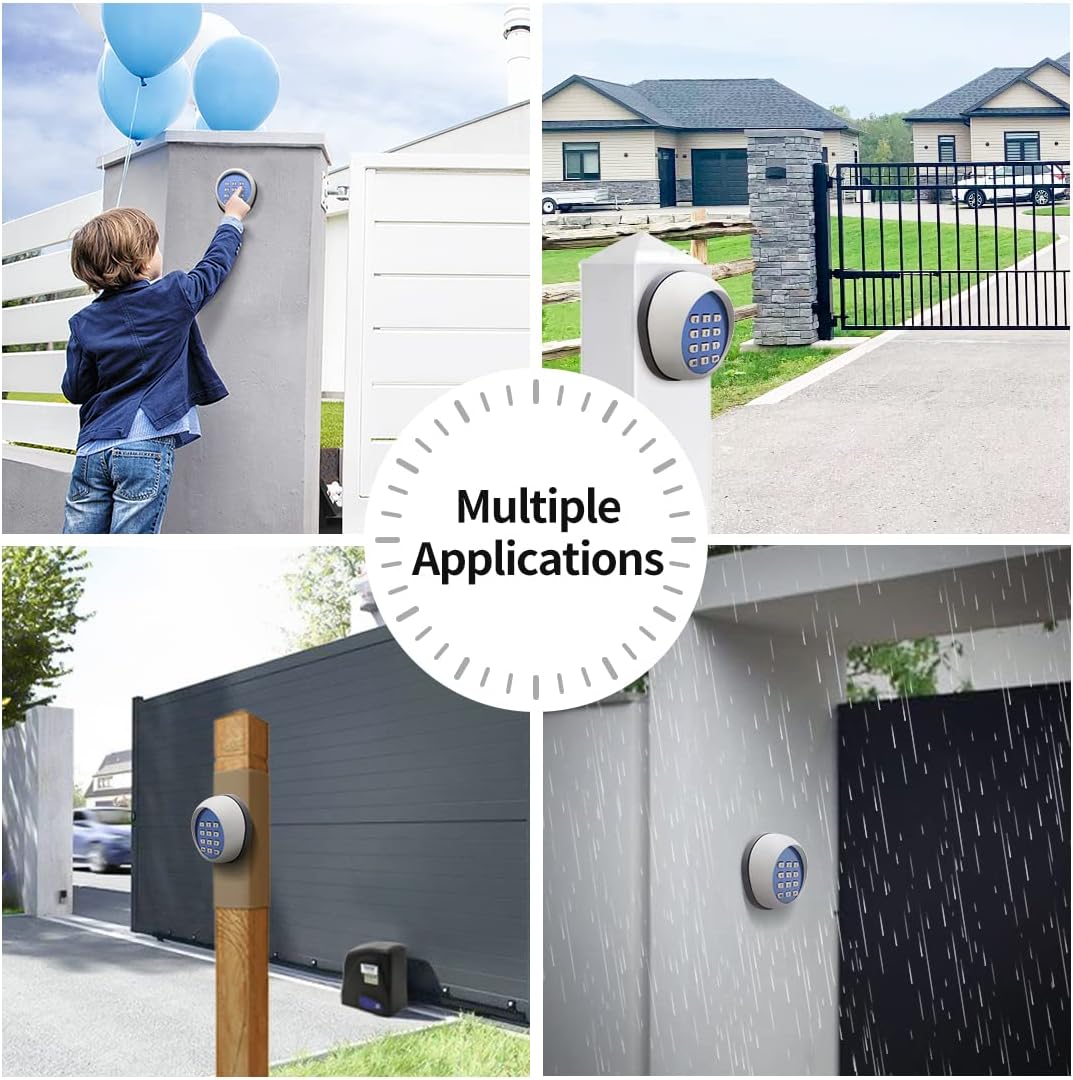
Figure 2.2: Multiple Applications for the TKP3 Wireless Keypad.

Figure 2.3: TKP3 Keypad Operating Temperature Range.
3. Pakendi sisu
Paki avamisel veenduge, et kõik allpool loetletud esemed on olemas ja heas seisukorras:
- TOPENS TKP3 juhtmevaba klaviatuur
- 3 x AAA leelispatareid
- Kinnitusdetailid (kruvid, ankrud)
- Kasutusjuhend
4. Tehnilised andmed
| Funktsioon | Spetsifikatsioon |
|---|---|
| Mudel | TKP3 |
| Klaviatuuri tüüp | Juhtmevaba nupp |
| Toiteallikas | 3 x AAA (1.5V) Alkaline Battery |
| Access Code Digits | 6 numbrit |
| Juhtimisvahemik | Max. 100 feet (30m) |
| Toote mõõtmed | 3.62 x 3.15 x 1.57 tolli (92 x 80 x 40 mm) |
| Kauba kaal | 13 untsi |
| Veekindluse reiting | IP 44 Waterproof Degree |
| Eriomadused | Backlit, Waterproof |
| Soovitatavad kasutusalad | Residential and commercial gate access control, Keyless entry, Controlled access for guests, Low-light and bad weather conditions |

Figure 4.1: Keypad Model Comparison.
5. Paigaldamine
The TKP3 Wireless Keypad is designed for easy installation. It can be mounted on a wall or a post near your gate. Ensure the mounting location is within the effective control range of your gate opener (up to 100 feet or 30 meters).
5.1 Klahvistiku paigaldamine
- Separate the keypad from its rear mounting plate. This typically involves removing small screws or prying the cover gently with a small flat-head screwdriver.
- Position the rear mounting plate on your desired surface (wall or post). Mark the drilling points for the mounting screws.
- Drill pilot holes at the marked locations. If mounting to masonry or concrete, insert the provided wall anchors.
- Secure the rear mounting plate to the surface using the provided screws.
- Attach the keypad unit back onto the mounted plate, ensuring it clicks securely into place or is fastened with its screws.

Figure 5.1: TKP3 Keypad Mounted on a Post.

Figure 5.2: Keypad Installation Example.
6. Programmeerimine
The TKP3 keypad needs to be programmed to your gate opener's control board to function. The programming process involves learning the keypad's transmitter code and setting your desired entry code.
6.1 Learning the Keypad to the Gate Opener
Refer to your specific TOPENS gate opener manual for the exact location of the 'LEARN' button on its control board. The general steps are:
- Ensure the control board of the opener is powered on and in standby mode.
- Press and release the 'LEARN' button on the gate opener's control board. The LED on the control board will typically light up or flash, indicating it is in learning mode.
- Within 1-2 seconds, press the 'OK' button on the TKP3 keypad. The control board's LED will flash for 2 seconds and then turn off, indicating successful learning.
6.2 Programming a New Entry Code
For security reasons, it is recommended to change the factory default entry code. The keypad supports a single 6-digit entry code.
- With the control board in standby mode (LED flashes '—'), press and release the 'PIN' button on the keypad.
- Enter the 6-digit factory default entry code (usually '888888') and then press 'PIN' again. The LED on the keypad will display 'CH'.
- Enter your new 6-digit entry code and press 'PIN' to store it. The entry code is successfully updated when the control board's LED flashes for 2 seconds.
Note: If an error occurs during programming (e.g., incorrect code, timeout), the keypad will beep, and you may need to restart the process.

Figure 6.1: Keypad Pairing Capacity.
7. Operatsioon
Once the keypad is successfully programmed, you can use it to operate your gate opener.
- To open or close the gate, enter your 6-digit entry code and then press the 'OK' button. The gate will begin to move.
- To stop the moving gate at any time, press the 'OK' button once.
Note: For TOPENS sliding gate openers, the TKP3 keypad cannot activate the midway (partial open) mode.

Figure 7.1: Operating the Keypad.
8. Ühilduvus
The TOPENS TKP3 Wireless Keypad is designed to work seamlessly with all TOPENS brand gate openers. For third-party gate openers, an additional accessory may be required.
- TOPENS Gate Openers: Directly compatible with all TOPENS gate opener models.
- Third-Party Gate Openers: Compatible with most third-party gate openers whose control board accepts a "Normally Open Dry Contact" signal for a push button. This requires the use of the TOPENS ERM12 External Receiver (sold separately). The ERM12 can be powered by 9-24VDC from the control board or an external power source.
Note: This keypad is exclusively for gate openers and does not support other door access control systems.

Figure 8.1: Compatibility with TOPENS Gate Openers.
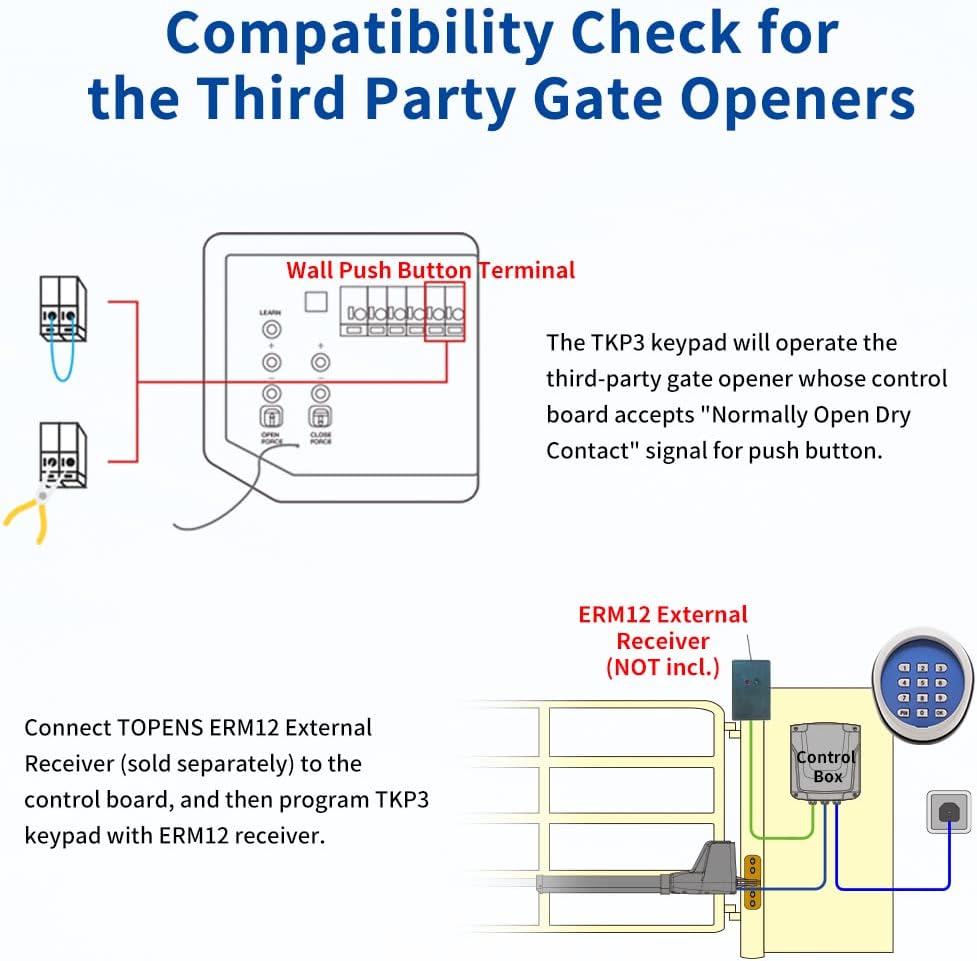
Figure 8.2: Compatibility with Third-Party Gate Openers using ERM12 Receiver.
9. Hooldus
9.1 Aku vahetamine
The TKP3 keypad uses 3 x AAA alkaline batteries. When the batteries are low, the keypad's performance may degrade. To replace the batteries:
- Carefully remove the keypad unit from its mounting plate.
- Leidke klahvistiku tagaküljel asuv patareipesa.
- Open the battery compartment cover (usually secured by a small screw).
- Remove the old batteries and insert new 3 x AAA alkaline batteries, ensuring correct polarity.
- Close the battery compartment cover and reattach the keypad to its mounting plate.
9.2 Puhastamine
Clean the keypad surface periodically with a soft, damp cloth. Avoid using abrasive cleaners or solvents, as these can damage the keypad's finish or electronic components.
10. Garantii ja tugi
The TOPENS TKP3 Wireless Keypad comes with a 12-month warranty from the date of purchase. This warranty covers defects in materials and workmanship under normal use.
For technical assistance, troubleshooting, or warranty claims, please contact TOPENS customer support. Detailed contact information can be found on the official TOPENS websaidil või toote pakendil.
Palun hoidke oma ostutõend garantiiteenuse kasutamiseks alles.


