1. Sissejuhatus
This manual provides detailed instructions for the installation, operation, and maintenance of your THINKWARE F100 Dash Cam. The F100 is designed to record high-quality video footage of your journeys, offering features such as Full HD 1080p recording, night vision, and a secure parking mode to enhance your driving safety and provide evidence in case of incidents.
Palun lugege enne toote kasutamist see kasutusjuhend hoolikalt läbi, et tagada selle nõuetekohane toimimine ja vältida kahjustusi.
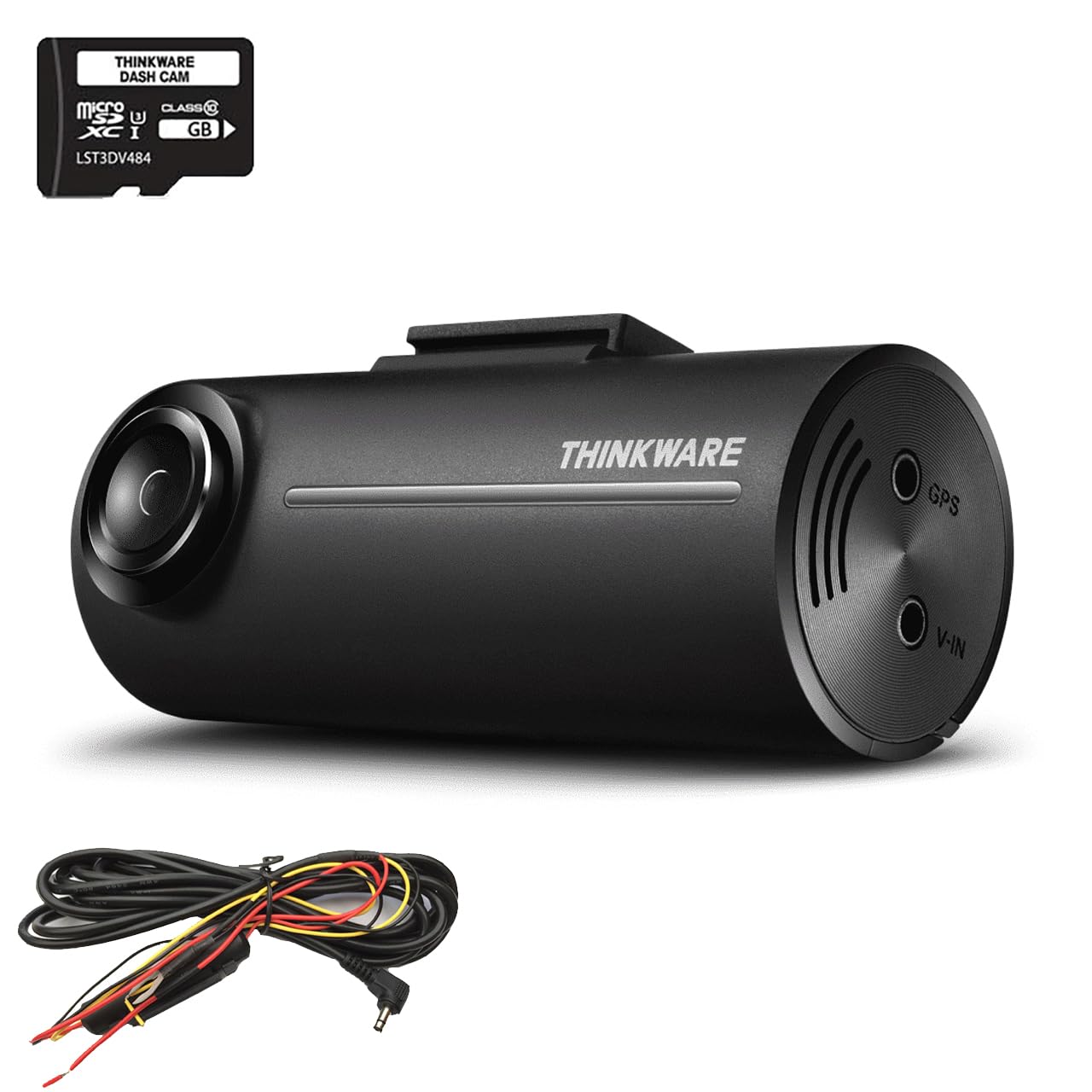
Image 1.1: The THINKWARE F100 Dash Cam recording in Full HD 1080p.
2. Pakendi sisu
Verify that all components are present in the box before proceeding with installation.
- THINKWARE F100 Dash Cam Unit
- Riisttraat kaabel
- 16 GB Micro SD kaart
- Kiirjuhend ja garantiiteave
- 3M Sticky Mounting Pad (2 included)

Image 2.1: All items included in the THINKWARE F100 Dash Cam package.
3. Toote lõppview
The THINKWARE F100 Dash Cam features a compact design for discreet installation and a wide-angle lens to capture a broad view teelt.

Image 3.1: The F100 Dash Cam mounted on a windshield.
Peamised omadused:
- Täis-HD 1080p salvestus: Captures clear video at 30 frames per second with a 135-degree wide-angle view.
- Night Enhancement Technology: Sony CMOS image sensors provide clearer images in low-light conditions.
- Parkimise jälgimise režiim: Monitors your vehicle when parked, preventing battery drain with its G-sensor system.
- Vormivaba tehnoloogia: Extends the life of your Micro SD card by eliminating the need for manual formatting.
- Juhi turvaelemendid: Includes emergency recording via G-sensor accident detection and optional speed camera alerts (requires optional GPS antenna).

Image 3.2: Visual representation of F100 key features.
4. Paigaldamine
Proper installation is crucial for optimal performance. It is recommended to have the dash cam professionally installed, especially for hardwiring.
4.1 Videoregistraatori paigaldamine
- Puhastage esiklaasil ala, kuhu kavatsete videoregistraatori paigaldada. Veenduge, et see ei takistaks teie liikumist. view.
- Attach one of the 3M sticky mounting pads to the dash cam mount.
- Firmly press the mount onto the cleaned windshield area. Hold for at least 30 seconds to ensure a secure bond.
- Adjust the camera angle to ensure it captures the road ahead clearly, with the horizon in the middle of the frame.
4.2 Power Connection (Hardwire)
The F100 includes a hardwire cable for secure parking mode installation, which connects directly to your vehicle's fuse box. This connection prevents battery drain while providing continuous power for parking surveillance.
- Connect the hardwire cable to the power input port on the dash cam.
- Route the cable along the windshield trim and down to your vehicle's fuse box. Use cable clips to secure the cable and keep it tidy.
- Connect the hardwire cable's ACC (Accessory) and BATT (Battery) wires to appropriate fuse slots in your vehicle's fuse box. Consult your vehicle's manual or a professional installer for correct fuse selection.
- Connect the GND (Ground) wire to a metal bolt or chassis point in your vehicle.
- Once connected, start your vehicle to ensure the dash cam powers on correctly.
5. Põhitoimingud
5.1 Sisse-/väljalülitamine
- When connected to your vehicle's power supply (either via cigarette lighter adapter or hardwire kit), the F100 will automatically power on and begin continuous recording when the vehicle starts.
- The dash cam will automatically power off when the vehicle's ignition is turned off, unless parking mode is enabled via hardwire installation.
5.2 Salvestusrežiimid
- Pidev salvestamine: The dash cam records continuously in 1-minute segments while driving. Older files are overwritten automatically when the SD card is full.
- Sündmuse salvestus: In the event of an impact or sudden braking detected by the G-sensor, the dash cam will automatically save a 20-second video clip (10 seconds before and 10 seconds after the event) to a protected folder, preventing it from being overwritten.
- Käsitsi salvestamine: Press the emergency recording button on the dash cam to manually save a 20-second video clip to the protected folder.
6. Täiustatud funktsioonid
6.1 Parkimise jälgimisrežiim
With the hardwire installation, the F100 can monitor your vehicle even when parked. This mode uses the G-sensor to detect impacts and motion, recording events to provide security when you are away from your vehicle.
- The F100's parking mode system continuously monitors your car battery's health. If the battery voltage drops below a safe level, the dash cam will automatically shut down to prevent complete battery drain.
- Motion detection and impact detection are active in parking mode.

Image 6.1: Battery Saving Parking Mode functionality.
6.2 Driver Safety Features
- G-Sensor Accident Detection: Automatically detects impacts and saves footage kaitstud kausta.
- Kiiruskaamerate hoiatused: The F100 supports a UK speed camera database (Cyclops) with free updates. This feature requires an optional GPS antenna to function.
6.3 Format Free Technology
The F100 utilizes an advanced file allocation table system that manages the Micro SD card efficiently, reducing the need for manual formatting and extending the lifespan of the memory card.
7. PC/Mac Viewer Tarkvara
The THINKWARE PC/Mac Viewer software allows you to manage your dash cam settings, view salvestatud footage, and download or delete files teie arvutist.
7.1 Downloading and Installing the Viewer
The viewer software can be downloaded for free from the official THINKWARE website. Follow the on-screen instructions to install it on your computer.
7.2 Kasutades Viewer
- Remove the Micro SD card from the dash cam.
- Insert the Micro SD card into your computer's card reader.
- Käivitage THINKWARE PC/Mac Viewer tarkvara.
- You can now browse recorded videos, adjust dash cam settings, and update firmware if available.

Image 7.1: The THINKWARE PC/Mac Viewer software in use.
8. Hooldus
8.1 Micro SD-kaardi haldus
- Varundage regulaarselt olulisi toiduaineidtage from your Micro SD card to a computer or external storage.
- Although the F100 features Format Free technology, it is still recommended to manually format the SD card every few months using the PC/Mac Viewer software to maintain optimal performance and prevent data corruption.
- Use only high-quality, genuine Micro SD cards from reputable brands.
8.2 Videoregistraatori puhastamine
- Wipe the camera lens gently with a soft, lint-free cloth to ensure clear recordings.
- Clean the exterior of the dash cam with a dry or slightly damp riie. Ärge kasutage tugevatoimelisi kemikaale ega abrasiivseid puhastusvahendeid.
9. Veaotsing
If you encounter issues with your F100 Dash Cam, refer to the following common problems and solutions:
| Probleem | Võimalik põhjus | Lahendus |
|---|---|---|
| Videoregistraator ei lülitu sisse. | No power supply; faulty cable; incorrect hardwire connection. | Check power cable connection. Ensure vehicle ignition is on (if not hardwired). Verify hardwire connections to fuse box. |
| Salvestamine peatub või hangub. | SD card error; full SD card; incompatible SD card. | Format the SD card using the PC/Mac Viewer. Replace with a new, high-quality SD card if issues persist. |
| Halb video kvaliteet. | Dirty lens; incorrect camera angle; low-light conditions. | Clean the camera lens. Adjust camera angle. Ensure sufficient lighting for optimal recording. |
| Parkimisrežiim ei tööta. | Not hardwired; incorrect hardwire connection; battery voltage liiga madal. | Ensure the dash cam is hardwired correctly. Check vehicle battery health. |
If the problem persists after trying these solutions, please contact THINKWARE customer support.
10. Tehnilised andmed
Technical specifications for the THINKWARE F100 Dash Cam:
| Funktsioon | Detail |
|---|---|
| Tootja | Mõttevara |
| Mudeli number | F100 |
| Toote mõõtmed | 7.8 x 3.4 x 3.15 cm |
| Kaal | 421.84 grammi |
| Video jäädvustamise eraldusvõime | 1080p täis -HD |
| Optilise anduri tehnoloogia | CMOS (Sony) |
| Eriomadused | Night Vision, G-Sensor, Parking Mode, Format Free Technology |
| Paigaldustüüp | Esiklaasimägi |
| Kaasatud komponendid | Dash Camera, Hardwire Cable, 16GB SD Card |
| Värv | Must |
11. Garantii ja tugi
THINKWARE provides comprehensive support for its products. As a global dash cam brand, we offer a free technical helpline and professional national installation services.
For warranty information, please refer to the 'Quick Start Guide & Warranty Information' included in your product package. For technical assistance or further inquiries, please visit the official THINKWARE websaidil või võtke otse ühendust nende klienditoega.


