1. Sissejuhatus
This manual provides comprehensive instructions for the safe and effective use of the PCE Instruments PCE-170 A Light Meter. This device is designed for measuring illuminance (lux or foot-candles) in various environments, such as offices, factories, and outdoor settings. It features a wide measurement range, fast response time, and a compact design for ease of use.
Palun lugege see kasutusjuhend enne seadme kasutamist hoolikalt läbi ja hoidke see alles edaspidiseks kasutamiseks.
2. Ohutusalane teave
Observe the following safety precautions to prevent injury and avoid damage to the device:
- Ärge jätke seadet äärmuslike temperatuuride, niiskuse või otsese päikesevalguse kätte.
- Vältige tugevaid vibratsioone või lööke.
- Ärge proovige seadet avada ega muuta. Jätke kogu hooldus kvalifitseeritud personalile.
- Keep the light sensor clean and free from obstructions to ensure accurate readings.
- Lekke vältimiseks eemaldage aku, kui seadet pikemat aega ei kasutata.
- Hävitage patareid ja seade vastavalt kohalikele eeskirjadele.
3. Toote lõppview
The PCE-170 A Light Meter consists of a main unit with a display and control buttons, and an integrated light sensor.

Joonis 1: Esiosa view of the PCE-170 A Light Meter, showing the display, control buttons, and light sensor at the top.
3.1 Komponendid
- Valgusandur: Located at the top of the device, protected by a white dome. This silicon photodiode measures incident light.
- LCD ekraan: A 5-digit display showing measurement values, units (lux/fc), and function indicators (e.g., AUTO RANGE, HOLD, MIN, MAX).
- Toitenupp (sisse/välja): Lülitab seadme sisse või välja.
- CAL-nupp: Used for zero adjustment.
- HOLD nupp: Külmutab ekraanil kuvatava näidu.
- fc/lx Button: Toggles between foot-candle (fc) and lux (lx) measurement units.
- RANGE nupp: Manually selects measurement ranges or activates auto-ranging.
- Akupesa: Tagaküljel asub 9V patarei.

Joonis 2: Lähivõte view of the LCD display, showing a reading of "534 lx" and "AUTO RANGE 4 000".
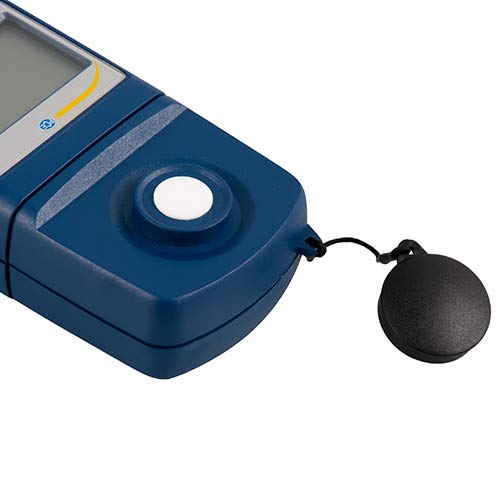
Joonis 3: Üksikasjalik view of the light sensor at the top of the device, with its protective cap removed.
4. Seadistamine
4.1 Aku paigaldamine
- Leidke seadme tagaküljelt patareipesa kate.
- Slide the cover open or unscrew it, depending on the model.
- Sisestage üks 9 V patarei, jälgides õiget polaarsust (+/-).
- Asetage patareipesa kate kindlalt tagasi.
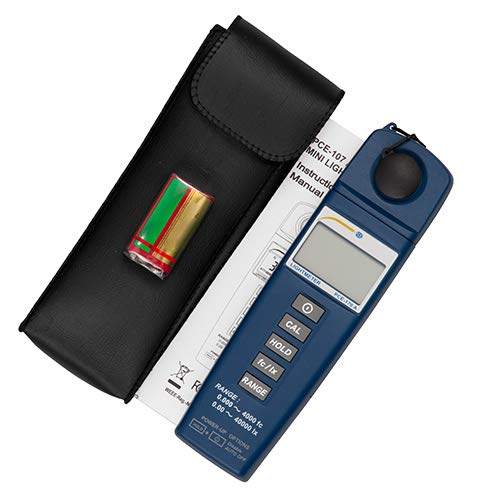
Joonis 4: The PCE-170 A Light Meter shown with its carrying case and the included 9V battery, ready for installation.
4.2 Esmane sisselülitamine
Vajutage nuppu Võimsus button to turn on the device. The display will illuminate and show a reading. If the battery symbol appears, replace the battery.
5. Kasutusjuhised
5.1 Mõõtmine
- Turn on the device using the Võimsus nuppu.
- Ensure the light sensor is clean and unobstructed.
- Position the light sensor at the location where illuminance is to be measured. Ensure the sensor is facing the light source directly for accurate readings.
- The current illuminance value will be displayed on the LCD.

Joonis 5: A user measuring light levels in an office environment with the PCE-170 A Light Meter.
5.2 Changing Measurement Units (fc/lx)
Vajutage nuppu fc/lx button to toggle between foot-candles (fc) and lux (lx) units. The selected unit will be indicated on the display.
5.3 HOLD funktsioon
Vajutage nuppu HOIDA button to freeze the current reading on the display. Press it again to release the hold and resume live measurements.
5.4 Zero Adjustment (CAL)
Nulli reguleerimiseks tehke järgmist.
- Place the light sensor in a completely dark environment (e.g., cover it with the protective cap or place it in a dark box).
- Vajutage nuppu CAL button. The display should show "0.00" or a value very close to zero.
- If the display does not show zero, repeat the process.
5.5 Vahemiku valik
The device typically operates in auto-ranging mode. To manually select a range or cycle through available ranges, press the VALIK button. The display will indicate the active range. Press and hold the VALIK button to return to auto-ranging mode.
5.6 Min/Max Function (Power-Up Option)
The PCE-170 A supports Min/Max recording. To activate this feature, refer to the power-up options indicated on the device label (e.g., press and hold a specific button during power-on). This function records the minimum and maximum illuminance values detected during a measurement session.
6. Hooldus
6.1 Puhastamine
Wipe the device with a soft, dry cloth. Do not use abrasive cleaners or solvents. Keep the light sensor clean and free of dust or smudges, as this can affect measurement accuracy.
6.2 Säilitamine
When not in use, store the PCE-170 A Light Meter in its carrying case in a cool, dry place, away from direct sunlight and extreme temperatures. Remove the battery if storing for extended periods.
7. Veaotsing
| Probleem | Võimalik põhjus | Lahendus |
|---|---|---|
| Seade ei lülitu sisse. | Tühja või valesti paigaldatud aku. | Kontrollige patarei polaarsust või vahetage see uue 9V patarei vastu. |
| Ekraanil kuvatakse "OL" (ülekoormus). | Light intensity exceeds the current measurement range. | Switch to a higher measurement range using the VALIK button, or move to a less intensely lit area. |
| Ebatäpsed näidud. | Dirty sensor, incorrect zero adjustment, or sensor not facing light source correctly. | Clean the sensor, perform zero adjustment in darkness, and ensure the sensor is properly oriented. |
| Ekraan on tühi või virvendab. | Aku tühi. | Vahetage 9V patarei. |
8. Tehnilised andmed
| Parameeter | Väärtus |
|---|---|
| Mõõtmisvahemikud | 0.00 ... 40,000 lux / 0.000 ... 4000 fc |
| Resolutsioon | 0.01 luksi / 0.001 fc |
| Täpsus | ±3% of measurement value + 5 digits |
| Ülekoormuse indikaator | "OL" |
| Mõõtmismäär | Iga 2 sekundi järel |
| Töötemperatuur | 0 ... 40°C / 32 ... 104°F |
| Valgusandur | Silicon photodiode, corrected cosine angle |
| Ekraan | 5-kohaline LCD-ekraan |
| Toiteallikas | 9V aku (kaasas) |
| Mõõtmed | 33 x 54 x 196 mm / 1.3 x 2.1 x 7.7 tolli |
| Kaal | 180 g / <1 lb (approx. 9.17 ounces) |
8.1 Kohaletoimetamise ulatus
The standard delivery package includes:
- 1 x PCE-170 A Lux Meter
- 1x9V aku
- 1 x kandekott
- 1 x Kasutusjuhend (käesolev dokument)
9. Garantii ja tugi
PCE Instruments provides a warranty for this product against defects in materials and workmanship. For specific warranty terms and conditions, please refer to the warranty card included with your purchase or visit the official PCE Instruments website. For technical support, service, or calibration inquiries, please contact PCE Instruments customer service.
PCE Instruments US: Külasta poodi


