1. Sissejuhatus
Thank you for choosing the PatrolEyes PE-DV5-2 Body Camera. This device is designed for professional use, offering high-definition video recording, advanced night vision capabilities, and integrated GPS for reliable evidence collection. This manual will guide you through the setup, operation, and maintenance of your new body camera to ensure optimal performance and longevity.
2. Pakendi sisu
Palun kontrollige, kas pakis on kõik esemed olemas:
- PatrolEyes PE-DV5-2 Body Camera
- Battery (Included Components)
- USB laadimis-/andmesidekaabel
- Seina laadija
- Kinnitusklamber
- Kasutusjuhend (see dokument)
3. Osad ja juhtnupud
Familiarize yourself with the various parts and controls of your PatrolEyes PE-DV5-2 body camera.

Joonis 3.1: Esiosa view of the PatrolEyes PE-DV5-2 body camera, highlighting the central camera lens, surrounding infrared (IR) lights for night vision, and the PatrolEyes logo at the bottom. The device has a rugged, black casing.

Joonis 3.2: Front-side perspective of the PatrolEyes PE-DV5-2 body camera, providing a clearer view of the camera lens and the array of control buttons located on the side panel, including the yellow button at the top.

Joonis 3.3: Külg view of the PatrolEyes PE-DV5-2 body camera, prominently featuring the red record button and the covered USB port for charging and data transfer.
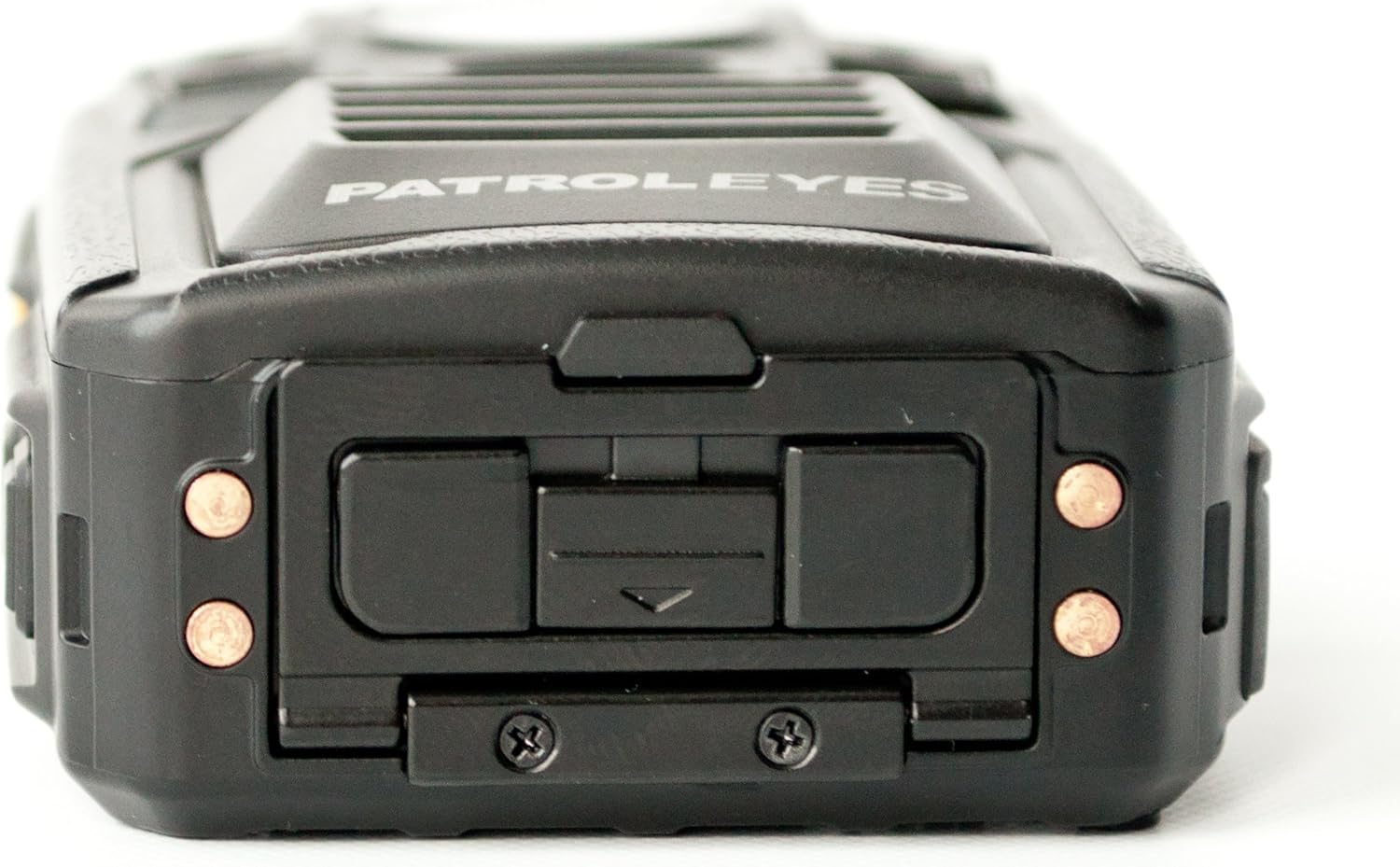
Joonis 3.4: Üles view of the PatrolEyes PE-DV5-2 body camera, displaying the GPS indicator light and other top-mounted features.

Joonis 3.5: Altpoolt view of the PatrolEyes PE-DV5-2 body camera, revealing the charging contacts designed for use with a docking station.
4. Alustamine
4.1. Aku laadimine
Before first use, fully charge the camera's battery. The camera comes with a rechargeable battery.
- Connect the USB charging cable to the camera's USB port.
- Plug the other end of the USB cable into the wall charger and then into a power outlet.
- The charging indicator light will illuminate. It will change color or turn off once charging is complete.
Alternatively, use a compatible docking station (sold separately) for charging.
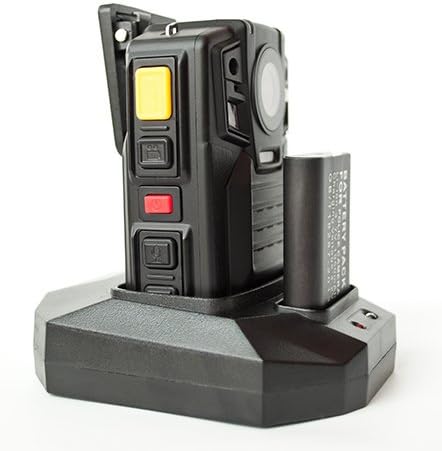
Joonis 4.1: The PatrolEyes body camera securely placed in its docking station, which also features a dedicated slot for charging an additional battery pack.

Joonis 4.2: Tagumine view of the PatrolEyes docking station, clearly showing the power input port and the USB data port for connecting to a computer.
4.2. Toite sisse / välja lülitamine
- Sisselülitamiseks: Press and hold the Power button for a few seconds until the device vibrates and the indicator lights turn on.
- Väljalülitamiseks: Press and hold the Power button until the device vibrates and the indicator lights turn off.
4.3. Attaching the Mounting Clip
Attach the provided mounting clip to the back of the camera. This allows you to securely fasten the camera to your uniform or gear.
5. Kaamera kasutamine
5.1. Video salvestamine
The camera supports video capture resolutions of 1080p, 480p, and 720p.
- Veenduge, et kaamera oleks sisse lülitatud.
- Vajutage spetsiaalset nuppu Salvestusnupp (often red) once to start video recording. The recording indicator light will flash.
- Vajutage nuppu Salvestusnupp again to stop recording. The indicator light will stop flashing.
5.2. Fotode tegemine
The camera has an effective still resolution of 33 MP.
- While in standby mode or during video recording, press the Foto nupp once to capture a still image.
5.3. Night Vision (IR)
The camera features auto IR night vision with a range of 30 feet, utilizing infrared light sources.
- The camera is equipped with automatic infrared (IR) activation. In low-light conditions, the IR lights will automatically turn on to provide clear night vision footage.
5.4. GPS-i funktsionaalsus
The integrated GPS module automatically records location data with your video footage. Ensure the camera has a clear view optimaalse GPS-signaali vastuvõtmiseks taevast.
5.5. Taasesitus
Saate uuestiview salvestatud videoid ja fotosid otse kaamera ekraanil.
- Enter Playback mode via the menu or a dedicated button (refer to on-screen prompts).
- Liikuge läbi filesuunanuppude abil.
- Press the OK/Select button to play a video or view foto.
5.6. Arvutiga ühendamine
Ülekandmiseks files, connect the camera to a computer using the provided USB cable.
- Lülitage kaamera sisse.
- Ühendage kaamera USB -kaabli abil arvutiga.
- Kaamera kuvatakse teie arvutis eemaldatava kettaseadmena.
- You can now access and transfer video and photo files.
6. Hooldus ja hooldus
6.1. Puhastamine
- Pühkige kaamera korpust pehme lapigaamp riie. Ärge kasutage tugevatoimelisi kemikaale ega abrasiivseid puhastusvahendeid.
- Kriimustuste vältimiseks kasutage objektiivi puhastamiseks spetsiaalset objektiivipuhastuslappi ja -lahust.
6.2. Ladustamine
- Hoidke kaamerat jahedas ja kuivas kohas, eemal otsesest päikesevalgusest ja äärmuslikest temperatuuridest.
- Ensure the battery is partially charged (around 50%) if storing for extended periods to preserve battery life.
6.3. Aku hooldus
- Vältige aku sagedast täielikku tühjenemist.
- Use only the original or approved charging accessories.
7. Veaotsing
| Probleem | Võimalik põhjus | Lahendus |
|---|---|---|
| Kaamera ei lülitu sisse. | Aku on madal või puudub üldse. | Laadige aku täielikult. |
| Ei saa videot salvestada/fotosid teha. | Storage full. | Ülekanne files to a computer and delete them from the camera. |
| Halb video/pildi kvaliteet. | Määrdunud objektiiv; hämaras valguses. | Clean the lens; ensure IR is active in low light. |
| GPS ei leia signaali. | Takistud view of sky; indoor use. | Liikuge avatud õuealale. |
| Arvuti ei tuvasta kaamerat. | Faulty USB cable; driver issue. | Try a different USB port/cable; ensure camera is powered on. |
8. Tehnilised andmed
| Funktsioon | Detail |
|---|---|
| Mudeli number | PE-DV5-2 |
| Video jäädvustamise eraldusvõime | 1080p, 480p, 720p |
| Tõhus liikumatu eraldusvõime | 33 MP |
| Kaadrisagedus | 30 kaadrit sekundis |
| Öise nägemise ulatus | 30 jalga |
| Ühenduvustehnoloogia | Juhtmeta (Wi-Fi) |
| Toiteallikas | Akutoitel |
| Kaasatud komponendid | Aku |
| Rahvusvaheline kaitse hinnang | IP54 |
| Eriomadused | Liikumisandur, öine nägemine |
| Kasutamine siseruumides/välistingimustes | Toas, Väljas |
| Tootja | Patrullsilmad |
| Esimene vaba kuupäev | 14. mai 2017 |
9. Garantii teave
PatrolEyes products typically come with a limited manufacturer's warranty. Please refer to the warranty card included with your purchase or visit the official PatrolEyes webTäpsemad garantiitingimused leiate veebisaidilt. Garantiinõuete esitamiseks hoidke ostutõend alles.
10. Klienditugi
For technical assistance, troubleshooting beyond this manual, or inquiries about your PatrolEyes PE-DV5-2 body camera, please contact PatrolEyes customer support. Contact information can typically be found on the manufacturer's webveebilehel või toote pakendil.
Interneti-ressursid: Visit the official PatrolEyes webKKK, tarkvarauuenduste ja täiendavate tugimaterjalide sait.


