1. Sissejuhatus
Tänan ostu eestasing the Supersonic SC-20H DVD Player. This manual provides essential information for the proper installation, operation, and maintenance of your device. Please read this manual thoroughly before using the product and retain it for future reference.
2. Ohutusalane teave
Ohutu töö tagamiseks ja kahjustuste vältimiseks järgige järgmisi ettevaatusabinõusid:
- Toiteallikas: Connect the player only to a power supply within the specified range (110-240V, 50/60Hz).
- Ventilatsioon: Ärge blokeerige ventilatsiooniavasid. Tagage seadme ümber piisavalt ruumi nõuetekohaseks õhuvooluks.
- Niiskus: Do not expose the player to rain, moisture, or dripping/splashing liquids. Do not place objects filled with liquids, such as vases, on the apparatus.
- Kuumus: Hoidke mängijat eemal soojusallikatest, näiteks radiaatoritest, küttekehadest, pliitidest või muudest seadmetest (sh amptõsteseadmed), mis toodavad soojust.
- Puhastamine: Unplug the player from the wall outlet before cleaning. Use a dry cloth for cleaning.
- Teenindus: Ärge proovige seda toodet ise hooldada. Andke kõik hooldustööd kvalifitseeritud hooldustöötajatele.
- California ettepanek 65 Hoiatus: See toode sisaldab kemikaale, mis California osariigi teada põhjustavad vähki ja sünnidefekte või muid reproduktiivkahjustusi.
3. Pakendi sisu
Veenduge, et pakendis on kõik esemed olemas:
- Supersonic SC-20H DVD Player
- Toitekaabel
- AV Cables (Composite)
- Full Function Remote Control (Batteries not included)
- Kasutusjuhend (see dokument)
4. Toote lõppview
4.1 Esipaneel
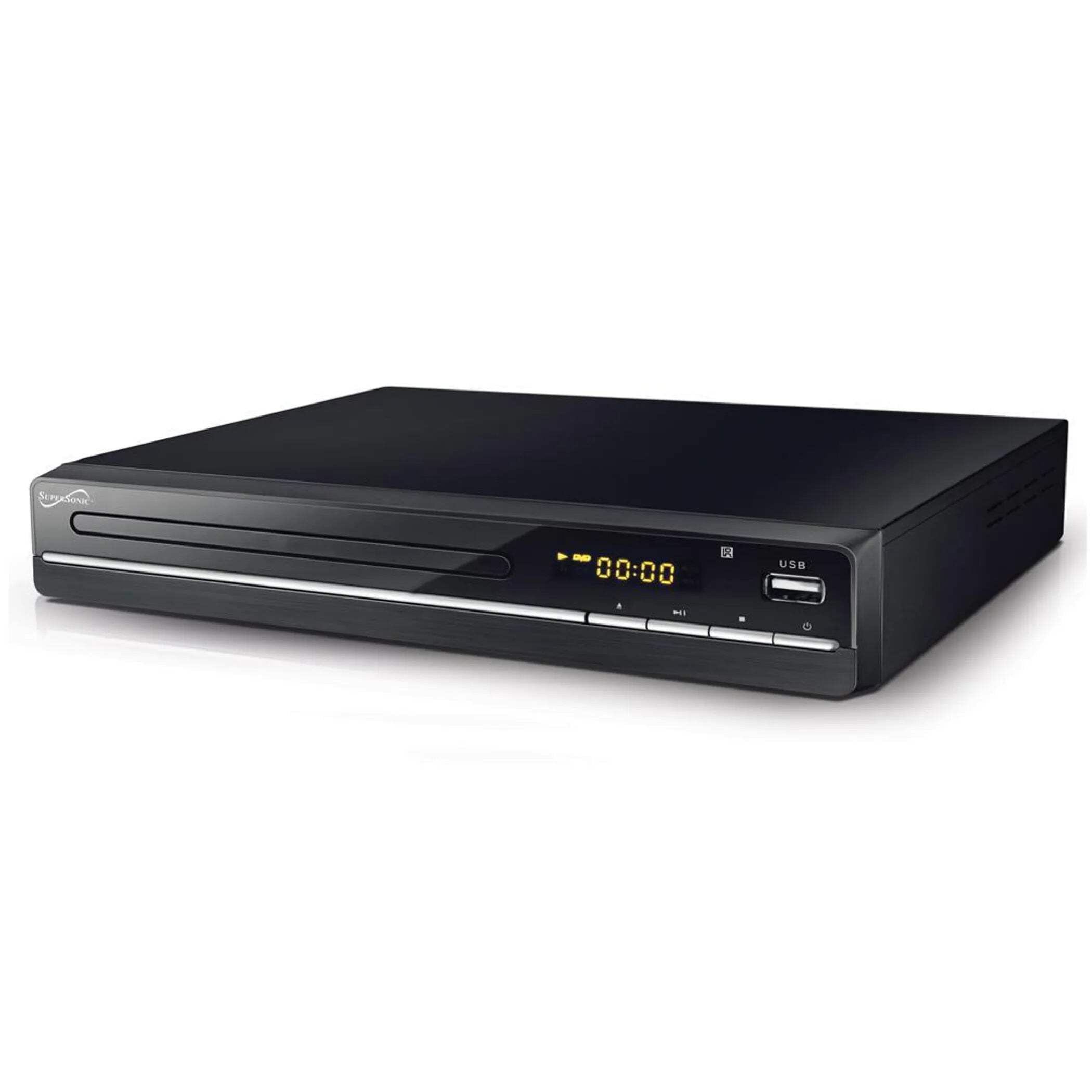
The image above displays the front panel of the SC-20H DVD Player. Key features include:
- Plaadisahtel: For inserting DVDs, VCDs, CDs, and other compatible discs.
- Ekraan: Shows playback time, track number, and other operational information.
- Juhtnupud: Includes Play/Pause, Stop, Previous, Next, and Power buttons for direct control.
- USB sisend: Allows connection of USB flash drives for media playback.
- SD-kaardi pesa: For inserting SD cards to play media files. (Note: The image primarily shows the USB port, but the product features indicate an SD input as well, typically located near the USB port or on the side).
4.2 Tagapaneel
The rear panel of the DVD player contains all the necessary connection ports for audio and video output.
- HDMI väljund: Connects to an HDMI-enabled TV or display for high-definition audio and video.
- Composite A/V Output (RCA): Yellow (Video), White (Left Audio), Red (Right Audio) jacks for standard definition connection to older TVs.
- Component YUV Output: Y (Luminance), Pb (Blue difference), Pr (Red difference) jacks for progressive scan video output, offering better quality than composite.
- Toite sisend: For connecting the power supply cable.
5. Seadistamine
5.1 Televiisoriga ühendamine
Valige üks järgmistest ühendusviisidest.
- HDMI-ühendus (soovitatav):
- Connect one end of an HDMI cable (not included) to the HDMI OUT port on the DVD player.
- Connect the other end of the HDMI cable to an HDMI IN port on your television.
- Valige oma teleril vastav HDMI-sisend selle kaugjuhtimispuldi abil.
- Composite A/V Connection:
- Connect the yellow RCA cable to the VIDEO OUT port on the DVD player and the VIDEO IN port on your TV.
- Connect the white RCA cable to the L AUDIO OUT port on the DVD player and the L AUDIO IN port on your TV.
- Connect the red RCA cable to the R AUDIO OUT port on the DVD player and the R AUDIO IN port on your TV.
- Select the corresponding A/V input on your TV.
- Component YUV Connection:
- Connect the Y, Pb, and Pr cables to the corresponding YUV OUT ports on the DVD player and YUV IN ports on your TV.
- For audio, use the white and red RCA cables to connect the L/R AUDIO OUT ports on the DVD player to the L/R AUDIO IN ports on your TV.
- Valige oma teleril vastav komponentsisend.
5.2 Toiteühendus
After connecting the audio/video cables, plug the power supply cable into the DVD player's power input and then into a wall outlet.
6. Kasutusjuhised
6.1 Põhiline plaadi taasesitus
- Toide sisse: Vajutage esipaneelil või kaugjuhtimispuldil olevat toitenuppu.
- Sisesta plaat: Press the OPEN/CLOSE button to open the disc tray. Place a compatible disc (DVD, VCD, CD, KODAK CD, DVD±R/RW, CD-R, CD-RW) onto the tray with the label side facing up. Press OPEN/CLOSE again to close the tray.
- Taasesitus: The player will typically begin playback automatically. If not, press the PLAY button.
- Peata/Jätka: Press the PAUSE button to temporarily stop playback. Press PLAY again to resume.
- Peatus: Taasesituse lõpetamiseks vajutage nuppu STOP.
- Skip Tracks/Chapters: Use the PREVIOUS and NEXT buttons to navigate between tracks or chapters.
6.2 USB/SD-meedia taasesitus
- Sisesta meedia: Sisestage USB-mälupulk USB-porti või SD-kaart SD-kaardi pessa.
- Valige allikas: Use the SOURCE or USB/SD button on the remote control to switch to the USB or SD input.
- Sirvige Files: Use the navigation buttons (Up, Down, Left, Right) and OK button on the remote to browse through your media files (MP3, video formats).
- Mängi File: Valige soovitud file and press the PLAY button to begin playback.
6.3 System Settings (OSD Menu)
Access the On-Screen Display (OSD) menu to configure various settings:
- Juurdepääsu menüü: Press the SETUP button on the remote control.
- Navigeerimine: Menüüvalikute vahel liikumiseks kasutage navigeerimisnuppe.
- Valik: Press OK to select an option or enter a sub-menu.
- Väljumine: Press SETUP again to exit the menu.
Peamised seaded hõlmavad järgmist:
- Keel: Set OSD menu language and subtitle language (supports multiple languages).
- Kuvasuhe: Choose between 4:3 (Standard) and 16:9 (Widescreen) for video output.
- Vanemlik kontroll: Set a password and rating level to restrict playback of certain content.
- Helisätted: Adjust audio output modes (e.g., Surround).
7. Hooldus
Proper maintenance ensures the longevity of your DVD player:
- Seadme puhastamine: Wipe the exterior of the player with a soft, dry cloth. Do not use liquid cleaners or aerosol sprays.
- Puhastuskettad: Use a soft, lint-free cloth to wipe discs from the center outwards. Do not use abrasive cleaners or solvents.
- Plaatide käitlemine: Always hold discs by their edges to avoid fingerprints and scratches. Store discs in their cases when not in use.
- Ventilatsioon: Veenduge, et ventilatsiooniavad oleksid tolmust ja prahist puhtad, et vältida ülekuumenemist.
8. Veaotsing
Probleemide korral vaadake järgmisi levinud probleeme ja lahendusi.
| Probleem | Võimalik põhjus | Lahendus |
|---|---|---|
| Pole jõudu | Toitekaabel pole ühendatud; pistikupesa on vigane | Veenduge, et toitejuhe on kindlalt ühendatud. Testige pistikupesa teise seadmega. |
| Pilti pole | Incorrect video connection; Wrong TV input selected | Check video cables (HDMI, Composite, Component) are correctly connected. Select the correct input source on your TV. |
| Ei mingit heli | Incorrect audio connection; TV/player volume too low; Mute activated | Check audio cables (HDMI, RCA) are correctly connected. Increase volume on TV and player. Deactivate mute function. |
| Plaat ei mängi | Disc inserted incorrectly; Disc is dirty or scratched; Incompatible disc format | Ensure disc is inserted label-side up. Clean the disc. Check if the disc format is supported (DVD, VCD, CD, KODAK CD, DVD±R/RW, CD-R, CD-RW, MP3). |
| USB/SD media not playing | Incorrect source selected; Incompatible file format; USB/SD device faulty | Select USB or SD source. Ensure media files are compatible. Try another USB/SD device. |
9. Tehnilised andmed
Detailed technical specifications for the Supersonic SC-20H DVD Player:
- Mudel: SC-20H
- Kaubamärk: Ülehelikiirus
- Plaadi ühilduvus: DVD, VCD, KODAK CD, DVD±R/RW, CD, CD-R, CD-RW, MP3
- Video väljund: HDMI, Composite A/V, Component YUV
- Heliväljundi režiim: Ümbritsev
- Resolutsioon: 1920x1080 (via HDMI)
- Ühenduvus: USB 2.0, SD Card Slot
- Toiteallikas: 110-240V, 50/60Hz
- Energiatarve: 15W
- Mõõdud (P x L x K): 10.5 x 10 x 3.3 tolli
- Kauba kaal: 1.75 naela
- Eriomadused: Multi-language subtitles (up to 32 languages), PAL/NTSC compatible, Parental Lock, Aspect Ratio (4:3, 16:9)
10. Garantii ja tugi
Garantiiteabe ja tehnilise toe saamiseks lugege ostuga kaasasolevat dokumentatsiooni või külastage ametlikku Supersonici veebisaiti. webveebisait. Hoidke ostutõendit alles garantiinõuete esitamiseks.


