1. Sissejuhatus
This manual provides essential information for setting up, operating, maintaining, and troubleshooting your Microsoft Surface Pro Model 1796. The Surface Pro is a versatile 2-in-1 device designed to function as both a high-performance laptop and a portable tablet. Please read these instructions carefully to ensure optimal use and longevity of your device.
2. Toote lõppview
The Microsoft Surface Pro Model 1796 features a 12.3-inch PixelSense multi-touch display, an Intel Core i5 processor, 4GB of RAM, and a 128GB SSD. It operates on Windows 10 Pro, offering a full desktop experience in a portable form factor. The device supports a detachable keyboard (Surface Pro Signature Type Cover) and a digital pen (Surface Pen), both sold separately, to enhance its functionality.

Figure 2.1: Microsoft Surface Pro in tablet mode, displaying the lock screen.
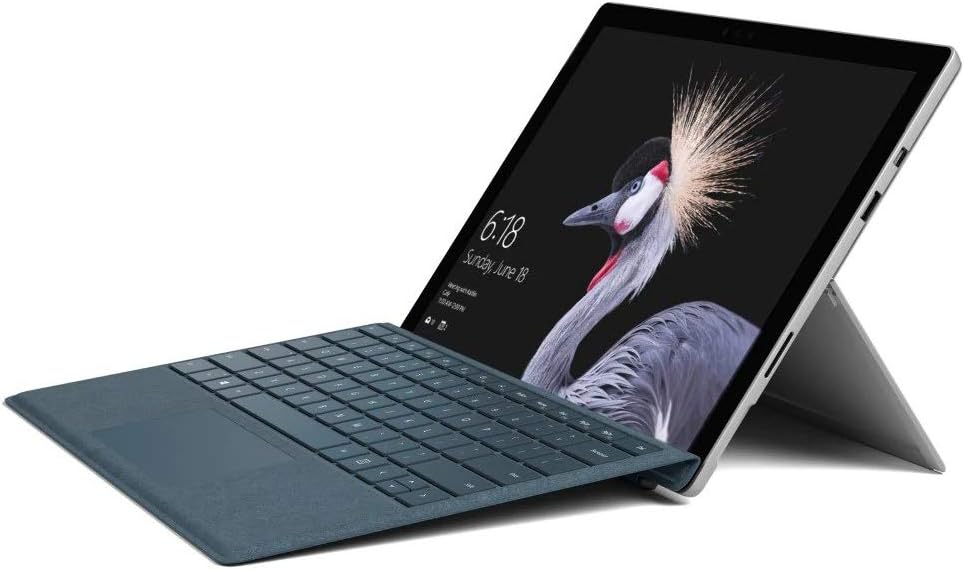
Figure 2.2: Microsoft Surface Pro with Signature Type Cover attached, configured as a laptop.

Figure 2.3: Microsoft Surface Pro tablet and detached Signature Type Cover.
3. Seadistamine
3.1 Esmane sisselülitamine
- Connect the power supply to the Surface Pro and a power outlet.
- Vajutage seadme ülaservas asuvat toitenuppu.
- Windows 10 Pro esmase seadistamise (sh keele valik, võrguühendus ja kasutajakonto loomine) lõpuleviimiseks järgige ekraanil kuvatavaid juhiseid.
3.2 Lisatarvikute ühendamine
- Surface Pro Signature Type Cover: Align the Type Cover with the magnetic connector along the bottom edge of the Surface Pro until it clicks into place.
- Surface'i pliiats: The Surface Pen connects via Bluetooth. Go to Seaded > Seadmed > Bluetooth ja muud seadmed to pair the pen.
3.3 Seadme laadimine
Use the provided power adapter to charge your Surface Pro. The charging port is located on the right side of the device. A full charge provides approximately 13 hours of typical device usage.
4. Kasutusjuhised
4.1 Lihtne navigeerimine
- Puudutage: Use multi-touch gestures on the PixelSense display for navigation, zooming, and scrolling.
- Tüüpkate: Utilize the keyboard and trackpad for traditional laptop input.
- Surface'i pliiats: Write, draw, and annotate directly on the screen.
4.2 Windows 10 Pro funktsioonid
Your Surface Pro comes with Windows 10 Pro, offering features such as:
- Windowsi tere: For fast, secure, password-free sign-in using facial recognition.
- Cortana: Your personal digital assistant.
- Microsoft Edge'i: Vaikimisi web brauser.
- Tahvelarvuti režiim: Automatically or manually switch to a touch-optimized interface when the Type Cover is detached.
4.3 Ekraani seaded
The 12.3-inch PixelSense display has a resolution of 2736 x 1824 pixels. You can adjust display settings such as brightness, resolution, and scaling through Seaded > Süsteem > Ekraan.
5. Hooldus
5.1 Seadme puhastamine
- Kasutage pehmet ebemevaba lappi dampened with water or an approved screen cleaner to clean the display.
- For the device body, use a soft, dry cloth. Avoid harsh chemicals or abrasive materials.
5.2 Tarkvaravärskendused
Regularly check for and install Windows updates to ensure your device has the latest security patches and features. Go to Seaded > Värskendamine ja turvalisus > Windows Update.
5.3 Aku hooldus
- Vältige äärmuslikke temperatuure, kuna need võivad aku tööiga lühendada.
- Aku optimaalse seisukorra tagamiseks vältige aku pidevat täielikku tühjendamist või selle pikaajalist 100% laetuse juures hoidmist.
6. Veaotsing
6.1 Levinud probleemid
- Seade ei lülitu sisse: Ensure the device is charged. Try holding the power button for 10-15 seconds to perform a force restart.
- Ekraan ei reageeri: Restart the device. If the issue persists, check for driver updates.
- Jõudlusprobleemid: Close unnecessary applications, check for Windows updates, or run a disk cleanup.
6.2 Toega ühenduse võtmine
For more complex issues or technical assistance, please visit the official Microsoft Support website or contact their customer service. Have your device's model number (FJU-00001) and serial number ready.
7. Tehnilised andmed
| Funktsioon | Spetsifikatsioon |
|---|---|
| Mudeli nimi | FJU-00001 |
| Ekraani suurus | 12.3 tolli |
| Ekraani eraldusvõime | 2736 x 1824 pikslit |
| Protsessor | Intel Core i5 (2.6 GHz) |
| RAM | 4 GB DDR3 |
| Säilitamine | 128 GB SSD |
| Graafika kaasprotsessor | Intel HD Graphics 620 |
| Operatsioonisüsteem | Windows 10 Pro |
| Traadita tüüp | 802.11b, 802.11g, 802.11n |
| Keskmine aku tööiga | 13 tundi |
| Kauba kaal | 1.7 naela |
| Toote mõõtmed | 11.5 x 0.33 x 7.93 tolli |
| Tagumine Webkaamera eraldusvõime | 5 MP |
8. Garantii ja tugi
Your Microsoft Surface Pro Model 1796 is covered by a limited hardware warranty provided by Microsoft. For detailed warranty terms and conditions, please refer to the documentation included with your purchase or visit the official Microsoft support webveebisait. Hoidke ostutõendit garantiinõuete esitamiseks.
For technical support, driver downloads, and service information, please visit support.microsoft.com. You may need to provide your device's serial number and model information.


